
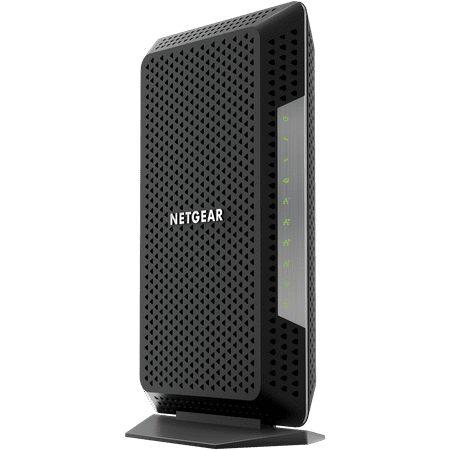
NETGEAR Nighthawk® Multi-Gig Speed Cable Modem for XFINITY® Internet & Voice. DOCSIS 3.1 Technology (CM1150V-100NAS)
- Brand:
- NETGEAR
- Model Number:
- CM1150V100NAS
- UPC:
- 606449135015
- EAN:
- 0606449135015
- ASIN:
- B07LCHLFD6
- Walmart SKU:
- 792211281
| Price Type | Price | Date |
|---|---|---|
|
Highest Price
|
$319.89 | |
|
Lowest Price
|
$199.99 | |
|
Most Recent Price
|
$319.89 |
| Price Type | Price | Date |
|---|---|---|
|
Highest Price
|
$249.99 | |
|
Lowest Price
|
$249.99 | |
|
Most Recent Price
|
$249.99 |
Tracking History: We have tracked NETGEAR Nighthawk® Multi-Gig Speed Cable Modem for XFINITY® Internet & Voice. DOCSIS 3.1 Technology (CM1150V-100NAS) since 6/15/2024. The most recent price update was on Jun 15, 2024.
Price Range: Over the past 90 days, the price has ranged from $249.99 (lowest on 6/15/2024) to $249.99 (highest on 6/15/2024). The average price during this period is $249.99.
Current Trend: No Walmart.com pricing data available for analysis.
Customer Insights: Rated 4.5/5 from 293 reviews.
Costly but a nice investment. No more monthly payment to Xfinity for a modem. 1 and done and this works beautifully. Covers of to 2500 FT. I have no issues since the install.
I had an Arris modem that was giving me problems having to reboot it about once a week. After looking what was on the market and reading the reviews on several sites I chose the Netgear Nighthawk. What a difference, and easy to setup on my comcast internet. Up and running in ten minutes.
Good uograde for me as my previous modem was slow.
My service provider is Comcast for cable tv, internet up to 300mbps wifi5, phone. My prior setup was a combination router-modem. Sometimes I called it the router. Sometimes I called it a modem. I didn't really know the difference between the two. My download speeds were between 125 and 160mbps. This device provided a wifi network, and three ethernet cables were attached to it, providing internet to three outlets around our home. For maintaining these services, I needed to buy two devices. This review is for both devices. For easier reading, I'm calling the Netgear Nighthawk CM1150V the “modem”. And I'm calling the Netgear Orbi AX6000 Wifi6 with 2 satellites the “router”. The modem translates the signal so it can be used inside your home. The Router breaks up the signal and sends it out to different places. The modem installation is first. I tried setup with a tablet, Chromebook, laptop. These were unsuccessful. It only worked with our desktop computer. Plan to have a desktop within reach of where you plan to leave this modem. I appreciate that the needed ethernet cable was enclosed with this modem. If you don't own a desktop or have trouble, you will need to call Comcast for install support. I wish it came with a battery backup, because the only reason why I have this phone line is for emergencies. My cell service at home is very poor, and I want to be able to report power outages on my land line. Make sure you use phone port 1. The second port is for a second phone line, not a second handset. I successfully installed this modem. Next, I tried to hook up our three ethernet lines before installing our mesh wifi router. Even though there are three ethernet ports on the modem, this does not work. I had two choices. Choice 1: Plug my ethernet lines into the ports on my router components. Or choice 2: Buy and install a separate router for the ethernet lines, hook that up to the modem. I chose #1. Installing the router was not easy. I followed the directions, and then the internet could pull up Google search results but it would not open any websites. This was across all devices. I revisited www.comcast.com/activate and looked around. There, I updated firmware for my router base and each satellite. I went to Comcast's online help, and did a troubleshoot. It ran a scan on my system, corrected what was wrong, rebooted my system, and everything then worked great. My wifi base unit is located inside our open back tv cabinet. It reaches the two satellites easily. The results: Downloads of 300mb. We walked down the block, and we could still stream movies on the other end of our street. We can enjoy fast wifi all over our house and yard. Our DVR guide is more clear and responsive. We took the time to set up a strong password because our signal is stronger than a college radio station. I highly recommend both of these devices. My home is about 4,000 square feet, with a very large detached garage. I recommend installing this system, over a weaker system with a separate outdoor router. My desktop computer that needed ethernet works great and directly plugs into my router. I'm glad I did not get the router package with three satellites, it was not needed for our two story, no basement home. Originally I thought I'd upgrade to a faster Comcast internet speed. But with my new set up, I don't need it.
Setup fine, speed great, works well with Xfinity connections including the phone hook up. 4 ethernet ports, when only one works. A second port could be used to double modem speed but requires special modem. The 1150 IS a modem, not a router. Teamed up with a netgear router and pleased with the entire system.
The modem is fast. Better instructions for setup would be helpful. Specifically, instructions stating only one ethernet port can be used unless you contact your internet provider. Customer srevice fixed the issue in a minute, they were great.
Something between my laptop and my R8000P is setting ethernet to something other than 1Gbps. My wifi runs faster than my ethernet. I can sometimes disable/enable. If thatfails restart windows and sometimes. Ore than once.
Too much trouble setting up. We spent HOURS on the phone with net gear, working out kinks. Even after all of that time on the phone, the device would not deliver a consistent signal or speed.
I have problem with telephone I cannot to install
Could not get v=phone to work
Detailed price history for the past 90 days
No Walmart.com pricing data available for analysis.