
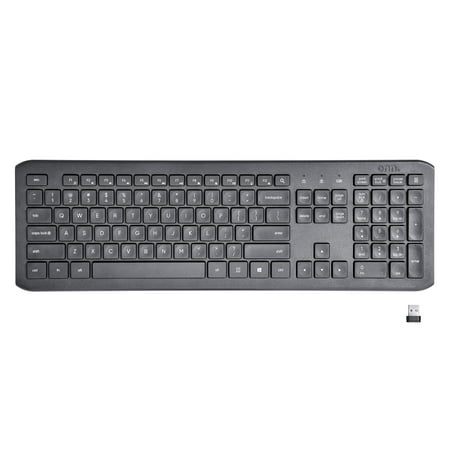
onn. Wireless Silent Full Size Keyboard, Windows & Mac Compatible, USB Receiver, Gray
- Brand:
- Onn
- Model Number:
- 100012579
- UPC:
- 681131308977
- EAN:
- 0681131308977
- Walmart SKU:
- 705979228
Market rate of $14.97 positions buyers 0.0% under the established average.
| Price Type | Price | Date |
|---|---|---|
|
Highest Price
|
$14.97 | |
|
Lowest Price
|
$14.97 | |
|
Most Recent Price
|
$14.97 |
Tracking History: We have tracked onn. Wireless Silent Full Size Keyboard, Windows & Mac Compatible, USB Receiver, Gray since 11/5/2022. The most recent price update was on Feb 23, 2026.
Price Range: Over the past 90 days, the price has ranged from $14.97 (lowest on 11/5/2022) to $14.97 (highest on 11/5/2022). The average price during this period is $14.97.
Current Trend: No Walmart.com pricing data available for analysis.
Customer Insights: Rated 4.0/5 from 180 reviews.
This wireless keyboard is a really good alternative to the big name options out there. It is sturdy and level and connected with my laptop, no problem. It takes 2 AAA batteries that are not included. The keys all function with no problems and it works well. I would recommend to family and friends!
I don't know where this keyboard has been all my life - I am in love! And it could not have arrived at a better time - with multiple family members now working and schooling from home, the clickety-clack of my own typing was starting to get on my nerves. I'm not the best IT tech, but the wireless set up was quick and easy. And I wasn't truly convinced until I started typing, but the full-size keyboard is truly silent thanks to new noise-reduction technology. The keys are uniquely, slightly curved offering an ergonomic experience and allow for fast, accurate typing. I plan to purchase another keyboard to take to the office upon return and will be the envy of my co-workers.
Onn Wireless Keyboard Requested item 5/13/2020 Received: 5/21/2020 Review submitted: 5/23/2020 Product on the Walmart.com site: https://www.walmart.com/ip/onn-Wireless-Silent-Keyboard/705979228 Model: 100012579 Walmart # 578458505 Product Description The Walmart Spark Reviewer email had absolutely no description for this product other than “ONN.WRLS SILENT KB”. That's not good enough. The Spark Reviewer email should contain a link to the product on the Walmart.com site. On the Walmart.com site (link above), the description is somewhat generic. It mentions “noise reduction keycap technology”, LED indicator, USB plug and play, PC and MAC compatible. Packaging and Instructions See image for descriptions on the box. The box description is divided into three sections: The Basics, The Specs, and What's in the Box. It says there are 2 AAA batteries in the box, but I found none. Inside the box there is a small instruction booklet. On the cover of this booklet is the model number, which matches the model number online. The booklet has the typical FCC disclaimers, description of LED indicator light patterns and description of the function keys. It says the RF communication works up to 8-10 meters of open space and the battery life can be up to 8 months. Compatibility is supposed to be with Windows 7,8,10 and MAC OS 10.5 and newer. I don't use MAC, so this review is based on Windows computers. Even though Windows XP is not identified as compatible, this keyboard worked on XP. All this is useful information, but some of it should be on the website. Product Use, Functionality, Quality The keyboard is just over 17 inches long and weighs 1 lb 33 oz (about 550g). On the back side there is a compartment for batteries, which also includes a cut-out for storing the USB connector. Also on the back there is an on-off switch and a button to initiating the RF connection between the keyboard and the USB plug. These features are very thoughtful, useful and excellent for this price point. More expensive keyboards don't have these. Installation (on Windows computer): plugged in USB connector with the keyboard off. It was recognized quickly and with no problem. Switched on the keyboard. LED turned on for a few seconds and then went off. Then pressed the Connect button. LED came on solid briefly and then went off. The keyboard was now connected and worked. The entire process took less than 10 seconds. There was a minor difference between my experience in how the LED light worked and the instructions: the instructions said that the LED blinked during pairing, but all I saw as a solid LED. However, the duration of pairing was very short and it didn't cause any confusion. On a different computer, all I did was plug in the USB connector and the keyboard started working without having to press the Connect button. I tested all the keys and they all worked. The function key shortcuts also worked for opening email, going to browser home page, etc. There are other dedicated buttons for bringing up the calculator and doing a right-click. Everything worked great and with no hassle. My Onn wireless keyboard experience was much better than my experience with a Logitec keyboard costing twice as much. As for the range of operation, the keyboard worked better than advertised, with the signal passing through a wall and wood desktop, at over 10 meters. Finally, the product literature makes a big deal about this being a “silent” keyboard. It is, in the sense that there is no clicking sound when you press the keys. There is also no tactile feedback from the keys. Whether this is good or bad depends on how you use it. If you're a touch typist writing a novel, then maybe you need the feedback. For typical computer usage, it works just great. A few observations: There is no LED indicator for when the keyboard is on (switch on), so there is no reminder to turn it off when not in use. There are no tabs to increase the inclination at the back end of the keyboard. There is no touch pad on the keyboard, so the usage is intended for a computer. Note that Walmart does also sell this keyboard packaged with a wireless mouse. Overall, this is an excellent product, especially for the price. Of course, this review is based on a few hours of usage. If something changes, I'll update the review. Product Pricing and Worth At $14.97, the Onn wireless keyboard is absolutely worth the price. It competes very favorably with similar keyboards costing twice as much
This black soft key keyboard is excellent! I have been typing for 50 years and this is my favorite. Very classy look and feel! The keys are soft yet still have a "touch" to them. There is 106 keys and it uses 2 AAA batteries that are supposed to be included. This is a full-size keyboard so any typist will find it comfortable. It has a good weight and the rubber "feet" keep it positioned and it does not move around as you type. The keyboard is slightly inclined so it's easy to see and use. There is an open area on the box where you can try it before you buy it. The keys don't wiggle back and forth either. The only key I miss is a "sleep" button but that is not that important for me. I would recommend this keyboard to my friends and family. It's the best I've used so far!
This keyboard was a breeze to set up. I plugged in the USB hub and it connected instantly, no tricky setup required. The keys are silent which is great for when I want to get some work done without alerting the whole house that I am up and in the office. Requires two AAA batteries.
The ONN. Wireless Silent Keyboard is a great product and a lifesaver! My wife always gets annoyed with me when using the computer. I'm not a great typist more of a hunt and peck person and she always says it sounds like I am going to break the computer! Lol this has eliminated that problem all together. The keyboard truly is silent so I can peck away! The keyboard was simple to set up, it comes with a usb hub that I plugged and it installed on its own. The keyboard is very comfortable to use and sturdy. It is well made. The keyboard requires 2 AAA batteries. This is a great wireless keyboard. I highly recommend this product!
The ONN WRLS SILENT KB KEYBOARD is a decent keyboard that does most things well but can use some improvements. Keyboards are a highly personal thing. What one person might love, another person might think is kooky. I grew up on full size PC workstation type keyboards and that's the type I still use today. I dread using the laptop keyboard when I have to. First the good: It has the old fashioned layout for the insert, delete, home, end, page up and page down keys above the arrow keys that I've used for a LONG time and would NOT want to live without. It was super easy to connect to my windows 10 laptop. It's got a dedicated key to launch the calculator program. Now the places it could be improved: The windows key is on the right side of the keyboard. It works MUCH better for me when it is on the left side. There is a small lip on the back that raises it up a bit, but I'd like some feet back there to be able to raise it up more. If the couple of things that I noted that need improved don't bother you, then I would give this keyboard a try.
My coworkers tell me that I type really loud. I got this to try to reduce the disturbance of my typing while on calls. This keyboard is really great for that! My coworkers have noticed a big difference and it is less distracting for me to type while I'm taking customer calls. I also love that this is wireless! The setup was very easy and I'm very happy with the keyboard. My only wish is that there were the little flippable stands in the back of the keyboard to elevate the keys a bit. The keyboard just sits flat against your desk. If that doesn't bother you, then definitely get this keyboard now!
This keyboard operates wirelessly and silently. Connection is smooth and easy. I connected it to my laptop and I like it better than my laptop keyboard. It's not ergonomic, but it's easier to use than my laptop keyboard. It stated that batteries were included, but there were not batteries in the box, so be sure you have 2 AAA batteries on hand. The only potential issue I see with this keyboard is that the battery cover is extra long and a bit flimsy, it seems like if you aren't very careful it could break easily.
I got this because it said wireless keyboard so in my mind I assumed it would be Bluetooth! Because that's what wireless usually means. This is not bluetooth, it comes with a usb nano receiver that you have to stick into your computer and then turn the keyboard on and you can start typing with the keyboard right away. It was disappointing because I got this for my son and he only has a laptop which already has a keyboard so it doesn't make sense to me to use but he likes it! I thought we would've been able to connect it to our phones or iPads and tablets but sadly no! And once we first connected it every time we typed i the number 0 would pop up right next to it, so it would look like i0 and then whenever we typed a number a 0 would pop up right next to it like 10 20 30 40 even though we were typing a single number. And then 00000000000000 would type by itself. Finally I pressed number lock and that issue went away. It types very smoothly silently and satisfying, makes no noise! Not like an old school keyboard. I would only Recommend this for someone who would use it with a monitor or a television but deff not for someone who only has laptops. I mean my son said you can leave your laptop on the table and walk away with the keyboard and type but I have bad eyes so I wouldn't be able To see that far haha. Easy to assemble comes with 2 triple A batteries, has a connect button on back of keyboard. Says you can keep usb nano receiver in the battery compartment when not in use.
Detailed price history for the past 90 days
No Walmart.com pricing data available for analysis.