
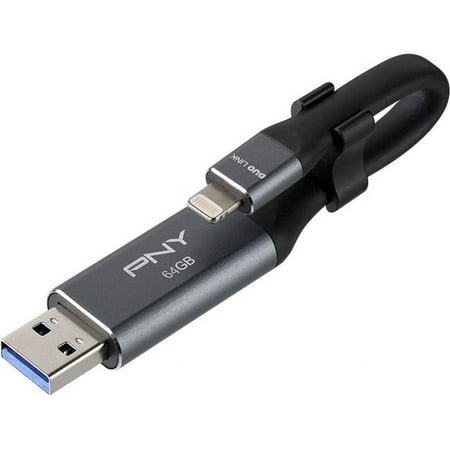
PNY 64GB DUO LINK iOS USB 3.0 OTG Flash Drive
- Brand:
- PNY
- Model Number:
- P-FDI64GLA02GC-RB
- UPC:
- 751492607696
- EAN:
- 0751492607696
- ASIN:
- B075D1S4D4
- Best Buy SKU:
- 6033300
- Walmart SKU:
- 646514165
Market direction turned downward with current $29.99 representing 0.0% under standard pricing.
| Price Type | Price | Date |
|---|---|---|
|
Highest Price
|
$29.99 | |
|
Lowest Price
|
$28.49 | |
|
Most Recent Price
|
$28.49 |
| Price Type | Price | Date |
|---|---|---|
|
Highest Price
|
$29.99 | |
|
Lowest Price
|
$23.99 | |
|
Most Recent Price
|
$29.99 |
Tracking History: We have tracked PNY 64GB DUO LINK iOS USB 3.0 OTG Flash Drive since 12/5/2022. The most recent price update was on Jun 30, 2026.
Price Range: Over the past 90 days, the price has ranged from $23.99 (lowest on 6/16/2024) to $29.99 (highest on 12/5/2022). The average price during this period is $29.04.
Current Trend: Walmart.com prices have ranged from $29.99 (Jun 30) to $29.99 (Jun 30) over the past 90 days. Current price is close to the 90-day average of $29.99.
Customer Insights: Rated 3.88/5 from 32 reviews.
I used the Duo Link to transfer photos and documents from my phone onto my computer because my cloud was always getting full and I would have to either buy space or delete some stuff off of my phone. And I'm so glad for the Duo Link so that I can save all my stuff on my computer and I don't lose anything by having to delete it from my phone. I wish I had this product sooner, but I already recommended this product to my family and friends and they plan on purchasing one for themselves. It was easy to plug into my computer and phone and follow the instructions and it was easy to do and transfer my files.
Omg I love PNY back up and charger. Just plug into your phone and you have an instant backup for any pictures, files, music, whatever you have on your phone. It actually seems to recharge my phone quicker than my iPhone charger does. I have also used it to back up pictures on my iPad. It conveniently folds into its self so you can stick in a purse or pocket. It has 128 GB so you can store a ton of stuff.
I have just about used all of my 64gb on my phone. This flash drive is easy to use. Just plug it in and it does it's own thing. I plugged it into my iPhone and the drive started obtaining the data. I decided to start a back up and by the time I was done I had used just about all of the 64 bites. Just plug it in and it does it's own thing. I like it.
I was so excited to receive this and be able to easily get all of the pictures from my iPhone so that I could print or use on other platforms. This did not disappoint. It does take a bit of familiarizing yourself with the app but once you do that, it is extremely easy to use. I absolutely love it.
Overall, the product is useful. The device and required app do seem fairly straightforward. However, there is a bit of a learning curve in regards to understanding the steps involved when attempting to view a specific file after transferring from iPad to PC. I found the DUO LINK to be competitively priced and I am satisfied with my purchase.
I got this mainly to transfer photos from my phone to my desktop computer. And it worked great! Very easy for this old lady to use and although I'm fairly computer savvy, all these tech items can be a little intimidating sometimes. But this was easy-peasy. Just plug into your iPhone, wait until the phone recognizes it, pic what you want to copy or backup, and go. Then just plug it into your computer and copy. Simple to do. I have only used it a couple of times so far, but I know I will get plenty of use out of it in the future. Great gadget!
I am grateful I got to try this device out, however, it is not for me. This flash drive requires an app in order to function, so if you do not have regular internet access and are wishing to simply preserve and back up your iPhone data, this phone accessory will not be what you're looking for. It did not fit into my phone without removing the phone's hard shell case first. Once I removed the case and got it plugged in, a box popped up on the screen asking me to download an app. I downloaded it and found the interface to be a bit confusing. Note that this app will not work unless you have the device plugged in, so there is no way to access the app unless you plug the flash drive into your phone. I honestly thought this was going to be extra storage for my phone but I am not a fan of the way it is set up and requires you to have the app to be able to use it. I have never had a flash drive that required me to connect to the internet. If you don't mind that, then you should buy this item because it is really neat idea to be able to free up space on your phone and store it in a portable fashion.
This Drive hasn't worked for me yet. I've tried going about it through different ways with still no progress. I tried it with just my phone. It took me through the prompts and when I tried to back up my phone onto it, it stays at 0%. I did this during the day and left it all night thinking that maybe it just took a while. When I woke up the next morning it was still at 0% progress. I also took it to a school and tried to use a computer there thinking maybe I had a faulty connection, same thing happened, 0%. I plan to reach out to customer service again, but for now, I do not feel very good about this product. Also, you have to download an app to use the drive. As of now, the app has poor ratings and reviews and I can see why. This has the potential to be a really great product, but needs a lot of work. Overall, I do NOT recommend this product.
I love the concept of this device and couldn't wait to get started. Unfortunately, I had a really hard time using this. I am pretty tech savvy and typically do not have issues figuring out how to use tech devices. I tried this with an iPhone and iPad, plugged into a Mac Book. I downloaded the app per the instructions and had no issues. I opened the app and plugged the device into my phone and the computer. The app was open and as it was plugged in, the message 'please plug your DUO LINK in to get started' appeared. It would not go away. I was finally able to tap somewhere on the screen to pull up the menu. When tapping on the Transfer Media menu icons nothing would happen. I went into the folders menu to find my photos. I was able to transfer photos in that manner by copying them to the folder. It is supposed to charge your devices but it did not charge my iPad. I was hoping this would be more user friendly and plug and play, but it isn't.
The software for the device doesn't work properly. It keeps crashing every time it tries and loads the device. Figures, since the app store review is a 2.1 average, and the software hasn't had maintenance in 2 yrs. I would suggest the SanDisk ones. I returned a SanDisk product similar to this one because it only had 32gb. I'll be going back to that one cause at least it WORKS.
Detailed price history for the past 90 days
Walmart.com prices have ranged from $29.99 (Jun 30) to $29.99 (Jun 30) over the past 90 days. Current price is close to the 90-day average of $29.99.
| Date | Price | Change | % Change |
|---|---|---|---|
| $29.99 | $+0.00 | +0.0% | |
| $29.99 | $+0.00 | +0.0% | |
| $29.99 | $+0.00 | +0.0% | |
| $29.99 | $+0.00 | +0.0% | |
| $29.99 | — | — |