
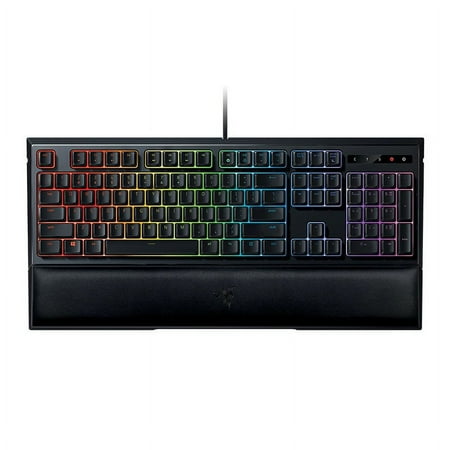
Razer Ornata Chroma Mechanical Membrane Gaming Keyboard - Mid-height Keycaps
- Brand:
- NEW!
- Model Number:
- Ornata Chroma
- UPC:
- 814855022663
- EAN:
- 0814855022663
- Walmart SKU:
- 712073058
| Price Type | Price | Date |
|---|---|---|
|
Highest Price
|
$114.99 | |
|
Lowest Price
|
$93.95 | |
|
Most Recent Price
|
$94.00 |
Price history data is not available for this product at the moment.
Current Trend: No Walmart.com pricing data available for analysis.
Customer Insights: Rated 4.5/5 from 46 reviews.
This membrane keyboard actually has been off for a long time, as Chinese rubber dome with High Profile keycaps, tried to mimic mechanical feel. they added a little bump on their key stem so it would make a similar click feel to every stroke. You can notice that there's a silver bump inside the keyboard stem near the rubber, that's where the click sound comes from. Note this keyboard is not a mechanical keyboard.The texture of keys feels good to fingertips. I really like the moderate sound that they make rather than the super loud mechanical keyboards or the really quiet membrane keyboards. I also really enjoy the pretty LED lights on the keyboard, really awesome.Razor has made a well-made keyboard with heavy-duty USB cord.You'll enjoy typing with the soft wrist magnetic pad. This keyboard is a little pricey but, with the quality, comfort, feel, it's worth it.Shipping was fast and the keyboard was packaged and came in excellent condition. I would recommend keyboard to anyone who wants a quality made keyboard.
My other gaming keyboard is a full red switch mechanical so I get to compare, as this one is a special “Mecha-Membrane” hybrid design. It has a separate black wrist rest with non-slip rubber feet (as does the keyboard), but that doesn't show in my photo since my keyboard drawer already has the blue wrist rest shown. The keys on this new design have a slightly shorter throw than my other gaming keyboard. They are also much stiffer. Personally, I think they are slightly too stiff. However, I notice that when my fingers really get flying, I make fewer keystroke errors on the Razer. This is because if you inadvertently knick an adjacent key slightly, you won't register a press as often happens on my mechanical keyboard. So even though this keyboard feels a little less pleasant to use due to the stiffness, I've decided to make it my primary because I can type faster with fewer mistakes. The Razer has highly configurable lighting bling with multi-color individual LEDs on each key. The fancy lighting is a distraction for me though so I just set white – it's up to you. The keyboard is highly customizable with the Razer Synapse software. You can change the brightness with the keys, and the keyboard remembers your preferred configurations without starting the Razer Synapse software. You can set and choose profiles.
The Razor Ornata Chroma Gaming Keyboard came packaged in an extremely snug well designed sleek looking box. The instructions pamphlet is standard Razor keyboard manual easy to understand and comes with 2 holo stickers. It is a simple and attractive gaming keyboard. The keyboard is solidly constructed with a high quality black matte plastic on the outside and frosted/white plastic accent internals with absolutely no flex what so ever. It is a full size gaming keyboard and about 3 times taller with relatively no slope, than the wireless Logitech K800 which has shallow, spongy membrane keys which I have been using for a long time. It is incredible responsive and absolutely day and night improvement. The bottom of the keyboard has rubber textured feet that grip very well and does not slide or separate from the wrist pad. The detachable wrist pad is made of the same black mate plastic with a very comfortable soft faux leather cushioned padding, that is about 1/8" thick and attaches magnetically. The magnets are strong enough to slide the keyboard but not break loose. The wrist pad is an absolute must, as to how tall the keyboard is, even when the rear feet are kicked up. Razor has a proprietary Mecha membrane designed key which simulates around the stiffness just like a Cherry MX red (switch design), with a nice audible click but still uses a membrane switch with a medium like travel. The keyboard has an anti-ghosting technology which allows you to press 10 keys at the same time. The cord is a 7' braided USB 2.0 and has under keyboard left/right/center routing slots. The Razor Synapse 2.0 downloadable software drivers are incredibly easy to use it gives you presets for most AAA game titles and endless customize RGB (red, green, blue) lighting. A mild gripe and inconvenience, it is lacking a calculator and some punctuation symbols are inverted ([ is over {), unlike any other keyboard I have seen. All in all the Razor Ornata Chroma Gaming Keyboard is top notch with a Superior design.
The Razer Ornata Chroma keyboard is a keyboard for gamers, and it has many features that are useful. The keyboard has good response time. The keyboard allows tons of customization when you pair it with the Razor Synapse application. This application allows full and detailed customization over the functions of the keys. This application also can pair up with other Razor products such as a mouse, albeit the customization varies from product to product, but still retain similar features like lights and rebind ability. You can have lots of profiles that can be active when you are running certain applications. For an example you could have a profile only be active when you run your preferred web browser and have another profile active with other programs. Unfortunately you cannot have one profile linked to many different profiles, but you can have copy a profile with all its settings. In each profile you can customize the lights in great detail having multiple different effects bound to each key. You could have the escape key glowing a solid color, rotate through all the colors, etc. On top of the lighting customization you can also rebind all the keys (but the Windows button) to any bind you'd like, you can also create macros for each profile and have buttons bound to activate the macros, or just make them do the extended binds that Synapse offers. Not only is there profiles, but some applications may have a Razor Synapse addon which is activated by default when that program is running, a good example is Overwatch which has a custom addon that runs when Overwatch is active and has unique functionality to the keyboard such as glowing colors based off what hero you are and certain buttons glowing when cooldowns are up. The downside to the addons is that they cannot be modified, however you can still have a profile active which at the least lets you have custom keybinds. The keys on the keyboard are smooth, but allow for good grip and have a quick response time along with a nice responsive click on keypress. The keys raise quickly and do not get stuck. The keyboard is comfortable for long term use and is not oversized so it can fit on a smaller space and allow for more mouse space. Overall this product is good quality for the price you pay, and only gets better when you have the Razor Synapse application installed and working, I would recommend this product to others if they are into gaming for long periods of time. YouTube video: https://youtu.be/sEH1NikjUJ0
Even for being a few years later from when it released, picking up this keyboard still holds to the quality and durability. The Chroma is always fun to play with and set up with Synapse. The magnetic wrist rest is one of the main reasons for choosing this particular keyboard. An older model for sure, but feels perfect even for today!
Well, I recently received the Razor Ornata Chroma Gaming Keyboard through the Spark Reviewer program and this is my view of this special keyboard for the past 2 weeks. So I received The Razer Ornata Chroma keyboard which features the all-new Razer Mecha-Membrane that combines the best of both membrane rubber domes and mechanical switches to deliver a typing experience unlike anything before which boasted a hybrid of mechanical and membrane technology. This technological method as the manufacture claim is that this method will help reduce fatigue when conducting long gaming sessions. Well, I have to admit that the feeling is way better then I had hoped. The keyboard feels very good and responsive to each key press. I typed effortlessly and comfortably more than I have ever been, really. At times I find myself smiling for no reason. The Ornata Chroma setup was very easy to do. No problem here. There is even a wrist rest support piece included that can connect to the keyboard to reduce wrist sprain. Very comfortable to use, well constructed, thick plastic, premium grade, thick and tough. No problems here either. So I used the Ornata Chroma with the following games, Battlefield 4 and Gears of War 4. My gaming went from average to Beast Mode. I notice the difference immediately before the first round was even over. By the next round, I was unstoppable. The Ornata Chroma Gaming Keyboard has many programmable buttons which can be reprogrammed in Razer Synapse. The Razer Synapse is free software that can be downloaded so that you access every setting and edit every feature that this keyboard offers. With the Razor Synapse software, you can control the LED lighting effects setting on the Ornata Chroma, from one color selection to random to off. So the big YES. Yes, I would highly recommend the Ornata Chroma Gaming Keyboard for any serious eSports player. Really blown away!!!
Where to begin? Sorry no photos of the keyboard "On Fire" but every picture came out in black and white due to the colors reflecting. Shame as it's awesome. I play Warcraft. I was more interested in the action of the keys than the colors of the keyboard, but am finding I love all of it. The action of the keys is tight. There is a slight curve of the keys which I have noticed made 95% of my typos go away as your fingers don't slip on to other keys. This is a combination mechanical and membrane keyboard. What that means is less noise, although if you had this at a workplace your co-workers would be hating you by mid morning coffee break. Let's not forget the most luxurious wrist rest ever. The wrist rest is attached to the keyboard through magnets. Removable if you like, but no way would you. No matter how intense you game and smash those keys it will keep you comfortable and less fatigued. This keyboard is able to be customized. There is a super simple internet download that even a person who fears change can handle. All of the customizing is done right on your monitor as it shows your keyboard and all of your options. Simply click what you want to do. And if you hate what you did it is easy to switch back or try something else. They made it user friendly. This will even track your playing and see where you might be losing valuable DPS time with slow key movements. Yes, you can set up gaming macros! The key height is medium giving you faster,more accurate key smashing. I can customize the keyboard to only light up the common keys hit while playing Warcraft. There are so many quality details like the cord being a generous 6 foot length and covered in nylon so it doesn't stick to your desk. Classy. And the packaging was top shelf letting you know you are about to embark on a special journey of a new level of playing. As far as cleaning this is not a water resistant keyboard. I would suggest the compressed air. Yes, I have tipped it over and tapped it on my desk. A crumb fell out so that works too. I was skeptical if I would enjoy a clicky keyboard with tons of features, but I love it.
I received this product as a part of the walmart spark reviewer program. This is by far the best keyboard i have ever used period. First of all, the packaging in which the keyboard comes in looks great. i love it!!! it makes it feel like you are getting an awesome gift with all the colors and cool type font. Secondly, when you do open the box the presentation is outstanding. They put great effort into the packaging and presentation, and I greatly appreciate it... you can buy it off of just that. Next the the installation is a 5 second process: you plug it into the usb socket and boom WALA!!! lights up like the 4th of july and is working. Then the ergonomic attachment is connected via a strong magnetic strip along the edge... pretty awesome. Then the keystroke reaction and feedback is awesome... it gives a slight feel of working on a typewriter wit the noise feedback and finger pressure feed back. the response of each key is phenomenal. the ergonomic attachment is like a memory foam pillow (it may actually be a memory foam) so your palm sinks in and is well rested. The quality of this key board is beyond my expectation possibly because this ism first gaming laptop. but it is a DEFINITE must have if you are looking fo ra great keyboard. the lights and click noise may possibly annoy you if your sensitive to it.... but as i said... i love it!!!!
This Razer Ornata Chroma keyboard is marketed as a gaming keyboard, but it could be for typists, writers, programmers—anyone who spends a good deal of time on the computer and requires responsiveness from every keystroke. If packaging is an indicator as to the quality of the product within, then what's inside the Razer box must be pure magic because the exterior is impressive. Stylish, clean and understated, the black and bright green color scheme still manages to grab attention. I appreciate the small window opening that allows a user to test the feel of the keys right at the store. The keyboard has rubber feet to keep it in place, adjustable back legs and features a braided cable with gold USB connector that can be channeled under the keyboard as needed. The wrist rest bundled with this keyboard is wide, solid and surprisingly more comfortable than it looks. The rest attaches to the front of the keyboard by magnets and can be added or removed easily. No little plastic pieces to snap off or break. Love this idea! Mecha-membrane with mid-height keycaps marries the best features of the click-clack mechanical keyboards with the softer touch of the membrane keyboards. What it boils down to is you still get a quick response from your keystrokes, but the sound is now slightly muted. Not enough for me and likely not enough not to irritate someone nearby so this is not a keyboard you would want in a work environment. Or at home in the same room where someone is trying to sleep. The keyboard states its ergonomic, however the keys are set in straight lines. My old ergonomic keyboard has a slight curve to the body as well as the keys which I find to be more natural than this. As with any new keyboard, it just takes some getting used to and my fingers were soon flying over the keys as I typed an email. It's not just the keys themselves that illuminate, but the backing as well making the keys appear to “hover” over the board. The font on the keys resembles any office keyboard which I like, but gamers may long for something larger and easier to see. One thing I noticed immediately is the matte black keys show finger oils badly which I didn't expect from such a surface. In order to configure the lights, settings and gaming profiles, you'll have to download the Razer Synapse software. The software did not download automatically for me as the instructions stated it might. I had to set up an account with a username/password in order to download it which I felt was completely unnecessary and made me question whether I even wanted to deal with it. After downloading, updating and rebooting, I was finally able to play around with the light settings. Razer states there are 16.8 million colors this keyboard is capable of creating and after playing with the software a bit, I believe them. It is here where you can choose from such light patterns as ripple, wave and breathing as well as several other preconfigured effects including turning the lights off completely. I liked Fire which uses orange, yellow and red in a slow flickering pattern reminiscent of flames. Starlight randomly lights up different keys in various colors which is just kind of fun to watch. You can also configure your own lighting effects, brightness and even customize colors and patterns of individual keys to indicate keys used specifically for certain games, etc. Color Cycle which is the keyboard's default became my favorite of the effects. It gradually cycles through every color in sequence and is rather calming. I find this less distracting while typing than many of the others. All in all, the Razer Ornata Chroma is a solid product with only a couple of minor cons. I'm not a gamer so I can't say if this keyboard will give you an edge over your opponents, but if you just like being able to customize your system down to the last key cap, you should definitely consider this model. The $99.00 original price is a bit steep, but if you can find it on sale for around $20 less, it's a good purchase in line with similar keyboards of its kind.
Razor Ornata Mechanical Membrane Keyboard with mid-height keys. Package includes: the keyboard with USB cord wrist rest manual decals. First thing I noticed when the keyboard arrived was the impressive, professional looking packaging it came in. The keyboard itself is lightweight, matte black, and has mid height keys. This keyboard comes with a padded wrist rest which attaches to magnets in the front of the keyboard. Amazingly comfortable! Connects by USB cord. Con: There's no USB or audio pass-through on the side of the keyboard for connecting additional devices or headphones. The position of all the (shift+symbol) keys are in reverse. In other words on a regular keyboard “ ? “would be above the “ / “. On this keyboard, the “/” is above the “?”. This keyboard has programmable back-lit keys which can be set through Razer Synapse software. I wasn't prompted to download Razer synapse once I connected my keyboard so I downloaded the software online. The Razer Synapse software allows you to rebind controls or assign macros to any of your Razer peripherals and saves all your settings automatically to the cloud so the effects will be displayed across your entire setup. With Customized RGB you can link different profiles to a file. So whenever you start your favorite game your customized lighting profile is switched automatically. The Razer website has a workshop and a community. From the workshop you can download a limited choice of free games.
Detailed price history for the past 90 days
No Walmart.com pricing data available for analysis.