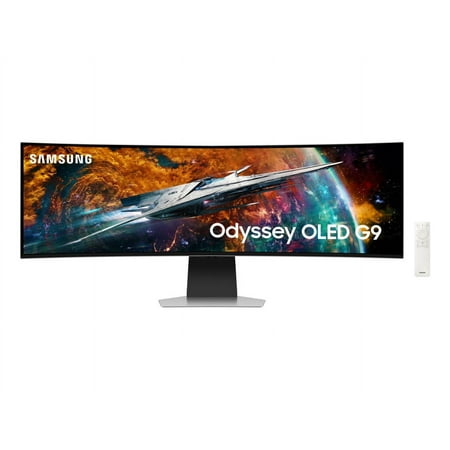
Samsung 49" Odyssey OLED G9 DQHD 240Hz 0.03ms G-Sync Compatible Curved Smart Gaming Monitor - LS49CG954SNXZA price history and forecast - Samsung LS49CG954SNXZA
Samsung 49" Odyssey OLED G9 DQHD 240Hz 0.03ms G-Sync Compatible Curved Smart Gaming Monitor - LS49CG954SNXZA

Samsung 49" Odyssey OLED G9 DQHD 240Hz 0.03ms G-Sync Compatible Curved Smart Gaming Monitor - LS49CG954SNXZA

Brand:
Samsung
Model Number:
LS49CG954SNXZA
UPC:
887276756721
EAN:
0887276756721
ASIN:
B0C48D7Q22
Best Buy SKU:
6544291
Walmart SKU:
2033328405
Key Takeaway

The the past three weeks at $1,799.99 represents stable pricing, running closely tracking the 90-day average of $1,799.99.

Third-Party Seller Summary

Third-Party Seller Price History Summary
Price Type Price Date
Highest Price
$1,799.99
Lowest Price
$899.99
Most Recent Price
$1,099.99
Average Price
$1,231.23
First Tracked
Last Update

Walmart.com Summary

Walmart.com Price History Summary
Price Type Price Date
Highest Price
$2,199.99
Lowest Price
$899.99
Most Recent Price
$1,799.99
Average Price
$1,483.42
First Tracked
Last Update

Price Analysis

Tracking History: We have tracked Samsung 49" Odyssey OLED G9 DQHD 240Hz 0.03ms G-Sync Compatible Curved Smart Gaming Monitor - LS49CG954SNXZA since 7/12/2023. The most recent price update was on Jul 12, 2026.

Price Range: Over the past 90 days, the price has ranged from $899.99 (lowest on 12/10/2025) to $2,199.99 (highest on 7/12/2023). The average price during this period is $1,483.42.

Current Trend: Walmart.com prices have ranged from $1,799.99 (Jul 12) to $1,799.99 (Jul 12) over the past 90 days. Current price is close to the 90-day average of $1,799.99.

Customer Insights: Rated 4.1/5 from 438 reviews.

Customer Reviews

438 reviews

Customer Reviews

4.1
Based on 438 reviews
5
287
4
66
3
18
2
18
1
49
Filter Reviews:
Sort By:
Showing 10 of 438 reviews

Finally the best 32:9 aspect ratio Super Ultrawide

Andrew Tan July 23, 2023

Gorgeous display, OLED still the best image quality, especially on HDR. Thanks for this QD-OLED Gen 2, the text fringing is minimum now. Awesome! This monitor is great but they are something I like to highlight. 1st, please don't over tune, default value of 30 in color is way too vibrancy, I reduce to 20. Some default value should change for better suite use as a monitor. For example, Contrast Enhancer and Peak Brightness should be off as this two enhancement never make image quality better. Logo semi-transparent default value should be on to better burn-in prevention. Games HDR should be set as Advanced or Basic, why default the value is off, this make the HDR gaming looks dark and dull like missing of suppose HDR. Beside above point I like to highlight, I am truly impressive with this newer OLED G9 Super Ultrawide. Totally no regret purchased. 😊

Was this review helpful?

G9 OLED 49" Monitor

Mohanie April 5, 2025

Probably one of the best monitors I've ever owned. Not only does it have a built in smart feature where you can download apps like netflix and hulu and get free samsung TV channels it also comes with a remote which helps you navigate through all the features and to turn the volume up and down! This monitor is not your average monitor, the 240Hz is amazing. I can run games way above 120FPS with no screen tearing. The field of view you also get in games is very nice. With the wide width of monitor it shows extra field of view on the left and right in game. You see more of the map and whats going on around you versus a traditional monitor or TV. The .003 refresh rate is also nice and noticable. I win more gun fights in game because of this. The vibrant colors and the brightness of the screen is amazing. I do notice from time to time after playing a game the HDR trys to switch back to normal and it flickers on the screen with white lines, which is quite annoying. The only fix I found for this so far is you have to manually turn HDR off and turn it back on by hitting Windows key control B. That will turn off HDR and then hitting that same key pattern will turn it back on. I also notice after playing games for a couple hours the screen panel runs really hot. Have a fan to dispurse the heat it generates. I also found that if you want to mount this monitor to a desk the best arm to get is Secretlab Heavy duty arm. Its expensive but its the only arm that can hold this monitor up without any worries. I will be buying another one of these monitors to double stack on top of my current one.

Was this review helpful?

Fantastic for gaming and work use

Schmedy September 18, 2025

[This review was collected as part of a promotion.] I mammy game in fps type games like escape from tarkov, scum, and day z, but also use this for typical internet and light work use. To say wow is an understatement, this thing is fantastic. The colors and blacks in the game are insane, the refresh is fast so no blur, and the curve really immersed you. This is like using vr without the stupid headset, you are so pulled into the game. As for day to day use, the only thing I need to do is try and find my mouse pointer from time to time due to the real estate, but that's not an issue. Things like movies, streaming and YouTube are like being in a theater. I went from a samsung 34" ultrawide to this thinking it might be too big, nope it's perfect. If you have the desk or wall room, get this, now!

Was this review helpful?

Excellent wide screen display

ElPresidente September 9, 2025

[This review was collected as part of a promotion.] After using the 49” LCD Odyssey monitor for a while, I decided to upgrade to the OLED model—and it did not disappoint. The improvement was immediately noticeable. I use this monitor for both gaming and work, and it excels in both areas. Games look stunning on the expansive OLED display, with vibrant colors and deep blacks that truly elevate the experience. For productivity, the ultra-wide screen is a game changer. Being able to view multiple windows and programs side by side has transformed how I work. One unexpected perk: the OLED model is significantly lighter than its predecessor. Since I wall-mounted it to save space, the reduced weight made installation much easier and more secure. It's also a smart monitor, meaning you can run apps natively. That said, I rarely use the smart features—they're nice to have, but not essential for my setup. If you're in the market for a premium ultra-wide monitor—whether for immersive gaming or serious multitasking—I highly recommend this one.

Was this review helpful?

Awesome Experience

multitasker March 17, 2025

[This review was collected as part of a promotion.] I am using the monitor for gaming and working, mostly coding. I have always used two monitors but having this screen is way more productive.

Was this review helpful?

Superb monitor

Zachariah May 6, 2025

[This review was collected as part of a promotion.] Great monitor with awesome HDR colors really pop on this monitor. 240 Hz really immerses you in the gameplay on video games. It's also phenomenal with watching movies and editing videos. Would highly recommend this monitor to anybody.

Was this review helpful?

Samsung G95SC – 2.5 Year Owner Review

OledGamerHS September 9, 2025

[This review was collected as part of a promotion.] I've had my Samsung G95SC for about two years now, and honestly, it's been amazing. The HDR is gorgeous, colors pop, and the brightness is insane — it just makes games look alive. The 240Hz refresh rate and fast response times make it perfect for competitive gaming too, super smooth with zero noticeable lag. One thing I really appreciate is the built-in TV features. When I'm done gaming, I can just kick back and stream something without switching inputs or turning on another device. I did have a small hiccup early on with DisplayPort not recognizing my PC, but switching to the latest HDMI version fixed it instantly. Since then, no issues at all — and no burn-in, which is impressive for an OLED. Looks-wise, this thing is a beast. It's sleek, crazy thin, and honestly looks like something from the future sitting on my desk. Despite the size, it's really light. I've got mine on a VESA mount, but the stand it comes with is solid if you're using it on a desk. Just make sure you have a big enough desk — it's huge. Bottom line: this is hands down the best gaming monitor I've ever used. If you're considering a glossy OLED, go for the G95SC — you won't regret it.

Was this review helpful?

A pretty great monitor with a short life

Protista September 11, 2025

[This review was collected as part of a promotion.] Generally speaking the monitor worked well for me, the picture quality / color was good and it delivered on all the performance specifications, HDR, 240hz, arc to my Soundbar when using it as smart TV, etc. It worked great for gaming and was pretty decent for office work using either my windows pc or my macbook and could easily support a few apps open top to bottom or a variety of other window arrangements while still being readable. I did get the smart variety of it which came with a smart TV style interface and would often adjust my monitor arm I had it mounted on for watching TV, though some what boxed on the sides due to how wide the screen is, in a more relaxed sitting arrangement. All of this worked pretty well with the Bluetooth remote and managing the monitor with it was pretty straightforward. Support wise it seemed to get updates fairly regularly which always makes me feel good to see a product is receiving software support especially with the smart TV style software embedded. I would normally give it 5 stars but it died while in use 5 months outside of the 12 month manufacturers warranty which is a big let down for me. I have two other Samsung monitors that are around 10 and 3 years old as well as other brands that are older still that are working fine. I hope that this is not a consistent issue with this model series but for the price these command it is hard to not be frustrated.

Was this review helpful?

Potential for Greatness

GamingmadeClear July 5, 2023

[This review was collected as part of a promotion.] This monitor is being used for gaming and for VFX work. I love the features of the monitor and how it acts like a TV giving me more flexibility. My issue at the moment however is that I'm seeing this contrast lines throughout my one side of my screen. It's especially noticable with a grey screen. Not sure if I got a bad batch or not but hopefully I can have this issue resolved.

Was this review helpful?

GARBAGE

Disappointed May 9, 2025

I've had this monitor for about a month. Less than 5 hours screen time. Now it's a brick. Red light at bottom blinks every 5 seconds, screen won't come on can't access menu. Apparently others have had same issue. Shame on you Samsung…

Was this review helpful?

Price History

Historical price data graph for Samsung 49" Odyssey OLED G9 DQHD 240Hz 0.03ms G-Sync Compatible Curved Smart Gaming Monitor - LS49CG954SNXZA

Recent Price Changes

Detailed price history for the past 90 days

Walmart.com Pricing

23 records

Walmart.com prices have ranged from $1,799.99 (Jul 12) to $1,799.99 (Jul 12) over the past 90 days. Current price is close to the 90-day average of $1,799.99.

Walmart.com price history for Samsung 49" Odyssey OLED G9 DQHD 240Hz 0.03ms G-Sync Compatible Curved Smart Gaming Monitor - LS49CG954SNXZA showing recent price changes over the past 90 days
Date Price Change % Change
$1,799.99 $+0.00 +0.0%
$1,799.99 $+0.00 +0.0%
$1,799.99 $+0.00 +0.0%
$1,799.99 $+0.00 +0.0%
$1,799.99 $+0.00 +0.0%
$1,799.99 $+0.00 +0.0%
$1,799.99 $+0.00 +0.0%
$1,799.99 $+0.00 +0.0%
$1,799.99 $+0.00 +0.0%
$1,799.99 $+0.00 +0.0%
$1,799.99 $+0.00 +0.0%
$1,799.99 $+0.00 +0.0%
$1,799.99 $+0.00 +0.0%
$1,799.99 $+0.00 +0.0%
$1,799.99 $+0.00 +0.0%
$1,799.99 $+0.00 +0.0%
$1,799.99 $+0.00 +0.0%
$1,799.99 $+0.00 +0.0%
$1,799.99 $+0.00 +0.0%
$1,799.99 $+0.00 +0.0%
$1,799.99 $+0.00 +0.0%
$1,799.99 $+0.00 +0.0%
$1,799.99
No third-party seller price history available for this product in the past 90 days.