
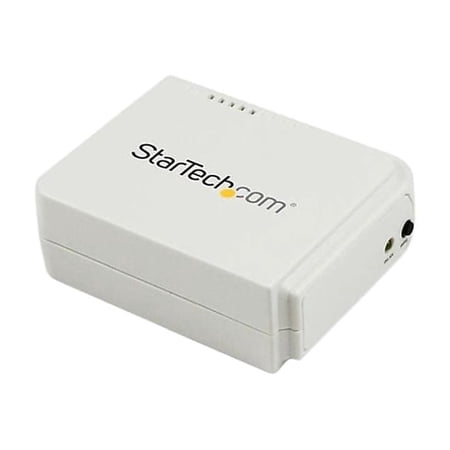
StarTech 1-Port USB Wireless N Network Print Server w/ Ethernet Port
- Brand:
- StarTech.com
- Model Number:
- PM1115UW
- UPC:
- 065030855167
- EAN:
- 0065030855167
- Walmart SKU:
- 41516019
| Price Type | Price | Date |
|---|---|---|
|
Highest Price
|
$87.00 | |
|
Lowest Price
|
$80.10 | |
|
Most Recent Price
|
$87.00 |
Price history data is not available for this product at the moment.
Current Trend: No Walmart.com pricing data available for analysis.
Customer Insights: Rated 3.17/5 from 23 reviews.
My use case is for Endicia for Mac. I use this to print NetStamps and shipping labels. I needed to replace a 10 yo MacMini used as a print server. After configuring as described in the docs here, I added the printer to the mac. The "trick" here is to pre-install the software and printer on the mac via USB first, so the drivers are present on the computer. When configuring the new print server, you must set it as the type of DYMO printer you previously installed. This is available in a list when selecting the printer type - it will list all previously installed printers on the Mac. Once that is done the printer is propoerly recognized and you can print from right/left rolls as before.
I bought this last week and played around for a couple of days trying to setup. Used Support Chat and Lukas had me going in short order. My router had assigned the default address to something else which was causing the connection problems. Once that was determined I was able to setup and print from from a second laptop in a matter of minutes.
After I was able to get it connected to my router (press WPS on your router then WPS on the print server) I had issues having my MacBook Pro recognize the device. I used chat support and Matthew was able to login and help troubleshoot the issue. I ended up connecting the printer to my USB hub to get to make sure the MacBook could recognize and print, then connected the USB to the printer server, created a new printer in my preferences and it connected.
Yes it is slightly cumbersome to setup the print server. However once it is setup it works flawlessly. I have a USB printer and this was the only way I could connect it to my Chromebook for printing. Saved me from the hassle of getting another printer. Thanks StarTech. Also the support is very responsive and top notch.
Finally, I don't have to move my laptop to the room with the printer to be able to print! (It's been an issue ever since I got fibre optic internet and had to move the router to the basement. My printer supports Ethernet and USB but not WiFi.) Rather than follow the manual for setting up the WiFi connection, I just used the WPS button like soe reviewers on Amazon suggested. Much easier! But it was hard to tell if it worked or not until I hooked it up to the printer and followed the instructions to print a test page. Even now with everything working, the Status light is blinking and the instructions say it should be solid on when everything is good. I also had to dig through troubleshooting info on the internet to figure out how to change the IP address. My router only allows IP addresses in the 192.168.1.x range, but this print server is set to 192.168.0.10 by default. Eventually I figured out that I could connect it directly to my computer with an Ethernet cable, go to 192.168.0.10 in a web browser, and change the IP address there. Set up on Windows wasn't too difficult, but I did have to select the networking device (Network Print Server, USB, 1-port; or something like that) and the printer model manually. Setting up on Chrome OS was a bit trickier, but eventually found out that LPD (the option I had to pick on the Chromebook) is basically the same as LPR (listed in the specs for this device). Now it's all working! Just needs better documentation.
I've had this for maybe a year and just called in to get help installing it on my new laptop. The device has allowed me to use a great electrostatic usb printer on my wireless network. It works flawlessly. It could be easier to install. Each time I need to install it on a new computer I have to call product support who promptly links to my PC and sets it up. Good service, just a little more difficult to install than most devices.
Does not work with modern Windows Wi-Fi security. Comes with drivers on a CD... Nobody has CDs anymore. Even with downloading from their website I was not able to get it to connect to Windows.
I bought this device few weeks ago and it works just 5 to 10 mins then we had to take off the power and then take in the power to get it work. This is not a normal behavior for a new device
I have it installed and working with my HP Laserjet, but it constantly needs to be reset. It won't stay connected more than 10-15 minutes. It's very irritating. I do not recommend this unit.
Wi-Fi component is not ready. It can find an SSID in the next block but not 10 feet away (and it has two to choose from). Hopefully the unit has upgradeable firmware and will someday reach its full potential. Otherwise it is a just an Ethernet print server with higher price point than competing Ethernet print servers.
Detailed price history for the past 90 days
No Walmart.com pricing data available for analysis.
Third-Party Sellers prices have ranged from $80.10 (Aug 4) to $87.00 (Sep 8) over the past 90 days. Current price is close to the 90-day average of $85.85.
| Date | Price | Change | % Change |
|---|---|---|---|
| $87.00 | $+0.00 | +0.0% | |
| $87.00 | $+6.90 | +8.6% | |
| $80.10 | $-6.90 | -7.9% | |
| $87.00 | $+0.00 | +0.0% | |
| $87.00 | $+0.00 | +0.0% | |
| $87.00 | — | — |