
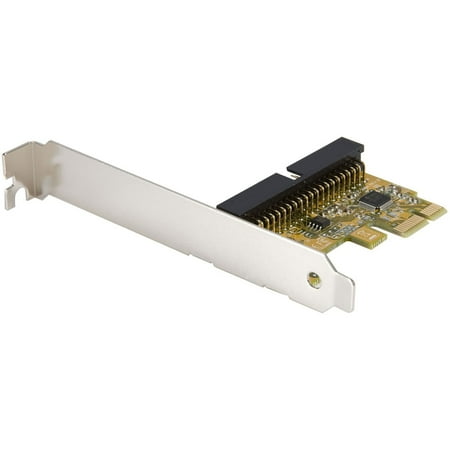
StarTech PEX2IDE 1-Port PCI Express IDE Controller Adapter Card
- Brand:
- StarTech.com
- Model Number:
- PEX2IDE
- UPC:
- 065030825153
- EAN:
- 0065030825153
- Walmart SKU:
- 13216238
Market rate of $22.17 positions buyers 0.0% under the established average.
| Price Type | Price | Date |
|---|---|---|
|
Highest Price
|
$37.59 | |
|
Lowest Price
|
$28.29 | |
|
Most Recent Price
|
$33.11 |
| Price Type | Price | Date |
|---|---|---|
|
Highest Price
|
$22.93 | |
|
Lowest Price
|
$22.17 | |
|
Most Recent Price
|
$22.17 |
Tracking History: We have tracked StarTech PEX2IDE 1-Port PCI Express IDE Controller Adapter Card since 12/5/2022. The most recent price update was on Jul 30, 2024.
Price Range: Over the past 90 days, the price has ranged from $22.17 (lowest on 6/9/2024) to $22.93 (highest on 12/5/2022). The average price during this period is $22.57.
Current Trend: No Walmart.com pricing data available for analysis.
Customer Insights: Rated 4.33/5 from 9 reviews.
It worked for what i needed it to do..i needed to add a couple of ide(pata) cd/dvd players to a sata only motherboard..i have only tried playing some dvd movies and music cds thru the adapter with no issues, i have not tried to burn any cd/dvd thru the adapter yet. no problems with windows 7 recognizing the adapter or attached devices (cd and dvd optical drives) or windows 7 installing the drivers for the adapter of connected devices(cd/dvd optical drives)
It connects two IDE devices to PCIE slot and show up on system just like they were plugged into an IDE connection. Little system disc did not want to install driver, copied contents to SD card and installed easily.
My review on Amazon To enable my trusty Panasonic DVD-Ram to run on my new all-SATA Gigabyte board, I considered an expansion card as a possible solution for my problem. The card used was a StarTech PCI-Express IDE Adaptor Card (PEX2IDE). However, it didn't worked straight out of the box (possibly, because of the extremely basic instructions supplied). After I installed the card, my computer wouldn't boot (I couldn't even access the bios!). It informed me that it couldn't find a bootable disk. The StarTech card has its own bios and is, probably, designed to re-use IDE hard drives (for booting purposes?). Anyway, I pulled out the card and searched my Gigabyte bios for some setting to change. I did see one setting that looked promising under "Bios features": PCI Rom Priority. My bios was set as "EFI Compatibility Rom" so I reset it for "Legacy Rom". After that change, the whole system worked fine. ------------------------ UPDATE --------------------------------- Recently installed Windows 7 64-bit in a dual-boot system. Ran into the infamous "The selected disk has an MBR partition table. On EFI systems, windows can only be installed to GPT disks". I tried to get into the motherboard's bios without pulling out the StarTech card: when the bios splash-screen appeared, I tapped the 'delete' key on a regular basis (about once every 2 seconds). Nothing, but I kept hitting the key anyway. The JMicron screen appeared for a few seconds, with the usual "press any key to continue" (it'll continue without pressing any key!). I kept tapping 'delete' throughout this sequence, and, then, the bios splash-screen appeared once again, briefly. Suddenly, I was in the motherboard's bios, and I made a change to the way my DVD drive was listed: I changed it from an 'UEFI Optical Drive' to a plain 'SATA Optical Drive'. Since then, I've changed the "PCI Rom Priority" back to its original setting and all is well: Windows 7 installed successfully & my Panasonic DVD now burns disks. Still don't know what went wrong in the first place!? ---------------------------------------------------------------- I gave 5 stars for this adapter, but it really merits 4.5 stars because of the pathetic set of instructions (forget StarTech's website!)
Card works in Ubuntu 20 without adding any drivers, modifications etc. I can now finally access my old DVD drives.
I purchased a couple of these to utilize some older DVD drives I had and to rescue media from an IDE Zip-100 drive and some old IDE hard drives. Am very pleased this device is well supported on Linux (including latest Ubuntu 24.04 64-bit). I used it on an MSI Motherboard from 2023 and an old Asus board from 2008. I was able to boot from DVD on the old board, did not try booting on the newer one. Great device.
Great product to use with legacy IDE drives
I bought this to see what I had on my zip drive disks worked great
PEX2IDE Controller would not allow Win10 x64 to boot. Nothing in the docs or on the website - until I saw another user's comments about Win7. That prompted me to go into BIOS and turn off disk drive AHCI. Bingo! The system now boots and can see the IDE drive (ZIP100).
Detailed price history for the past 90 days
No Walmart.com pricing data available for analysis.
Third-Party Sellers prices have ranged from $32.51 (Jun 26) to $35.44 (Jul 7) over the past 90 days. Current price is close to the 90-day average of $33.40.
| Date | Price | Change | % Change |
|---|---|---|---|
| $33.11 | $+0.00 | +0.0% | |
| $33.11 | $+0.00 | +0.0% | |
| $33.11 | $+0.00 | +0.0% | |
| $33.11 | $-2.33 | -6.6% | |
| $35.44 | $+2.93 | +9.0% | |
| $32.51 | — | — |