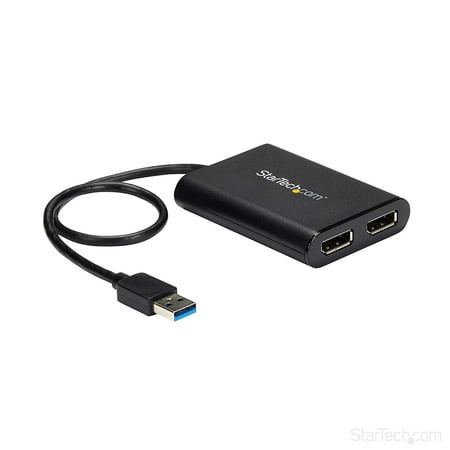
StarTech.com USB 3.0 to Dual DisplayPort Adapter 4K 60Hz, DisplayLink Certified, Video Converter with External Graphics Card - Mac & PC price history and forecast - StarTech.com USB32DP24K60
StarTech.com USB 3.0 to Dual DisplayPort Adapter 4K 60Hz, DisplayLink Certified, Video Converter with External Graphics Card - Mac & PC

StarTech.com USB 3.0 to Dual DisplayPort Adapter 4K 60Hz, DisplayLink Certified, Video Converter with External Graphics Card - Mac & PC

Brand:
StarTech.com
Model Number:
USB32DP24K60
UPC:
065030878487
EAN:
0065030878487
ASIN:
B07C69HG33
Walmart SKU:
705004652

Third-Party Seller Summary

Third-Party Seller Price History Summary
Price Type Price Date
Highest Price
$122.69
Lowest Price
$97.99
Most Recent Price
$109.06
Average Price
$106.71
First Tracked
Last Update

Walmart.com Summary

Walmart.com Price History Summary
Price Type Price Date
Highest Price
$116.10
Lowest Price
$115.82
Most Recent Price
$116.10
Average Price
$115.96
First Tracked
Last Update

Price Analysis

Tracking History: We have tracked StarTech.com USB 3.0 to Dual DisplayPort Adapter 4K 60Hz, DisplayLink Certified, Video Converter with External Graphics Card - Mac & PC since 12/5/2022. The most recent price update was on Jun 2, 2023.

Price Range: Over the past 90 days, the price has ranged from $115.82 (lowest on 12/5/2022) to $116.10 (highest on 6/1/2023). The average price during this period is $115.96.

Current Trend: No Walmart.com pricing data available for analysis.

Customer Insights: Rated 4.55/5 from 11 reviews.

Customer Reviews

11 reviews

Customer Reviews

4.6
Based on 11 reviews
5
9
4
1
3
0
2
0
1
1
Filter Reviews:
Sort By:
Showing 10 of 11 reviews

AMAZING product - STARTECH tech support is Awesome

Brook Lang May 26, 2022

Using the Startech USB 3.0 to Dual DisplayPort Adapter - 4K 60Hz with new Microsoft Surface Pro 8 with a Surface Dock2 - so running FOUR 4K external 32" 4K 60hz LG monitors. Monitor # 1 & 2 are using USB C to USB C cable plug into the two Surface Dock2 4k 60hz supported on the Surface dock2. Then plugged in the Startech USB 3.0 to Dual DisplayPort Adapter - 4K 60Hz to one of the USB ports on the Surface Dock2 that is NOT video display supported (thus why need this device - and used Displayport Cables) and all 4 external 4k 32" LG monitors are going great! So the 5th screen is the Surface Pro 8 itself. So if you want 4 external 4K monitors for your Laptop - THIS IS THE PRODUCT YOU WANT

Was this review helpful?

Device works!

David April 3, 2024

This device was exactly what i needed. I was able to cast to both screens.

Was this review helpful?

A nice alternative to a dock for those on the go

ShawnO_6 July 16, 2018

This adapter works as described and can be setup quickly and easily. It is smaller, lighter than a docking station for those who only need additional displays or have cost concerns. The fact that it requires no additional power may also make this a smart choice for those who want a dock without the hassle of additional cables, etc. I did not have any 4K displays available but this adapter provided crystal clear output to my standard displays. I received this product in exchange for an unbiased review.

Was this review helpful?

Great solution to add more displays

alexanderb December 15, 2020

I needed to connect 5 monitors on a single PC and only had a HDMI and VGA adaptor onboard. First I searched for a dedicated graphics card with 5 output ports, but that seemed to be difficult because it needed to be low profile and there aren't much graphics cards with that much ports. I'am glad I found this adaptor from Startech, since it's a very easy solution to add multiple monitors with a far lower price than a graphics card would've cost. I connected two Startech adaptors and used the HDMI port for the 5th monitor. Everything was working right out of the box, I didn't even needed to install drivers. Very happy with them!

Was this review helpful?

Works perfectly as advertised on M1 MacBook Pro

F240 May 5, 2021

Been using for months so that I could use 3 displays with M1 Mac. This totally solved the problem. Using with LG 4k 24 inch, in addition to built In screen and another LG 21 inch 4k directly into M1 Mac. Could not be more stable. Absolutely first rate for typical, professional use case.

Was this review helpful?

Finally something that worked

JackP April 9, 2024

I tried everything to get my Dell 3414 monitor to work at 3440x1440 resolution. Spent hours going in circles between Microsoft, Dell and Asus support before finally learning my Asus laptop has an HDMI 1.2 not 2.0, which is why I could only get 2540x1440 resolution (that stretched all images making graphics programs all but useless. I had given up when happened to see a review of this Dual Displayport and decided to give it a try. Had to install the software and change both my Dell monitors to DP from HDMI (didn't change automatically) but once I rebooted it all worked. Thank you so much StarTech for making a product that actually does what it says it does.

Was this review helpful?

USB to dual Display Port

Starr June 25, 2018

This product was a surprise for me. I was skeptical about running 2 4K display ports on a single USB port but the quality was great and it was simple to install.

Was this review helpful?

Works Well

nivek July 15, 2018

Easy installation after downloading and installing the drivers. I'm very happy with the performance.

Was this review helpful?

Problem Free After Initial Installation

NickD_CA50 July 17, 2018

I have been testing this dual DisplayPort to USB adaptor for a few weeks with my Lenovo laptop and two monitors. It has been working well and I keep forgetting it is even connected. The adaptor comes in a box about the size of a couple DVD cases. The adaptor fits in the palm of my hand and the cable is the length of my forearm. The adaptor is very well made with round soft sides and shiny black ends. The USB cable connects firmly to my computer and the DisplayPort cables click in to lock nicely in the adaptor. When I first connected the adaptor to my computer, it made all the dings to indicate it had been connected. When I connected a monitor nothing happened and I could not get any video to work. I tried a few times with the same result. I then downloaded the installation software from the product website. It installed a DisplayLink software which although I don't like having to install software, it does appear to be more reputable than others I have had to install for display adaptors. After the software was installed the adaptor worked immediately when connected. It is equally as fast and reliable as using the manufacturer band's docking station. Not a single hiccup using this adaptor after the software was installed (I am using Windows 10). I wish that I didn't have to install any software to use this adaptor, but once it got going it was working well. I received this product in exchange for an unbiased review.

Was this review helpful?

Don't work on m1 MacBook Pro and Air

yakuza May 24, 2021

I had version of Mac OS 11.3.1 and second Mac 11.3.5 But on windows all work fine ! But I don't need a windows I need work on Mac !

Was this review helpful?

Price History

Historical price data graph for StarTech.com USB 3.0 to Dual DisplayPort Adapter 4K 60Hz, DisplayLink Certified, Video Converter with External Graphics Card - Mac & PC

Recent Price Changes

Detailed price history for the past 90 days

Walmart.com Pricing

0 records

No Walmart.com pricing data available for analysis.

No Walmart price history available in the past 90 days

Third-Party Seller Pricing

3 records

Third-Party Sellers prices have ranged from $97.99 (May 7) to $122.69 (Apr 12) over the past 90 days. Current price is close to the 90-day average of $109.91.

Third-party seller price history for StarTech.com USB 3.0 to Dual DisplayPort Adapter 4K 60Hz, DisplayLink Certified, Video Converter with External Graphics Card - Mac & PC showing recent price changes
Date Price Change % Change
$109.06 $+11.07 +11.3%
$97.99 $-24.70 -20.1%
$122.69