
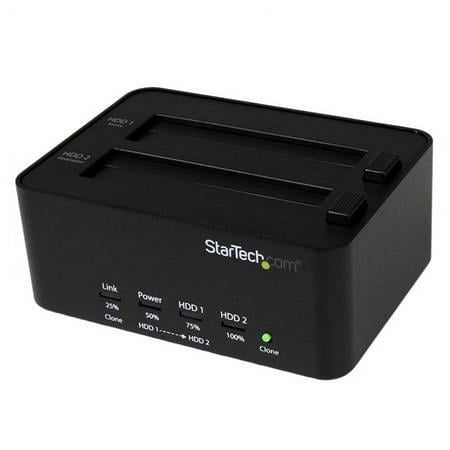
StarTech.com USB 3.0 SATA Hard Drive Duplicator & Eraser Dock, Standalone 2.5/3.5in HDD & SSD Eraser and Cloner
- Brand:
- StarTech.com
- Model Number:
- SATDOCK2REU3
- UPC:
- 065030852654
- EAN:
- 0065030852654
- Walmart SKU:
- 35461508
Current pricing at $106.03 reflects recent market activity, running 0.0% below the 90-day average.
| Price Type | Price | Date |
|---|---|---|
|
Highest Price
|
$149.95 | |
|
Lowest Price
|
$78.54 | |
|
Most Recent Price
|
$102.94 |
| Price Type | Price | Date |
|---|---|---|
|
Highest Price
|
$106.03 | |
|
Lowest Price
|
$85.99 | |
|
Most Recent Price
|
$106.03 |
Tracking History: We have tracked StarTech.com USB 3.0 SATA Hard Drive Duplicator & Eraser Dock, Standalone 2.5/3.5in HDD & SSD Eraser and Cloner since 12/5/2022. The most recent price update was on Dec 12, 2024.
Price Range: Over the past 90 days, the price has ranged from $85.99 (lowest on 12/5/2022) to $106.03 (highest on 12/10/2024). The average price during this period is $94.01.
Current Trend: No Walmart.com pricing data available for analysis.
Customer Insights: Rated 3.57/5 from 21 reviews.
We are a small IT tech shop and in the past we've utilized cloning software with a SATA adapter to clone Windows OS. But, we found ourselves stuck when trying to clone server OS, it just wouldn't work. So we purchased this unit after talking to the people here and was pleasantly surprised when after doing a Windows 8 clone we didn't have to go in and initialize the MBR to get it to work. It booted right up. We did the Windows 2012 R2 Essential clone and worked as advertised. We are very happy that we made this purchase and will continue to use this instead.of the cloning software.
I have three laptops. I use this to clone the hard drives about once a month. I then put the newly cloned drive in till the next cloning then switch again. I recently got a bad virus on one laptop that prevented boot up. Put in the clone (lost a couple weeks data-my fault) and was up again. Cloned over the bad disk and had 2 good again. This works great if it is easy to remove the hard drive from the laptop. However I have a 10 inch mini that requires major surgery to get the disk out. I have not figured out how to clone when you can't get the disk out of the laptop and use the provided cable. Instructions lacking in this area.
thank you order very good
I am an IT Tech and have been using this duplicator for many years and it has worked great. The reason for any failure is 99.99999 % is user related. Either the Hard Drive they are trying to clone is defective or the main one is they are trying to clone to a Hard Drive that is smaller than the original one (ie: 750 gb to 500 gb). The issue of programs not working after a clone is one issue I have never come across. I also have cloned Sata to SSD and using the USB interface to clone M.2 to SSD using cloning software. Before you use this product or any other device, understand the working of the device first. Do your research first.
The duplicator worked exactly as advertised. We have duplicated over 100 drives with this device and have not had any issues. Great value and great product overall!
I had a drive on the edge of failure, and this device allowed me to make a copy of it on to a new drive. It was my primary drive (C:), so I held my breath when I put the new drive in my notebook and fired it up. It was a good feeling to see the "Windows loading..." screen! I haven't used it as an external drive bay yet, but feel confident it should work fine in that role as well.
You MUST power on the unit EMPTY. Then insert the source hard drive, then insert the destination hard drive. Lastly push the clone button on the front for 5 to 10 seconds until the front LEDs activate. This exact procedure is not listed/clear in the manual
I bought this to clone hard drives for a school computer lab. I have cloned almost 40 drives with no problem. Now, all of a sudden, the product won't clone. In the middle of a clone the LEDs went from the flashing amber to Off-Solid Red-Off-Off. I ejected the destination drive, turned off, turned back on and LEDs showed Off-Solid Amber-Off-Solid Amber. I now cannot get the product to clone or perform any other function. Have had product less than one week.
Used many times over the last year or so. When it works it's fast and great. Sometimes though, when cloning the last LED lights solid. No clue as to why it can't start duplication... I can try another and it works fine. The source HDD boots and runs fine in host computer. Irksome.
I've owned this device for a few years (two) and worked well initially . .I bought a ps4pro and managed it clone the ps4 date directly to a Samsung evo 860 1tb ssd .... subsequently I have tried to clone a few hard drive hdd to ssd without any luck... only get the 2nd drive like flashing red
Detailed price history for the past 90 days
No Walmart.com pricing data available for analysis.
Third-Party Sellers prices have ranged from $102.94 (Jun 5) to $149.95 (Mar 20) over the past 90 days. Current price is 13.2% below the 90-day average of $118.61.
| Date | Price | Change | % Change |
|---|---|---|---|
| $102.94 | $+0.00 | +0.0% | |
| $102.94 | $-47.01 | -31.4% | |
| $149.95 | — | — |