
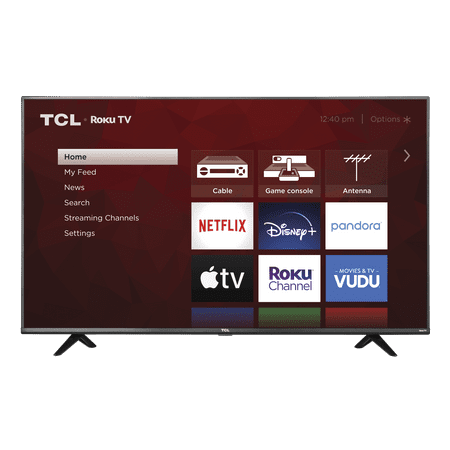
TCL 55" Class 4K UHD HDR LED Smart Roku TV - 55S20
- Model Number:
- 55S20
- UPC:
- 846042016292
- EAN:
- 0846042016292
- ASIN:
- B0CDCP8G4S
- Walmart SKU:
- 473987409
At $238.13, pricing shows 0.0% discount compared to typical $0.00 levels.
| Price Type | Price | Date |
|---|---|---|
|
Highest Price
|
$394.00 | |
|
Lowest Price
|
$249.99 | |
|
Most Recent Price
|
$249.99 |
| Price Type | Price | Date |
|---|---|---|
|
Highest Price
|
$238.13 | |
|
Lowest Price
|
$238.13 | |
|
Most Recent Price
|
$238.13 |
Tracking History: We have tracked TCL 55" Class 4K UHD HDR LED Smart Roku TV - 55S20 since 3/21/2023. The most recent price update was on Jul 15, 2024.
Price Range: Over the past 90 days, the price has ranged from $238.13 (lowest on 3/21/2023) to $238.13 (highest on 3/21/2023). The average price during this period is $238.13.
Current Trend: No Walmart.com pricing data available for analysis.
Customer Insights: Rated 3.8/5 from 940 reviews.
Let me start by saying this is not the first TCL Roku Smart TV in our home. We own an identical, but older model 55" Roku Smart TV, so after having such a positive experience with TCL Roku Smart TVs it was never a debate on what we wanted to replace our guest room/ game room TV with. Set up is so simple and easy, literally took all of 5 minutes! The picture and sound quality is awesome. Roku has tons of apps that you can download to the TV, so all of your favorite entertainment options are right at your fingertips. Our house has been cable free for nearly 10 years now, and we never miss our favorite shows and movies because they are available to watch anytime we want on our Roku Smart TVs, which we now own 3 of! If that's not a testimony of how much we love TCL, I can't imagine what else is! If you're on the fence about which smart TV to purchase, TCL Roku TVs are the way to go. They are the only brand our family uses!
This is a nice TV! I was able to put the feet on it and lift it on my own, but it is a 2 person carry according to the instructions. Just be really careful not to squeeze or put pressure on the screen. The picture is great, and adding peripherals like an Xbox is easy. After turning it on and letting the tv detect it, a button was added to the home screen that switches to it when selected. No need to change outputs with the remote. The picture for gaming was excellent, just needed to adjust brightness a tiny bit. Setup was simple, but does lead to my one negative point: you must create a Roku account to use the TV at all. It's free, and they say you don't need to enter a credit card. But I could not progress any further in sign up on Roku's site until I did. I used mobile, might be worth trying on PC and see if anything shows up that way.
I was quite intimidated by the "new technology" for me! I was very surprised how easily everything came together! I had this set up and ready to begin within 20 minutes! Not knowing what I was doing I was pleasantly surprised as the TV walks you through each step. I never streamed nor had a smart TV before but you literally are walked through every step right on the screen. If you can set up a fire stick or any iphone this is a piece of cake in comparison. The sound is so crisp and clear and the picture is just beautiful! All the already added features I watched for a few days without turning on cable mode! I highly recommend this TV for beginners who want an easy set up with amazing quality! I want to replace every TV in the house with this! You won't find better!
Wow!! I love my new tv and so does my husband. It's a Smart TV with integrated Roku and WiFi enabled. I am able to share my phone's screen to the TV. I like that I don't need my Roku or my mirascreen attachment anymore (less plugs). I was able to attach my DVD player and antenna (since I don't have cable). I was so excited that with my antenna and this awesome tv, I can finally get channel 11,13 and 7. In antenna mode I can see the signal strength of each channel as well as having a guide. This I love the most because I can plan what I'm going to watch. I also get a great picture with my DVD player. It gives a great picture quality, sound quality and the size is amazing. We use it in our bedroom and it's just what we needed. When you turn it on with your tv/Roku remote you get the Roku screen. It displays any additional attachments and your Roku channels. If you are new to Roku you can watch tons of movies and shows for free so its extra amazing. It was easy to assemble and set up. I am average in strength and I unpacked it, attached the legs and put it up on my dresser alone. Love it!!
We love this TV! The picture and sound quality on this tv are really great! The isn't super heavy which made it easy to unbox and when we want to change it from wall mount to sitting. One issue I did have was the instruction manual. It's not large in size, therefore it doesn't cover a whole lot. One particular situation I had was regarding the wall mount. On the back of the TV there are holes(like most TVs have) but these are different. When I referenced it in the manual it just told me I needed to go buy a specific BRAND of mount. I found this unusual and not helpful at all since I know the mound I had will work. We ended up getting it on the wall so it's not an issue but I found that to be odd. Overall, we LOVE the TV. The kids love the features that Roku gives you where you can pick screensavers and wallpaper. The remote has quick buttons for Netflix and Hulu and that's helpful for my little one. The picture is clear and sharp. I would 100% recommend this TV!
I didn't open it until the third day...because I wanted to make sure I had time to complete the set up. BUT - this tv took only about 10 minutes to unpack and plug in! I already had an old Roku account, so I logged on to it with a nearby computer, signed in and added some channels....all in a few minutes. If you don't have a Roku account, you can make one on your computer, its free. Next, I LOVE the remote. It doesn't have a trillion buttons like some remotes. Don't let that fool you, the television has plenty of customization options for the sounds and colors. The remote is small, simple, and best of all...I already have accounts on 3 of the 4 main buttons. (Netflix, Hulu and Disney) After logging in to each one with my password, saving....I have tons of shows, movies and music! I am so pleased that I even removed the "Dish Box" to return it. I haven't had this television for too long, but so far there isn't anything I don't like about it.
This television is 55 inches and a excellent buy for the price. It does take some getting used to you will use Roku as your device and you will need Internet service for most of the platforms you watch. Set up was quite easy I just attached the two legs with the four screws provided and it sits perfectly upon my faux fireplace hearth. The picture is superb on most of the platforms I watched it on however I did notice lack of picture clarity when I used my iPhone to cast to the television. I was also impressed with the Number of available ports HDMI, usb, av in/out and cable as they are all located on the side! So much easier than other televisions. The Roku remote does take some getting used to but it just takes a little practice and you'll be able to enjoy many thousands of hours of content. I think the clarity of picture will improve when I can get my cable dish directly connected to it. There is a warranty for 1 year that is included, 6 months warranty for commercial use. There are also several free trial channels to work with! Roku offers so many that you can try a bunch of premium titles at no cost! I hope I've given you some information and thanks for reading! Have a great day.
Comparing to my 65" LG TV, this is a great TV for anyone and anyplace. It has WiFi connection and it's loaded with streaming apps. It has all the apps that most won't even use but more is better than less.. It plays movies and music from USB stick or drive, has great vibrant colors, audio is not very bassy but good enough to listen to. 4 stars because the remote control is less than basic and has 4 buttons that I don't even use. And also because this TV has ONLY 1 USB port! Come on people, 1 USB port? Why didn't u substitute the Ethernet port for another USB port? Overall, the box outweighs the TV itself, packing is 28 lbs and TV is 25 lbs. For the price, it's much better than others, not Google voice ready but picture quality is very good. I like it and I hope it will work for years..
so far the television works great. It was easy to connect to the internet, Netflix, Disney+ and create a Roku account. The TV is light enough for me to lift on my own. It comes with a remote that is absolutely user friendly especially for the apps I mentioned above. I do hope the TV last. My only concern is the way the screen changes when my children walk hard or when we ever so gently touch the screen.
I've seen TCL products around a lot in the past year and decided to do some research. Apparently TCL is the third largest manufacturer of LCD tvs which makes me feel a bit better about taking a chance with an off brand. The economy level of LCD's is filled with so many makes and models now, it's hard to choose. This 55” TCL 4K HDR Roku smart tv came well packed in three boxes with a minimum of styrofoam which I appreciate. It actually took me longer to unpack it than to set it up. One major gripe is there was packaging tape all around the outer edge of the screen. Not just on the bezel, but on the screen itself. This seems counterintuitive to me when I was taking such great care not to touch or press on the screen as it could damage it. One of the lines of tape broke off leaving a little piece behind and removing it was akin to performing brain surgery. I was sweating. Manufacturers: please stop doing this. The manual was helpful in explaining how to use the remote, the connections and what different features the tv has. It even listed the codes for programming universal remotes. Installing the legs took a few minutes with a power screwdriver torqued low as I didn't want to strip the screws. The remote came with batteries—yeah! Unfortunately the minute I started using it, I hated the feel. I have other Roku tv remotes so I'm used to the format, but this remote feels chintzy. There's a loud annoying click whenever you press a button and you have to point the remote right at the tv for it to pick up the signal. The plastic it's made of is thinner and the back is semi-transparent unlike my others. If there's a downfall to this set, it's this. The sound is acceptable although I find I have to set the volume louder on this tv than my other Roku sets. Could be due to small wattage speakers. I can't find any specs on this tv anywhere on the internet, but that's my assumption. You'll probably want a good sound bar. The Roku interface is so clean and simple and customizable, I'm not sure why every tv doesn't have Roku. ‘Nuff said. So picture quality... Impressive. Backlight seems to be even all the way around the screen. No bright spots, no dead pixels and no lag. The tv is in an extra bedroom far away from the router so if there were Wi-Fi connection issues, I'd understand, but I've had no issues at all. I ran it through its paces with movies, music videos and a bunch of Youtube content. 4K footage was stunning. Taking virtual tours of other countries was vibrant and lifelike. Not as much as high end brand name smart sets, but considering you're going to pay a lot more for those, the quality is pretty darn good. This is clearly where the money went on this LCD tv and I'm willing to suffer a bit with the remote and sound for picture quality this good. I compared the TCL to another economy brand I own head to head and there was no contest. TCL won hands down when it came to 4K. Tweak the video settings and you can do even better. As for connections, they're all here as long as you're not a power user and need several of each. There's three HDMI, one USB, one cable, ethernet and optical audio. There is an AV In connection, but you'll need an adapter to use it which is a bit of a disappointment. One thing I found irritating is the bright white status light located dead center below the TCL name. It blinks when the remote sends a signal and stays on constant like a nightlight when the tv is off. I saw no use for this and was able to turn it off in the main settings so it's not on all the time, but I can't shut it off completely. It still blinks when I use the remote. I just find it distracting and unnecessary to have a light that bright or big on the front of the tv. There's no listing for this model of TCL 55” tv as of this writing so I have no idea of pricing, but if it's well below $300, it's worth the money. Maybe grab a universal remote while you're at it and your life will be better for it.
Detailed price history for the past 90 days
No Walmart.com pricing data available for analysis.