
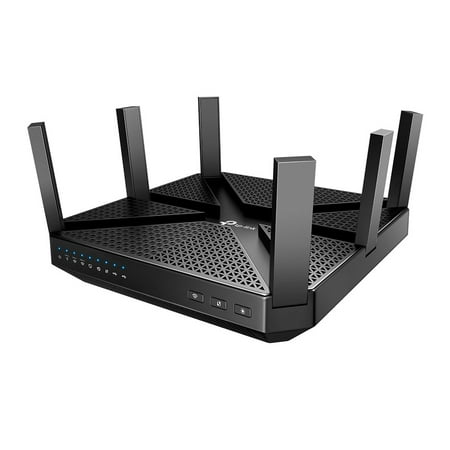
TP-Link AC4000 MU-MIMO Tri-Band Wi-Fi Router (Archer C4000)
- Brand:
- TP-Link
- Model Number:
- TP-RE205
- UPC:
- 845973081423
- EAN:
- 0845973081423
- ASIN:
- B07F1YB5LX
- Best Buy SKU:
- 6351103
- Walmart SKU:
- 231733369
Market rate of $180.12 positions buyers 0.0% under the established average.
| Price Type | Price | Date |
|---|---|---|
|
Highest Price
|
$148.95 | |
|
Lowest Price
|
$106.99 | |
|
Most Recent Price
|
$121.00 |
| Price Type | Price | Date |
|---|---|---|
|
Highest Price
|
$180.12 | |
|
Lowest Price
|
$180.12 | |
|
Most Recent Price
|
$180.12 |
Tracking History: We have tracked TP-Link AC4000 MU-MIMO Tri-Band Wi-Fi Router (Archer C4000) since 8/6/2025. The most recent price update was on Dec 13, 2025.
Price Range: Over the past 90 days, the price has ranged from $180.12 (lowest on 8/6/2025) to $180.12 (highest on 8/6/2025). The average price during this period is $180.12.
Current Trend: No Walmart.com pricing data available for analysis.
Customer Insights: Rated 4.3/5 from 51 reviews.
Although I’ve only had it for a short time, this has to be by far the best router I’ve owned for the cost. I’ve tried mane elite wireless routers that cost 3 times this one and have never experienced this type of connectivity. The range on this thing is absolutely the best I have ever seen. I get connectivity all over my house and even in my backyard and front yard. I always had issues connecting to the internet upstairs, but now that’s an issue of the past! We threw our range extender away because we didn’t need it anymore now that we have this one. It also comes w/ a 2 yr warranty. From what I read, replacing it under warranty is a breeze as well. It was also easy to install. I was up and running in less than five minutes after it was plugged into my cable modem. Would buy again!
I received the TP-Link AC4000 MU-MIMO Tri-Band Wi-Fi Router and I’m loving it. My internet provider seems to be lagging. The thread and application running on your network with a 1.8 GHz 64-bit quad-core CPU and delivers fast, lag-free connections to gaming, streaming and mobile devices. behind. I always would have to restart and I couldn’t seem to get the internet around the whole house. With 512 MB of RAM and three additional WIFI processors support the router’s quad-core CPU and balances WIFI it definitely keeps with allowing your WIFI needs. I was able to run three cell phones, two laptops, and PC with no lagging time. I can’t believe that no slow internet or restarting needed. Airtime Fairness and Smart Connect Protect my network from intruders, viruses, and malware with advanced WiFi encryption and comprehensive antivirus security. You can limit and monitor internet use with rich controls that let you customize WiFi access for person and device double wired connection speeds from 1 Gbps to 2 Gbps. Another great feature is you can up your WiFi in minutes and manage your network through the TP-Link Tether app. It’s so convenient to work the internet through the app on your phone. I would definitely recommend this to anyone looking to improve their WIFI access and set up many devices, it is well worth the price.
I plugged this in to my local cable modem box and set up was very easy. It took me about 10 minutes to get everything working. I feel like my devices were receiving the internet at very high speeds, faster than my old router which is a very good router, but is 2 years old. I am very happy with this routers speed. After using it for a week I have not had any need to reset or any connectivity issues.
I received this item from the Spark Reviewer program and was asked to provide an unbiased review. The TP-LINK Archer C4000 MU-MIMO Tri-Band Wi-Fi Router is a feature packed powerful router. The AC4000 offers Tri-Band technology which allows the router to operate three separate Wi-Fi channels at one time. The router detects the devices being used and assigns them to the best channel. The MU-MIMO technology allows several devices to be used at the same time while allowing each to run efficiently. The router is powered by a 1.8 GHz quad-core CPU and three co-processors. The AC4000 has six antennas using its RangeBoost and Beamforming features to provide a vast wi-fi coverage area. The router has four Ethernet ports, one USB 3.0 and one USB 2.0 port. The router is square in dimension (8”W x 8”D) and only 1 ½” tall….the antennas are approximately 2 ½” in length. The router is very solid and stable in construction. I’ve had routers that felt cheap or needed tape to keep them from sliding off my shelf. The router offers a WPS button to allow easy setup for your devices. I downloaded the smartphone app to setup the AC4000 and found it to be easy and user-friendly. The instructions were clear and simple using words and pictures. The smartphone app, called TetherApp, helps you manage your network, including setting parental controls. This allows you to see who is using the network and cut them off if necessary….the kids don’t like this feature. The router also has advanced security built into it powered by Homecare…helping with anti-virus, malware and parental controls. The router works with Amazon Alexa also…allowing you to perform certain commands like accessing the guest network. I noticed a drastic improvement over my previous router as far as coverage. I’m able to stay connected where I was not able previously. The kids seem to be happier with streaming video too. So, I feel the separate bands are helping when multiple devices are attached. Overall, I am very pleased with the TP-LINK Archer C4000. I would recommend this router to anyone searching for a well-designed powerful and feature packed wireless network router.
I received the tri-band Wi-Fi router and hooked everything hooked everything up. I downloaded the app to my mobile phone. I using ethernet cord to plug it in to my laptop. It installed to my computer and you have to put in a password you choose and then it will be all set up. I like that you can log in and you can see the information that you need to know about the signal. I would highly recommend this router. My Wi-Fi bars are all the way up now and they weren't before. I like the way they designed this router and how the prongs come up in the air.
So many amazing things to say about this router. We have so many things connected to WiFi in our home that sometimes speeds are slow. I have two echo speakers, 3 google mini’s, several phones, a Xbox one s, and a ps4 as well as a security system connected. I haven’t experienced any lag with this router and it actually works with Alexa. I can even pick up WiFi outside in my yard and I have guest WiFi so that my family and friends can use it when they come over. It was easy to setup and it’s easy to manage with the Tether app. The app makes it easy to access your router even if your not home. The parental controls let you manage how connected devices access the internet and even when. It also comes with a two year warranty.
We live deep in the woods and pay a ton for very little internet service. We have struggled to get internet throughout our house because our signal is so weak. This boost that signal and even extended to outside. We get internet everywhere on our property. I'm hoping that when we move that this can replace having to buy a new modem for our new internet service. I am very impressed.
This AC4000 Tri-Band wifi router by TP-Link couldn't arrive at a better time. Our current ISP router was getting old and providing choppy wifi strength, and for the longest time, thought it was just the limitation of the overall internet setup in our house. Removing the old router and replacing with this AC4000 router was relatively simple. Initializing this router gave two options. The first is the traditional method of hard wiring an ethernet cable to a computer to setup access and settings. I'm familiar with this method as I've done it on previous routers. The second method is using a smartphone or device and downloading the TP-Link Tether app to do the same thing. Reluctantly, I decided to try the app method and I'm glad I did, as it is somewhat painless and easy to follow along, as step by step instructions are given through the app which is intuitive. Once router is setup thru the app, it is ready to be used. The wifi signal strength is strong and noticeable as there is no lag, buffer, or choppiness. The three bands of wifi are superb and very useful. It's not the latest and greatest, but this mid-range router will handle most average size households at a price point that is reflective of this type of model and speed. Overall, the ease of the setup, the app used in conjunction with this router, and the strong tri-band wifi signal strength will improve and remove any latency that you previously had. This router is highly recommended.
Excellent router. It has an excellent reach and very reliant (for the most part). I like how more compact this router is in comparison to the Asus AC3200 which I am now using as a media bridge. This router can easily be setup by someone with less experience because they do a good job of displaying documentation for each settings. But for the more experienced, the UI is very basic. It has enough configs and settings that I need. I wish there was support for DD-WRT or OpenWRT but that's fine for now. If you have devices that connect to 2.4GHz, I recommend not using the Smart Connect feature. It kept dropping my devices and computers connected to that band. Took me a couple of days to find out that was the problem.
I was excited to go from a dual band that was so-so to a newer tri-band. Out of the box the setup was easy and straight forward. Raise the antenna's, plug in the power cord, plug in the cord to the modem and power it up. There are two ways to go to the setup screen to modify ssid names and passwords etc. This is the TP-Link website or download their app. to your phone or tablet. I chose to use the website on my tablet and within a few minutes had the setup complete. The setup was very user friendly. After that just reconnecting all the devices in the house. I was able to use the protected WiFi setup for my printer, this was awesome as on my old router I could never get the printer to setup that way. The only item that I had trouble setting up was the garage door opener( it has an app.) but you have to push a button on the opener itself and the distance from the router seemed like it might pose a problem. After two attempts to scan for the ssid it finally located and setup. So I am very satisfied so far with the new router,
Detailed price history for the past 90 days
No Walmart.com pricing data available for analysis.
Third-Party Sellers prices have ranged from $106.99 (Sep 8) to $121.00 (Nov 14) over the past 90 days. Current price is close to the 90-day average of $117.19.
| Date | Price | Change | % Change |
|---|---|---|---|
| $121.00 | $+0.00 | +0.0% | |
| $121.00 | $+0.00 | +0.0% | |
| $121.00 | $+0.00 | +0.0% | |
| $121.00 | $+0.00 | +0.0% | |
| $121.00 | $+0.00 | +0.0% | |
| $121.00 | $+0.00 | +0.0% | |
| $121.00 | $+12.05 | +11.1% | |
| $108.95 | $+1.96 | +1.8% | |
| $106.99 | $-1.96 | -1.8% | |
| $108.95 | — | — |