
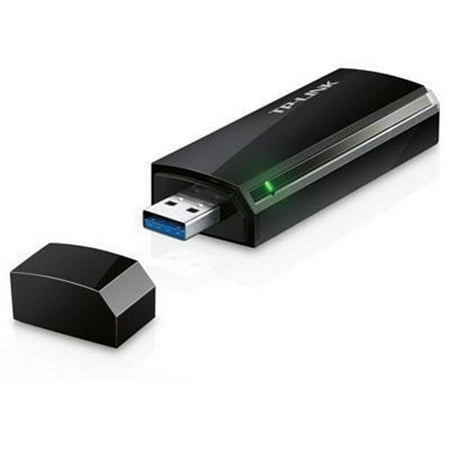
TP-LINK Archer T4U IEEE 802.11ac USB Wi-Fi Adapater
- Brand:
- TP-Link
- Model Number:
- TPL-ARCHERT4U
- UPC:
- 845973050863
- EAN:
- 0845973050863
- ASIN:
- B00JBJ6VG8
- Walmart SKU:
- 37670695
| Price Type | Price | Date |
|---|---|---|
|
Highest Price
|
$44.97 | |
|
Lowest Price
|
$44.97 | |
|
Most Recent Price
|
$44.97 |
Price history data is not available for this product at the moment.
Current Trend: No Walmart.com pricing data available for analysis.
Customer Insights: Rated 3.82/5 from 39 reviews.
This is the perfect device if you're looking to replace a faulty wireless card on a laptop or even if, as in my case, you just need wireless capability for a desktop machine. The box contains the adapter, disc, instructions as well as a USB 3.0 extension cable. The AC 1200 adapter is black, high gloss and elegant in its simplicity possessing a small green light on the side which flickers to let you know when its transmitting data. Although it is touted as USB 3.0, it is backwards compatible with 2.0 as well. The instructions are straightforward. Basically plug in the device to an open USB port on your computer, cancel any installation windows that might pop up, drop the tiny resource cd into your cd/dvd rom tray and wait for it to load. Then click on “Install Driver and Utility” and follow the prompts from there on out. The configuration page showing available networks will come up and at this point you choose your network and input your security key code. If you don't have your code, there is a button on the side of the device that lets you get around that when used in conjunction with the reset button on the back of your router. This is a nifty solution if for some reason you don't have or know your pass code which is often the problem. I don't own a dual band router. I'm sure if I did, this thing would have been blazing fast since it is capable of 867 + 300 Mbps which far exceeds what the modem I rent from my ISP is capable of and which I'm hoping to soon upgrade. If you have anything better than that, your outcome will likely be much better than mine, but this will give you an idea of performance on base equipment. It took me mere minutes to set up the wireless device on an old XP machine I had recently upgraded to Windows 7. I wanted wireless for it simply so I could retrieve updates for the programs I still use and browse the internet from time to time. I had been running network cable across my living room every time I needed to do this previously so any speed the TP Link device was able to offer was going to be an improvement in convenience alone. It topped out at 54 Mbps which is exactly what I get when I use wi-fi on my laptop. It's not 300 Mbps, but this is more than fast enough for me to get my updates and do some online shopping. I tried several Youtube videos and they were choppy at first, yet watchable at 480p given some load time. I figured this was more due to the limitations of the machine itself than the wireless device. To test it, I tried the device on a brand new Windows 8.1 quad core machine with USB 3.0 ports. I wished to plug in the adapter at the back of the computer since those are directly connected to the motherboard and usually offer the strongest signal, but I couldn't fit the device back there. That is the one drawback I found. The device itself is wide and might cover two or even three ports if they are very close together. Suddenly that included USB extension cord was going to come in very handy. My speed was 54 Mbps again which is about half of what I get on the new machine with a direct cable hookup, however the internet was zippy with the wireless. Youtube videos played at 1080p flawlessly so it was obviously the age of the other machine and its components holding it back. Now the older computer was about ten feet away from the modem. The newer machine is about fifteen feet and on the other side of a wall. Signal strength wasn't quite as good on the newer machine, so I hooked the wireless device to the USB extension cord which gave me an extra three feet or so to work with and used a large binder clip to attach the wire to the side of my desk. Suddenly I had full signal strength by simply lifting the device higher off the floor and finding the wi-fi sweet spot. Perfect! I'd definitely recommend this device. The install was quick, it provided a stable signal on old and new equipment using a low end modem and did what I needed it to do with a minimum of effort.
When I received the TP-LINK Archer T4U AC1200 Wireless Dual-Band USB Adapter, I was prepared for the grueling task of dealing with installation. Surprisingly enough, the set up was quick and simple. Basically, I installed the disc into the drive and the install wizard did the rest! It took literally less than 5 minutes to set up. I was amazed at how easy it was to install and set up. I now have an icon on my desktop and can operate a desktop computer without having to buy another router, there are no wires and cords to deal with, and I avoided a lengthy installation process. I have two words to describe my experience: seamless installation. The TP-LINK Archer T4U AC1200 Wireless Dual-Band USB Adapter is slightly larger than a pack of Juicy Fruit gum, works with your current router, plugs into your existing USB port, comes with a USB extension cable, and has a broad wireless range. It boasts ultra-fast 1200 mbps wireless speed with 802.11ac, a super speed USB 3.0 port (which is up to ten times faster than USB 2.0), is backward compatible with 802.11a/b/g/n products, has an easy wireless encryption at the touch of a WPS button, and is equipped with a USB extension cable for flexible deployment. It works for desktops and laptops. All in all, I am delighted with it.
I've tested this USB adapter on Win 8.1 notebooks, Win 8.1 desktops, and one Win 7 desktop. It installs easily, but I made sure to download the latest drivers from TP-Link, which is a standard approach I take. I didn't try it, but reportedly the adapter is said to be the best choice for 5Ghz usage in Linux. It uses a standard Realtek chip. When used in conjunction with a TP-Link Archer C9 router, I find I can get high data rates throughout the house. When the adapter and router are maximally separated in my residence (through several rooms), the data rate dropped to 520Mbps, down from the maximum 867. It could do this latter in the same room, but the data speed is still excellent anywhere in my residence. As others report, the device is larger than a typical USB drive stick and could block adjacent USB jacks if plugged directly into the machine. However, it comes with a quality USB extender cable, which I encourage people to use for best performance. I found that if the T4U were physically plugged directly into a notebook at the far end of my house, the 5Ghz data rate was only about 300Mbps. However, I made an artistic stand for it (shown in the photo) which upped the data rate to 520Mbps in the same location. I would advise always using the supplied cord and somehow dangling the T4U vertically away from other objects. I might point out that some competing products do come with little plastic stands for better signal pickup. This product does not, and it's up to the user to use the supplied cable to best situate the adapter for fastest rate. My creative mount shown in the photo is bigger than it needs to be but does work well just to give you the idea. Plugging any USB adapter directly into a notebook, especially at 5GHz is not optimal. Finally, if you do run into issues with any TP-Link product, they offer 24/7 customer support by either phone or email. I've used a number of TP-Link products, and in one case found the support to be knowledgeable and helpful.
I chose the TP -Link Archer T4U AC1300 Wireless Dual-Band USB Adapter for my son who is a computer science major to give a try. Since I know virtually nothing about computers this could have been a disaster. This is what he had to say..." Fastest speeds over WiFI I have ever seen at the house as the usual speeds with my laptop's built I'm wireless receiver card is usually only around seventy five megabits per second. With the TP-Link Archer AC1300 I experienced download speeds exceeding one hundred and twenty megabits per second along with a much wider receiving range than that of my laptop's internal wifi card.This product will be a huge aide to my studying as the wifi at my school is rather temperamental about the distance you can be from an access point.This is most certainly a product that I would purchase again to use with my other computers and recommend to to my friends who are in the software engineering field like myself. In conclusion, I think he was most impressed with this product.
TP-LINK Archer T4U AC1200 Wireless Dual-Band USB Adapter Today I received and am reviewing the TP-Link Archer T4u AC1200 Wireless Dual Band Adapter.. When I opened the box. It came with the TP-Link Archer T4u AC1200 Wireless Dual Band Adapter. A CD with drivers for the unit, A quick set up guide,And an USB extension cable. That seems to be about three feet long. The adapter is black and so is the USB cable that comes with it..This adapter connects your devices like Smart Phones, Smart Tv's, Laptops, Desk tops, And a list of other devices that connects threw you home internet WiFi A feature of the adapter is that it's USB 3.0 That can be up to ten times faster than USB 2.0 You can tell a product is 3.0 by the blue color coding inside the USB port connector. The adapter works on a IEEE 208.11 ac wireless LAN. Set at 2.4 and 5.0GHz frequencies to make it a dual band adapter, with data speeds up to 1.17 Gigabytes per second. That's fast. You could browse the web, stream video's. Download large files and much more. The adapter features security on WPA, WPA2 and WPS. There's two easy ways to connect to your home WiFi. One buy manually typing in the routers security key, Or by pressing the button on you modem/router to open your router to gain open access. And then pressing the button located on the right side of the adapter. There is a LED light on the left side of the adapter to show it's connected. I'm glad I had the chance to obtain and review this product. I'm giving the adapter 5 stars.
This TP-LINK Archer T4u Wireless Adapter is used mainly for older computers and laptops. If you have an older desk or lap top that doesn't have a wireless card already installed, (like I did just a few short years ago), this is the perfect device. All you would need to do is plug this small USB adapter up to it and you're up and running in no time. This prevents you from having to get rid of your old computer and buy a new one. I think that's a great feature to have for people like me who do have the older computers and can't afford a new computer. This device sells for around thirty dollars in the places that I have look and that's a far less price than a new computer. It allows you to do things likes email, gaming, stream music (for those of us who like to have our own type of music for things like yoga) and various other things. I think this product is a must for people with older computers who want that wifi connection without the cost of a new computer.
First, I want to say that the TP-LINK Archer T4U AC1200 Wireless Dual-Band USB Adapter works pretty well. It does what it says it will do. I am no computer genius. I cannot tell you how it works or why it works, but I can tell you that it does work. We wanted to try this on our old laptop computer that is not wifi. My husband plugged in the USB adapter, popped in the tiny, little disc of instructions, and in just a few minutes, we were up and running. With 867 +300Mbps wireless speed, it is great for online gaming, HD streaming and large file downloads. The SuperSpeed USB 3.0 port is 10 times faster than the 2.0 port. It also comes with a USB extension cable for flexible deployment. All this computer slang is beyond my basic understanding, but the TP-LINK comes with everything you need to make your computer experience a lot more pleasant. You get faster speed with less interference. If you have any questions, it is nice to know that it comes with a 2 year warranty, and a 24 hour a day, 7 days a week Tech Support.
The TP-Link Archer T4U AC1200 Wireless Dual-Band USB Adapter, creates a hot spot, just activate the SoftAp function. I have Windows 8. The speed is good. The signal strength better. I had to install the driver from the CD (provided) or you can go to the TP Link site and then install the T4U without any issue. No drops. After that you can use it to be a built in wireless utility in your operating system to connect to a wireless network. You can connect a desktop computer or laptop to a dual band wireless network. It's very flexible to accommodate different applications you are running. Bandwidth-intensive apps like HD video streaming and multi-player gaming. The USB extension gave me an extra 5ft to work with. I had a full signal strength. Installation is quick. It works well with old and new equipment. It comes with: Wireless Adapter Archer T4U USB 3.0 Extension Cable Resource CD Installation Guide After I got it installed and understood, It was a breeze. I would recommend The TP-Link. I find it very reliable.
Sadly, this is the first time I have ever given a less-than-excellent review. However, I want to preface my comments by expressing the possibility that it could just be my personal experience (an isolated incident) and may not be a problem for anyone else. When I had wireless installed in my home last yr, I had to buy & install a wireless adapter, which I did. Easy install, works great. Therefore, I did not expect any problem with this one. I tried TP-LINK as I thought it may be a little faster, etc. So, I gave it a try. It was next-to-impossible to install (& I had installed one before). When I loaded the software from the MINI CD (which I could never read), I IMMEDIATELY had PC problems (ie, the computer said "no drivers", etc). From there to multiple problems. My PC was definitely infected at that point from something, so I immediately did a FULL SCAN w/my ultra-strong security system. They found hundreds of vulnerabilities. When the TP-LINK software was installed, the adapter never did work despite my hours-long attempts. I finally decided to just REMOVE the adapter and software. Went through the venues to remove to make sure it was all gone. PC STILL INFECTED! I rebooted and the TP-LINK software appeared repeatedly. I could NOT get rid of it. This continued. My wonderful & powerful security system found it but somehow, it wasn't removed. This went on for many days, causing a ton of stress and concern. I'm still not convinced it's gone. The large bold black letters "TP-LINK" appeared days later on the face of a nationally known website unrelated to them. (my security is still investigating) I will AGAIN express this may be an ISOLATED INCIDENT in that it could be my PC, my install, etc. So, there is the possibility it could be just fine for someone else.
I'm not a techie at all. I'm a writer, so my computer is my partner. Even so, this looked simple enough and had great reviews, so I felt comfortable ordering it. And they advertised 24/7 support. Non-techies like me always need the support people. For over a week, I was booted off the calls after 4 minutes. (Since I received this for free, I wanted to see if getting a real person was even possible.) Today, I talked to a real person! English was not her first language. She was very, very hard to understand and was unable to understand me. We repeated almost everything we said to each other several times. I had assumed that since they had Support numbers for all around the world that the person who answered would know the language of that country. Never assume. The box advertises "multi-lingual" support. I think that means that they don't understand their customers in many languages. When the box came, it contained a small CD, an instruction pamphlet for the CD, a USB extension cable, a USB (with a model number too little to read I found out when she asked me for it). I read her every number on the side of the box and she said we'd try it without the number. First problem: I explained that my MacBook Air and my husband's I-Pad don't have ports to play a CD. Surely there was another way to upload the information I needed? Could she send me a link that would allow me to upload what was on the disc?" "No instructions for Macs," Support said. Support wanted to know why I wanted this. I said for faster wireless speeds and hopefully it would increase the distance we could be from our router. We live in the country. There appears to be a couple of dead areas in the house, small enough that we aren't sure. But annoying us at times when things go really really slow. "Not for routers," Support said. Wow. Things went downhill quickly after she told me that I couldn't use a Mac and that it didn't improve router speed. I asked why the 3 pictures were on the box: a desktop, a router, a laptop. I'm guessing she's never seen a box. "Not for routers" (When she found a phrase that worked like "no instructions for Macs. Need hardware. Won't work for routers." she would repeat those after every question. Seemed relieved. And I could almost understand them by then.) Wow. Maybe I could try whatever link she could send me? Support said that I could look at it and then search the Internet for anyone who might have an answer because she didn't. I asked if she meant the support page on their website. "No, no instructions for a Mac. You'll probably need hardware." Then she had An Idea: I could research it on the Internet. I asked if she meant I was supposed to throw the question out there in cyber space and hope someone somewhere was posting an answer to that question. "Yes," she said. She seemed relieved. Support added a sentence or two about Java Script, but the only 2 words I understood were "Java" and "Script." I assume that a tech savvy person can find a way to use this. That's not me. So, no go on rating the product. The 24/7 support they advertise is understaffed and don't speak English. Support kept her "helpful" attitude throughout the conversation even though we went in circles. "No instructions for a Mac. Need hardware." Support began to sound a bit glad the more she said it. "No" was the most understandable word she had. Support was confident that someone in cyber space might have an answer "if I bought hardware to do it." At the end when I finally understood that I was to ask the question on Google, she gave an enthusiastic "Yes." And then she cheerfully asked if there was anything else she could help me with? Nope, I think that was all I needed. We both sighed in relief. I heard that we can increase our router speed with a Pringles can, so I'll try that.
Detailed price history for the past 90 days
No Walmart.com pricing data available for analysis.
Third-Party Sellers prices have ranged from $44.97 (Sep 24) to $44.97 (Sep 24) over the past 90 days. Current price is close to the 90-day average of $44.97.
| Date | Price | Change | % Change |
|---|---|---|---|
| $44.97 | $+0.00 | +0.0% | |
| $44.97 | $+0.00 | +0.0% | |
| $44.97 | $+0.00 | +0.0% | |
| $44.97 | $+0.00 | +0.0% | |
| $44.97 | $+0.00 | +0.0% | |
| $44.97 | $+0.00 | +0.0% | |
| $44.97 | $+0.00 | +0.0% | |
| $44.97 | $+0.00 | +0.0% | |
| $44.97 | $+0.00 | +0.0% | |
| $44.97 | $+0.00 | +0.0% | |
| $44.97 | $+0.00 | +0.0% | |
| $44.97 | $+0.00 | +0.0% | |
| $44.97 | $+0.00 | +0.0% | |
| $44.97 | $+0.00 | +0.0% | |
| $44.97 | $+0.00 | +0.0% | |
| $44.97 | $+0.00 | +0.0% | |
| $44.97 | $+0.00 | +0.0% | |
| $44.97 | — | — |