
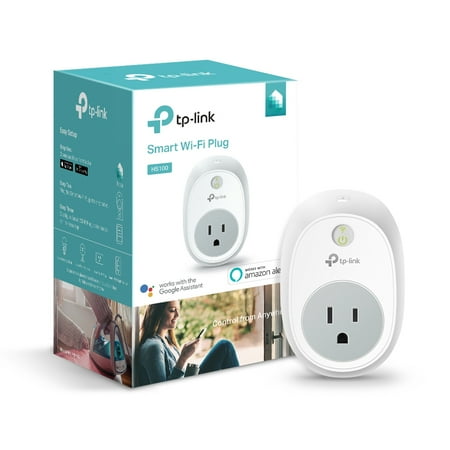
TP-Link HS100 Smart Plug, 1-Pack
- Brand:
- TP-Link
- Model Number:
- HS100
- UPC:
- 845973094263
- EAN:
- 0845973094263
- ASIN:
- B076B22JVD
- Walmart SKU:
- 48695651
Market direction turned downward with current $22.87 representing 0.0% under standard pricing.
| Price Type | Price | Date |
|---|---|---|
|
Highest Price
|
$42.98 | |
|
Lowest Price
|
$10.99 | |
|
Most Recent Price
|
$34.99 |
| Price Type | Price | Date |
|---|---|---|
|
Highest Price
|
$22.87 | |
|
Lowest Price
|
$22.87 | |
|
Most Recent Price
|
$22.87 |
Tracking History: We have tracked TP-Link HS100 Smart Plug, 1-Pack since 3/25/2026. The most recent price update was on Aug 22, 2026.
Price Range: Over the past 90 days, the price has ranged from $22.87 (lowest on 3/25/2026) to $22.87 (highest on 3/25/2026). The average price during this period is $22.87.
Current Trend: Walmart.com prices have ranged from $22.87 (Aug 22) to $22.87 (Aug 22) over the past 90 days. Current price is close to the 90-day average of $22.87.
Customer Insights: Rated 4.37/5 from 19 reviews.
I had this up and running within about 15 minutes of opening the package. We love the fact that it works directly with the Google Assistant as fast as you can say it
This is a review of a free product received from TP-LINK for testing and feedback as part of their review program. These are my own honest opinions along with a comprehensive performance report that has not been reviewed or edited by anyone at TP-LINK. Connect Appliances to Wi-Fi for a Smart Home & Internet of Things (IoT). The HS100 works with Android and Apple iOS (tablets and smartphones). The free Kasa app can turn appliances On and Off from anywhere in the world. That includes things like lamps, lights, air conditioners, fans, space heaters, alarm systems, and coffee makers. Voice commands work with Amazon Alexa technology enabled devices, Echo, Echo Dot, and Tap. Alexa can group several Smart Plugs into a single group name. HS100 Smart Plugs operate exclusively on the 2.4GHz band so they are compatible with all routers, even older models. While the 5.0GHz band accommodates higher speeds it has less range than 2.4GHz. There is no point to Smart Plugs using 5.0GHz because they require little bandwidth and their maximum Wi-Fi distance from the router would be reduced. I've been using Smart Plugs at home for more than a month. My Wi-Fi connections are stable and reliable. I'm in a rather large house and all my HS100's are located several rooms away far from the router. I've never had a Smart Plug disconnect. My router is an Archer C3150. So for anyone having Smart Plug disconnects, I'd recommend looking at the router as the suspect. With the Kasa app on my tablet/smartphone I can control all my Smart Plugs, Locally (from anywhere in the house, same LAN) or Remotely (wherever Internet is available). For anyone paranoid about security, Remote control can be disabled by skipping the Cloud Account registration. One reviewer mentioned that for Remote use it was necessary to assign static IP addresses to Smart Plugs and assign Plugs different names, within the router. This may be a myth because it was not needed in my case. I tested several Smart Plugs, and they all worked fine both Locally and Remotely. Just plugged them in and configured with Kasa. Didn't have to play any games or modify my router's configuration in any way. Just plug and play. My take is that TP-LINK designed these Smart Plugs so anyone can get them working simply, with little effort or expertise. TP-LINK even has a 24x7 telephone help line and a Support Team to assist in resolving issues. When I called to test their support phone number, after a brief hold, I got connected to a smart guy in California. Was even emailed a follow-up survey asking how he did. Apparently TP-LINK tries to please customers. One of my HS100 controls a large bedroom through-the-wall Air Conditioner (8,000 BTU, 8 Amp, 850 Watts). When it's hot, I power On this AC remotely from my office, just before leaving for home. It's been a pleasure coming home to a room that's already cool. The HS100 is saving me from having a bigger energy bill. I frequently unexpectedly work late. Now I can turn the AC On at the optimum time, just before leaving. The HS100 ratings are Maximum Load=15 Amp, Maximum Power=1,800 Watts. So the Smart Plug has ample Amps and Watts to accommodate my AC. Remote control has worked every day without any issues. My other HS100 powers a TP-LINK NC250 Wi-Fi Cloud Security Camera, which can email me Motion and Sound Detection Alerts. I use the HS100 to turn On this camera whenever leaving the house. Any emailed alerts have pictures attached and TP-LINK's tpCamera app allows me to remotely monitor what's happening at home, on my tablet, in real time. Best of all, I'm save money since there are no recurring monthly charges for this security system, thanks to the free TP-LINK cloud servers. Aside from connecting appliances to the Internet, Smart Plugs are also sophisticated digital rule-based timers. “Schedule” events to turn a device On/Off, selecting the times and days of the week; even different times on different days. In “Away Mode” a time period is specified during which the connected device will turn On/Off randomly, mimicking someone being at home. “Timer” turns the connected device either On/Off after a specified period of time. I wish Kasa ran on Windows 10. Hopefully a future version of Kasa will be Windows compatible. I'd also like a User Interface Menu to appear when a Smart Plug's IP address is entered into a Windows browser. I did get Kasa installed on a Windows PC using “androVM for VM VirtualBox”. Smart Plugs are UL certified. They are barely warm when the plugged in device is Off. After devices are On for a while, my Smart Plugs feel lukewarm. Even my HS100, which has the air conditioner plugged in and running continuously, never gets hot. The HS100 comes with a 2-year warranty and unlimited 24x7 toll-free technical support by telephone and email. Calls made during regular business hours are usually answered in California, after-hours by English speakers in China. A complete User Guide (12 pages) can be downloaded as a PDF file from the TP-LINK website. TP-LINK also sponsors Tech Support Forums. These are attractively priced, clever, simple, and versatile devices which can control/automate your home appliances and make life more enjoyable. After trying one Smart Plug, you'll likely decide that you need a few more. I presently own four. The Internet of Things (IoT) craze is addictive. Your imagination will run wild with additional opportunities and situations.
Very easy to set up and use. We do foster care great for shutting tvs, video games #sweepstakes [This review was collected as part of a promotion.]
A very cool product that has many uses. Whether it's turning off your bedroom light from the bed or while you're away from the house turning lights on/off to make it look like you're home, this is a handy device.
These are great! Work perfectly!
Best thing since popcorn.
Easy to install, easy to use, works great!
I'm a fan of percolator coffee and you'll never find an electric one with a turn-on timer. Percolator coffee takes a while to brew, especially our 18 cup unit (3 adults who LOVE coffee). With this device, I can set up the percolator, plug it in, but have it turn on at my set time, which is about 15 minutes before waking. I then set a turn-off time too, in case I forget to do so myself. It took a little finagling (I had to restart my phone and unplug the plug and put it back in after setting up the device) but it works! I get my awesome, strong coffee AND I have it turn on before I wake-up--win win for everyone! The app works and the timer works. For the price, I am completely satisfied. (Note--I've used TP Link for wi-fi range extenders before--they're a good brand)
I had one which worked with 5ghz internet frequency. This one did also.
works with amazon echo
Detailed price history for the past 90 days
Walmart.com prices have ranged from $22.87 (Aug 22) to $22.87 (Aug 22) over the past 90 days. Current price is close to the 90-day average of $22.87.
| Date | Price | Change | % Change |
|---|---|---|---|
| $22.87 | $+0.00 | +0.0% | |
| $22.87 | $+0.00 | +0.0% | |
| $22.87 | — | — |
Third-Party Sellers prices have ranged from $24.00 (Sep 4) to $34.99 (Sep 20) over the past 90 days. Current price is 30.4% above the 90-day average of $26.83.
| Date | Price | Change | % Change |
|---|---|---|---|
| $34.99 | $+10.99 | +45.8% | |
| $24.00 | $+0.00 | +0.0% | |
| $24.00 | $-1.99 | -7.7% | |
| $25.99 | $+0.00 | +0.0% | |
| $25.99 | $+0.00 | +0.0% | |
| $25.99 | — | — |