
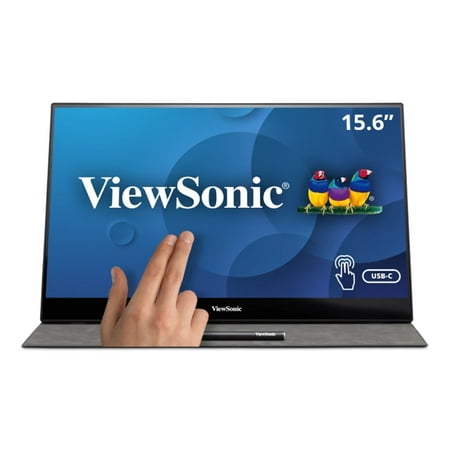
ViewSonic TD1655 15.6 Inch 1080p Touch Screen Portable Monitor, USB C
- Brand:
- ViewSonic
- Model Number:
- TD1655
- UPC:
- 766907007077
- EAN:
- 0766907007077
- ASIN:
- B08778F756
- Best Buy SKU:
- 6428015
- Walmart SKU:
- 473106605
| Price Type | Price | Date |
|---|---|---|
|
Highest Price
|
$392.75 | |
|
Lowest Price
|
$244.99 | |
|
Most Recent Price
|
$299.99 |
Price history data is not available for this product at the moment.
Current Trend: No Walmart.com pricing data available for analysis.
Customer Insights: Rated 4.53/5 from 17 reviews.
It was a good dea.
Easy to set up. Easy to carry. Goes everywhere with me in my laptop bag/backpack. Great addition when working remotely while traveling. As an added bonus, I can travel with my switch and hook it up as well to have a large screen for gameplay.
My son is in the third grade and hasn't learned to type yet. All his homework is web-based, so he spends almost 3 hours each night doing his homework, and was falling behind. I can see his frustration. I asked if it would be better if he were able to write his responses instead of hunting/pecking at the keyboard. As soon as he started working with this, he immediately cut his homework time to less than an hour. Having the second screen so he can read the prompt, and work on separate screen also helps a lot. This also helps his penmanship.
[This review was collected as part of a promotion.] I'm using as exterior monitor to my iMac 2020 running flight simulation software X-Plane11 and Air Manager. X-Plane runs on my iMac monitor and Air Manager shows plane's instrument panel on my TD1655. With touch capability and the addition of a device called Knobster, I can activate any control knob or switch on the instrument panel to make changes, and not have to use mouse or keyboard when flying in simulator. Really cool. I love the monitor.
I use the TD1655 in my home office. I started working out of my bedroom, but got to a point of feeling like I was trapped in my room al day, my setup consist of laptop display with two 22" Monitors. Pain point there so many cables below my desk. I was looking for something that would allow me to be mobile with limited cable requirements. There are time when I would have to go out in the field to visit customer. I've yet to use my TD1655 out in the field, at this the use is at home, working in the living room which is great! The USB C cable included with the TD1655 worked with my HP ProBook Laptop (i5, 8GB, 256GB SSD, Windows 10 64bit OS). Also the USB C cable design, certainly was carefully thought through when I connect the cable it does block any of my additional ports (USB A, HDMI) I have. Great Job! on the cable design. Once I had the TD1655 connected to my HP Laptop, the video was display. There is a power button on the back right side when facing the display. I've been using the TD1655 for two weeks not one issue, the Video Quality is amazing and its only 1080p which sufficient which I don't have a requirement for 4k usage. The Touch works great you can use your finger or the Pen that too is included.
[This review was collected as part of a promotion.] I bought this portable monitor because I had a need for an extra monitor when I'm working on the road. Very easy to connect to and my laptop charges the monitor. Took a while to figure out that I didn't need the power cable connected to the monitor, but once I figured that out, it was seamless.
[This review was collected as part of a promotion.] I am glad this company has not forgot about the power of the smart phones. Laptops can't make phone calls per say. . . Phones coupled with a monitor screen are awesome and make life easier!
Certainly have to wait and see how it holds up. The monitor is built well and feels great. Stand is excellent. Touch is good and image quality is excellent for this type. The screen is a beautiful high gloss screen which will be problematic for outdoors with sun. Menu is good and on screen control with joystick is good. The various "viewing" modes such as for games/movies/text etc actually do make a notable difference. If outside, found switching to Game (RTS) helped a ways.
Is not working with Mac M1 via usb-C. You need connect your Mac by HDMI and USB-c.. If you have two monitors and one HDMI port you need hub. So works but on two cables not one. Also consumer support is very slow. I've got info 2months ago "we are working hard on new software update" and still everything the same. So this great reviews on YT are not 100% sure because M1. Anyway very good monitor
It doesn't work. Need to return it
Detailed price history for the past 90 days
No Walmart.com pricing data available for analysis.
Third-Party Sellers prices have ranged from $299.24 (Jul 20) to $299.99 (Sep 5) over the past 90 days. Current price is close to the 90-day average of $299.87.
| Date | Price | Change | % Change |
|---|---|---|---|
| $299.99 | $+0.00 | +0.0% | |
| $299.99 | $+0.00 | +0.0% | |
| $299.99 | $+0.75 | +0.3% | |
| $299.24 | $-0.75 | -0.3% | |
| $299.99 | $+0.00 | +0.0% | |
| $299.99 | — | — |