
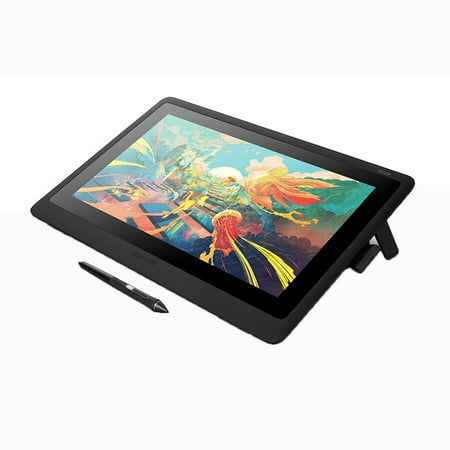
Wacom DTK1660K0A Cintiq 16 Drawing Tablet with Screen
- Brand:
- Wacom
- Model Number:
- DTK1660K0A
- UPC:
- 753218986399
- EAN:
- 0753218986399
- ASIN:
- B07L77GTTY
- Best Buy SKU:
- 6330449
- Walmart SKU:
- 870437055
Market direction turned downward with current $649.95 representing 0.0% under standard pricing.
| Price Type | Price | Date |
|---|---|---|
|
Highest Price
|
$649.95 | |
|
Lowest Price
|
$471.00 | |
|
Most Recent Price
|
$599.00 |
| Price Type | Price | Date |
|---|---|---|
|
Highest Price
|
$799.95 | |
|
Lowest Price
|
$649.95 | |
|
Most Recent Price
|
$649.95 |
Tracking History: We have tracked Wacom DTK1660K0A Cintiq 16 Drawing Tablet with Screen since 12/5/2022. The most recent price update was on Jun 7, 2026.
Price Range: Over the past 90 days, the price has ranged from $649.95 (lowest on 12/5/2022) to $799.95 (highest on 7/8/2024). The average price during this period is $655.31.
Current Trend: Walmart.com prices have ranged from $649.95 (Jun 7) to $649.95 (Jun 7) over the past 90 days. Current price is close to the 90-day average of $649.95.
Customer Insights: Rated 4.47/5 from 19 reviews.
I put off this purchase for a long time but I am thrilled to own one now. It's a different experience but it's as natural as using a wacom like Intuos. Anyway, it's scratch resistant which is great. It's a monitor, more or less, so the dpi isn't fantastic at this level (there is a several thousand dollar version) but it's more than enough to draw, animate, sculpt, make pixel art, or whatever else. It's da best.
Gives me the same level of comfort as drawing on their Cintiq Pros. The only difference in terms of drawing experience is maybe the screen feel. The texture is more film like, and it feels like I am drawing with the old Intuos Pro I had. This is fine, I never had problems with the way Wacom Tablets feel and they never gave me that sticky feeling either. Also, if you're concerned about the parallax? Don't be. It's entirely unnoticeable. I tried comparing this with my Mobile Studio and there practically no difference in space between the mouse and pen :) This is definitely worthy of its 5 star rating. I think this is an excellent deal since you're getting the Pro Pen 2 with this tablet as well. Cons? • I wish this was more portable and it could be too if it were sporting an all-in-1 USB C cable, and hook up via 1 single cable. • No touch, but this isn't really that important to me. although I wish we had a choice • No side buttons. This is a personal taste. I'm sure many don't mind this having no side buttons and are ok with using a $100 remote you purchase separately. Me, I still can't stop using my keyboard. Old habits die hard.
So far I have only had this product a few days but I am already falling in love with it! I am an illustration Major in college and although I love my Intuos drawing tablet it does take me a lot longer to draw things to the level that I like on it and nearly impossible for me to get the level of linework that I can normally achieve pretty easily on paper with it. I decided to finally take the plunge and get this tablet when I found out that unlike most others from Wacom, this one wasn't over a thousand dollars! It's fantastic. It paired with my computer immediately. Settings were perfect. Super easy to set up! I was worried about the lack of buttons but you don't need them because when you click the tablet's pen a certain way a circle comes up on screen with different pre-set settings you can click and you can even change them if you want. For those that don't like how dark the screen is you can also go into the settings to change screen brightness. I also like that it isn't a touch screen because I don't have to constantly worry about jumping my pen all over the screen. I have also noticed that at least so far there doesn't seem to be any sort of lag at all which I have heard can be a problem with screen drawing tablets. I am able to produce nicer quality work in half the time so far!
Everything went smoothly.
Great quality and very useful for professional artists. Price was 200.00 less than Amazon.
Love the Wacom pen display. Wacom finally made a pen display affordable compared to the other Wacom tablets. If you like digital drawing this is a pen tablet to get. The screen is large 16 inches. The color display is perfect also. So glad I bought it.
I love the way the fine lines show so much better.
Got it from Walmart fairly quickly and am very happy purchasing, it does what it says! The flow of the pen to tablet is smooth and amazing. I brought this with Clip Studio Paint from Walmart too later and the program works with ease with my tablet on my computer. I got my tablet in the the end of May or the beginning of June 2020 and love it. The only problem I'm having with the tablet is when I'm scrolling the web (like googling pictures on google) the tablet bar jumps. To stop that from happening I scroll up and down by the arrows on my keyboard. The only other thing is I wish for all the money I'm paying I get touch functions but you can't. Now more of the pros to help y'all decide on your purchase. The color range is beautiful and I can draw for hours with no eye problems because I can dim the lights and color controls. The size of the drawing area is great and weight is fine. I especially love that unlike other tablets I got from Wacom I don't have to worry about restarting the tablet because it's not working or something being wrong with pen pressure because it ALWAYS WORKS! No matter if I take out the cables or leave them connected to the computer. Everything works on the photoshop I have (CS4). SAI worked great when I had it and now I have Clip Studio Paint Pro and everything works fine with the tablet, including the pose it models. If you do have problems with the tablet Wacom helps a lot. With my older wacom tablets which are 2 Bamboo's, and 1 CTH480 they helped me when I had problems. And my CTH 480 still works and I got it around 2015. Hope this tablet lasts forever because it was a heavy investment. I rate it a 4.5 out of 5 because it works perfectly besides the small problem I'm having and I wish it had touch functions. I'm writing this post on 1/3/2021 if it doesn't show.
After plugging in the tablet my primary display intermittently blacks out. It doesn't do this if the tablet is unplugged.
Detailed price history for the past 90 days
Walmart.com prices have ranged from $649.95 (Jun 7) to $649.95 (Jun 7) over the past 90 days. Current price is close to the 90-day average of $649.95.
| Date | Price | Change | % Change |
|---|---|---|---|
| $649.95 | $+0.00 | +0.0% | |
| $649.95 | $+0.00 | +0.0% | |
| $649.95 | — | — |
Third-Party Sellers prices have ranged from $471.00 (May 2) to $649.95 (Jul 3) over the past 90 days. Current price is close to the 90-day average of $608.14.
| Date | Price | Change | % Change |
|---|---|---|---|
| $599.00 | $-30.00 | -4.8% | |
| $629.00 | $-20.95 | -3.2% | |
| $649.95 | $+0.00 | +0.0% | |
| $649.95 | $+0.00 | +0.0% | |
| $649.95 | $+178.95 | +38.0% | |
| $471.00 | — | — |