
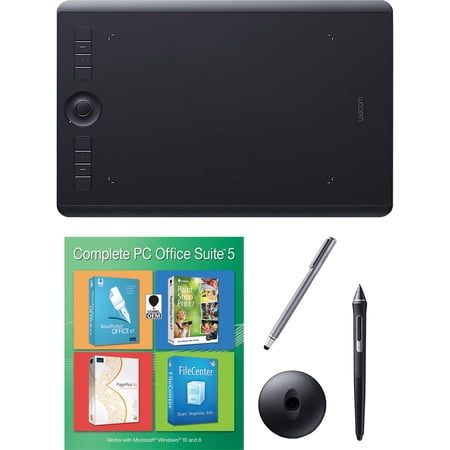
Wacom Intuos Pro Medium Bundle w/ Extra Stylus and Corel Office 5
- Brand:
- Wacom
- Model Number:
- PTH660
- UPC:
- 841434157614
- EAN:
- 0841434157614
- Walmart SKU:
- 256253355
| Price Type | Price | Date |
|---|---|---|
|
Highest Price
|
$379.95 | |
|
Lowest Price
|
$299.95 | |
|
Most Recent Price
|
$379.95 |
Price history data is not available for this product at the moment.
Current Trend: No Walmart.com pricing data available for analysis.
Customer Insights: Rated 4.76/5 from 41 reviews.
Was a Christmas gift for my daughter. She loves it!
Great product for drawing.
Pros: This is my 5th Wacom tablet... I work with them daily and have warn them out (which takes years) very relialable. Cons: None Other thoughts: The size of the tablet doesn't have anything to do with the quality of detail you can achive in your work.
Pros: Solid refurb, complete with Wifi and new battery. Cons: Wacom's support less than robust and software add-ons are worthless. Other thoughts: Purchased this tablet after weighing the offerings from various vendors. Wacom are really the premier tablets in the market place and it's not worth the time buying a tablet from a vendor who is unlikely to offer updated drivers or one which has sub-optimal functionality.
Pros: reasonable price, Quick delivery, Easy to setup, Amazing quality Cons: No Paint Program Other thoughts: Just received our Wacom Intuos 5 a few weeks ago and I am excited for whats to come. The only thing that I was disappointed with was that there wasn't a paint program that came with it. But my Boyfriend purchased the top of the line Corel Painter 12, which takes our Wacom to the next level. It is easy to use. Everything that you want to do as a artist is right infront of us without the big mess. I'm very excited about the Wacom Intuos 5.
Pros: Touch Gestures, Tracking Cons: Freebie Software Install Other thoughts: Pros: Tracking is incredible. I can write as fast as I can and it keeps up no problem. I can even (unfortunately) see the same little wisps of lines digitally as I do when with a real pencil I don't lift the tip completely before moving to a new letter. (Time to improve my handwriting.) Pressure sensitivity is smooth. Pen is comfortable to hold. I bought it for the pen input and didn't even really care about touch, but the touch is great as well. Two finger pan is SO handy. You can also pinch-zoom on Android emulators/VMs so you can finally see the entire Angry Birds level :D. The size of this thing is great too. It's active area is almost as large as my screen giving me an almost 1:1 ratio. The build quality is great and the device feels solid. Installation of the DEVICE was very easy, basically one-click. (Free software was a bit more complicated, see below.) Included Photoshop Elements software is quite capable and does work with the pressure sensitivity. Just remember to set the software in Advanced Mode or else it's a glorified cropping tool. This device is even upgradeable to wireless if you buy the extra kit which includes a battery and a transmitter/receiver. This device has far exceeded my expectations and I think it was at a really good price. Cons: The process of finding and downloading the freebie software was a bit cumbersome. You had to go to some minimalist sites and enter your included redemption code. It was a bit unnerving to read basically that if you don't get all the downloads you want properly at this time you're out of luck. Everything did work though, but the process is a bit unpolished. Bezel outside of the active area could be smaller, BUT this might be less comfortable for drawing. Tracking on the TOUCH is not quite as good as some better laptop trackpads, BUT if you need more precision just pick up your pen. Other Thoughts: I recommend checking the setting for 'Force Proportions' in the Mapping tab of the pen options. That way if you draw circles on the tablet they will show as such on the screen. PC Info: Intel Core2 Quad @ 3GHz, 8GB Ram, Win7 Pro x64, SSD.
Pros: New Surface Texture, Wireless feature, Wacom Software Updated, Touch Gestures, Perfect size Cons: Other thoughts: I use this for complete control of my apps - No Brainer on Mac The wireless feature and the multi-touch features allow me complete freedom of a mouse and total stylus control - the programmability of the software/hardware is excellent for my needs >Painting >Compositing >Roto >Touch-Up >Sculpting
I use this for work [I'm a graphic designer] as well as a drawing in a my free time. It's extremely easy to use. I like the sensitivity and how easy it was to get the lines in. Though I don't like too much how the working space on the tablet is literally the size of your screen. My hand kind of strains to get to the ends of the screens [I'm a very small, left-handed person].
Although this is a great product, it is not worth upgrading if you're coming from an Intuos 4 tablet. That being said, if this is your first tablet or coming from an earlier addition, than by all means buy one. Once you use a tablet you'll never use a mouse again! This is the one to buy.
Pros: Easy Set Up Cons: no tutorial, Steep learning curve Other thoughts: Used for photo editing in Photoshop. Gives great control Needs tutorials or written manual(s), takes some getting used to coordinate between tablet and monitor. Steep learning curve without documentation
Detailed price history for the past 90 days
No Walmart.com pricing data available for analysis.