
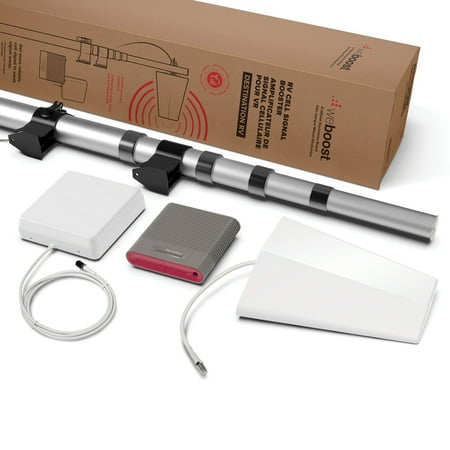
WeBoost Destination RV 470159 Cellular Phone Signal Booster
- Brand:
- weBoost
- Model Number:
- 470159
- UPC:
- 810005962797
- EAN:
- 0810005962797
- ASIN:
- B08WTRVG61
- Walmart SKU:
- 191666885
| Price Type | Price | Date |
|---|---|---|
|
Highest Price
|
$649.99 | |
|
Lowest Price
|
$524.00 | |
|
Most Recent Price
|
$649.98 |
Price history data is not available for this product at the moment.
Current Trend: No Walmart.com pricing data available for analysis.
Customer Insights: Rated 4.3/5 from 82 reviews.
I went from one bar and continuous spooling to three bars and pulling in 5g. No more spooling. I now have over 100 mg down load. Upload is around 5 mg.
We went from barely one bar to three bars consistently! Streaming, computer work, and receiving calls , no more dropped calls!! This is a game changer.
Ok, where to start. I did a lot of research. My wife and I are not specific to RV traveling. But when I was researching and watching several folks use this and other product, what sold me was the higher db rating you can get with a “residential style” booster. I will have AT&T but may get T-Mobile Home internet. I needed multiple device AND high boost to hit the TV in the front, back and right outside of our 40' RV. This WeBoost Destination seemed to make the best sense for us. I read manuals, watched videos and all the information on several websites. I learned that the outside directional antenna needs to be at least 20' away and favoring the opposite direction from the indoor antenna. This set up allowed me to raise the antenna outside and mount the indoor antenna in the center of our RV to provide better service to all connected devices. Additionally, these folks have the extra mount brackets so I was able to put mounting brackets on all four sides of my RV In preparation for wherever we park. This allows me to put the collapsing pole in the front or back and on either side of the 5th wheel, keeping the indoor/outdoor antenna favoring AWAY from each other. After temp install, i was very impressed with the results. I went ahead and mounted the other three locations, bought enough RG6 to pull from each location into my basement of the 5th wheel and permanently brought up and go through my ceiling to mount the indoor antenna. This will allow me to do a quick search for the tower location, then lift the mast to ensure opposite direction and just plug it in then turn it on. I snapped. Couple pics of before on and after on for your info.
What a fantastic product. I work in a remote rural area and telework several days a week out of a neighbor's office space. We have a wee boost antenna at home and it works great, we were able to get rid of our internet service and simply use phones as hotspots for all our needs so it paid for itself. However, I didn't want such a permanent installation at my neighbor's house. The Destination RV was the perfect solution. My work-issued hotspot went from 2 bars intermittent service to 4 bars of 5G service. What a game-changer! I can conduct good quality encrypted video meetings, use large, complicated, and secure software packages on a VPN - with no loss of connection. Furthermore, I can take down and stow the tower/antenna rig in seconds. It's high quality and sturdy, yet lightweight so it is no struggle at all.
We've been very happy with the Destination RV for our 5th wheel rig. We go to one rally every year where the cell signal is very weak to non-existent, and the WeBoost got us to nearly full bars all the time. I also use the rig for jobsite work, and was very pleased to find that I had full bars in another rural area with very weak signal. As expected, I did notice that ample distance between inside & outside antennas is *very* important for it to work right - otherwise the light turns orange or red, indicating that the electronics have cut down the boost due to feedback between the antennas. Extending the tower fully is basically mandatory. I do wish the app had a way of preloading and saving cell locations, as I would have had a lot of trouble aiming the outside antenna if I hadn't used another app to map cell tower locations and drop pins for them on that map. Also, the meaning and usage of the compass arrow on the cell locations screen is confusing.
I work remotely and couldn't make it through a Teams meeting with my camera on. Adding this to my campers exterior made a huge difference. We can now stream movies, be on our phones, and be on camera during meetings. Money well spent!!
I did not want a voice over IP satellite set up with its monthly bills. This was the solution. Took some adjustments over a ten day span, but went from no signal to 4+-5+ on the Verizon network. Streaming movies and playing games still hit and miss, but for phone and text it works.
So far it living up to what I thought it would, I just wish the output antenna would cover a little broader range. We started with no bars and when we turned it on we got 4 bars and 5G
Barely works for us. The campers beside us said there worked good but apparently we have more trees. We have to sit within yards of the inside antenna for texting. Very disappointed.
Can't seem to get it positioned right hasn't really affected my signal. Still not getting good service.
Detailed price history for the past 90 days
No Walmart.com pricing data available for analysis.
Third-Party Sellers prices have ranged from $609.99 (Sep 17) to $649.99 (Aug 21) over the past 90 days. Current price is close to the 90-day average of $643.32.
| Date | Price | Change | % Change |
|---|---|---|---|
| $649.98 | $+0.00 | +0.0% | |
| $649.98 | $+39.99 | +6.6% | |
| $609.99 | $-40.00 | -6.2% | |
| $649.99 | $+0.00 | +0.0% | |
| $649.99 | $+0.00 | +0.0% | |
| $649.99 | — | — |