
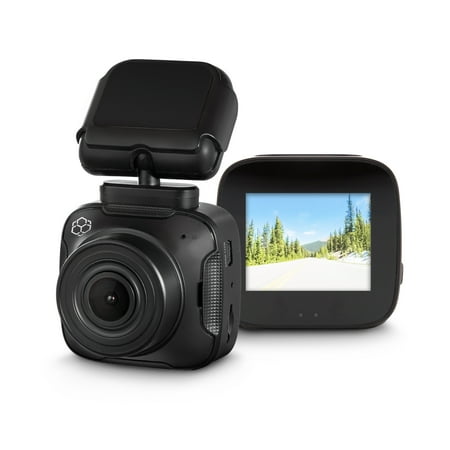
YADA 1080p Roadcam, Dash Camera with App, G-Sensor Technology with Park and Record Mode
- Brand:
- YADA
- Model Number:
- BT58187-6/2
- UPC:
- 643334581878
- EAN:
- 0643334581878
- Walmart SKU:
- 727416591
Market rate of $49.98 positions buyers 0.0% under the established average.
| Price Type | Price | Date |
|---|---|---|
|
Highest Price
|
$48.99 | |
|
Lowest Price
|
$29.99 | |
|
Most Recent Price
|
$29.99 |
| Price Type | Price | Date |
|---|---|---|
|
Highest Price
|
$49.98 | |
|
Lowest Price
|
$49.98 | |
|
Most Recent Price
|
$49.98 |
Tracking History: We have tracked YADA 1080p Roadcam, Dash Camera with App, G-Sensor Technology with Park and Record Mode since 3/3/2023. The most recent price update was on Jan 21, 2025.
Price Range: Over the past 90 days, the price has ranged from $49.98 (lowest on 3/3/2023) to $49.98 (highest on 3/3/2023). The average price during this period is $49.98.
Current Trend: No Walmart.com pricing data available for analysis.
Customer Insights: Rated 3.1/5 from 53 reviews.
Finally had the opportunity to take this Yada Road Cam on a trip. Works as stated. Easy to use. What's not to luv. Frightening how many people ride the hammer lane on I-95/I-16 in Georgia and won't move over when the car behind them flashes their lights. U-tube worthy, lol. Troopers really need to start writing tickets out to these law breakers. Causes such traffic back-ups and a angry drivers.
My first impression after trying to set it up was not so great,….but then I called customer service and after a 3 minute hold time was greeted with a very helpful customer service rep who had me up and running in 5 minutes. The instructions are not that great. In fact, they are horrible,…so I was glad that I didn't have a long hold time and the rep was knowledgeable. HUGE NOTE: When trying to determine where to place the camera in my car, it slipped out of my hands and fell on the concrete garage floor. I thought for sure that I had already broken it before I even had a chance to use it,….but much to my surprise, everything works great. Maybe its because it is designed to be able to record in a crash situation. Anyway,…I thought that was a huge bonus. The 12v plug in has a 12 foot long cord. I wish the plug part included a USB port like another road camera I have does. I have decided to used this on my golf cart. Im going to use a solar generator to power it until I can install a 12 volt plug on my cart. This is working out just fine for now and only pulls 1 watt. The picture is very clear, I have no complaints whatsoever on that. In fact, I quite impressed. To set the date and time, you will have to be connected to the app. When connecting to the app, turn off cellular data, or you wont be able to connect. Once in the app go to camera settings, make sure the date stamp is turned on. Next, go to system settings, its self explanatory from there. Downloading the app was a breeze. I just noticed, when not set to record,…the camera displays the date and time, which is awesome for on our golf cart! Screen rotation: This camera has a screen that rotates,……like on my cell phone. So whether I choose to mount it from above or from below, the screen will rotate when I turn the camera upside down to accommodate either. Initially I was going to give this a 3, but after an easy cal to customer service and using it,… I'm at a 5!
This YADA, app-controlled roadcam packs a lot in a smaller unit. Its specs range from 1080P HD to G-Sensor Technology. I really like that it can be controlled through an app. The videos can be shared via social media apps. There's also built-in WiFi for smart phone connectivity. There's loop-recording, motion detection, and the unit will save the last 20 seconds of recording should there be an accident. Great unit. Highly recommend!
As far as funtionability, this dashcasm performs well. Its easy enough to install using peel and stick mounting, but might opt for suction install models next time to avoid the permancecy of placement. Its a good size, not too intrusive on the windshield. Video quality is good and clear. The field of view is plenty and pleasing. Set up is quick enough as far as recording, as you just turn it on to record. I appreciate the good instruction book that comes with the cam. There is not an overwhelming amount of informtion as using this cam is a few basic steps. That's a plus. Did not enjoy the app instructions- most likely due to being 'one of those' ..... technically challenged people. I found it confusing and requiring more patience than I wanted to muster. With that said, it's no worse than with anything else requiring apps and technical knowledge, and would be of very little challenge to most people. For people who have a need or just want to have fun with it, it's a good dashcam.
This has great resolution ! Easy to set up and down load the app. You can place it where it's not obstructing your view . Easy to operate! When on live though you do loose Wei connection now and then fir a bit! That's the only complaint I have with it! But it does still record so you can view it later ! Wish I would have had it a week earlier so it could have captured the truck stop convince store I went into being robbed while I was in the restroom!
This little dash cam has a great picture. I had some trouble getting it all set up and started, but works well once installed. I wish that I didn't have to see that darn cord hanging about though. I like the Park and Record feature which turns the unit battery on and begins recording when an "incident" is detected, I don't know if 20 seconds is long enough though. The unit records over old images (loop recording) unless it is triggered by the G sensor to permanently save a portion, again only 20 seconds. Recordings include a GPS and timestamp. Although I hope it won't be necessary, I am confident that this dash cam will provide any information required for an auto insurance claim.
This Yada 1080p Roadcam is a nice, small package that includes most of the features of larger, more expensive dashcams. Everything you need to install and use the unit is in the box. Mounting the camera on the windshield was very easy. The supplied tape seems to be holding well. If you park your vehicle outdoors, in hot weather, you may need to use a thicker, stronger double-sided adhesive tape. My car is garage kept, so I haven't had an issue with the supplied tape. Running the wiring is equally simple. There's enough length to accommodate most vehicles. Some vehicles will be more complicated than others to neatly stow and disguise the wiring. Thus far, the instructions have been clear and well thought out. But setting up and using the dash cam is a little more difficult. It's hard to put so many functions in such a small package, but here the design is a bit confusing. It's a little hard to determine if your dashcam is recording properly, and whether or not the motion sensor and parking functions are operating as you want them. This part of the design could be explained more fully and made more simple. But once you've figured out how you want to use the camera, it does a nice job of recording your movements. The camera takes in a 120-degree view, which is sufficient under most circumstances. The picture quality is quite good. The unit comes with an 8GB micro SD memory card; the max card size is 32GB. I'd recommend buying a larger card. Viewing the videos on my home computer was easy. Finding what I wanted to see was a bit of a struggle, and in some instances, the dashcam wasn't recording when I thought it was--once again a problem understanding the setup instructions--and that could be a serious issue in case of an accident or incident you really want on your recording. Downloading and using the wi-fi app was a breeze. Like most of these devices, following the instructions carefully is mandatory. Once the app is in use, making setting changes to the unit becomes much easier. You can also download files from the camera to your phone, a feature that might be very handy. All in all, I'm glad that I have this dash cam on my car. I need a bit more experience with the unit to ensure that it's doing what I want it to do, but that will come with practice. I'd recommend it to other people with the advice to download the operation manual, and have it handy until you become familiar with the camera's features and foibles.
I am a little hung up on a few things that keep me from giving this camera a good review. The port on the camera is a mini USB. The power supply that came with it is a micro USB. I didn't see an adapter in the packaging anywhere. I am not a fan of the cable hanging down. I will have to get some tape and hope the cord is long enough to reach around the windshield and to the plug on the dash. It has built-in wifi but how many people have wifi in their vehicle or phone they can use as a wifi hotspot? The functionality of the camera is pretty good though as well as the App, so there is that.
It doesn't come with the right charger. It requires a mini USB but doesn't have one so be aware of that before you waste your money and have to buy a separate car charger for it.
The Yada Roadcam is the first roadcam that I owned or tired, so I was concerned about the ease of setting it up and the quality of the video. I had trouble turning on the camera. To turn on the cameral, you're supposed to simply push the power button. It didn't work. I finally got it to turn on after trying fir days. It shouldn't be that difficult. I don't know if I got a bad device or not, but regardless, that was a negative aspect of this camera. After I got the camera to turn on, I turned it off and it kept turning back on. Very frustrating. One last con is that, AGAIN, a feature didn't' work. I followed the instructions to enable the wifi to connect the camera to the app, but the wifi button didn't work and I wasn't able to connect the device to the app. Huge negative. Things I do appreciate about the camera is the video quality. It's really good. It's clear and does well in capturing images. Plus there a an impressive amount of different setting such as parking monitor and screen save. The size of the camera is perfect. It fits in the palm of your hand and doesn't obstruct your view when driving. Had all the features worked, I would have given this two thumbs up. To be honest, I was disappointed with the camera.
Detailed price history for the past 90 days
No Walmart.com pricing data available for analysis.
Third-Party Sellers prices have ranged from $29.99 (Jul 22) to $29.99 (Jul 22) over the past 90 days. Current price is close to the 90-day average of $29.99.
| Date | Price | Change | % Change |
|---|---|---|---|
| $29.99 | $+0.00 | +0.0% | |
| $29.99 | $+0.00 | +0.0% | |
| $29.99 | $+0.00 | +0.0% | |
| $29.99 | $+0.00 | +0.0% | |
| $29.99 | $+0.00 | +0.0% | |
| $29.99 | $+0.00 | +0.0% | |
| $29.99 | — | — |