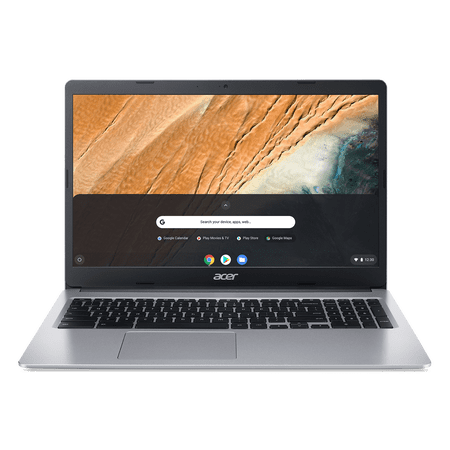
Acer CB315-3H-C19A 15.6\" HD Celeron N4020 1.1GHz Intel UHD Graphics 600 4GB RAM 64GB SSD Chrome OS Pure Silver
- Brand:
- Acer
- Model Number:
- CB315-3H-C19A
- UPC:
- 195133114158
- EAN:
- 0195133114158
- ASIN:
- B0CGD4D2Y8
- Walmart SKU:
- 826255173
Significant price reduction expected soon—our analysis suggests a 6.3% drop is imminent after 0 days at $159.00.
Price expected to drop to $149.00 soon
| Price Type | Price | Date |
|---|---|---|
|
Highest Price
|
$249.99 | |
|
Lowest Price
|
$159.00 | |
|
Most Recent Price
|
$245.00 |
| Price Type | Price | Date |
|---|---|---|
|
Highest Price
|
$199.00 | |
|
Lowest Price
|
$149.00 | |
|
Most Recent Price
|
$159.00 |
Tracking History: We have tracked Acer CB315-3H-C19A 15.6\" HD Celeron N4020 1.1GHz Intel UHD Graphics 600 4GB RAM 64GB SSD Chrome OS Pure Silver since 10/30/2022. The most recent price update was on Oct 28, 2023.
Price Range: Over the past 90 days, the price has ranged from $149.00 (lowest on 11/11/2022) to $199.00 (highest on 3/24/2023). The average price during this period is $176.22.
Current Trend: No Walmart.com pricing data available for analysis.
Customer Insights: Rated 4.2/5 from 1405 reviews.
I've been using this Chromebook a lot more than I thought I would. To start things off, I am new to ChromeOS. My last portable PC was what they called a "Netbook" and it was dreadful. This is vastly better in every conceivable way. So starting off, it's big! This is a 15.6" display, there's no squinting here. Display resolution is 1366x768, so a little beyond 720p which is understandable when you're looking for low energy use. It's powered by the energy sipping dual-core Celeron N4020 with UHD 600 graphics and comes with 4GB RAM I assume soldered to the motherboard. But that's okay, nobody's upgrading these things. Bluetooth, webcam and microphone are on board as well, for those that need them for classes etc. Also comes with a whopping 128GB of flash memory, which I thought was impressive. System/formatting leaves you with an even 100GB of storage which for a computer like this is a whole lot. So how does it run? Very well, actually! The lower resolution is a good match for this processor, as streaming videos run flawlessly. You've got a USB 3 slot on either side as a well as a USB C on both sides. An audio jack as well. The unique part of this particular Chromebook is there was space to add a number pad on the keyboard. I took this one with me and decided to do a little work on it while away from my desktop, and I had no issue with it thanks to that number pad. It's a perfect little backup in that regard. Also comes with a very nice case that fits perfectly, which was a great little bonus. I'm a little shocked how far these "Netbook" style laptops have come. This thing boots almost instantly and is plenty snappy opening Chrome and any documents I want to peek at. So long as you keep your expectations in order (this isn't a powerhouse gaming PC) I think most people will be happy with it. For surfing the Internet, it's flawless. For taking notes or creating documents, it's also a very fine choice. And the thing lasts for hours upon hours. Definitely hits its battery life claims. All in all, if you're looking for a computer for a student to use to attend virtual school, or to bring to college classes, this would fit the bill easily. Recommended for basic use. (Not gaming).
So, these are some thoughts from someone who hasn’t had a laptop or even a computer in about 10 years. The chrome book came in a nice, securely packaged box, (there was no room for movement or bumping around). I read the instruction on it before charging. Instructions were clear and easy to understand, (it does come with reference to a website or phone for customer service if you still have questions.) Starting it up was pretty awesome, the screen is big and the colors are very vibrant. The computer walked me through set up, I didn’t have to do much other than click a button here and there. Internet Wi-Fi was easy to set and once it was, I was ready for the internet. I put in one of my as cards to view some old camera pictures and videos that I had been meaning to sort through and edit. It was wonderfully quick and easy. I didn’t have any issues with lagging or slowness. I will mainly use this for the pics and internet, but my daughter will be using it for schoolwork as well. It also comes with a nice zip up cover to protect it. (The protector even has a smaller pouch in the front to put papers or even the chargers in, very handy). Very happy with this computer! Works very well for what we need. I am loving that the chemo book is also supposed to be safe with online use as security is built into the system. Would recommend of you have young students who need for homework.
So, right out of the package, I love the sleek and modern look of this laptop. It was packaged great and love that they added a case to put the laptop in. Setting it up was a breeze and love the fact that there is an option to have your phone open your laptop instead of having to type in the password. It took me about 10 minutes to set the laptop up and that is including an update the computer needed to go through. Also, the number lock on the side is amazing! I use mine a lot, so it is nice to have it on a laptop. Now for the speed of this laptop is fantastic. It is super-fast, and I noticed no lag so far. The keys are a silent key where you can still hear just a little bit when you click, and they are a nice and soft bounce when clicking. I know some people don’t care about the keys, but some people do and just wanted to let them know what the keys felt like. The screen is a 15-inch screen, and the picture quality is very good. It also has a great battery life so far. I charged it over night before setting it up and I am on day 3 with a little battery left. I do want to add that it has 128 GB and is just enough for what I use it for, which is nursing school. Overall, this is a great laptop and would recommend to anyone looking at getting a Chromebook. You won't regret it!
The Acer Chromebook 315, 15.6 HD, Intel Celeron N4000, 4GB LPDDR4, 128GB eMMC, Chrome OS, CB315-3H-C0VT is just as I expected it to be! The design is sleek, lightweight and comes with a protective case which makes it nice to travel. Everything was easy to setup comes with the a power adapter that not only charges quickly but has long battery life so the power adapter doesn’t need to be used all the time. Everything loads and connects fast, the screen is a perfect size, bright and features an anti-glare coating. It also provides crisp and clear video playback and allows me to multitask with several pages running at the same time. Another great feature it has a interested numeric keypad that’s also included. It has excellent speaker sound, the key pads are easy to press without sticking and is made very durable with amazing quality that will last me a long time!
Okay, Admittedly it's been quite a while since I've gotten a new laptop which is pretty crazy since I use it every day, but I was pleasantly surprised when this little guy showed up today! This laptop could not have been easier to set up!!! I had no idea you could just sign into your Google account and everything from my desktop computer and phone that I use through Google just shows up. So many cool features and I'm excited to learn about all of them!! The processing and uploading speed is so much faster than my current computer. I would definitely say that I'm impressed so far and would for sure recommend this!!! It weighs just under 4 lbs so not the heaviest or lightest, pretty thin at about 1/2 inch thick when closed (not including foot pads) just under 3/4 inch tall including foot pads. Comes with a nice padded carrying case with a zippered compartment for laptop and separate zippered compartment for accessories like charging cords (included).
I have so many good things to say about this computer. First off, let me say, the speed of this computer is the most impressive by far. I turn it on and it’s ready to go. No lag, no waiting on the computer to “do its thing”, none of that. I turned it on and it’s ready. This is the 1st laptop I’ve owned that has a number keypad built in without having all the buttons crammed in together. I have fat fingers and I have no issues with accidentally pressing other keys. The battery life is amazing as well. It has a battery life up to 12.5 hours. I had used it the 1st day I got it and the battery life, while streaming was 10 hours. (I like DIY videos). The set up was almost fool proof. It has the Google Chrome Operating system, an Intel Celerin processor, and Internet UHF Graphics. The screen is a 15.6” comfyView LCD and the storage comes with eMMC 128 GB. It also has A 4 GB. Last but not least, it comes with a case. Super nice padded case.
As a user of a laptop daily for work and general entertainment, sometimes it seems like laptops try to pack in more and more features that I never really want or use. Sometimes I would simply like something affordable and basic that can take notes, and play music or movies. This Acer Chromebook does everything I need and nothing I don’t. While I am no longer a student, this would be optimal for a young person needing a basic laptop for school. But it is not just for children, anyone can use this for simple internet browsing, writing, spreadsheets, pretty much most common work related activities. While some may not like it, this 315 model comes with a 10-keypad for faster number entry which I like to use on spreadsheets. While it is relatively low-powered and quite ‘basic’ in general, most users will never miss the latest CPU, increased storage or RAM. I’m fairly tech savvy and was skeptical of this chromebook’s capabilities, but it just works well. Everything is responsive and smooth: I can stream movies on websites, listen to podcasts (included on-board bluetooth!), work on my writing, check on my security cameras at home, and respond to emails all at the same time. This thing is snappy. I was also worried that I’d have to get used to the Chrome OS, but I’ve used my android phone for years now and it is very intuitive and easy to transition into the ChromeOS environment. Nothing is unusual as most of the icons are identical. I’ve been using Google home products and this ChromeOS just works flawlessly with all of them: I can use the catchphrase “okay Google” and it is as if I’m using the assistant on my smartphone or smart speaker. It is so nice because while it works best with a wifi connection, it can work offline and sync up later. But I can also connect the Chromebook to the phone with bluetooth and it’ll connect to the internet that way. This is the easiest and most connected laptop I’ve ever used. The battery lasts quite a while depending on what you’re doing, how bright the screen is, and other factors such as charging my headphones and cell phone. The battery has lasted me almost all day without being plugged in. There are easy ways to extend it if you know you will need every minute of battery but I never found myself needing to conserve power. The nice part is it uses a USB and a fairly small power brick and long cable for charging. Still, I wouldn’t worry about taking this anywhere and using it for at least 8 hours or more. So far, the longest I’ve gone without charging is about 11 hours and it still had some juice left in it. The track pad is fairly large and I never found myself running out of space for scrolling around. The bottom of the Chromebook does get a little warm, however not anywhere near hot and only under extended load. Definitely usable on your legs without worry. This laptop isn’t perfect however: this 315 model comes with a screen that isn’t super high definition or the best viewing angles but is easy on the eyes in general. The viewing angle is just okay but can be used outdoors in sunlight. Another negative I’ve found is in dark areas like a bedroom, classroom, or dim coffee shop, there is no keyboard backlight nor is there an LED to help you see the keyboard. The webcam isn’t great and the microphone isn’t studio quality, but if you are doing a simple webcam meeting, face-sharing call, or a quick selfie it’ll do. While Acer does include a fabric carrying case, the Chromebook should slip easily into most backpacks, travel bags, and large purses. However due to this unit’s size, it is a little large for smaller desks but it isn’t what I would consider ‘heavy’. The traditional keyboard layout is modified; no caps lock button, the top row of quick keys is a little unusual and takes some getting used to, and some of the keys like delete are just not where you expect them to be. Not a big deal, but easy enough to get used to. The keys are comfortable enough to type on for extended writing sessions and don’t make much noise. Additionally, there is plenty of wrist-rest on the body of the laptop as well. It doesn’t appear the hard drive or memory can be easily upgraded, however considering the general purpose of this laptop and connectivity to your Google Drive, the only consideration for storage space should be USB thumb sticks if you just need the space. Overall I love this Acer 315 Chromebook. For a regular-duty internet, music, video streaming, note-typing, spreadsheet completing, social media, music player, and all-day laptop alternative this is the solution! It has such a great value for what it can do and Android phone users will slide right into using this OS with ease. Google made the OS and most of the apps that work on it and I haven’t found anything yet that hasn't worked flawlessly. Pretty minor shortfalls but this Chromebook is very capable and should be considered first for students, professionals, or those just looking for a high-value laptop style computer.
I am very excited about this Acer Chromebook 315, 15.6 HD with 128GB! Nothing slow about this Acer Chromebook and the visuals are outstanding. As soon as I took it out of the box and opened it up I fell in love! The Acer Chromebook setup was super easy and it walked me through a virtual setup . Super easy and everything came up without a problem at all! I love how really thin the Acer is and it makes it very good for traveling. You can slide it right in to a backpack without any trouble at all! I am able to just grab it and lay it in my lap for hours! It came with a really nice case and also came with a charger and cord! The keyboard works like a charm, and you barely have to touch it! I love the sensitivity of it! I am able to whip through my emails and handle my business and for that I m very pleased!
I've had this product for just about a week now was in the market for a new Chromebook mine was a little dated I received this at the perfect time and it has been amazing it's not your high dollar overpriced Chromebook it does everything I need and then some very very fast on my Xfinity gigabyte service this device is great. Does everything I need to do on Chrome and lets me store large files videos and pictures. I've also used it a little bit to cross over from my work laptop I use this Chromebook to do some of my work stuff because the features on this Chromebook are way better than the laptop my work gives me. I would highly recommend this product to my family and friends it's super fast it's very light and super sleek the color is great and like I said for some reason it is very fast. The pages in Chrome load super fast and I've never had an issue with it glitching or tripping out in the seven or eight days I've owned it. I found two or three Acer's and have been pleased every time I imagine just like the other couple I've owned this one will last me for many years four or five years and I'll be ready for another one but I'm super excited that I received this product just in the nick of time. Listen at this price point people you won't find anything better save you a few hundred dollars and get this instead of getting one in the thousands that this find machine will do the same thing!
This Chromebook by Acer is pretty nice for a Chromebook. By that I mean, the model itself is quite nice, but suffers the same problems as all other chrome OS devices. I guess I should preface this review by saying that we have owned half a dozen chromebooks and chromeboxes over the years and the constant is that the software environment has continued to decline that entire time. At this point, Chrome OS is circling the drain of my personal opinion. Here are the details: - Build quality: Lightweight, but nice looking. It's very large and yet weighs under 3lbs. Huge display, full sized keyboard with numpad, the works! Both sides have USB3A and USB3C ports which is a very nice touch. Downside to all this light weight build is that the keys and trackpad are flimsy and difficult to type/click consistently. I often get false clicks or failed clicks when attempting to use the track pad. Camera and mic are functional for audio calls, but beware that you cant install Zoom on this device!! - Audio: Is barely there. You will need a headset or aux speaker 100% of the time if using this device to stream video or music. The built in speakers are OK for spoken word audio only. - Connectivity: Good! Nice wifi V5 chip with great range. - Battery life: Claims 12.5 hours. In reality I found that it consistently gets 10hrs per charge. Not bad at all! - Screen: Very large and clear if you are sitting directly in front of it. Like most "low glare" displays, it is tough to see if you are seated at an "off angle". - Software: The weakest link. Chrome OS has gone thru many changes over the years and it is the worse for wear. Updates come through sporadically, and they dont always make things better. EOL happens arbitrarily. You never know when Google is going to cut you off. Chrome apps were recently merged with the android app store and as a result there are dozens of apps that are able to be installed on the device, only to discover that they dont actually work on Chrome OS after all. Very frustrating. Overall, it's a fine laptop that is quick to boot and easy to get online with. If all you are doing is some lightweight web browsing then this is a fine machine. If you have any specific tasks that need to be completed on a regular basis (document creation, photo tasks, audio tasks, file transfer and management, video calling, anything that requires specific software, etc) then the operating system is going to hamstring you. If you need robust OS functionality, steer clear of Chrome devices.
Detailed price history for the past 90 days
No Walmart.com pricing data available for analysis.
Third-Party Sellers prices have ranged from $199.79 (Sep 21) to $249.99 (Sep 20) over the past 90 days. Current price is 10.5% above the 90-day average of $221.72.
| Date | Price | Change | % Change |
|---|---|---|---|
| $245.00 | $+0.00 | +0.0% | |
| $245.00 | $+45.21 | +22.6% | |
| $199.79 | $-50.20 | -20.1% | |
| $249.99 | $+0.00 | +0.0% | |
| $249.99 | $+0.00 | +0.0% | |
| $249.99 | $+50.20 | +25.1% | |
| $199.79 | $-50.20 | -20.1% | |
| $249.99 | $+50.20 | +25.1% | |
| $199.79 | $-50.20 | -20.1% | |
| $249.99 | $+0.00 | +0.0% | |
| $249.99 | $+0.00 | +0.0% | |
| $249.99 | $+50.20 | +25.1% | |
| $199.79 | $-44.71 | -18.3% | |
| $244.50 | $+0.00 | +0.0% | |
| $244.50 | $+0.00 | +0.0% | |
| $244.50 | $+44.71 | +22.4% | |
| $199.79 | $-44.71 | -18.3% | |
| $244.50 | $-5.49 | -2.2% | |
| $249.99 | $+0.00 | +0.0% | |
| $249.99 | $+0.00 | +0.0% | |
| $249.99 | $+0.00 | +0.0% | |
| $249.99 | $+0.00 | +0.0% | |
| $249.99 | $+50.20 | +25.1% | |
| $199.79 | $-45.21 | -18.5% | |
| $245.00 | $+45.21 | +22.6% | |
| $199.79 | $-50.20 | -20.1% | |
| $249.99 | $+50.20 | +25.1% | |
| $199.79 | $-45.21 | -18.5% | |
| $245.00 | $+45.21 | +22.6% | |
| $199.79 | $-37.21 | -15.7% | |
| $237.00 | $+37.21 | +18.6% | |
| $199.79 | $-37.21 | -15.7% | |
| $237.00 | $+37.21 | +18.6% | |
| $199.79 | $-50.20 | -20.1% | |
| $249.99 | $+10.00 | +4.2% | |
| $239.99 | $+40.20 | +20.1% | |
| $199.79 | $-17.21 | -7.9% | |
| $217.00 | $-2.00 | -0.9% | |
| $219.00 | $+12.00 | +5.8% | |
| $207.00 | $+0.00 | +0.0% | |
| $207.00 | $-2.00 | -1.0% | |
| $209.00 | $+0.00 | +0.0% | |
| $209.00 | $+0.00 | +0.0% | |
| $209.00 | $+0.00 | +0.0% | |
| $209.00 | $+2.00 | +1.0% | |
| $207.00 | $-2.00 | -1.0% | |
| $209.00 | $+0.00 | +0.0% | |
| $209.00 | $+0.00 | +0.0% | |
| $209.00 | $+0.00 | +0.0% | |
| $209.00 | $+0.00 | +0.0% | |
| $209.00 | $+0.00 | +0.0% | |
| $209.00 | $+9.21 | +4.6% | |
| $199.79 | $-9.21 | -4.4% | |
| $209.00 | $+9.21 | +4.6% | |
| $199.79 | $-9.21 | -4.4% | |
| $209.00 | $+2.00 | +1.0% | |
| $207.00 | $+0.00 | +0.0% | |
| $207.00 | $+0.00 | +0.0% | |
| $207.00 | $+0.00 | +0.0% | |
| $207.00 | $+0.00 | +0.0% | |
| $207.00 | $+0.00 | +0.0% | |
| $207.00 | $+0.00 | +0.0% | |
| $207.00 | $+0.00 | +0.0% | |
| $207.00 | — | — |