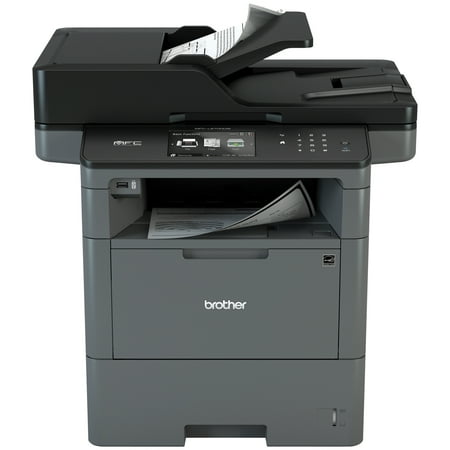
Brother Monochrome Laser Multifunction All-In-One Printer MFC-L6700DW Duplex Two-Sided Printing & Scanning & Copying Wireless Networking Mobile Printing and Scanning
- Model Number:
- UPC:
- 00012502642053
- Walmart SKU:
- 100923982
Market rate of $699.99 positions buyers 0.0% under the established average.
| Price Type | Price | Date |
|---|---|---|
|
Highest Price
|
$793.45 | |
|
Lowest Price
|
$698.99 | |
|
Most Recent Price
|
$793.45 |
| Price Type | Price | Date |
|---|---|---|
|
Highest Price
|
$699.99 | |
|
Lowest Price
|
$699.99 | |
|
Most Recent Price
|
$699.99 |
Tracking History: We have tracked Brother Monochrome Laser Multifunction All-In-One Printer MFC-L6700DW Duplex Two-Sided Printing & Scanning & Copying Wireless Networking Mobile Printing and Scanning since 10/4/2023. The most recent price update was on Jun 27, 2024.
Price Range: Over the past 90 days, the price has ranged from $699.99 (lowest on 10/4/2023) to $699.99 (highest on 10/4/2023). The average price during this period is $699.99.
Current Trend: No Walmart.com pricing data available for analysis.
Customer Insights: Rated 4.0/5 from 64 reviews.
This Brother printer is the sturdiest and most well built printer our clinic has bought to date. Though we are not a heavy use clinic, we had been running into the issue that after about a year any printer that we use would quit working, usually due to feeding issues. This printer has all the functions and capabilities of all our other printers, but all the intricate little pieces that make it function smoothly are much more durable than in other printer models. It has worked flawlessly thus far, and we expect to get 400% of the lifespan with this printer for only 50% more cost to our clinic. Without a doubt this is a good investment and it would be well recommended to any other business.
This is my 2nd brother multi-function printer. I gave my previous one to my son because I needed 2-sided copying. The scanning clarity is amazing and the 2-sided scanning is a huge time saver. As always, I am very pleased with my brother printer.
Great machine.
I own a real estate business and we scan and print quite a bit. I have found Brother printers to be quite reliable and efficient to operate. I just purchased this printer as an upgrade to an older multi-function device. I am very pleased. Its quick to print the first page and very fast after that. The scanner is also very fast. It scans both sides at the same time which is great for double sided material and seems to be twice as fast. I am very pleased with every aspect of this machine.
This machine is great. Scans nicely. Prints and scans fast. Does what I need it to do. EXCEPT- scanning multisized documents. I frequently need to scan packages of 25-150 pages of mixed letter and legal sized documents. The pdf is either legal or letter but never actual size. I specifically ordered this model because I understood that what it was able to do. Neither the machines driver nor the 3rd party software that comes with it is able to do this. I am required to purchase another 3rd party software to accomplish this simple programming item. My previous MFC8950DW did handle multi-sized documents perfectly. This MFC-L6700DW is indicated as the replacement for the MFC8950DW yet it is truly not. If I had known, I would not have purchased this model. I was misled. Suggestion - provide a 3rd party software that scans multi sized documents to PDF actual size document files. AND ability to add a password to the file prior to sending (this should be a given in this day and age).
Pros: Loaded with features and unlike most other brands, Brother makes the cheapest MFC that can be set up to scan to a fax server. Network and local scanning is good and I have set up the scan software for a few users with USB-connected MFCs and no problems. Reliability is much improved from the previous generation (no more toner leaking everywhere and clogging the fuser heating tube) Cons: Like others have said, creasing is often a problem with these. Depends on how long the unit sits idle and cools down. I believe the heat-up cycle for the fuser is not long enough to prevent creases from a cold start. In an effort to have fast startup and be eco-friendly ...we are using paper :/ ...they try to limit the warm-up time to as short as possible at the sacrifice of wasting paper, ruining the first few sheets: definitely not 'green'. I keep updating the firmware on these things in the high hopes that they will finally get it right. It has improved from the very first of these we received, but still NOT resolved. Please at least release an optional firmware that has an extra 15 seconds of warm up from a cold start..
The quality of the printing and scanning exceeds my expectations. I only have one occasional problem, where some PDF file simply don't print. When I send to print, the printer receives the data and then resets its self. The connection to Dropbox is my favorite feature.
There's a lot I like about this machine. It was easy to setup and configure, it has the print and scan features we need. But, sometimes when selecting scanning, there's two beeps and then no scan capability. Power cycling fixes it, until the next time.
This product stoppoworking in couple of weeks, very bad customer service
I have purchased new Brother AIOs that were reliable performers. I then purchased a refurbished MFC-L6700DW for a small business that has very low volume printing needs. The printer is a failure; smudgy print and wrinkled output on single or duplex-printed pages. Wireless printing from the Internet is wrenchingly slow (and the printer is located within six feet of the modem). Superior as a doorstop, not much value for anything else. Will not buy another Brother refurbished product.
Detailed price history for the past 90 days
No Walmart.com pricing data available for analysis.