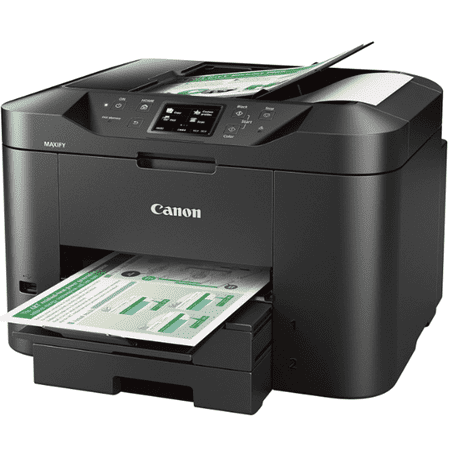
Canon MAXIFY MB2720 Wireless Color Photo Printer with Scanner, Copier and Fax
- Brand:
- Canon
- Model Number:
- MB2720
- UPC:
- 013803266047
- EAN:
- 0013803266047
- ASIN:
- B01IIOMMRS
- Walmart SKU:
- 54620240
After 0 days of stability at $189.99, market indicators point to an immediate 5.8% price reduction.
Price expected to drop to $179.00 soon
| Price Type | Price | Date |
|---|---|---|
|
Highest Price
|
$159.99 | |
|
Lowest Price
|
$119.00 | |
|
Most Recent Price
|
$149.99 |
| Price Type | Price | Date |
|---|---|---|
|
Highest Price
|
$189.99 | |
|
Lowest Price
|
$99.00 | |
|
Most Recent Price
|
$189.99 |
Tracking History: We have tracked Canon MAXIFY MB2720 Wireless Color Photo Printer with Scanner, Copier and Fax since 12/5/2022. The most recent price update was on Jun 16, 2025.
Price Range: Over the past 90 days, the price has ranged from $99.00 (lowest on 1/17/2025) to $189.99 (highest on 6/16/2025). The average price during this period is $127.30.
Current Trend: No Walmart.com pricing data available for analysis.
Customer Insights: Rated 4.0/5 from 604 reviews.
This a multifunctional printer/copy machine/scanner/fax that has color touch screen. You need to press the hardware to get back to the menu whitch is making it a little bit odd. The cartriges are large, set up is eassy, yet ned 10 minutes for initializing. Once the cartriges are instaled can't be taken out before they are empty. The price for replacement cartriges is reasonable in comparison with other brands. The printer is heavy. Close to 30 lb... and takes some space. It has 2 paper trays thst need to be extended manually to fit the paper, that makes it to stick out of its casing and is taking more space. Printing is super fast and good. It has te option of choosing between document or pictures print.
I really like the Canon Maxify MB2720 printer. It was super easy to setup on my android phone. I have been using a Brother black and white for some time just for printing out receipts from online orders. The color will be nice for other purposes. I like the feed ramp for loading the printer cartridges. You load the first one the hit next on the screen and it advances to the next color. It is straight forward and easy to use. The auto feed will come in handy also. Try it you'll be glad you did.
It is nice when some companies get it right. This Canon all in one printer, scanner, copier cannot be beat. This all comes in a smaller than most footprint and it is wireless to boot. I will be taking down to our Florida home for use there with my laptop and tablet too.
Out of the box this printer is everything you need in a printer. Wireless , Copy , Scan , Fax , Print . 100 % USA based customer support.All ink available in XL helps save time and money . 1200 pages black ink printing and 900 pages color ink printing.. Hold 500 sheets of paper.
I found this printer relatively easy to set up. I am connected to my computer via the router, but not wifi, but ethernet cable. The printer as well as the included software (if you do not have a cd-rom drive there is a link to download it provided in the paperwork) walks you through it making it an easy process. Way easier than printers when the wifi option first came out (well for me). I like how easy loading the ink cartridges were. There's a slider/glider directional piece that automatically moves to the color you're changing and you use to line it up and push it directly in with an audible click noise. Haven't had any issues printing and I like that I can change the number of copies I want to make from the scanner plate. Overall very pleased with this.
This is not a personal printer for the top of your desk, it is massive. This printer is very large and able to handle small business work. The cartridge's are all separate one black, blue, red and yellow. I did find ink online that is not too expensive so even though this is a large printer it will cost less in cartridges than my previous personal sized one that had one black and one color cartridge at about 50.00 each. The speed is impressive and can do a double sided print in seconds, so far no jams. this is great for heavy duty work at home or a small office. Just be aware it will take up a lot of space.
The multifunction works well, good scan quality, print quality. Fast printing. The only thing I wished it had was a fast print option that would save ink. There are only 2 quality printing options- good and high. My Brother had 4 allowing me to save ink or to print in ultra high quality. Otherwise an excellent value but it might go through ink cartridges faster than I would like.
First off, I was shocked at the size. I wish Walmart would give one a little more info on the products. It is HUGE. It is also way more than I need. I had a really hard time to figure out how to get it to work wirelessly. But I finally did figure it out. Prints beautifully. Makes almost no noise. I had a hard time even figuring out how to load the paper trays with paper. Truthfully, it is just too much for me. I will probably never use it. Not Canon's fault, mine. Would be happy to return it to Walmart. The first photo is the new printer sitting on a file cabinet. The fsecibd photo is the printer near my regular Canon printer.
This printer/scanner/fax looks awesome. It is not. I have had Canon printers before, and all of them have been difficult to connect to WiFi. This printer just doesn't connect at all. It prints if you connect directly to the printer, but even that is not reliable and sometimes knocks you off the internet. I cannot get the scan function to work, even with direct connection the printer won't recognize my PC. I do not have a CD rom, and the install program I downloaded from the website won't recognize the printer at all, so I cannot get the drivers to install right. I spent three hours trying everything multiple times and multiple ways. No luck. The good thing I can say is that if/when I manage to print something, it is quiet and fast. Its black and looks cool. It holds a lot of paper. It is not heavy but it is large. Because the printer is impossible to set up and is larger than I feel like is reasonable for what is is supposed to do, I cannot really recommend it.
I have not even been able to install the ink cartridges in this printer! I have used several and owned several printers over the years but this one is difficult to figure out. I like the idea of blue tooth capabilities so i have not given up on it yet. Hopefully my son can help me get ink in it and set up soon.
Detailed price history for the past 90 days
No Walmart.com pricing data available for analysis.
Third-Party Sellers prices have ranged from $119.00 (Jun 16) to $149.99 (Jun 21) over the past 90 days. Current price is 16.0% above the 90-day average of $129.33.
| Date | Price | Change | % Change |
|---|---|---|---|
| $149.99 | $+0.00 | +0.0% | |
| $149.99 | $+0.00 | +0.0% | |
| $149.99 | $+30.99 | +26.0% | |
| $119.00 | $+0.00 | +0.0% | |
| $119.00 | $+0.00 | +0.0% | |
| $119.00 | $+0.00 | +0.0% | |
| $119.00 | $+0.00 | +0.0% | |
| $119.00 | $+0.00 | +0.0% | |
| $119.00 | — | — |