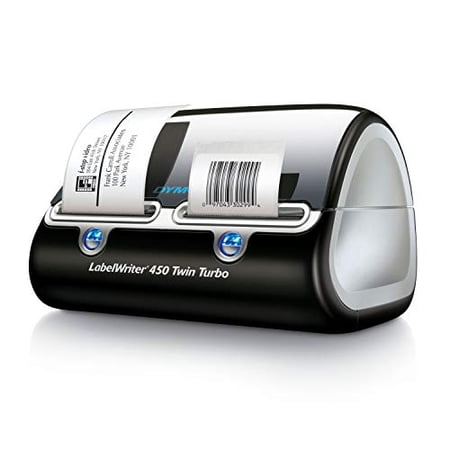
DYMO Label Writer 450 Twin Turbo Direct Thermal Label Printer, 1 Count
- Brand:
- DYMO
- Model Number:
- 1752266
- UPC:
- 071701056597
- EAN:
- 0071701056597
- ASIN:
- B0027J9KH6
- Walmart SKU:
- 13081337
Market direction turned downward recently with current $199.00 representing 4.5% under standard pricing.
| Price Type | Price | Date |
|---|---|---|
|
Highest Price
|
$479.94 | |
|
Lowest Price
|
$201.99 | |
|
Most Recent Price
|
$247.63 |
| Price Type | Price | Date |
|---|---|---|
|
Highest Price
|
$335.68 | |
|
Lowest Price
|
$177.67 | |
|
Most Recent Price
|
$199.00 |
Tracking History: We have tracked DYMO Label Writer 450 Twin Turbo Direct Thermal Label Printer, 1 Count since 5/22/2024. The most recent price update was on Aug 27, 2026.
Price Range: Over the past 90 days, the price has ranged from $177.67 (lowest on 3/7/2025) to $335.68 (highest on 5/22/2024). The average price during this period is $236.71.
Current Trend: Walmart.com prices have ranged from $199.00 (Aug 27) to $255.89 (Jun 28) over the past 90 days. Current price is close to the 90-day average of $208.32.
Customer Insights: Rated 2.7/5 from 166 reviews.
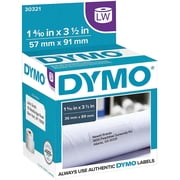
This is a very good product. Prints fast and almost the instant you push the print button. Even though I was only looking for a single printer for printing postage, I opted for the twin as I figured I would find many more uses of this product after owning it for a while since there are so many label choices available and didn't want to be bothered changing label rolls all the time. It didn't take long to realize I made the right choice. I've already found many more uses than I anticipated and the list is growing. Having the second side makes it easier since I can leave the stamps in one side and other labels in the other side. I've read the complaints from others about the dymo stamps postage options for this printer so I will shed some light on it. Dymo stamps offer a free account with no monthly service charge that allows you to print stamps and postage for flat rate boxes, packages up to 13oz, large envelopes, letters and postcards. It works very well, the free account just doesn't allow you to print specific amounts for packages weighing over 13oz unless you are using flat rate boxes. So it's a basic postage service. If you upgrade to the Standard account, which carries a monthly charge, you may print variable amounts and also add tracking information plus some other features. Personally, the free account works perfect for me. For the basic dymo stamps account you may only print postage on the smaller stamps labels and the paid accounts allow you to print postage on any shipping label as well. When purchasing stamp labels for the free account, only purchase dymo brand as they now require you to register each roll of stamp labels with your account and the dymo brand have the registration number printed on the backing paper from the roll. So stay away from the cheaper replacements. Plus, if you misprint a stamp, dymo will refund your account for the postage used and they only do this with authentic dymo stamp labels. The printer comes with a stamp starter roll of 50 and address labels. The roll that came with my machine didn't have a registration number on the back even though they are dymo, but a quick call to dymo stamps and they took care of it by allowing me to print 50 before being prompted for a registration number. I purchased a new roll that has it on there so when I run out of the starters, I'll be good to go. Be aware that some of the previous model printers such as the labelwriter 400 can be found at a decent price but require a software upgrade costing $50 to print postage. So I recommend sticking with the newer models like this one. There is no off button on the printer, so be aware that there are blue lights on the front that illuminate all the time, which I find annoying but not a big deal unless the printer is in your bedroom. I love the fact that it doesn't use any ink, which is a big plus. The software for the printer is very simple and easy to learn in just a few minutes but also has many features, allowing you to even customize your labels with pictures or logos and different fonts. It even has an option to click on that will check to make sure the address you typed in is accurate and will correct it for you. It will add that funny postal barcode to the label so that it goes through the mail system more accurately. When you use a roll of labels for the first time, make sure you pull off and discard the first few labels that have adhesive from the tape on them to avoid gumming up the printer. All in all, I am very impressed with this product and hope it continues to serve us well.
I already had one of these for about 10 years and it just recently stopped working. It has the same features as my old one, which I already loved. The Dymo label site is the software used to make address labels, and you can also make shipping labels with Dazzle software included. To make stamps you need to use Endicia. It's all very easy and self-explanatory. I love my labeler and highly recommend it for anyone who needs it for personal or small business.
We bought this to replace the previous LabelWriter Twin Turbo, which we had for about 11 years. The 450 Twin Turbo prints address labels about twice as fast as the previous model. Stamps print at about the same speed as previous model.
I have been using LabelWriter 450 Twin Turbo for a couple of weeks now, daily at my job. It does exactly what we needed to and more. There are a few things I would personally update on the software, however I am thoroughly pleased with the functions it performs.
The DYMO twin turbo has made my filing system so much more organized, and I now have a consistent appearance in all my files. Love it!
Bought this for one of our admin assistants. She loves it. She doesn't use it for postage, just 2 different sized labels. She wouldn't use anything else now.
for a label printer that can print 2 different size labels it makes it fast to do work by not having to change the labels every time the size changes.
If you own a unit by the same name, don't be fooled. It shut us down until we could sort out the issues between the 1 and 2 version of the unit. When you install the unit it assumes you have the 1 version of the printer. This is no longer a "plug and play" unit, it is a "plug and pray." Very unnecessary confusion by the two versions. I have used the 1 for years.
doesn't work, won't print , installed software won;t print labels
Not sure what happened but we bought this unit to replace an older one same model etc. and after a week of using it stopped spooling
Detailed price history for the past 90 days
Walmart.com prices have ranged from $199.00 (Aug 27) to $255.89 (Jun 28) over the past 90 days. Current price is close to the 90-day average of $208.32.
| Date | Price | Change | % Change |
|---|---|---|---|
| $199.00 | $+0.00 | +0.0% | |
| $199.00 | $+0.00 | +0.0% | |
| $199.00 | $+0.00 | +0.0% | |
| $199.00 | $+0.00 | +0.0% | |
| $199.00 | $+0.00 | +0.0% | |
| $199.00 | $-11.00 | -5.2% | |
| $210.00 | $+0.00 | +0.0% | |
| $210.00 | $+0.00 | +0.0% | |
| $210.00 | $+0.00 | +0.0% | |
| $210.00 | $+0.00 | +0.0% | |
| $210.00 | $-45.89 | -17.9% | |
| $255.89 | — | — |
Third-Party Sellers prices have ranged from $247.63 (Sep 23) to $254.99 (Jul 11) over the past 90 days. Current price is close to the 90-day average of $253.52.
| Date | Price | Change | % Change |
|---|---|---|---|
| $247.63 | $-7.36 | -2.9% | |
| $254.99 | $+0.00 | +0.0% | |
| $254.99 | $+0.00 | +0.0% | |
| $254.99 | $+0.00 | +0.0% | |
| $254.99 | — | — |