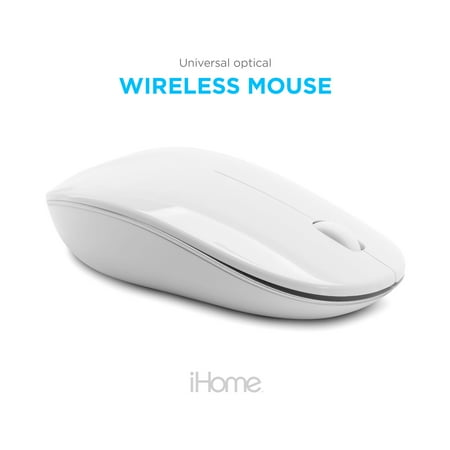
iHome Wireless Optical Mouse: Universal Mouse with USB-C & USB-A Adapter
- Brand:
- iHome
- Model Number:
- IMAC-M211W
- UPC:
- 812350145702
- EAN:
- 0812350145702
- Walmart SKU:
- 973385085
The two weeks at $26.55 represents stable pricing, running closely tracking the 90-day average of $26.55.
| Price Type | Price | Date |
|---|---|---|
|
Highest Price
|
$26.55 | |
|
Lowest Price
|
$21.91 | |
|
Most Recent Price
|
$26.55 |
Tracking History: We have tracked iHome Wireless Optical Mouse: Universal Mouse with USB-C & USB-A Adapter since 12/5/2022. The most recent price update was on Sep 15, 2026.
Price Range: Over the past 90 days, the price has ranged from $21.91 (lowest on 12/5/2022) to $26.55 (highest on 4/5/2025). The average price during this period is $26.28.
Current Trend: Walmart.com prices have ranged from $26.55 (Sep 15) to $26.55 (Sep 15) over the past 90 days. Current price is close to the 90-day average of $26.55.
Customer Insights: Rated 3.8/5 from 54 reviews.
This wireless mouse is great...It comes with 2 adapters that make it truly universal...It's good to go right out of the package...It's described as being white but to me it looks more like an iridescent pearl...very attractive... but I would prefer it to be a grey/black to match my other computer components.
The iHome Wireless Optical Mouse Universal Mouse with USB-C & USB-A Adapter is very nicely sized and fits comfortably in your hand. The right and left click buttons are optimally placed for comfort and usage. The scroll wheel is comfortably located. Set up is simple to accomplish. Install the batteries into the mouse, insert the USB sensor into the computer USB port, turn the mouse on/off switch to the “on” position and you are ready to go. There is one negative to this mouse. This mouse does not automatically turn off after 20 or 30 minutes of non-use. You must remember to turn the mouse on/off switch to the “off” position when you are finished for the day, otherwise the batteries will become depleted too soon. The mouse on my other computer has this feature and frankly I miss it with this mouse.
The iHome optical mouse is Mac and pc compatible. It has wireless connection and an optical sensor. The mouse runs on 2 AAA batteries which are included in the package saving me from forgetting to purchase them. Setting up the mouse was pretty easy. The mouse connects to your computer by Bluetooth and there's no need to sync or anything so you can just use it immediately. The mouse I have is a glossy white. There's a power switch to turn it off and on when your not using it. The scroll wheel turns easily and the mouse is curved for right or left handed people. Overall I like this product. I'm not that computer savvy so this was great for me because the setup was quick and easy. I like not having any wires to tie me to the computer. I've only had it for a short period of time so I'm not sure of its durability but it seems like a good quality item. I would recommend this mouse to anyone looking for a mouse like this. I received this iHome Bluetooth optical mouse for free in exchange for a fair and honest review.
The scroll in the middle of the mouse unfortunately does not work but overall I enjoy using it.
Yeah, this is a great little mouse it does everything that mouses that cost three times as much do and it does not have buttons on it that you never figure out how to use. On the bottom it has a button to change the signal and a button to change a the speed of your pointer. It took some time to change over to the ihome from our logitech mouse but we're getting use to the change.
White in color. Contoured for either hand use. Feels comfortable to use. Wireless. 2 AAA batteries. Easy quick guide for use. Optical sensor. Works well. Initially takes a few seconds to begin working with my Chromebooks. Scroll wheel is also button for easy location on page. Happy with this product. Definitely recommend for easier time than using mouse on any laptop.
This is a nice wireless mouse never had internal problems with it. Did well when moving around the internet but didn't do so well when I tried to play a game in which I had to move around quickly. Was nice to hook up the laptop and mouse together but since the mouse ran slow when playing a game I had to unhook the mouse. Works good unless you play games.
The i Home Wireless Optical Mouse came in a crisp white color. The design is a bit longer than i'm use to using and comes with a slightly tilted sleek design. It was easy to install on my computer.And even though i would recommend it i personally do not care for the design.It does not fit comfortably in my hand.
I use my computer on a daily basis and one of the essential parts is the mouse. When I had the chance to try out and review the 'iHome Wireless Optical Universal Mouse', the first thing I wanted to experience was how it felt in my hand. This mouse is sleek and the size doesn't get in the way. It is white so it suits any décor. It is a wireless optical which means it is easy to set up. Simply install the batteries (Two AAA) and plug in the adaptor to your USB port. The scroll wheel handles easily and smoothly and the optical sensor is accurate. This mouse is perfect for use at home, the office or school. It can even be used at the local coffee shop. The 'iHome Mouse" can be used with any PC or Mac. The 'on and off switch' offers power saving and conserves battery life to ensure reliable usage every time you need it. A great wireless mouse...
Worst piece of computer hardware I ever bought. Turns off if you don't move it for a few minutes, and it takes maybe 15 seconds to come back on. After a couple weeks the cursor began fluttering, making it impossible to click accurately on anything. And good luck getting it open to install batteries - the design makes no sense at all.
Detailed price history for the past 90 days
Walmart.com prices have ranged from $26.55 (Sep 15) to $26.55 (Sep 15) over the past 90 days. Current price is close to the 90-day average of $26.55.
| Date | Price | Change | % Change |
|---|---|---|---|
| $26.55 | $+0.00 | +0.0% | |
| $26.55 | $+0.00 | +0.0% | |
| $26.55 | $+0.00 | +0.0% | |
| $26.55 | $+0.00 | +0.0% | |
| $26.55 | $+0.00 | +0.0% | |
| $26.55 | $+0.00 | +0.0% | |
| $26.55 | $+0.00 | +0.0% | |
| $26.55 | $+0.00 | +0.0% | |
| $26.55 | $+0.00 | +0.0% | |
| $26.55 | $+0.00 | +0.0% | |
| $26.55 | $+0.00 | +0.0% | |
| $26.55 | $+0.00 | +0.0% | |
| $26.55 | $+0.00 | +0.0% | |
| $26.55 | — | — |