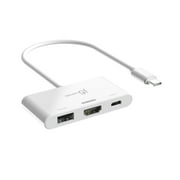
j5create, USB-C to Dual HDMI Multi-Monitor Adapter, JCA365
- Brand:
- j5create
- Model Number:
- JCA365
- UPC:
- 847626005893
- EAN:
- 0847626005893
- ASIN:
- B09Y8QPNFZ
- Best Buy SKU:
- 6507869
- Walmart SKU:
- 1684664422

| Price Type | Price | Date |
|---|---|---|
|
Highest Price
|
$69.00 | |
|
Lowest Price
|
$42.00 | |
|
Most Recent Price
|
$54.99 |
| Price Type | Price | Date |
|---|---|---|
|
Highest Price
|
$59.87 | |
|
Lowest Price
|
$59.87 | |
|
Most Recent Price
|
$59.87 |
Tracking History: We have tracked j5create, USB-C to Dual HDMI Multi-Monitor Adapter, JCA365 since 6/14/2026. The most recent price update was on Jun 14, 2026.
Price Range: Over the past 90 days, the price has ranged from $59.87 (lowest on 6/14/2026) to $59.87 (highest on 6/14/2026). The average price during this period is $59.87.
Current Trend: No Walmart.com pricing data available for analysis.
Customer Insights: Rated 4.3/5 from 101 reviews.
it works fine and gives you all the herts and resolution you can get, no cut off. it fits on my regular 24 inch, 27 inch, and my friends samsung curved monitor.
Excellent quality. Not what I needed this time but keeping it anyway for my next need.
This made it so much easier to connect two monitors to my laptop, just plug in, download the driver, and you are done!!
The instructions were easy to follow, to get the display working. It works amazingly with my dual monitors a seamless connection. I absolutely love that there is an attachment for USBC and USBA. I definitely recommend this product as it was easy to setup with the driver has a sleek build. The resolution has remained crisp for videos and is able to view in 4K and 2K displays. High quality and extremely sturdy. P.S. Don't mind the setup :p I'm in the process of cleaning!
This is the best and most simple adapter to set up dual monitors! I finally have two monitors for my home office/WFH set up with just this instead of a full on docking station. I also LOVE that it's USB-C and comes with the USB 3.0 adapter in case your laptop is a little older and doesn't have a USB-C port.
I've been using this adapter to connect my MacBook to two external monitors, and it works really well. Just plug it in, let the driver install automatically, and connect your HDMI cables—super easy setup. One HDMI port supports 4K resolution, and the other gives clear, sharp display good enough for everyday work. The compact design makes it easy to carry around, and it's perfect for multitasking or having more screen space. Pros: Quick setup, supports two displays, great resolution. Cons: Make sure your device supports DisplayPort Alt Mode for full compatibility. Overall, it's a solid choice if you need to boost productivity with a dual-screen setup.
This adapter has been super useful for expanding my workspace. I love that it supports dual HDMI monitors—perfect for multitasking. Setup was easy, just plug and play with no extra software needed. It works smoothly with my USB-C laptop and the additional USB ports come in handy for my mouse and keyboard. Video and audio were crisp with no lag, which was a huge plus. One small issue: the USB-C notch has to be perfectly aligned in the port or it won't connect properly. The compact size makes it easy to travel with or keep tucked away on my desk. I do wish the cord was a little longer for more flexibility with setup, but overall it's a reliable, efficient tool that does exactly what I need. Would definitely recommend for anyone looking to boost their productivity with a clean, simple setup.
Unfortunately, this adapter just didn't work well for my needs. The cord was too short for my setup, and it didn't offer the variety of port options I needed to connect everything in my office. I ultimately ended up returning it because it simply didn't serve the purpose I purchased it for. It may work well for a simpler setup, but I would definitely check your connection and cord-length needs before purchasing.
The adapter is decent overall and does what it claims—lets you connect two HDMI monitors through a USB-C port. However, I'm giving it 3 stars because it's not compatible with Apple devices that have the M1 chip. I found out the hard way when trying to set it up with my MacBook, and only one display would work. After switching to a Mac with the M2 chip, both monitors connected without any issues. Just a heads-up for anyone using an M1 Mac—this adapter won't support dual extended displays. Otherwise, build quality and video output are fine.
This item damaged my laptop battery right away, it won't hold charge.
Detailed price history for the past 90 days
No Walmart.com pricing data available for analysis.
Third-Party Sellers prices have ranged from $49.87 (Aug 17) to $57.99 (Nov 11) over the past 90 days. Current price is close to the 90-day average of $56.70.
| Date | Price | Change | % Change |
|---|---|---|---|
| $54.99 | $+0.00 | +0.0% | |
| $54.99 | $-3.00 | -5.2% | |
| $57.99 | $+0.00 | +0.0% | |
| $57.99 | $+0.00 | +0.0% | |
| $57.99 | $+0.00 | +0.0% | |
| $57.99 | $+0.00 | +0.0% | |
| $57.99 | $+3.00 | +5.5% | |
| $54.99 | $-3.00 | -5.2% | |
| $57.99 | $+0.00 | +0.0% | |
| $57.99 | $+0.00 | +0.0% | |
| $57.99 | $+0.00 | +0.0% | |
| $57.99 | $+0.00 | +0.0% | |
| $57.99 | $+0.00 | +0.0% | |
| $57.99 | $+0.00 | +0.0% | |
| $57.99 | $+0.00 | +0.0% | |
| $57.99 | $+0.00 | +0.0% | |
| $57.99 | $+0.00 | +0.0% | |
| $57.99 | $+0.00 | +0.0% | |
| $57.99 | $+0.00 | +0.0% | |
| $57.99 | $+0.00 | +0.0% | |
| $57.99 | $+0.00 | +0.0% | |
| $57.99 | $+0.00 | +0.0% | |
| $57.99 | $+0.00 | +0.0% | |
| $57.99 | $+0.00 | +0.0% | |
| $57.99 | $+0.00 | +0.0% | |
| $57.99 | $+0.00 | +0.0% | |
| $57.99 | $+0.00 | +0.0% | |
| $57.99 | $+8.01 | +16.0% | |
| $49.98 | $+0.00 | +0.0% | |
| $49.98 | $+0.00 | +0.0% | |
| $49.98 | $+0.11 | +0.2% | |
| $49.87 | — | — |