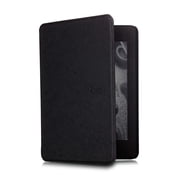
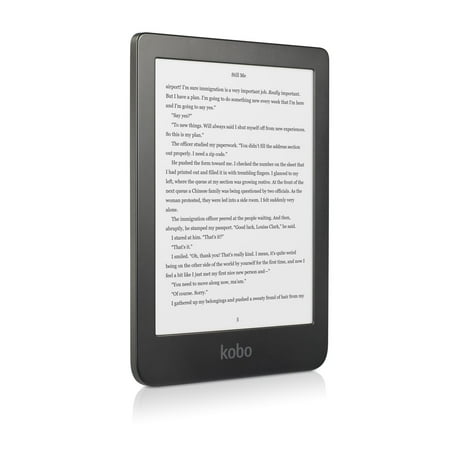
Kobo Clara HD eReader - 6" Glare-Free, High-Definition Carta E Ink Touchscreen Display, ComfortLight PRO, Wi-Fi enabled
- Brand:
- Kobo
- Model Number:
- N249-KU-BK-K-EP
- UPC:
- 681495007554
- EAN:
- 0681495007554
- ASIN:
- B07CXNMVKY
- Walmart SKU:
- 848940265
Market direction turned downward with current $119.99 representing 0.0% under standard pricing.
| Price Type | Price | Date |
|---|---|---|
|
Highest Price
|
$179.99 | |
|
Lowest Price
|
$119.99 | |
|
Most Recent Price
|
$159.99 |
| Price Type | Price | Date |
|---|---|---|
|
Highest Price
|
$119.99 | |
|
Lowest Price
|
$119.99 | |
|
Most Recent Price
|
$119.99 |
Tracking History: We have tracked Kobo Clara HD eReader - 6" Glare-Free, High-Definition Carta E Ink Touchscreen Display, ComfortLight PRO, Wi-Fi enabled since 11/11/2022. The most recent price update was on May 7, 2026.
Price Range: Over the past 90 days, the price has ranged from $119.99 (lowest on 11/11/2022) to $119.99 (highest on 11/11/2022). The average price during this period is $119.99.
Current Trend: Walmart.com prices have ranged from $119.99 (May 6) to $119.99 (May 6) over the past 90 days. Current price is close to the 90-day average of $119.99.
Customer Insights: Rated 4.2/5 from 285 reviews.
I bought this e-reader when our library temporarily closed due to the pandemic. I was panicking because I am totally hopeless with technology but really needed my books. This e-reader is VERY easy to set up. I did it in 5 minutes, which means anyone can do it. It already has Overdrive loaded on to it (the app for borrowing from library). It is really user friendly, small and lightweight. I got a cover for it for "sleeping" and hands free reading. I couldn't be happy with it
After doing some extensive research I found the Kobo Clara to be the best e-reader for my wife. It is compact and easy to use. The white pages are like reading a book and the font is adjustable for personal reading preferences. The already programmed Overdrive makes borrowing books from your library a breeze and it is easy to set up. The Kobo Clara in my opinion is the best e-reader for the money! I would not consider any other e- readers for the features it offers in such a compact package.
This is my first E-reader. I chose it for seamless use of Overdrive from my library. Easy to set up, easy to figure how to download. I have not explored many of the features but I know there are more than I will ever need. Excellent for those who want to use Overdrive for free books from the library.
This is my first Kobo e-reader and I am very pleased with it. I own for many years the Kindle Paperwhite, I was looking for an upgrade without burning my wallet. I did my research and I found the Kobo Clara HD had everything I was looking for a reasonable price. All my books from the Kobo/Walmart Library appeared instantly, I was able to borrow books from my local library thru the Clara HD reader. I love how the light adjusts to my environment. I am not missing anything. I was able to make the font bigger on the books. This e-reader is very simple to use. It is easy to charge and the battery does last a very long time. I love the point that I am not bombarded with ads. The touch capabilities are outstanding. The e-reader is easy to hold. The quality is superior to the competitor. I really recommend Clara HD. If you are looking for a new e-reader, moving away from the competitors' systems, or just wanting to have the ability to be in both worlds, then by all means buy it. You will not regret it.
I absolutely love my Kobo. I have not had any issues at all. The store is awesome and has a ton of books to choose from. I have read some comments that it lags when turning pages or downloading books, I have not has that problem at all. I would recommend to anyone who loves to read!
Great Device. Its very easy to remove the terrible Walmart logo on the sleep screen: Plug Kobo into computer Double click Kobo device to open Kobos files Double click the folder that says .kobo. Unhide hidden files (If you are on a Mac and dont see the .kobo folder, try hitting command shift . to reveal hidden folders) Inside the .kobo folder, open the file named affiliate.conf change affiliate=walmart to affiliate=kobo, then close out of the file and click ok to lock in your changes
While this looks like a Kindle it is better in many ways. It is just slightly smaller, enough that I can use it one handed which I really like. It reads most ebook formats, except of course Kindle DRM protected ebooks. There is no paying an extra $15 to get rid of ads either. I do wish Kobo and Walmart were as aggressive as Amazon at pushing books- I know that sounds strange but I've gotten some great deals for a buck from Amazon. Overall I am completely satisfied with my purchase of the Kobo Clara.
I love my e-reader! This is the first e-reader I have bought and it's great. I can check books out from the Orange County public library for free. With Covid I don't want to borrow real books or buy 2nd hand books so this is a great alternative. It is lightweight and very easy to use. You can change the amount of "blue light" so that I can read books late at night without it affecting my sleep, which is a feature found in more expensive versions of the Kindle. I also bought a cover for it with a picture of the Eiffel Tower at Walmart.com and I love that also. Great buy (both items)!
If you're not familiar with electronic ink it's quite different than LCD pixels. For one thing is it really does look like paper and ink and there are no pixels to see at all. It really does add to the reading experience. You get 7.3gb storage internally, an average full 250 page book takes 1-2mb. You can tint the screen yellow for nighttime reading, but no other colors. Connect the cord to your computer and transfer over any of the following: TXT, CBR, CBZ, MOBI, ePub, HTML, and PDF. Possibly others are available file formats available too. Now the bad news. Once you power it up for the first time it will not let you do ANYTHING until you download software for your main computer (not this device) to connect to it where you must create an online account for purchasing books. Now the only reason I didn't return this device immediately at this point is because if you google how to bypass this nasty registration, you'll find a simple solution to do so and then it's unlocked, all yours, and no login will ever be needed - you can turn off Wi-Fi and simply transfer your eBooks directly to the root directory or in custom folders when the cable is connected to your computer. If you are into purchasing books though you can certainly go this route too and create a username and password to have total access to the high quality online book library. Because of the unique way the display is presented you are literally given weeks of battery life even with intensive reading and backlight. This really is a wonderful device to have if you are traveling abroad and want to read some books where they not only don't take a lot of space but you can also change the font and change the size it appears. This is great because there are just not enough large print books out there and this device turns any book into large-print easily simply by adjusting the font size. It has a comprehensive filer ability too where you can take your loose books and comic books and magazines and using the device's touch-screen type out new names for new folders to store them in so you can recall them easily from "My Collections." Go to "Home" to see every single book that has been uploaded. You can change the backlight too while reading. Just place your finger in the middle for 1/4 a second, then drag up or down to increase or decrease the backlight brightness. Tap the left or right side of the screen to change pages and tap in the center to bring up all menu options including the ability to close this book (it remembers where you left it) and then load up a new book to read. To turn it off, just tap the bottom physical button. It brings up the logo for the last book you read and turns off the backlight. As no electricity is needed to maintain the picture you can leave it like this for a month or more where just the internal clock needs power to maintain. You owe it to yourself to check out this radical new technology, reading books in these "electronic ink" devices.
Has the same issues eReaders had 10 years ago except for the backlight, it's only redeeming quality. Screen is slow to refresh. No comfortable place to hold it thanks to the narrow bezel. Can't easily transfer Epub and pdf eBooks to it, doesn't integrate very well with Overdrive -- sometimes wouldn't 'see' books as checked out.
Detailed price history for the past 90 days
Walmart.com prices have ranged from $119.99 (May 6) to $119.99 (May 6) over the past 90 days. Current price is close to the 90-day average of $119.99.
| Date | Price | Change | % Change |
|---|---|---|---|
| $119.99 | $+0.00 | +0.0% | |
| $119.99 | — | — |
Third-Party Sellers prices have ranged from $159.99 (Jun 4) to $159.99 (Jun 4) over the past 90 days. Current price is close to the 90-day average of $159.99.
| Date | Price | Change | % Change |
|---|---|---|---|
| $159.99 | $+0.00 | +0.0% | |
| $159.99 | $+0.00 | +0.0% | |
| $159.99 | $+0.00 | +0.0% | |
| $159.99 | $+0.00 | +0.0% | |
| $159.99 | — | — |