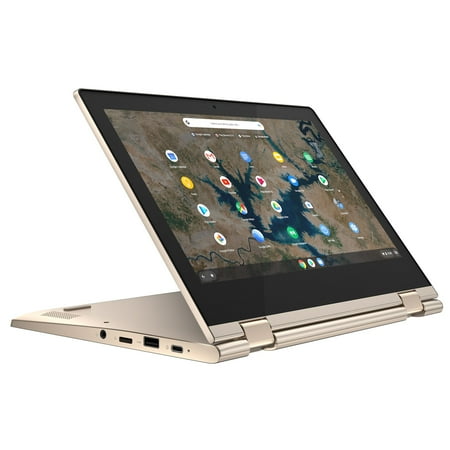
Lenovo Chromebook Flex 3 11.6" Touchscreen 2-in-1 Laptop, Intel Celeron N4020, 4GB RAM, 32GB HD, Chrome OS, Almond, 82BB0007US
- Brand:
- Lenovo
- Model Number:
- 82BB0007US
- UPC:
- 194778319560
- EAN:
- 0194778319560
- Walmart SKU:
- 818903857
Market direction turned downward with current $309.99 representing 0.0% under standard pricing.
| Price Type | Price | Date |
|---|---|---|
|
Highest Price
|
$399.98 | |
|
Lowest Price
|
$179.00 | |
|
Most Recent Price
|
$297.00 |
| Price Type | Price | Date |
|---|---|---|
|
Highest Price
|
$309.99 | |
|
Lowest Price
|
$309.99 | |
|
Most Recent Price
|
$309.99 |
Tracking History: We have tracked Lenovo Chromebook Flex 3 11.6" Touchscreen 2-in-1 Laptop, Intel Celeron N4020, 4GB RAM, 32GB HD, Chrome OS, Almond, 82BB0007US since 8/13/2026. The most recent price update was on Oct 16, 2026.
Price Range: Over the past 90 days, the price has ranged from $309.99 (lowest on 8/13/2026) to $309.99 (highest on 8/13/2026). The average price during this period is $309.99.
Current Trend: Walmart.com prices have ranged from $309.99 (Oct 16) to $309.99 (Oct 16) over the past 90 days. Current price is close to the 90-day average of $309.99.
Customer Insights: Rated 4.3/5 from 192 reviews.
Beautiful!!! It's exactly what we needed! Great value for a gorgeous laptop. I'm very happy with my purchase!
I am enjoying this laptop. my very first laptop and everything works excellent
I love my new Chromebook! It is a huge upgrade from my last tablet. Gold is my absolute favorite. This color is gorgeous and very classy/high end. The best tablet I have had yet! I recently found how to speak to text!!!!! Now I simply speak and my documents are typed for me. How awesome is that! The pictures don't show how sexy this chromebook really is!
clear picture
I got it last Thursday then went on a trip and got back Sunday. I looked at it today and noticed there is a gap and nothing holding the screen. Is that supposed to be like that.
It is fine for the cost. The case can break easily through. It is smaller than you think and not good for complex things like gaming. But does the job for school.
I bought it to use for school and when I travel. Its great. Glad I purchased.
[This review was NOT collected as part of a promotion. Who are these people and how do I become one of them?] I love this Chromebook. I also have the Lenovo Chromebook 3, which has a matte screen which is helpful for working on a computer outside, in sunlight, or if glare is a problem. For this laptop, though, the keyboard and trackpad are easy to use/write on, the screen is bright and responsive to touch. The color has a tiny, slight bit more of a greenish/aquamarine hue than I thought, but it looks great. The speakers are good. It's a bit heavier than my Lenovo Chromebook 3, but that is to be expected with the touch screen. Great for Google Docs, streaming and social media apps, music apps, etc. I have terrible vision so I like being able to read from the screen in tablet mode. I like that it has no fan, too.
As a doctoral student, most of my dissertation work is being done in Google Docs so I can easily collaborate with my dissertation chair. With this in mind, I thought it might be a great idea to get a Chromebook after finally having enough of the infamous butterfly-style keyboard on the MacBook Air keyboard. After watching and reading a ton of reviews, I ended up choosing the Lenovo Chromebook Flex3. First, it was heavily discounted for a back-to-school sale on WalMart.com. Second, I know that Lenovos are often lauded for their keyboards, which was paramount with the immense typing that I do and will be doing for the next year. I have only been using the Chromebook Flex3 for a few hours, but here is my initial take on it. I personally find the Almond color to be a classy alternative to the usual laptop colors. The Chromebook Flex 3 feels heavy for its size (versus the HP 11a Chromebook that I also picked up to test out) but I feel the relative heft adds to the feel of quality. It does not have the best screen but it is more than sufficient for typing papers, reading articles, browsing the web, and maybe a quick Zoom call here and there. The camera is not the best for Zoom, but for a quick call, it will suffice in proper lighting. I am happy to have two USB type-A ports and two USB-C ports and charging is via either of the USB-C ports. The trackpad works well and the keyboard did not disappoint with comfortable full-sized keys and nice key travel. The keyboard is actually quite good for such an affordable laptop. Overall, the unit feels well-built with strong hinges and no spots of flex in the keyboard. So my initial impression of the Chromebook Flex 3: Great job Lenovo! For what I plan to use it for, I think this unit will be a great fit.
awesome little laptop for the price... i am amazed at the quality and ease of use and the sleek design makes it super cute and portable and i totally recommend this laptop to everyone
Detailed price history for the past 90 days
Walmart.com prices have ranged from $309.99 (Oct 16) to $309.99 (Oct 16) over the past 90 days. Current price is close to the 90-day average of $309.99.
| Date | Price | Change | % Change |
|---|---|---|---|
| $309.99 | $+0.00 | +0.0% | |
| $309.99 | $+0.00 | +0.0% | |
| $309.99 | $+0.00 | +0.0% | |
| $309.99 | $+0.00 | +0.0% | |
| $309.99 | — | — |
Third-Party Sellers prices have ranged from $297.00 (Jul 20) to $297.00 (Jul 20) over the past 90 days. Current price is close to the 90-day average of $297.00.
| Date | Price | Change | % Change |
|---|---|---|---|
| $297.00 | — | — |