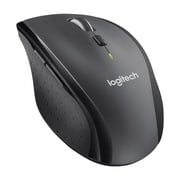
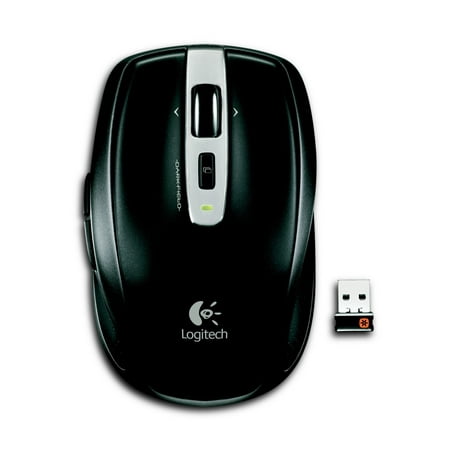
Logitech Anywhere Mouse MX
- Brand:
- Logitech
- Model Number:
- MX Anywhere
- UPC:
- 804066544122
- EAN:
- 0097855083876
- ASIN:
- B007PJ4Q4A
- Walmart SKU:
- 20690012
| Price Type | Price | Date |
|---|---|---|
|
Highest Price
|
$155.00 | |
|
Lowest Price
|
$65.24 | |
|
Most Recent Price
|
$149.99 |
| Price Type | Price | Date |
|---|---|---|
|
Highest Price
|
$39.99 | |
|
Lowest Price
|
$39.99 | |
|
Most Recent Price
|
$39.99 |
Tracking History: We have tracked Logitech Anywhere Mouse MX since 9/28/2025. The most recent price update was on Sep 29, 2025.
Price Range: Over the past 90 days, the price has ranged from $39.99 (lowest on 9/28/2025) to $39.99 (highest on 9/28/2025). The average price during this period is $39.99.
Current Trend: No Walmart.com pricing data available for analysis.
Customer Insights: Rated 4.3/5 from 92 reviews.
The copy and paste function makes this worth it. Page forward or backward by pushing a button. A button touch to zoom in or out. Plus you can customize it to suit your needs with many more options.
This mouse really does work on any surface. It is a great value. Durable, comfortable and has great battery life!
I have had so many mice over the years... and then this came out. I love this mouse so much I have bought several more for the years ahead. Replaceable batteries. (Use Eneloop rechargeables) Very pin point accuracy. I have even gamed with this mouse. Excellent response time. Darkfield Laser lets me use my mouse on glass tables. Feels great in the hand not as big as regular PC mice. Buttons last a good while. I did notice that I can wear this mouse out about the same from gaming as other mice. Power on off slider/cover for laser. Comes with USB dongle and can be paired to another dongle if you lose yours. One of my favorite things about this mouse is the hyper scrolling. Amazing for when I have to do spreadsheets.
I ordered this to replace one that I purchased that wouldn't behave and the Logitech mouse is perfect. It doesn't bounce the cursor around like the other one I bought did, you can use it either close to the computer or across the room. I couldn't be happier!
It is not pointed out that this mouse is excellent for a laptop or equally excellent for your desktop. It is small and compact, but my hands are small and it fits perfectly. It paired up with my keyboard that I already had. For me , no problems.
I especially love the Hyper Scroll mode where you can just spin the wheel to scroll up and down web pages, documents, spreadseets, etc. line by line, with one flick of a finger. At 30 bucks, it's about twice the price of my next favorite mouse Logitech M325, but it's about twice as good.
This Logitech anywhere mouse mx, is replacing my old one that lasted a couple years. The only thing that was wrong with the old one, was the left button quit working. I really gave that button a workout playing a couple of computer games. Time will tell if this new version will last comparably to the old one.
I have purchased Logitech mice in the past and for much more, almost twice the money and I was happy because of the great feature and quality. I need another mouse for my wife's PC and I bought a Ihome model for ten dollars looks very similar, But did not have any of the features this one has. The worst thing was It operated everything in slow motion. I mean I would have to wait a couple seconds for something to open etc. but with this mouse my PC fly's through programs. Click and its open. Had now Idea how much difference a good model could make, Now I do.
I've used a logitech vx nano mouse since 2007 before the nano receiver died this year and I decided to get this one. Pros: I liked how they moved the extra function keys down to the left side rather than next to the left mouse button. Still a great all surface mouse, very responsive, and still love the nano receiver (which sticks out much less than a usb stick size receiver) Cons: Smooth top surface of the newer model makes it easier to get dirty from skin oil, etc. Dislike having it switch from AAA batteries to AA batteries. (same battery life yet uses larger batteries?) Overall, I would still recommend this as an all purpose travel capable mouse.
Big and heavy. Back and forward buttons take too much pressure to click and you have to reposition your hand slightly. The wheel is too "free wheeling" to control easily. Overall not a comfortable mouse.
Detailed price history for the past 90 days
No Walmart.com pricing data available for analysis.
Third-Party Sellers prices have ranged from $129.99 (Nov 1) to $149.99 (Nov 4) over the past 90 days. Current price is close to the 90-day average of $147.99.
| Date | Price | Change | % Change |
|---|---|---|---|
| $149.99 | $+0.00 | +0.0% | |
| $149.99 | $+20.00 | +15.4% | |
| $129.99 | $-19.01 | -12.8% | |
| $149.00 | $+0.00 | +0.0% | |
| $149.00 | $+0.00 | +0.0% | |
| $149.00 | $-0.99 | -0.7% | |
| $149.99 | $+0.99 | +0.7% | |
| $149.00 | $-0.99 | -0.7% | |
| $149.99 | $+0.00 | +0.0% | |
| $149.99 | $+0.00 | +0.0% | |
| $149.99 | $+0.00 | +0.0% | |
| $149.99 | — | — |