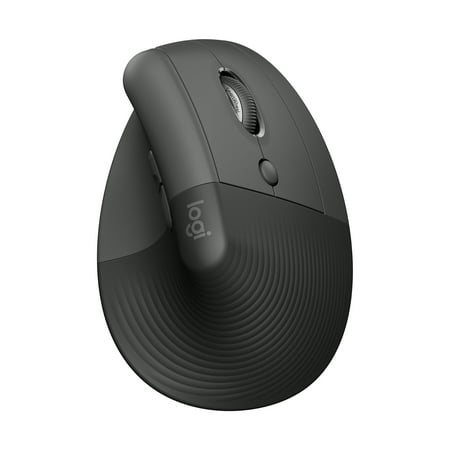
Logitech Lift Vertical Ergonomic Wireless Computer Mice
- Brand:
- Logitech
- Model Number:
- Lift Vertical Ergonomic Wireless Computer Mice
- UPC:
- 097855195968
- EAN:
- 0097855195968
- Walmart SKU:
- 5144705302
Current pricing at $69.00 reflects recent market activity, running 0.0% below the 90-day average.
| Price Type | Price | Date |
|---|---|---|
|
Highest Price
|
$79.00 | |
|
Lowest Price
|
$54.09 | |
|
Most Recent Price
|
$59.99 |
| Price Type | Price | Date |
|---|---|---|
|
Highest Price
|
$69.00 | |
|
Lowest Price
|
$59.00 | |
|
Most Recent Price
|
$69.00 |
Tracking History: We have tracked Logitech Lift Vertical Ergonomic Wireless Computer Mice since 2/7/2025. The most recent price update was on Jul 11, 2025.
Price Range: Over the past 90 days, the price has ranged from $59.00 (lowest on 2/7/2025) to $69.00 (highest on 5/8/2025). The average price during this period is $64.00.
Current Trend: No Walmart.com pricing data available for analysis.
Customer Insights: Rated 4.5/5 from 545 reviews.
I have large hands and really dislike the trend toward micro-sized mice. I don't game and primarily use this for programming and office work. This mouse fits my large hand just fine. I like the fact that I can use it both plugged in and wirelessly. I've read reviews (on other sites) where people complained about battery life. If you leave the RGB lighting on all the time, yes, it does impact battery life. However, it has a great standby mode and is very conservative with battery usage when used wirelessly with the RGB lighting turned off. For those with carpal tunnel syndrome or shoulder issues, this style of vertical mouse is a godsend. It took me about a day to get used to it. If you are accustomed to hovering your hand (and lifting your forearm) with a traditional mouse, this is a different experience. It's best used with your entire forearm resting on the desk and just moving your wrist. I experienced noticeable relief when using the vertical mouse this way. It is very well built, and the display is sharp and easy to read. I am buying a second mouse as a backup. Overall: 5 out of 5 stars.
This was my first vertical mouse that I have every had. I have had flat mouses for pretty much all my life. This was definitely a game changer, being a engineering student I use my mouse and laptop a ton, probably at least 70hrs a week, so over time the flat mouse would cramp my hands, but this one has been so comfortable. I will say that to use the initial USB setup is a bit tricky as you need a special drive for the AOC mouse to work, but it's USB connection works seemlessly. The best feature is the battery life, I have used it everyday for 3hr long classes and it will last easily one charge, the RGB gives it some style, and I love the portability of it being able to just pop it into my backpack. I have not had to set it up on another laptop so I am not sure about that but overall it is an excellent mouse and worth its price in my opinion
It is supper easy to use and customise lighting via led colours. I love the change in dpi (how fast the mouse pointer moves) by just click of a button. It really has looks and function locked. Would recommend if you have hand problems or love a cool mouse. Best to have a mouse pad
As always Logitech has what I need, the left and right mouse buttons do not make a click noise and just laying your finger on the button activates right click menu James k Luper
I bought this mouse because I was having a lot of pain using the magic mouse that came with my iMac. This mouse is so comfortable, and I started using it seamlessly. It's quiet, it's smooth and the optional buttons are convenient. I love it!
I have fairly small hands and it fits just perfectly for me. I love the lack of sound on the click. Been using for a couple of months now and have no issues thus far.
this is a great product. The fact that it has three options of wild, Bluetooth and wireless with a dongle is amazing. also, the DPI customized setting is great. I'm highly recommended for this product
I use my M650 for hours each day. The capability to use it across 3 different PCs is a real time saver for me. I use the USB interface on one and Bluetooth on the other two. I also have some special keys functions I use. I initially thought it was a bit expensive, but it has paid for itself.
Great for those with large hands and simple. Sometimes does not smoothly sdhift from LOGI sensor to bluetooth, requiring it to turn on and off to reset sensor settings.
It is quiet and the battery lasts, but it is extremely laggy and makes every game hard to play, much more worth it to buy a cheaper mouse or a much more expensive one, right now I’m stuck with this one and I can use it but wouldn’t recommend it to anyone else or buy it again.
Detailed price history for the past 90 days
No Walmart.com pricing data available for analysis.
Third-Party Sellers prices have ranged from $57.00 (Aug 22) to $79.00 (Jun 29) over the past 90 days. Current price is close to the 90-day average of $62.93.
| Date | Price | Change | % Change |
|---|---|---|---|
| $59.99 | $+0.00 | +0.0% | |
| $59.99 | $+0.00 | +0.0% | |
| $59.99 | $+0.00 | +0.0% | |
| $59.99 | $+0.00 | +0.0% | |
| $59.99 | $+0.00 | +0.0% | |
| $59.99 | $+0.00 | +0.0% | |
| $59.99 | $+2.99 | +5.2% | |
| $57.00 | $-0.99 | -1.7% | |
| $57.99 | $+0.00 | +0.0% | |
| $57.99 | $+0.59 | +1.0% | |
| $57.40 | $-0.54 | -0.9% | |
| $57.94 | $+0.54 | +0.9% | |
| $57.40 | $-0.54 | -0.9% | |
| $57.94 | $+0.00 | +0.0% | |
| $57.94 | $+0.00 | +0.0% | |
| $57.94 | $-0.05 | -0.1% | |
| $57.99 | $+0.00 | +0.0% | |
| $57.99 | $+0.00 | +0.0% | |
| $57.99 | $+0.00 | +0.0% | |
| $57.99 | $+0.00 | +0.0% | |
| $57.99 | $+0.05 | +0.1% | |
| $57.94 | $-1.55 | -2.6% | |
| $59.49 | $-0.50 | -0.8% | |
| $59.99 | $-19.01 | -24.1% | |
| $79.00 | $+0.00 | +0.0% | |
| $79.00 | $+0.00 | +0.0% | |
| $79.00 | $+0.00 | +0.0% | |
| $79.00 | $+0.00 | +0.0% | |
| $79.00 | $+0.00 | +0.0% | |
| $79.00 | $+9.05 | +12.9% | |
| $69.95 | — | — |