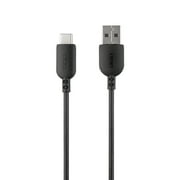
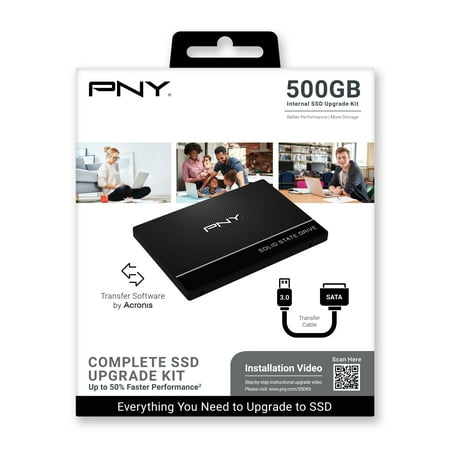
PNY 500GB CS900 2.5” Solid State SATA-III SSD Upgrade Kit w/ Transfer Cable and Software
- Brand:
- PNY
- Model Number:
- SSD7CS900-500KIT-RB
- UPC:
- 751492634906
- EAN:
- 0751492634906
- ASIN:
- B08LHK2HWN
- Walmart SKU:
- 172976564
Trending downward with a $0.00 move to reach $49.68. Current price runs 0.0% below the 90-day average.
| Price Type | Price | Date |
|---|---|---|
|
Highest Price
|
$66.52 | |
|
Lowest Price
|
$32.00 | |
|
Most Recent Price
|
$64.00 |
| Price Type | Price | Date |
|---|---|---|
|
Highest Price
|
$52.99 | |
|
Lowest Price
|
$39.00 | |
|
Most Recent Price
|
$49.68 |
Tracking History: We have tracked PNY 500GB CS900 2.5” Solid State SATA-III SSD Upgrade Kit w/ Transfer Cable and Software since 12/5/2022. The most recent price update was on Jul 25, 2026.
Price Range: Over the past 90 days, the price has ranged from $39.00 (lowest on 3/25/2023) to $52.99 (highest on 2/27/2023). The average price during this period is $47.51.
Current Trend: Walmart.com prices have ranged from $49.68 (Jul 25) to $49.68 (Jul 25) over the past 90 days. Current price is close to the 90-day average of $49.68.
Customer Insights: Rated 4.2/5 from 98 reviews.
I have been a computer tech since 1998 (my career has been in desktop IT for several different Corporatations and have also had my own company the last 5 years. I have recently switched most of my computers over to SSDs because of the significant performance boost it gives. I have used this drive as an external hrs drive because my laptop and desktop already have SSDs but need an external drive with faster performance. The files have transferred quite quickly and initialization and format of the drive were quick. I am happy with this and found it be extra lightweight so it will travel well for me in my laptop bag. Two thumbs up so far!
My initial impression of the PNY 500GB SSD (Solid State Drive) Upgrade Kit is very positive. Everything you need to make it work is included in the box. This SSD can be used in at least three different ways. First have to use the Disk Management tools in Windows so your computer recognizes the new disk. Then it automatically formats the drive. I'm not sure why this wasn't done before sending the SSD. There are no instructions or any documentation in the box. Having never done anything like this before I had to call Tech Support to figure this out, but it's easy enough if you're at all computer savvy and the PNY voice mail tree actually will walk you through it. Once I got that figured out, I cloned my existing hard drive onto this fast SSD using Acronis software. You have to download Acronis and use the supplied registration key to activate it – the key is on a sticker on the bottom of the plastic carrying tray the SSD arrived in. After that, replace your existing hard drive with the new drive. However, my computer is very old and while the new hard drive fit perfectly and was recognized and held all my data, I still needed to create a USB drive with the boot files. That was annoying to me so I looked for other uses. Next, I used the SSD as a backup drive to duplicate files I wanted to keep. That worked perfectly, using the supplied USB cable to connect to the drive. As I said, my computer is old, so my existing (spinning) hard drive was the limiting factor on speed, but it's very obvious the SSD was really fast as strictly a backup. Finally, my wife has a Lenovo Idea Pad (also from Walmart) that has a small SSD installed. However, there's a spot inside the computer body for an additional SSD drive and we installed it in her computer. She went from a mere 120GB of storage to 620GB immediately. Her computer recognized the PNY SSD without any issues and now she's very happy with the drive and the additional storage. You can probably tell I'm not a tech genius and there was some on-the-job learning here for me, but there are also a lot of videos online and PNY Tech Support was great (thanks Ron). If you're looking for an easy way to upgrade your computer or for additional backup capability take a look at this solid state drive. It's fast, has a ton of storage room and can be utilized in multiple ways. I wasn't expecting anything so versatile when I decided to review this hard drive. Big win.
The PNY SSD7CS 900 500GB Kit is really easy to get up and running IF you read the manual. And by manual, I mean the card in the box that says to go to the website and download the software that is needed to make it go. The drive is not plug and play out of the box like a usb memory stick is. The drive needs to be partitioned and formatted before it can be used. You can do it manually in windows, or you can use the software they provide on the website. Either way, once you get it up & running you will be amazed how much faster it is than your old mechanical hard drive. Boot time is drastically reduced as well as loading any software. For anyone needing to pump some new life into an older pc or laptop that has started to slow down so much to be almost unusable, I definitely recommend you give this SSD drive a try.
Do not let installing a drive in your laptop intimidate you. I assure you that anyone with a little common sense can easily install this. The hardest part is waiting for the software to clone your old laptop drive. A word of caution before purchasing this unit, make sure to check your old laptop's drive hard drive size. Considering this is 500GB. My old drive was 750GB. I did not have the entire drive filled up. So i did not mind the couple hundred gigabyte loss in volume. Over the gain in speed my laptop now has. My laptop is 10 years old and this amazing drive sped it up like a new computer now! Once you download the software and install it, there is a code inside the box to use as your software license. Then simply plug the drive in to a USB port and launch the software. Clone the drive by selecting the source which is the laptop old drive and the target which is the new drive you just plugged in. After that, for me it took 2 hours to clone the drive. Please note you will not be able to use your laptop during this time. Once finished. The computer was already off. I took a screwdriver, popped out the back panel. Unscrewed 4 screws for the cage that was holding the old hard drive. TOok out the old drive, slipped in the new one. Tightened the 4 old screws. Put the back panel back on. Turned on the computer and was amazed at how fast my system loaded. You will be too! Lastly, the cable is great because now you can use that if you want to to access your old drive or any other hard drive to make it an external hard drive. by simply plugging in the cable.
This PNY 500 GB comes with the 500 GB Solid State Hard Drive and SATA Data Transfer Cable that will work with a laptop or a desktop computer. I did not use the scan code for instruction as I already know how to clone a drive, but I did use the SATA cable and SSD that came in the kit. You can also load your Operating System like WIN 10 on this new PYN SSD and do a clean (new) installation. Just remember that when doing a clean installation, you will need to enter the Operating System's licence. If cloning and old hard drive to the new SSD, the licence will automatically be move to the new PNY SSD, nothing else needed! I used this kit on my laptop. I cloned the old Hard Drive in my laptop to this new SSD (solid state drive). Once the clone was done, I swapped out the old drive for the new PNY SSD and started the laptop. The laptop was extremely fast on boot-up with this SSD. WIN 10 was running in seconds, which was not the case with the old Hard Drive. Also I noticed that retrieving files, running an application or copying large files was also enhanced (faster), making this update to the PNY SSD a great experience for me. This SSD runs very stable all day no matter what I run on my laptop. On the tech side this SSD speed is very fast with reads being around 550 MB/Sec and writes being around 500 MB/Sec. Other benefits I noticed is the laptop runs cooler and there is a noticeable increase in the battery running time as well, so I can run longer on the battery between charges! There is a three (3) year warranty on this PNY SSD. You can clone to this SSD or load your OS onto it and start enjoying faster speeds! I had a great all around experience with this kit!
Thank goodness i got this SSD just in time. I had to back up my ailing Mac computer and wasn't sure how to do this. I opened the box, plugged in the SSD to the USB port of my computer and away i went! I had to take a minute to figure out how to initialize my SSD due to having a Mac but in a few seconds i was relieved. The stress of having all my files and photos safely tucked away in this portable drive was the answer i had been looking for!!
Ever since Microsoft ended support for Windows 7 back in January, I have been wanting to upgrade my desktop machine to Windows 10. The one thing I kept obsessing about however was how I was going to like it, and to be truthful, I simply wasn't crazy about the way it looked. On the other hand I did know that there was a risk in continuing to run Windows 7 without security updates, and it made me leery about making online purchases, banking, paypal, etc. I was in a quandry over it, when it occurred to me that what I might want to do was purchase a new drive expressly for the purpose of installing a full version of Windows 10 on it, so I could test drive it, if you will. Since the old drive would not be touched, I could always swap back to Windows 7 if I truly hated it. As luck would have it, my local Walmart had one PNY 500GB drive kit in stock, and at a fantastic price on Rollback, too. It was several bucks cheaper than any of the other vendors I checked. I eagerly purchased it and hurried home. The drive was well packaged and came accompanied by a USB interface adapter and a serial number for the Acronis software which you can download online if needed. Since my goal was simply to swap the drives, I placed the USB interface adapter aside and deferred the free software for a future time. Incidentally my existing drive was also a PNY, but from the higher performance XLR8 series. It is still cranking along flawlessly after 6 years. Its solid performance and longevity are the primary reasons I wanted to get another PNY drive. The drive exchange went painlessly and about 30 minutes later I was greeted with Windows 10 login screen. As it turned out my fears were unfounded. I am rapidly adjusting to Windows 10, but with more peace of mind. The older drive will go into another machine slated for a Windows 10 upgrade in the near future. Could PNY have done anything to make this package better? At this price point it's hard for me to find any fault, really. It would have been nicer perhaps if a 2.5" to 3.5" mounting tray and screws were included for installing in an older case which lacks 2.5" drive bays. Fortunately I had a tray on hand from my old drive. I only mention this because PNY labels this as a "kit", and as such, a mounting tray would truly make this kit complete. Performance-wise the drive is awesome. Windows is usable seconds after my system POSTs. It's really quite amazing. Applications open instantly, the system feels extremely responsive, no hesitating, no lurching, just as smooth as can be. To sum up things, I am delighted with my purchase and I highly recommend this drive.
It took a bit, but I was finally able to install my 500GB SSD! We chose the internal route in hopes that it would run faster. My boot time is incredible now! It takes about 30 seconds for my computer to be fully up and running with everything ready to go. I'm incredible impressed by the speed and capability of the SSD!! It only took about 10 minutes to install, and that was only because of the cleaning I had to do beforehand. We haven't had any issues!
I was so excited to get this and put it to use. I lost all my pictures when my hard drive crashed two years ago, and was looking for ways to back them up. I've used flash drives, but they get full quickly. When I saw this 500GB external hard drive, I was excited! It is super easy to install. Hook it up to an open USB slot in my USB extension, turned the laptop/PC on and off, and when it turned back on, it automatically installed the software. I quickly backed up my hard drive onto this external hard drive and disconnected it. Each month, I am going to do this again, so that I have a backup of my hard drive. Super easy for a non-tech person like me, so it will be equally easy for you. I like the small size, and was impressed with the automatic software installation.
It is fair to say I am not a computer hardware or software specialist, but I am not exactly tech illiterate, either. I have been involved in the building of my last two PCs. Installing a new drive alone? Sounded a little challenging, but the SSD drive product box reassured me. Three simple steps! That's what the box says: Transfer data using included Acronis software and transfer cable. Install CS900 SSD inside your laptop or desktop computer. Bootup and enjoy the storage and performance benefits of your PNY SSD. Well. I did not find the process that simple. I read a lot of opinions from other users online in attempts to make sure I did this correctly. Some people seemed to experience plug and play with the software. I did not. I had to go to the website and download it. My computer (built in 2016) did not detect the new drive, so I had to go into the control panel areas and change some settings. The language of the software and instructions (which you also have to go download because they are not included!) is not simple. I could understand for the most part, based on my watching-over-the-shoulder experience with hard drive installation. The instructions are 89 pages long! And all in one language, so not the same few pages repeated. 89 pages. Every step is a new warning not to mess up or your computer will brick. As I went step by step, there was nothing letting me know if I correctly completed the task or not. Just more warnings not to mess up or there would be consequences. I felt like I forced this thing over and over again, looking up hints and tricks. I had no idea if it would work and with potential risk damaging my computer, along with all the lost confidence on the way, got me to stop. In the end, I got a computer friend to come take a look and they did it manually, having the knowledge to do so. After having to add my own researched steps into the process, I lost confidence that it would work and got an “expert” to do it in my stead. Yes, the drive speeds up the computer. It does what it advertises. My PC loads up as fast as my newer laptop with an SSD drive. My complaint is with the misleading simplicity. I did not think before knowing this item existed that I could solo change my drive to SSD. But the box advertisement convinced me otherwise. It may have worked all along as I nearly forced every step to work until the very end. There could have been something wrong with my computer or the drive, making a manual clone and backup necessary. To add, the PNY website said it had a video to help, but there was only one video and it was about physically replacing a laptop drive. There was nothing about the software or anything that would help install in a desktop. That was also disappointing. It did not come with a new SATA cable. I did not like that but you are supposed to be replacing an old drive, I guess. Also, the software warns you about a timed deadline to use the software, as well as a message that you only get so many tries to install with the serial number before you have used all of your attempts. Yikes.
Detailed price history for the past 90 days
Walmart.com prices have ranged from $49.68 (Jul 25) to $49.68 (Jul 25) over the past 90 days. Current price is close to the 90-day average of $49.68.
| Date | Price | Change | % Change |
|---|---|---|---|
| $49.68 | $+0.00 | +0.0% | |
| $49.68 | — | — |
Third-Party Sellers prices have ranged from $64.00 (Sep 13) to $64.00 (Sep 13) over the past 90 days. Current price is close to the 90-day average of $64.00.
| Date | Price | Change | % Change |
|---|---|---|---|
| $64.00 | $+0.00 | +0.0% | |
| $64.00 | $+0.00 | +0.0% | |
| $64.00 | $+0.00 | +0.0% | |
| $64.00 | — | — |