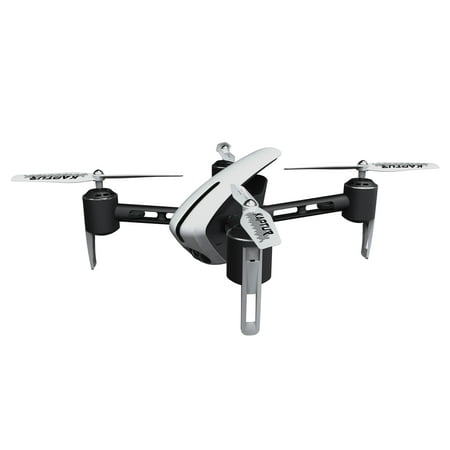
Protocol Kaptur GPS II Wi-Fi Drone with HD Camera
- Brand:
- Protocol
- Model Number:
- 6182-7XBH WAL
- UPC:
- 658531000565
- EAN:
- 0658531000565
- Walmart SKU:
- 708931057
Price momentum shifted downward , bringing the cost to $189.00. This represents a 0.0% discount to typical levels.
| Price Type | Price | Date |
|---|---|---|
|
Highest Price
|
$99.99 | |
|
Lowest Price
|
$54.99 | |
|
Most Recent Price
|
$54.99 |
| Price Type | Price | Date |
|---|---|---|
|
Highest Price
|
$189.99 | |
|
Lowest Price
|
$99.00 | |
|
Most Recent Price
|
$189.00 |
Tracking History: We have tracked Protocol Kaptur GPS II Wi-Fi Drone with HD Camera since 12/8/2022. The most recent price update was on Aug 24, 2026.
Price Range: Over the past 90 days, the price has ranged from $99.00 (lowest on 12/26/2022) to $189.99 (highest on 12/8/2022). The average price during this period is $183.07.
Current Trend: Walmart.com prices have ranged from $189.00 (Aug 24) to $189.00 (Aug 24) over the past 90 days. Current price is close to the 90-day average of $189.00.
Customer Insights: Rated 4.0/5 from 245 reviews.
drone works great especially for the price. couldn't find a working app for my phone but I don't use the camera anyways
flying good .....? but cant use camera cuz no app
Easy to control and has lots of fun with the kids
OK, I know you've seen these other reviews that basically say this drone is a waste of money. It's also a waste of money to buy a car for someone who can't see. This is a drone for the tec savy. A product that is very complex to set up, but not to fly. The set up is for your safety as well as to keep from losing the drone. The features that are offered are of the finest quality. Features that until today, would only be on the $1000 drones of yesterday. You don't have to pay that kind of money for the same kind of performance. You do have to be able to read the instructions, have a brain big enough to remember at least (10) orders of operation needed to get this guy in the air, and a space open enough to be able to lock onto the satellites needed for safe and stable flight. The gps system is how the return to home feature works, as well as the return to home for the low battery. The gps puts the boundary around the drone to keep it in range at all times, and also to keep it from flying away in situations that may occur due to outside influence like radio signal loss due to other nearby devices, high winds, etc. Also.... this is the most important thing..........FOLLOW THE INSTRUCTIONS TO THE LETTER! The start up procedure is important to get exactly right. From binding the drone to the controller, to receiving the satellite signals. If you do this in a park with lots of metal, or a parking lot with lots of cars, the metal will interfere with the satellite triangulation. The drone will still fly, but if not linked exactly like the instructions say, you will have no satellite signal, which will mean no return to home feature, and no containment barrier to keep the drone from being lost from pilot error or loss of signal. You will have to rely on your flying skills alone. I am an expert pilot when it comes to these drones, but I wouldn't fly mine without the gps system up and running. Also beware of strong winds. These Kaptur drones are light so they don't need to be registered, but you pay for that by not flying in strong winds. A 5 mph wind is strong enough to push your drone out of range and out of sight. So maintain constant weather updates. If you follow these simple instructions, you will most certainly enjoy your GPS 2 Kaptur drone as much as I do....... its a complex but quality product that will give you many, many enjoyable flights. THANKS PROTOCOL, you guys ROCK!
I am thoroughly impressed with Protocol's Kaptur GPS II Wi-Fi Drone. Out of the box, this drone is stylish and very lightweight. I find that being lightweight helps this drone to fly and move really well. The remote control for this has a phone mount that fits my phone securely and perfectly. There is a free app that you download to your phone for the live stream and I found the app to be very easy to navigate and use. I really like that this can take live streams as well as still HD photos. The pictures and videos I got out of my first flight were amazing! You can tell that the auto-stabilizers used in this drone are high quality because this drone is quite easy to control and get excellent quality videos from. The coolest feature of this drone is the built in GPS, which brings the drone home by just clicking a button. Other key features of this drone are the ability of it to fly home when the battery is low, the ability to hover in place easily, and it even includes geo-fencing so that the drone is always in a range for transmission. I'm super impressed with the quality, control, and features of this drone and highly recommend it!
I'll start by saying this is first ever drone or even remote anything I've ever owned so these comments are from complete noob. It took me a good a 30 minutes to set up drone and get it airworthy (not including blade guards installation. More on that later.). Would've been about 20 if I had followed directions included inside the drone box and NOT the app or pamphlet that's included with the controller. *ONLY follow the directions in the booklet included in drone box* The box includes everything you'll need: charging cable, 2 batteries, preassembled drone, spare blades and cell phone holder controller. The guard blades were impossible to "just snap in" but watched a video on how to loosen motors from legs in order to install blade guards. *way easier just be careful not to strip the screws when unscrewing/pulling apart.* The video quality is HD and drone does not seem to fly any differently when recording. It will fly straight up into the air very high on initial launches and return to a low hover once it found satellite signals. The batteries do not last long but comes with 2 which is nice but instructions say let drone motors cool off for about 15 minutes between flights (ie battery life) so not good to switch out batteries real quick then send it back up. It takes a minute or two to calibrate and sync etc before each flight but the steps are fairly easy/repetitive that I'm getting quicker.
My 16yo son was super excited getting the Protocol Kaptur GPS 2 Wi Fi Drone with HD Camera. Right off the bat, he was glad it came with it's own screwdriver, extra blades, and blade guards. It's fairly easy to get it ready to fly, but if you have any problems, there's the manual, and the You Tube video to help with instructions. The controller is easy to use, and it took us a little bit to get it synced up. For some reason the wi fi would sync, then lose it, but finally got it, and took it out. Also for some reason, when we take it out, sometimes we can't get the camera or video to work, I'm not quite sure what we're doing wrong when it happens. I am thankful there is a beginner's mode, since I'm a beginner. The GPS return home is great to have, the low battery return, and crash resistant materials.
Right propellers stopped working after a week. Got warranty through Walmart and when I went to file claim I was told it's under manufacture warranty and to contact the manufacturer. I reached out to manufacturer twice and never received a response. No point in buying coverage if I still have to contact manufacturer myself.
No App available on device product site . . . third party App available for subscription
I can't seem to download the app needed for it. I contacted company about it, and they never responded.
Detailed price history for the past 90 days
Walmart.com prices have ranged from $189.00 (Aug 24) to $189.00 (Aug 24) over the past 90 days. Current price is close to the 90-day average of $189.00.
| Date | Price | Change | % Change |
|---|---|---|---|
| $189.00 | $+0.00 | +0.0% | |
| $189.00 | $+0.00 | +0.0% | |
| $189.00 | $+0.00 | +0.0% | |
| $189.00 | — | — |
Third-Party Sellers prices have ranged from $54.99 (Jul 12) to $54.99 (Jul 12) over the past 90 days. Current price is close to the 90-day average of $54.99.
| Date | Price | Change | % Change |
|---|---|---|---|
| $54.99 | $+0.00 | +0.0% | |
| $54.99 | $+0.00 | +0.0% | |
| $54.99 | $+0.00 | +0.0% | |
| $54.99 | $+0.00 | +0.0% | |
| $54.99 | — | — |