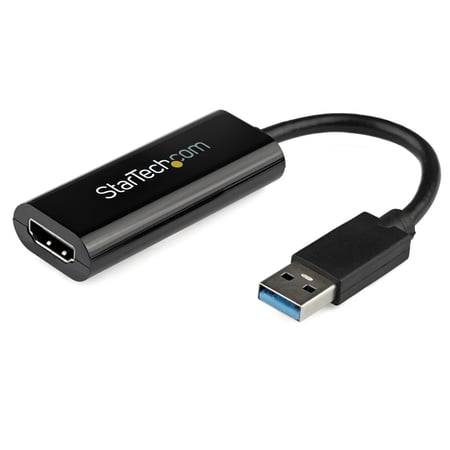
StarTech Slim USB 3.0 to HDMI External Video Card Multi-Monitor Adapter
- Brand:
- StarTech.com
- Model Number:
- USB32HDES
- UPC:
- 065030854887
- EAN:
- 0065030854887
- ASIN:
- B00H91BQ7Y
- Walmart SKU:
- 35118144
Price momentum shifted downward , bringing the cost to $31.57. This represents a 0.4% discount to typical levels.
| Price Type | Price | Date |
|---|---|---|
|
Highest Price
|
$34.98 | |
|
Lowest Price
|
$34.98 | |
|
Most Recent Price
|
$34.98 |
| Price Type | Price | Date |
|---|---|---|
|
Highest Price
|
$31.99 | |
|
Lowest Price
|
$25.00 | |
|
Most Recent Price
|
$31.57 |
Tracking History: We have tracked StarTech Slim USB 3.0 to HDMI External Video Card Multi-Monitor Adapter since 11/3/2025. The most recent price update was on Jul 17, 2026.
Price Range: Over the past 90 days, the price has ranged from $25.00 (lowest on 1/30/2026) to $31.99 (highest on 2/27/2026). The average price during this period is $28.93.
Current Trend: Walmart.com prices have ranged from $31.57 (Jul 16) to $31.99 (May 11) over the past 90 days. Current price is close to the 90-day average of $31.69.
Customer Insights: Rated 4.76/5 from 21 reviews.
Great device when you don't have an HDMI port.
Was worried what my resolution would look like as my tower has only USB 2.0 ports available for the second monitor. Plugged in an the 27" Dell monitor set up at 1920 x1080 automatically giving a great picture. Only issue is my mouse seems to track a little slower on the 2nd monitor, but probably has more to do with the age of the computer than the adapter
The external video card makes your life less complicated as opposed to one without one on an adapter. It's definitely worth the money. It took less than 5 minutes to get everything connected and online. I ordered it on a Friday and received it the following Monday.
I like that there is no long cord. I purchased this item for my son who has cable, game system & fire stick. His tv only hdm1 , hdm2 & usb. USB to HDM ables him to connect all three systems. No bulky cords. Connects directly to tv. Good purchase I would recommend this item
So far after 1 month works perfectly with my Dell Inspiron laptop. Makes working from home with an HDMI extra monitor super easy. Quick driver install and ready to roll. Great product!
Well what can I say about this product? Simply that Startech have once again delivered a great device that gives the ability to easily add extra monitors to a laptop or desktop. I had previously been running the older VGA versions for a number of years and I have to say they worked flawlessly. My reason for buying the newer ones is that I upgraded my monitors so thought that I would take the time to upgrade the cards as well. I have been using these now for over a year with no issues. I have 4 of these cards connected to my personal laptop. I can also unplug them and plug them into my work laptop with no issues either. Simply if you want an easy way to add more monitors then buy these. I know next time I swap my monitors in a year or so I will also be upgrading the video cards to the 4K ones as the Startech USB video cards have not let me down over the last 7 years I have been using these and their predecessors.
It was hard to get a direct answer about how to get a 4th monitor to work on an intel based laptop. The problem is that the Intel CPU only allows 3 displays, even if you have a dedicated GPU in the laptop because the GPU isn't a full gpu, but just an extra chip that runs through the Intel CPU. Since it runs through the intel CPU, it is limited by the same 3 display output as the CPU. This allows you to run more than 3 displays on a single laptop.
Super easy solution! I wanted to use two external monitors with my work laptop and this does the job. With the laptop, we found that daisy-chaining wouldn't work, and there weren't enough HDMI ports to plug them both into the laptop at once. Based on some properties info, it looked like the laptop couldn't have supported two monitors (not without the help of the video card in this adapter). When it arrived I didn't even end up needing to install a driver--just plugged this thing in and it works great! I had to do a bit of fiddling to get the resolutions (size and clarity) to look right on both external screens, and to select settings so I could close the laptop (without it going to sleep) to put it aside while working on the 2 desktop screens. That wasn't much trouble since I'm not afraid to experiment with settings, though others might find that intimidating. Altogether, I like this thing because it saves me from needing a costly docking station (which my IT dept wasn't even sure would work!)
I bought this to add a second display to my Startech Thunderbolt dock. However, I didn't realize until I tried to install it that Startech doesn't provide an OSX driver for this device. I was pretty bummed out until I found this article: https://discussions.apple.com/message/19185308#19185308 This did the trick for me. I installed the driver recommended in this article and the adapter now works great. I have this device plugged into one of the USB3.0 ports on a Startech Thunderbolt dock. I now have two HDMI displays connected through my Thunderbolt dock. One connected with a thunderbolt to HDMI adapter cable and the other with this adapter. Not sure why Startech doesn't just support and provide this driver directly. I have a Macbook Pro running Mavericks.
I've been using the adapter for a few months now and it's been working fine. I wish it had support for Linux/Ubuntu.
Detailed price history for the past 90 days
Walmart.com prices have ranged from $31.57 (Jul 16) to $31.99 (May 11) over the past 90 days. Current price is close to the 90-day average of $31.69.
| Date | Price | Change | % Change |
|---|---|---|---|
| $31.57 | $-0.03 | -0.1% | |
| $31.60 | $+0.00 | +0.0% | |
| $31.60 | $+0.00 | +0.0% | |
| $31.60 | $+0.00 | +0.0% | |
| $31.60 | $+0.00 | +0.0% | |
| $31.60 | $-0.39 | -1.2% | |
| $31.99 | $+0.00 | +0.0% | |
| $31.99 | — | — |
Third-Party Sellers prices have ranged from $34.98 (Jun 10) to $34.98 (Jun 10) over the past 90 days. Current price is close to the 90-day average of $34.98.
| Date | Price | Change | % Change |
|---|---|---|---|
| $34.98 | $+0.00 | +0.0% | |
| $34.98 | $+0.00 | +0.0% | |
| $34.98 | $+0.00 | +0.0% | |
| $34.98 | — | — |