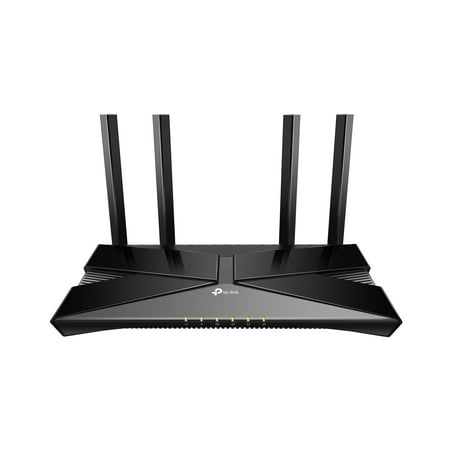
TP-Link Archer AX3000 | 4 Stream Dual-Band WiFi 6 Wireless Router | up to 3 Gbps Speeds
- Brand:
- TP-Link
- Model Number:
- AX3000
- UPC:
- 845973088781
- EAN:
- 0845973088781
- ASIN:
- B07YMFZ28Q
- Walmart SKU:
- 100797162
Current pricing at $79.99 reflects recent market activity, running 0.0% below the 90-day average.
| Price Type | Price | Date |
|---|---|---|
|
Highest Price
|
$139.99 | |
|
Lowest Price
|
$68.00 | |
|
Most Recent Price
|
$96.00 |
| Price Type | Price | Date |
|---|---|---|
|
Highest Price
|
$139.99 | |
|
Lowest Price
|
$69.00 | |
|
Most Recent Price
|
$79.99 |
Tracking History: We have tracked TP-Link Archer AX3000 | 4 Stream Dual-Band WiFi 6 Wireless Router | up to 3 Gbps Speeds since 11/22/2022. The most recent price update was on Oct 2, 2025.
Price Range: Over the past 90 days, the price has ranged from $69.00 (lowest on 5/14/2024) to $139.99 (highest on 12/5/2022). The average price during this period is $87.61.
Current Trend: No Walmart.com pricing data available for analysis.
Customer Insights: Rated 4.3/5 from 874 reviews.
With my old router, just uploading pictures took a few minutes which was so aggravating. Once I switched to this one, my pictures uploaded instantly. Switching web pages was also a lot faster. I cannot believe how much faster everything is just by upgrading my router to the TP-Link Archer AX3000. Set up was super easy with the TPLink Tether app. This router is backwards compatible and can connect with some older devices. It has a dual core CPU that allows for a more powerful signal to connect multiple devices without lag. It has four antennas that will transmit to every corner of your house. I have no dead spots in my house and the signal even reaches a good ways outside my house. It balances bandwidth of all connected devices to ensure fair and even connection and streaming. It has USB 2.0 ports for local sharing, play media from the USB and you can access the USB drive when away from home using remote access. I set this up by connecting it to my modem. This isn't a stand alone router so you will need to connect it to a modem or cable mode. The look of this router is a sleek and modern design and is quite thin. In the box, it comes with the router, AC adapter, WIFI info card, instruction booklet and ether net cord. the four antennas are located on the back of the router and are already attached. Overall, I am very happy with this router and I do highly recommend!
This is excellent WiFi Router! Got this after extensive research! Getting an AX3000 Wifi Router with all this features for $130 is great! In amazon this same thing cost more (In Amazon tp link AX1800 cost $129 whereas here that one cost $100). The signal is great! Tested the speed at various location and it is super fast (30 times faster than before)! Happy with the product. The app is easy to use, and all the features work super great. Will soon this product with bad internet (when I move) - will see if the system will stay stable or not.
We always had problems with conductivity when going to our family, which is in the basement. Installed this Archer AX3000 router and issue solved. Works great, looks great and can be wall mounted. Setup did require a call to our cable company but from there it was a typical install.
The TP-Link AX3000 was a great and much-needed addition to my household. It suits my two-floor townhouse superbly with little to no dead spots. The router supports Wifi 6, so all of my family's iPhone 11's get a good boost in WiFi speeds. Additionally, there is almost no buffering while we watch Netflix or YouTube videos. I wish I had found out about this router earlier. The only small downside is that there aren't any lights like those that are found on the older TP-Link WiFi routers to indicate that the devices connected via ethernet are receiving internet properly. Overall, it's a great WiFi router for any household.
We’ve been using this for five days now and have noticed that our internet is running faster. We had been having issues with streaming, but after watching several movies with no buffering or stopping and starting, we think this router has solved the problem! It was very easy to install by following the booklet, step by step. Be sure to follow both pages. We definitely would recommend this for performance and ease of installation.
This router is massive--the included picture shows it, in box, next to my old router. It's twice its size. And, I guess, with its massive size comes massive capabilities. This router is more capable than I am. 'I ain't got time for that.' In today's world, you want your electronics to just work--meaning you don't notice them working because they just do. No one wants slow or lags, and this router is faster than anything I can ever throw at it, meaning it just works without me noticing. Just how it should.
This router comes nicely packaged with four antennae. The setup went smoothly for me, and this is only the second router that I've ever setup before, so I was concerned about that. (I'm not the person who usually does this for our household.) As with any new router, it's a hassle to have to figure out how to get all our smart devices on the new network, but that's not the fault of this router. In the end, it's a great router!
The slim router looks well match a “gaming” setup. There are four non-removable, squashed-diamond antennas and lights to tell you connection, wireless status, etc. But the light icons are not very large; you’ll have to get very close to read it. Typically, there are also no lights to indicate which of the four router ports are being used. There is an on/off switch, which is handy if you ever need to restart. There is a pushbutton on the back to shut all LED’s off to completely darken it. There is also a hardware WPS button. Case screwholes on the bottom allow hanging from a wall. It seems the cabinet has enough cooling slots and is completely silent. But the bottom gets pretty warm, so I’d recommend placing on hard surface. IPv6 is not on by default. There was a firmware upgrade waiting, which improves Surface and AX smartphone usability. The upgrade is painless-- it will check, download, install, and reboot with 2 clicks. You can serve a USB storage device or play media from a connected USB device. You can manage the router on tablet or phone by the TP Tether App, installed by QR code on an included slip sheet or as the wizard runs. The interface smart wizard also runs from your computer upon connection. The GUI is excellent, clear, and provides many useful features. Curiously, it booted to overlapping channel 5 with my stock router on channel 6. I compared performance to my stock Arris modem/router. The TP-Link had very simlar performance until I tilted the outer two antennas almost horizontal to the box. This gave about 2-4 db better signal– especially the 5 Ghz band. So experiment with your install to see. The Intel dual-core processor kept up with any speed my ISP could provide (over 300Mbps). I’d rate it as marginally better. The 2.5GHz defaults to 40Mhz bandwidth. Thankfully, the default wireless password for both networks is just 8 numbers, so it’s easy to enter into devices. It’s easy to flip to “Access Point” mode in the GUI. You can allow guests to access each other. TP-Link has good products and they provide a 2-year warranty.
Good: great performance for the price Not good: router overheats Like many in these reviews, my router would overheat to the point of locking up, and would require to be powered off and allowed to cool down before working again. Attempts to improve airflow via passive means yielded no improvement so I broke down and bought a USB cooling fan for $20. This has solved the overheating issue, but wish I wouldn't have needed to spend that extra money to make this device work properly. Would easily be a 5-star product if overheating wasn't an issue. Is hard to recommend as it stands.
I ordered one router,for $102.dollars and recieved a cheaper one for $37. dollars,took it back to Walmart,as told by people in the return department and told to have them scan bar code they sent me,I relayed this information but lady scanned box instead,this was 8 days ago,and I have not recieved,any type of notice of return,or refund.Ordered another router from Target,it came no problem just what I ordered
Detailed price history for the past 90 days
No Walmart.com pricing data available for analysis.
Third-Party Sellers prices have ranged from $81.68 (May 13) to $139.99 (Jun 30) over the past 90 days. Current price is close to the 90-day average of $100.63.
| Date | Price | Change | % Change |
|---|---|---|---|
| $96.00 | $+0.00 | +0.0% | |
| $96.00 | $+0.00 | +0.0% | |
| $96.00 | $+0.00 | +0.0% | |
| $96.00 | $+0.00 | +0.0% | |
| $96.00 | $+12.98 | +15.6% | |
| $83.02 | $-12.98 | -13.5% | |
| $96.00 | $+0.00 | +0.0% | |
| $96.00 | $+12.56 | +15.1% | |
| $83.44 | $+0.00 | +0.0% | |
| $83.44 | $-16.53 | -16.5% | |
| $99.97 | $+0.00 | +0.0% | |
| $99.97 | $+0.00 | +0.0% | |
| $99.97 | $+0.00 | +0.0% | |
| $99.97 | $+0.00 | +0.0% | |
| $99.97 | $+0.00 | +0.0% | |
| $99.97 | $-0.02 | +0.0% | |
| $99.99 | $+12.99 | +14.9% | |
| $87.00 | $+3.56 | +4.3% | |
| $83.44 | $-56.55 | -40.4% | |
| $139.99 | $+40.00 | +40.0% | |
| $99.99 | $+0.00 | +0.0% | |
| $99.99 | $+12.99 | +14.9% | |
| $87.00 | $+0.00 | +0.0% | |
| $87.00 | $-52.99 | -37.9% | |
| $139.99 | $+52.99 | +60.9% | |
| $87.00 | $+0.00 | +0.0% | |
| $87.00 | $-52.99 | -37.9% | |
| $139.99 | $+56.34 | +67.4% | |
| $83.65 | $-56.34 | -40.2% | |
| $139.99 | $+0.00 | +0.0% | |
| $139.99 | $+50.99 | +57.3% | |
| $89.00 | $+0.00 | +0.0% | |
| $89.00 | $+7.32 | +9.0% | |
| $81.68 | $-58.31 | -41.7% | |
| $139.99 | $+56.97 | +68.6% | |
| $83.02 | $-13.98 | -14.4% | |
| $97.00 | $+0.00 | +0.0% | |
| $97.00 | $+0.00 | +0.0% | |
| $97.00 | $+0.00 | +0.0% | |
| $97.00 | $+0.00 | +0.0% | |
| $97.00 | $-2.00 | -2.0% | |
| $99.00 | $+0.00 | +0.0% | |
| $99.00 | $+0.00 | +0.0% | |
| $99.00 | $-40.99 | -29.3% | |
| $139.99 | — | — |