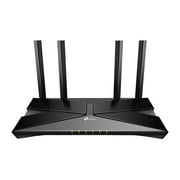
TP-Link Wi-Fi Mesh Router Replacement System | 2- AC1200 Mesh Routers | Coverage up to 3,000 Sq. ft. | Parental Controls | Connect up to 100 devices | TP-Link Deco W2400 price history and forecast - TP-Link Deco W2400 2-Pack
TP-Link Wi-Fi Mesh Router Replacement System | 2- AC1200 Mesh Routers | Coverage up to 3,000 Sq. ft. | Parental Controls | Connect up to 100 devices | TP-Link Deco W2400

TP-Link Wi-Fi Mesh Router Replacement System | 2- AC1200 Mesh Routers | Coverage up to 3,000 Sq. ft. | Parental Controls | Connect up to 100 devices | TP-Link Deco W2400

Brand:
TP-Link
Model Number:
Deco W2400 2-Pack
UPC:
840030700071
EAN:
0840030700071
ASIN:
B07YZRYM5C
Walmart SKU:
700801321
Key Takeaway

Price has held firm at $49.35 for 46 consecutive days, matching the 90-day norm—indicating market consensus on fair value.

Third-Party Seller Summary

Third-Party Seller Price History Summary
Price Type Price Date
Highest Price
$79.00
Lowest Price
$36.00
Most Recent Price
$74.97
Average Price
$58.27
First Tracked
Last Update

Walmart.com Summary

Walmart.com Price History Summary
Price Type Price Date
Highest Price
$79.00
Lowest Price
$39.00
Most Recent Price
$49.35
Average Price
$53.13
First Tracked
Last Update

Price Analysis

Tracking History: We have tracked TP-Link Wi-Fi Mesh Router Replacement System | 2- AC1200 Mesh Routers | Coverage up to 3,000 Sq. ft. | Parental Controls | Connect up to 100 devices | TP-Link Deco W2400 since 11/22/2022. The most recent price update was on Jun 19, 2026.

Price Range: Over the past 90 days, the price has ranged from $39.00 (lowest on 2/2/2026) to $79.00 (highest on 8/2/2023). The average price during this period is $53.13.

Current Trend: Walmart.com prices have ranged from $49.35 (Jun 18) to $49.35 (Jun 18) over the past 90 days. Current price is close to the 90-day average of $49.35.

Customer Insights: Rated 4.2/5 from 1516 reviews.

Customer Reviews

1516 reviews

Customer Reviews

4.2
Based on 1516 reviews
5
1019
4
171
3
83
2
62
1
181
Filter Reviews:
Sort By:
Showing 10 of 1516 reviews

TP Link Mesh Router

MICHAEL January 24, 2026

Bought several of these for my main Internet and my backup because I work from home and need dependable connections at all times. It is easy to setup and configure. I purchased more of them and for the price it another is a win win situation. Great value and dependable product. I order set today.

Was this review helpful?

Wifi Units

Womblemania January 13, 2026

If you have a lot of distance to cover these are the perfect units for you! I connected one unit to my great nephews house and the other unit to my brother's house approximately four hundred feet away and they connected to each other without any problems. Lightning speed!! Easy set up.

Was this review helpful?
Camille February 5, 2026

Great everything especially if you wifi in a hard to access room at a reasonable price. It did slow down our Internet but only mildly. We are very y happy with the purchase.

Was this review helpful?

Best range extender

ashley August 22, 2025

We have an older house that we couldn't get signal in certain parts. The internet company said it was because of the houses age and the way the plaster and brick etc. I bought this in hopes it would help, it did!!!! I now can get signal everywhere in the house and most of the yard! Worth the money for sure!

Was this review helpful?

This is a solid range router.

Ced45 July 11, 2019

I received this product as a member of the walmart spark reviewer program. I have always aligned myself with nether products but decide to give this a try as well. The two pack routers work ok in myth bedroom one and a half bath apartment but it is not an improvement from my netgear AC1750. More importantly, for gamers the signals from both routers could often times cause some lag issues due to NAT compatibilty issues, similar to what can happen with a repeater in a medium/small area. Fortunately, i took this to my parents three bedroom two bathroom house and replaced their annoying internet service provider stock router and it tripled their signal reception instantly. Prior to the TP Link dual band the house had very slow connection especially when four or five people were using the internet but with the bandwidth expansion provide by these two routers that problem is gone ... Thank havens.. so watching netflix, YouTube tv, and surfing the web are possibly without frustration..especially using the phone wifi as well. I also like how the two routers have identical cylindrical mesh-like shapes giving them a cool sci-fi, futuristic appearance. As a nerd, gamer, and scientist, i really appreciate the design. I recommend this product based on that but remember to be cautious when using in medium-small residences.

Was this review helpful?

Great Routers!

FootballMonkey July 4, 2019

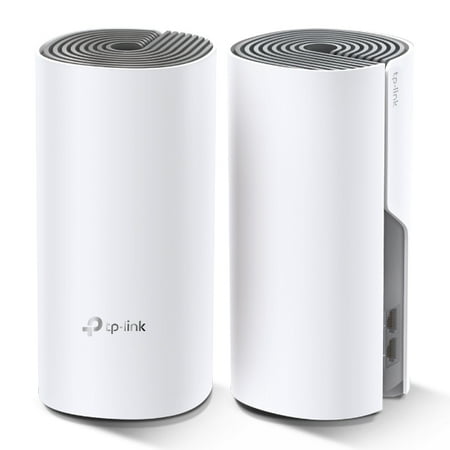
The TP-Link Deco Routers allow you to connect wirelessly (Wi-Fi) to an existing Internet connection. This set comes with 2 wireless routers which create mesh network between them. This means it automatically manages which router any device in your home is connected to – they both share a single SSID, so you just enter all the settings in each of your Wi-Fi devices and the routers will do the rest. The units themselves are very stylish looking (see picture). The instruction manual looks daunting at first, but it turns out that's just because there are instructions in 37 different languages (literally!). It pretty much just says, “Install the TL-Link Deco App for IOS or Android” and includes a table describing what each of the possible LED colors and blink codes mean. The app was easy enough to find and install on my phone, but it does require an account be setup to use. Once you get through all of the account/creation and setup procedure, the app will step you through the router setup process. It connects to the routers via Bluetooth, and seems to do what it is supposed to do and is very intuitive and user friendly. The system does a lot more than just Wi-Fi routing and includes features like parental controls, screen time limits, You-Tube blocker, etc. You can create a profile for each user and control how much time is allowed to be spent online and block specific websites if desired. Don't overlook the “More” button – the square button on the bottom right side of the app, which includes features you may not see at first. All in all the Deco Router system is rich in features and easy to use. I would recommend to anyone looking to cover add or improve Wi-Fi to a home.

Was this review helpful?

Easy WiFi Solution

walmartfanman May 11, 2019

I switched internet providers last week, from telephone company DSL to faster cable internet service, so Walmart sent this item for me to review and give an honest evaluation with perfect timing. I am usually a fan of TP-Link products, but this item disappointed me mainly because you must use their app on your cellphone or tablet. With most Wi-Fi routers you can open your web browser on your computer and enter an IP address to set things up and make changes. That is not possible with this item. Before downloading the TP-Link DECO app from Google, I tried the usual router 192.168.x.x IP addresses on my computer and it would not work. I also plugged an Ethernet cable into the router, tried again, and nothing would work. I then tried accessing tplinkwifi.net but it did not work either. I called and spoke with TP-Link customer service who confirmed that you must use their app. So, I downloaded the TP-Link DECO app to my Android 5.1 smartphone. Most folks will probably love this, but I would have rather used a computer. You must grant app version 1.8.5 permission to access the following: Location • approximate location (network-based) • precise location (GPS and network-based) Photos/Media/Files • modify or delete the contents of your SD card • read the contents of your SD card Camera • take pictures and videos Wi-Fi connection information • view Wi-Fi connections Device ID & call information • read phone status and identity Wearable sensors/activity data • body sensors (like heart rate monitors) Other • allow Wi-Fi Multicast reception • prevent phone from sleeping • connect and disconnect from Wi-Fi • control vibration • view network connections • full network access • pair with Bluetooth devices It also states that updates to TP-Link DECO may automatically add additional capabilities within each group. After opening the app, I was required to give my email address and a password for their TP-Link cloud service. Next, you are asked to create a network name and password. The rest of the setup was very simple to understand and follow. Just tell TP-Link how many levels your house has and what rooms you are placing the devices in and you are done. The first thing the app did was update the firmware in both units. While exploring the app, I went into the router settings and clicked on the Wi-Fi button and my new network name. I then hid my network name from broadcasting to my neighbors. Allowing unknown strangers around the world to have full access to my cellphone and home network is okay though. You can also setup a guest network, but I already feel like I did that with all of the apps permissions. You can also blacklist people you do not want on your network, but I gave the app full permission to spy on me by taking pictures and videos. If you want to control your children's access while they are on your wireless network there are a lot of controls that are easy to setup. You can filter content, limit time spent online and check internet history. You just need to setup profiles of your family members for TP-Link first. The app also has QoS to designate which devices and traffic on the network take priority. The app will also record and generate reports about which family member and devices has been on the network and for how long. It will also keep track of which websites you have visited and how long you were on those sites. You can also easily share your router settings with others, but I feel like I have already done that. The hardware works good. I have a consistent, seamless Wi-Fi connection throughout my entire two-story house. I have not experienced any issues. The units look good also resembling a large white candle while sitting on my fireplace mantel or shelf. Unlike a traditional wireless router, these units only have two ports and no USB slots. If you are okay with allowing apps to have permission to everything then this product is an easy Wi-Fi solution. You just plug it in, download the app and do what it tells you.

Was this review helpful?
Fernando January 5, 2025

Not good for anything over 100 gbps. inhave 600 speed and.it buffered very frequently!!. Box desciption inadequate. online description is not correct. Description boasts higher speeds, but my Internet service provider says the router is limited to 100. TP link tech support.says the same. easy setup but not what i needed.

Was this review helpful?
Steve April 7, 2026

They sell this item claiming 1 gigabit speed but when you read more on their site, you can only get 100Mbps doesn't matter how fast your connection is!!!! Seems like false advertisement to me!

Was this review helpful?

warning do not buy for highspeed wifi!

L May 20, 2024

This is advertised as 300mbs on 2.4 ghz and 867mps on 5ghz, yet the actual speed will never go past 90mpbs. Tp link technical support even said that the maximum speed on this is 100mbs. If you only need that much speed, go for it, but I would never recommend wasting money on a mesh system that can only put out 100mbs.

Was this review helpful?

Price History

Historical price data graph for TP-Link Wi-Fi Mesh Router Replacement System | 2- AC1200 Mesh Routers | Coverage up to 3,000 Sq. ft. | Parental Controls | Connect up to 100 devices | TP-Link Deco W2400

Recent Price Changes

Detailed price history for the past 90 days

Walmart.com Pricing

46 records

Walmart.com prices have ranged from $49.35 (Jun 18) to $49.35 (Jun 18) over the past 90 days. Current price is close to the 90-day average of $49.35.

Walmart.com price history for TP-Link Wi-Fi Mesh Router Replacement System | 2- AC1200 Mesh Routers | Coverage up to 3,000 Sq. ft. | Parental Controls | Connect up to 100 devices | TP-Link Deco W2400 showing recent price changes over the past 90 days
Date Price Change % Change
$49.35 $+0.00 +0.0%
$49.35 $+0.00 +0.0%
$49.35 $+0.00 +0.0%
$49.35 $+0.00 +0.0%
$49.35 $+0.00 +0.0%
$49.35 $+0.00 +0.0%
$49.35 $+0.00 +0.0%
$49.35 $+0.00 +0.0%
$49.35 $+0.00 +0.0%
$49.35 $+0.00 +0.0%
$49.35 $+0.00 +0.0%
$49.35 $+0.00 +0.0%
$49.35 $+0.00 +0.0%
$49.35 $+0.00 +0.0%
$49.35 $+0.00 +0.0%
$49.35 $+0.00 +0.0%
$49.35 $+0.00 +0.0%
$49.35 $+0.00 +0.0%
$49.35 $+0.00 +0.0%
$49.35 $+0.00 +0.0%
$49.35 $+0.00 +0.0%
$49.35 $+0.00 +0.0%
$49.35 $+0.00 +0.0%
$49.35 $+0.00 +0.0%
$49.35 $+0.00 +0.0%
$49.35 $+0.00 +0.0%
$49.35 $+0.00 +0.0%
$49.35 $+0.00 +0.0%
$49.35 $+0.00 +0.0%
$49.35 $+0.00 +0.0%
$49.35 $+0.00 +0.0%
$49.35 $+0.00 +0.0%
$49.35 $+0.00 +0.0%
$49.35 $+0.00 +0.0%
$49.35 $+0.00 +0.0%
$49.35 $+0.00 +0.0%
$49.35 $+0.00 +0.0%
$49.35 $+0.00 +0.0%
$49.35 $+0.00 +0.0%
$49.35 $+0.00 +0.0%
$49.35 $+0.00 +0.0%
$49.35 $+0.00 +0.0%
$49.35 $+0.00 +0.0%
$49.35 $+0.00 +0.0%
$49.35 $+0.00 +0.0%
$49.35

Third-Party Seller Pricing

8 records

Third-Party Sellers prices have ranged from $48.97 (Jun 1) to $79.00 (Jun 25) over the past 90 days. Current price is 14.3% above the 90-day average of $65.61.

Third-party seller price history for TP-Link Wi-Fi Mesh Router Replacement System | 2- AC1200 Mesh Routers | Coverage up to 3,000 Sq. ft. | Parental Controls | Connect up to 100 devices | TP-Link Deco W2400 showing recent price changes
Date Price Change % Change
$74.97 $+0.00 +0.0%
$74.97 $-4.03 -5.1%
$79.00 $+0.00 +0.0%
$79.00 $+30.03 +61.3%
$48.97 $+0.00 +0.0%
$48.97 $+0.00 +0.0%
$48.97 $-21.02 -30.0%
$69.99

Related Products