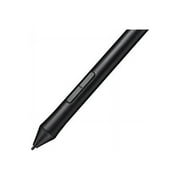
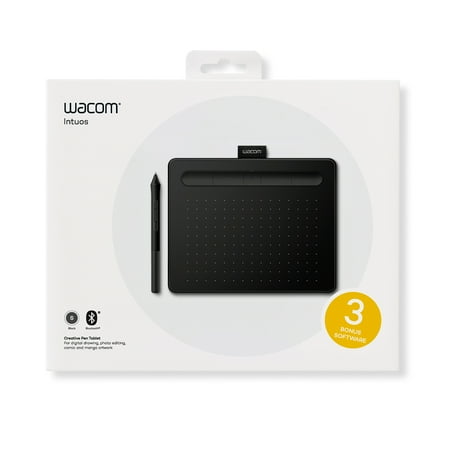
Wacom CTL4100WLK0 Intuos Wireless Graphic Tablet, 7.9" x 6.3", Black
- Brand:
- Wacom
- Model Number:
- CTL4100WLK0
- UPC:
- 753218986870
- EAN:
- 0753218986870
- ASIN:
- B079J2FSQ7
- Best Buy SKU:
- 6196634
- Walmart SKU:
- 792909880
At $99.95, pricing shows 0.0% discount compared to typical $0.00 levels.
| Price Type | Price | Date |
|---|---|---|
|
Highest Price
|
$99.95 | |
|
Lowest Price
|
$56.00 | |
|
Most Recent Price
|
$79.95 |
| Price Type | Price | Date |
|---|---|---|
|
Highest Price
|
$99.95 | |
|
Lowest Price
|
$49.95 | |
|
Most Recent Price
|
$99.95 |
Tracking History: We have tracked Wacom CTL4100WLK0 Intuos Wireless Graphic Tablet, 7.9" x 6.3", Black since 12/5/2022. The most recent price update was on Mar 1, 2026.
Price Range: Over the past 90 days, the price has ranged from $49.95 (lowest on 12/5/2022) to $99.95 (highest on 6/8/2023). The average price during this period is $79.95.
Current Trend: No Walmart.com pricing data available for analysis.
Customer Insights: Rated 4.0/5 from 51 reviews.
I am new to digital art... I had always wanted to attempt it. This is an awesome starter tablet! And I would imagine even expert artists would find this an excellent tablet... It offers 2 excellent software programs to download and use! There are so many options! I was a bit overwhelmed at first... Shading, coloring, shadowing, blending... But... Wacom offers videos to help along with hundreds of other videos online to help with every aspect and questions you have! The Corel Software is incredible! The tablet is extremely responsive! I have read some opinions that the small tablet does not give you enough space to ' elaborate ' your drawings... Myself... If I wanted to draw on a large canvas, buy a large canvas!!! The tablet is excellent size for carrying with you or sitting alone at home. I find it very convenient to grab and go and take it everywhere with me! I have not connected to a larger monitor, but it is simple to do... I highly recommend this tablet for anyone wanting to learn digital art!!!
I was a tad overwhelmed with this at first. I'm not an overly artistic person but I love to create and learn so I was excited to try. Set up was much easier than I anticipated. Very simple usb connection and download, step by step software instructions. Couldn't have been easier. The programs you get to chose from are all interesting just depends on what you are looking to do and try first. Admittedly this will be a learning process learning how to use different tool to create and at this point I'm very inspired, the possibilities seem endless! I tried my hand at freehand drawing and it didn't turn out as lovely as I had hoped lol so I will continue and practice. The coloring I did on the hair in this pic was so fun to do! Can't wait to do more! Maybe most exciting for me is seeing how excited my 11 year old son was when he saw it. He has expressed his desire to create video games as a profession and when he saw this he instantly thought of characters he could design! If you like to create or just have kids that have a creative mind, this is amazing! It's a little on the small side but this is the smallest of the group, excellent starting point though! Oh and I almost forgot to mention that the pistachio color is very pretty!
I received the Wacom Intudos Bluetooth drawing tablet for my honest rating and review. My packaged came undamaged and in great condition. I received (size small) Bluetooth tablet in the pistachio green color. It came with a 60 inch USB cable, pen, 4 nibs, and a tablet. The tablet is compatible with Windows 7 and Mac OX 10.11 or higher versions. The tablet cannot be paired via Bluetooth to an Ipad or Android tablet. It takes 3.5 hours to charge this tablet and there is a minimum 15-hour wireless connection. When you have it plugged through USB you don't have to worry about it being charged to use it. The active drawing area is 6 by 3.7 inches and it does not have a built in screen that shows you what your drawing. You have to look at your monitor. To install to your computer you go to the Wacom's website and download the driver. It also includes 2 free download softwares. This tablet is a great addition to my house because I have 2 artistic children whom are into animation and drawing. I do recommend you going with a bigger size tablet if you're using the tablet for drawing alone because the drawing space is a bit small. Also, the pen is a bit thinner and lighter then what we are used to so it will take some adjusting. I think if you have large hands you may want to go with a larger version, but that's just my opinion. My kids and I have small hands and this works great for us. The pen is very sensitive so you should also invest in more nibs because you will need them. This product is very easy to set up and works wonderful for my family's needs. I am please with this tablet and do recommend you purchasing it for an artist. My children and I rate it a 4 out of 5.
This comes with a USB cable, booklet, pressure sensitive pen and spare nubs. You have the option to use the USB or go wireless with Bluetooth on this tablet. The device is about the size of a sheet of paper and has four express keys so you can assign functions to them like saving your project. The pen is smaller than others I've used and I found it wasn't as comfortable to hold for long periods of time as a result. You receive two free downloads with it and can choose from three options Painter Essential 6, Clip Studio Paint Pro or Corel Aftershot 3. The installation is extremely simple just plug the unit into your computer using the included USB cable and the installation window pops up on your screen. The only real negative is that the Bluetooth wasn't 100% reliable but it's not a big deal seeing I prefer to have the tablet on my desk when I draw and the cable is long enough to move the tablet into a position that's comfortable to use. Overall it's a cute peripheral that works well and it makes it easier to bring out the budding artist or assist a seasoned one.
Although its primary purpose is for an artist drawing pictures and enhancing with color, it is very capable to be used as a photo shop equivalent with the Corel photo editor provided as a down load after registering the product. The unit allows free hand sketching to be directly displayed on the computer monitor, using either Windows or Mac operating systems. The pen that comes with it act like a mouse on a regular computer although movement of the cursor is caused by movement of the pen above the pad. Contact with the pad is only used for selection of something. The ease of use is determined directly by the ability of the person being able to essentially adapt to a "floating mouse." This product is an additional item to control the cursor and does not interfere with the operation of the installed mouse or mouse pad. The product can remain connected to the computer and merely not used in situations which using a mouse is just fine, like a word processor or work sheet.
This is a good product, nice design, good response pen to screen and a good paper-like feeling between the pen and the tables. However, setting it up has been long and not very intuitive. I believe that those with a digital art background will have it easier than a newbie but, like everything, the use of this tablet can be learned. After the setup I give it a try and then let my 7 years old experiment with it. I was surprised to see that she got it right away and could start leaving marks and colors on the screen. The hardest part will be setting this tablet up, I feel. You get to choose from 3 editing programs but you can choose only two of them, choose wisely. We used the Corel Painter essentials which took a bit to understand but then, we got a lot of options to work with (brush/pen size, watercolor, dry brush and so on). I believe this will make a good present for an artist who want to dig into the digital world of drawing and painting. If you are thinking to purchase this drawing tablet, make sure you watch some instructional videos to get a glimpse of what is this all about. My daughter keeps asking to use it to go past the test-scribbles she initially did. I am pleased with this product, minus the tedious setup.
It works great and it was as easy as plug-n-play on my laptop (running Windows 10) I didn't have to install any drivers, it worked immediately after plugging it in. It works as a mouse replacement. The tablet itself is very responsive and smooth. The buttons on the pen and on the tablet work.The pressure sensitivity works when affecting the brush stroke. I guess that's just because Im not use to it yet. It's working great and I love it!
Software was easy to download and only took 8 minutes including restarting the computer. Once downloaded it worked and could click the pen and tablet to select programs, but I much rather use a mouse! I also didn't understand the website. There were a bunch of videos on how it works, but then it appeared I had to purchase additional software to use it, which I didn't do. Overall, it's not for me and I didn't understand it.
Where do I begin? I received this tablet through the Walmart Spark Review program. It doesn't come with directions, everything is supposed to be online. It did say that there would be 2 free downloads available. Let me first start with the pros. Pros: extremely lightweight Nice color Holder for pen 3 free downloads Cons: Downloads had to be registered and had to give all of my information to get them. Did not like that. The instructions that were provided via online were not user friendly. Confusing and vague. Downloads did not initially work, therefore the tablet could not be used. Had to redo downloads and all the registration information 3 times, to finally get the tablet to show some life while connected to my computer. It did nothing more than an added mouse. I consulted my tech savvy son and daughter and they both played around with it with the same results. IT DID NOT WORK! Maybe we have a defected one. But, based off of this one, I would never buy one or recommend this to anyone.
Very disappointed with this product. I tried to upload the drivers and got nowhere. That was the end of the trial. In addition, there are very obscure instructions provided.
Detailed price history for the past 90 days
No Walmart.com pricing data available for analysis.
Third-Party Sellers prices have ranged from $79.95 (Jun 23) to $99.95 (Apr 9) over the past 90 days. Current price is close to the 90-day average of $82.17.
| Date | Price | Change | % Change |
|---|---|---|---|
| $79.95 | $+0.00 | +0.0% | |
| $79.95 | $+0.00 | +0.0% | |
| $79.95 | $+0.00 | +0.0% | |
| $79.95 | $+0.00 | +0.0% | |
| $79.95 | $+0.00 | +0.0% | |
| $79.95 | $+0.00 | +0.0% | |
| $79.95 | $+0.00 | +0.0% | |
| $79.95 | $-20.00 | -20.0% | |
| $99.95 | — | — |