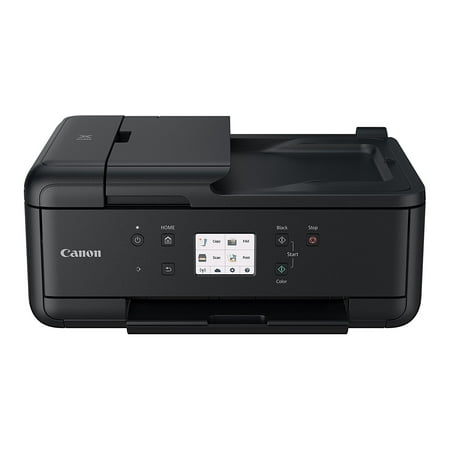
Canon PIXMA TR7520 Wireless Inkjet Multifunction Printer, Color
- Brand:
- Canon
- Model Number:
- TR7520
- UPC:
- 013803290707
- EAN:
- 0013803290707
- ASIN:
- B074V5CMYK
- Walmart SKU:
- 115649756
| Price Type | Price | Date |
|---|---|---|
|
Highest Price
|
$349.99 | |
|
Lowest Price
|
$278.99 | |
|
Most Recent Price
|
$308.95 |
| Price Type | Price | Date |
|---|---|---|
|
Highest Price
|
$158.00 | |
|
Lowest Price
|
$158.00 | |
|
Most Recent Price
|
$158.00 |
Tracking History: We have tracked Canon PIXMA TR7520 Wireless Inkjet Multifunction Printer, Color since 4/10/2026. The most recent price update was on Apr 10, 2026.
Price Range: Over the past 90 days, the price has ranged from $158.00 (lowest on 4/10/2026) to $158.00 (highest on 4/10/2026). The average price during this period is $158.00.
Current Trend: Walmart.com prices have ranged from $158.00 (Apr 10) to $158.00 (Apr 10) over the past 90 days. Current price is close to the 90-day average of $158.00.
Customer Insights: Rated 3.7/5 from 156 reviews.
Good all-around Printer/scanner ( I do not use the Fax feature). Greate colour - cartridges are easy to install. Love that it has the paper cassette AND a rear-loading paper rack as well. Save from having to pull the paper tray every time want to do a photo-print. Faster than my previous Brother printer. Nice device all the way around
After struggling for 4 days with another name brand printer I headed to Walmart to look for something else. This printer was easy to setup! I am able to print straight from my cell phone! Prints very fast! I'm very satisfied with this purchase!
With the print, copy and scan features, along with reliable (never jam or rip) two sided printing - this is the best choice for lower cost all-in-one printer. I also like that it automatically wakes up from "off" when a job is sent from my Iphone or computer.
I previously had purchased a printer---I think it is more discrete not to mention the brand name---which was a really defective device, I deliberately chose Canon for its brand name and made a point of looking at the reviews of what people who purchased it had to say about. I have now installed my printer and have it up and operating and so far my impression is that it s reliable and will do excactly what I need it to do and do it well.
My venerable Canon MX922 started printing fuzzy after more than five years of great service. I wanted a replacement with the five ink system so I could replace colors separately and, which would print auto-duplex. This printer was priced very well at my local Walmart store. The MX922 took third party ink cartridges well and I read that Canons are still tolerant of them. Even if not, I can get a full set of cartridges for this printer very reasonably at Walmart and, based on my several pages per day use and the ink draw for them so far, I believe the ink cost will be relatively economical. At first, none of my devices could see the printer on my wifi, but I hit upon using the printer touch screen to connect the printer to my wifi first. At the touch screen, I used the Manual method, chose my network (which the printer could see just fine) and entered my wifi password there. With the printer connected to my network, I was able to let each of my devices find the printer as per the printer instructions. Some have said here that the printer turns off automatically after printing and won't respond to a remote command. With the touch screen panel raised (I leave it that way), touch the Settings icon, then Settings, ECO, Energy Saving Settings, and follow the menu to the two settings you need. You pick the time delay to Auto power off and set Auto power on ON. Voila! The printer doesn't use excess energy and I can start it from any connected device in wifi range. This printer hesitates a little longer between sides of a duplex print than my MX922 but print quality seems excellent and photo prints are even acceptable to my wife. The TR7520 is also noticeably faster for single sided prints of any type. The ADF works well and, though it won't auto duplex scan, the touch screen automatically shows that you lift the scanned sheet out of the receiving tray and put it back on the ADF without changing its orientation to scan the other side; a nice piece of engineering and easy enough since you are at the printer to feed your copies anyway. I have only had the TR7520 for 10 days so I can't comment on durability but I remain a Canon troll for now.
Had a problem with installation , contgactind support on-line was a disaster after hours of NO help from support (attempted the instll via internet, my mistake), After about 2 hrs I gave up. than a message told my to try later as on-line support was suspended for system upgrades, thanks after hours. Well I should have used thew CD, my fault. With the CD installation went great, and quick, afdter the CD set-up I went back on-line for drivers up-date . The system was back-up in notime the updated drivers instlled, and the rinter works great, double side printing a bid slow, other than that it is a great printer, with a lot of special features. Avoid online install, use the CD, and avoid frustration.
The printer came in a reasonable sized box, that was easy to remove the contents from. The set-up of the printer took me 5 minutes and was pretty easy. It took me longer to figure out how to set up the app on my phone and get the printer onto my computer (i think this was a ME issue and not the directions issues!).This printer has been a lifesaver for someone who works from home as well as my office. I no longer need to wait to send a signed document or print something out. Since purchasing, i have been using the printer each day i have worked at home.
I've owned this for about 3 months now. I waited almost 6 months for it to become available as all retail outlets were out of stock. So far this has been a huge, and I mean huge improvement from my old Epson which was about 8 years old. No problems printing. The main reson I selected this model is due to needing a fax machine. Excellent print quality as you would expect from Canon. The only reason I didn't give five stars is the configuration of the print trays is a bit awkward. But something I can definitely live with.
This was a replacement for my student daughter who is away. I checked with her and she reports she really likes the printer, although she hasn't quite mastered the feeder. I personally have an older Canon printer that has the ability to print on CD/DVD disks. I would miss that feature in this printer, but for her it's just perfect.
Installation was easy. I chose to use the wired connection because that should be faster. All works well except paper size discrepancy when trying to copy material. The paper tray is very flimsy and awkward to reposition when loading paper. Having to lift the front panel to use the printer is awkward. All considered, for the price it is a good printer.
Detailed price history for the past 90 days
Walmart.com prices have ranged from $158.00 (Apr 10) to $158.00 (Apr 10) over the past 90 days. Current price is close to the 90-day average of $158.00.
| Date | Price | Change | % Change |
|---|---|---|---|
| $158.00 | — | — |
Third-Party Sellers prices have ranged from $308.95 (Jun 5) to $308.95 (Jun 5) over the past 90 days. Current price is close to the 90-day average of $308.95.
| Date | Price | Change | % Change |
|---|---|---|---|
| $308.95 | $+0.00 | +0.0% | |
| $308.95 | $+0.00 | +0.0% | |
| $308.95 | $+0.00 | +0.0% | |
| $308.95 | $+0.00 | +0.0% | |
| $308.95 | $+0.00 | +0.0% | |
| $308.95 | $+0.00 | +0.0% | |
| $308.95 | $+0.00 | +0.0% | |
| $308.95 | $+0.00 | +0.0% | |
| $308.95 | $+0.00 | +0.0% | |
| $308.95 | $+0.00 | +0.0% | |
| $308.95 | $+0.00 | +0.0% | |
| $308.95 | $+0.00 | +0.0% | |
| $308.95 | $+0.00 | +0.0% | |
| $308.95 | — | — |