
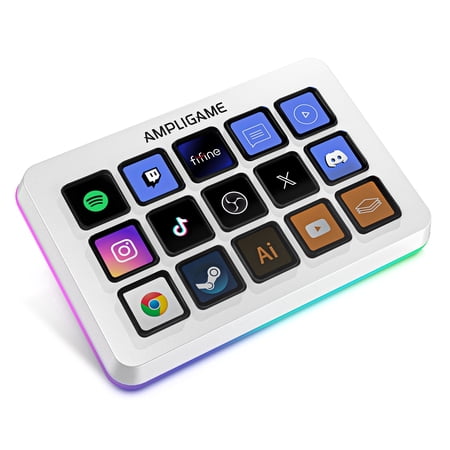
FIFINE D6 Stream Controller with 15 Customizable Macro Keys, Stream Control Deck with Trigger Actions in Software for OBS/Twitch/YouTube, PC, Mac, White
- Brand:
- FIFINE
- Model Number:
- D6
- UPC:
- 850082095070
- EAN:
- 0850082095070
- Walmart SKU:
- 18877418288
| Price Type | Price | Date |
|---|---|---|
|
Highest Price
|
$65.99 | |
|
Lowest Price
|
$56.09 | |
|
Most Recent Price
|
$65.99 |
Price history data is not available for this product at the moment.
Current Trend: No Walmart.com pricing data available for analysis.
Customer Insights: Rated 4.8/5 from 54 reviews.
For me it was a little clunky getting started. I had to restart my computer a couple times and I didn't like the fact that it had a pop up when downloading the app for it stating that it was an insecure download. I ended up downloading it anyway and going through with it and adding everything, at first it was kind of difficult but once you got the hang of it it was pretty easy. There are a lot of neat functions. I got the white one for my white computer and a black one for my black computer. Everything matches. The RGB lights are really cool and it does sync to the music when you play music as well. There is a RGB controller plugin that you have to install. When you go to their store in their app it gives you all kinds of things that you can install that you can use on it, found lots of nifty things. I was very excited about being able to see the battery usage on my controller and my headphones and my keyboard and the usage of my CPU Etc and Hardware monitoring that was a really nice bonus and unexpected. For the different sites and the different apps all you have to do is Click one button and you're there it's amazing I love it! I haven't tried the macro settings yet or the one click but eventually I'll add those however so far it has everything that I need and want to use and it changes with ease.
OMG!!! This is beautiful, as soon as I plugged into my PC it already started to apply the deck. I have already put at least 10 programs on it. I have a podcast and I think this will do wonders. Furthermore, I have FB, Inst, play, stop, Text box to add what I want, brightness display, VLC and more. With the URL you add it and the icon displays on its own. For instance Facebook, in the URL and the logo appears on the deck. The packaging was amazing, it was so nice when I took it out, I didn't want to remove the film on the buttons LOL.
So I've always wanted one of these. I couldn't justify the high price of the bigger brands. This works well, actually. I downloaded the Fifine controller app before I even got it delivered. I had set up some buttons to use. As soon as I plugged it in, it automatically and instantly showed all the buttons and pictures I made. There was no other setup or syncing. I don't stream, so I don't need OBS stuff. So my use is more of a quality-of-life helpful thing. I have an equalizer app that sort of complicates switching devices from soundbar to headphones; I have to pick it manually. I was able to download an add-on that can set audio output peripherals to a button. You can even screen cap or insert pictures to put on the keys. I included photos. I also game and watch YouTube, and sometimes I want to lower YouTube without also lowering my game. I can set Firefox volume as a button, and I have one set as -25% and the one beside it 25%. This works really well. I was able to use the add-on for system monitor info live in a button. There is one that runs from HWinfo which was lower in the list and I didn't see. The one I got wanted another app that runs an app from Stream Decks called MiraBox Craft. This, in my opinion, is riskware. I did some research on Reddit. It appears safe, but there were some suggestions to delete unneeded parts of it (an .exe). I did this and I'm pretty content with it, and it seems safe. I may look into the other add-on too when I get bored and see what is better. But the Mirabox one does work well. Using the app is pretty painless. I haven't used the Elgato one and don't know the difference in the amount of add-ons or how that program works. I know for the price, this one is a solid entry into getting Stream Deck use. There are many videos on YouTube about it you can check. It's a valid option on a budget. I'm really happy to have it. As I use it more I will find more cool useful things to add to it.
I picked up the FIFINE D6 stream controller to simplify my workflow, and it honestly exceeded expectations. The 15 customizable macro keys make a huge difference once everything is set up. Being able to switch OBS scenes, control audio, launch apps, or trigger multiple actions with a single button press saves a lot of time and keeps everything running smoothly during streams or recording sessions. Setup was straightforward, and the software makes it easy to assign actions and organize keys into different pages depending on what you're doing. I especially like that the icons display directly on the keys, so you always know what you're pressing without guessing. It makes the whole setup feel clean and professional. The build quality feels solid, the buttons are responsive, and the RGB lighting adds a nice touch without being distracting. I'm using it on a PC, but it's nice knowing it also works with Mac and popular platforms like OBS, Twitch, and YouTube, which makes it very flexible for different setups. For the price, this is a fantastic alternative to more expensive stream decks. Whether you're streaming, editing video, or just want quick shortcuts for everyday tasks, this controller makes your workflow faster and more enjoyable. Definitely a 5-star purchase and something I'd recommend to anyone building or upgrading a streaming or production desk.
This little stream controller punches above its weight for the price. Setup was pretty quick, the software is easy enough to figure out, and the keys are responsive without feeling cheap. The customization is the real win here since you can map shortcuts, apps, and stream controls. The lighting is a bonus and not obnoxious, and the build quality feels solid enough that it does not seem like it will fall apart after a few weeks of use. It is a good price for what you get, especially if you want something functional without shelling out big bucks for a "premium" stream deck.
I got this in yesterday and its really cool. You start by downloading a program and running it and once its up all you have to do is drag and drop the desktop icons onto the screen and you're done. This makes loading up my commonly used programs much easier. You can also make the buttons do a specific action or play something or pull up a specific website.
This 15-key stream deck is awsome! It feels super strong and high quality in your hands. The softwear is realy easy to use. I love that every single bottun can have its own custom picture, so you know exactly what it does. The RGB lights look cool and make my setup look way more fun and profesonal. Totally worth it!
This device from FIFINE is AMAZING! First off, it is one of the most versatile devices you can possibly add to your tech/streaming/music prod/podcasting setup that you can imagine. It's a trigger, a keyboard full of on-screen macros, you can use it in Logic Audio as a MIDI device, where its uses are just about limitless. StreamDeck? Forget it! This is better! Elgato? Nope - FIFINE beats it hands down. The device itself is beautifully designed from an ergonomic standpoint. with tactile keys that actuate decisively yet easily - it is a great companion to your keyboard. The buttons are responsive with zero discernable lag. The device also lights up with tunable color LEDs all around, making it stylish as well as practical. It is all configurable via a web interface - no extra software required. Works with OBS and just about every other platform out there. I cannot stress how fabulous and useful this device is, and the fact that it's price point is far below similar devices that do not offer even half the functionality that FIFINE does, makes this device a particularly great buy. Add this today to your streaming/prod desk - you'll thank me for the recommendation!
The Ampligame programmable stream controller by fifine is an awesome choice for gamers on a budget. installation was nice and simple. Came within a reasonable price without limiting features compared to the brand-named competition. The controls are smooth and responsive, yet LEDs on it are bright and clear. Highly recommend buying this device if you're a gamer to elevate your gaming setup.
I am extremely excited! I download the apps to open it and this shortcut device save me time and frustration.
Detailed price history for the past 90 days
No Walmart.com pricing data available for analysis.
Third-Party Sellers prices have ranged from $56.09 (Sep 3) to $65.99 (Sep 10) over the past 90 days. Current price is close to the 90-day average of $60.24.
| Date | Price | Change | % Change |
|---|---|---|---|
| $65.99 | $+0.00 | +0.0% | |
| $65.99 | $+0.00 | +0.0% | |
| $65.99 | $+0.00 | +0.0% | |
| $65.99 | $+0.00 | +0.0% | |
| $65.99 | $+0.00 | +0.0% | |
| $65.99 | $+9.90 | +17.7% | |
| $56.09 | $+0.00 | +0.0% | |
| $56.09 | $+0.00 | +0.0% | |
| $56.09 | $+0.00 | +0.0% | |
| $56.09 | $+0.00 | +0.0% | |
| $56.09 | $+0.00 | +0.0% | |
| $56.09 | $+0.00 | +0.0% | |
| $56.09 | $+0.00 | +0.0% | |
| $56.09 | $+0.00 | +0.0% | |
| $56.09 | $+0.00 | +0.0% | |
| $56.09 | $+0.00 | +0.0% | |
| $56.09 | $-9.90 | -15.0% | |
| $65.99 | $+0.00 | +0.0% | |
| $65.99 | $+9.90 | +17.7% | |
| $56.09 | $+0.00 | +0.0% | |
| $56.09 | $+0.00 | +0.0% | |
| $56.09 | $+0.00 | +0.0% | |
| $56.09 | $+0.00 | +0.0% | |
| $56.09 | $+0.00 | +0.0% | |
| $56.09 | $+0.00 | +0.0% | |
| $56.09 | $-9.90 | -15.0% | |
| $65.99 | $+0.00 | +0.0% | |
| $65.99 | $+0.00 | +0.0% | |
| $65.99 | $+0.00 | +0.0% | |
| $65.99 | $+0.00 | +0.0% | |
| $65.99 | — | — |