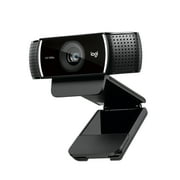
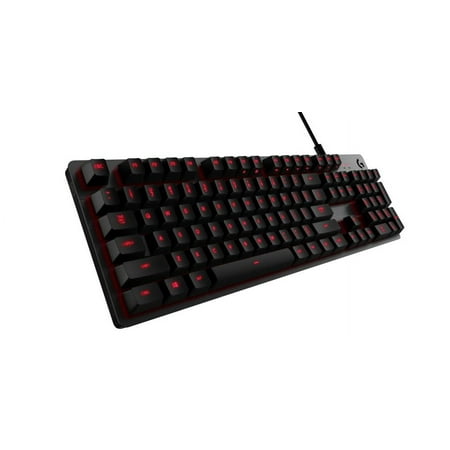
Logitech G413 Gaming Keyboard
- Brand:
- Logitech G
- Model Number:
- 920-008300
- UPC:
- 097855128744
- EAN:
- 0097855128744
- ASIN:
- B06XR5MWGM
- Walmart SKU:
- 583007950
Price momentum shifted downward , bringing the cost to $153.33. This represents a 0.0% discount to typical levels.
| Price Type | Price | Date |
|---|---|---|
|
Highest Price
|
$243.00 | |
|
Lowest Price
|
$42.00 | |
|
Most Recent Price
|
$64.99 |
| Price Type | Price | Date |
|---|---|---|
|
Highest Price
|
$153.33 | |
|
Lowest Price
|
$64.00 | |
|
Most Recent Price
|
$153.33 |
Tracking History: We have tracked Logitech G413 Gaming Keyboard since 12/5/2022. The most recent price update was on Aug 23, 2026.
Price Range: Over the past 90 days, the price has ranged from $64.00 (lowest on 12/5/2022) to $153.33 (highest on 7/26/2026). The average price during this period is $114.20.
Current Trend: Walmart.com prices have ranged from $153.33 (Aug 23) to $153.33 (Aug 23) over the past 90 days. Current price is close to the 90-day average of $153.33.
Customer Insights: Rated 4.2/5 from 69 reviews.
This keyboard is sleek. It is stylish with its brushed metal finish. The keys have a good height to them, and feel good on your fingers. I mainly use this for work as opposed to gaming, but the keys have proper resistance and don't feel flimsy. Its fully mechanical, but isn't nearly as loud as other mechanical keyboards I have used. I can type at 100+ words per minute on it. You can use the Logitech G app to sync the glow to your mouse, if you have a G mouse as well. And it has a lot of the gaming functionality you expect out of the G line of products. Only downside is that it doesn't have the color palette most of the keyboards have. The red looks very nice though.
Let's say this right at the start: It is a corded keyboard. The cord is 6-feet long, so it gives you some room but not total mobility. It also requires two USB ports to plug-in. Why? I don't know, it just does...and that's where my complaints are. Some instructions would be nice! I don't want to sound like a grumpy old man, but the attached photo shows the included instructions, and the website listed takes you to a PDF of the same piece of paper. If you go to Logitech's product page, there you can find out what the extra buttons are for, along with needed download you'll need for them. The keyboard itself is fantastic, and substantial. The only thing missing, for me, is included dedicated media keys--you know the volume up, down, mute, play/pause, stop. Yes, I know there's hot keys for them but I like the one touch of volume up or down. Beyond that, this is a serious keyboard.
Man, where do I begin? Theres 999 pros to this keyboard and Ill start with the looks, and solid feel of the board itself. Its a lightweight aluminum keyboard that is heavy enough to hold its own weight on your desk, it includes adjustable feet to give it a slight incline, and doesnt feel like a dragster lol. The keys are very responsive and the feel, while it isnt IBM Clicky style, is still extremely satisfying, and you can tell if youve missed a key or not, if you even slightly bump a key with your sausage fingers, you probably will end up weigthj letrters asnd words like that. Take it as you will, I LOVE the sensitivity, it alllows me to rocket type as quiet as a mouse. Another SUPER plus is the Full Power USB 2.0 port on the back. I put my finger print reader in here but you can use it for whatever you like and it will charge your phone at least as fast as a port on the computer will. The backlighting is absolutely beautiful, and the only gripe I have is that it only has one color (Red). It is however the most readable in all conditions and doesnt hurt your eyes or distract you at all. Using the GHUB app you can customize it a tad. Also comes with replaceable (ASDFWER12345) finger fitting keys for your favorite games to have better home buttons, as well as a tool for pulling them. This is an incredible overall example of a GOOD VALUE and HIGH QUALITY GAMING TIER keyboard from Logitech. Incredible job!
I got this for my big gaming millenial sons. The computer I bought them just last year was sold as a gaming computer. So you would think the keyboard it came with would be good. It was just good, this Logitech is great! The keys symbols are etched in, not just painted. It's made out of aluminum, strong and sturdy. Keys are responsive and the red light is especially impressive at night, giving an aura of a military operation!
So then, I have been wanting a high business quality backlit mechanical USB keyboard with numpad for about a year now and finally saw this one that fits the bill. It's a standard US keyboard layout and easy to read in dim rooms when the screen is so bright it makes it difficult to read the keyboard for us non-typists out there. The backlit color is red and can't be changed and it comes with three sets of replacement keys for the most commonly worn out keys on the US keyboards. The only thing that was a surprise was that it requires 2 USB ports, one for the keyboard I/O and the other for the red backlight. Never having a backlit keyboard before I didn't know that would be a requirement. My desktop has USB sockets to spare so it wasn't a problem but you could leave the backlight USB connector unplugged if you lacked in free USB ports. I'm very happy with this keyboard.
I am a huge Logitech fan. So when I got the chance to try the G413 backlit mechanical gaming keyboard, I jumped at the chance. It feels very solid and I absolutely love the metal base (aircraft grade aluminum – magnesium alloy). It has a no slip back which stays put even when I go crazy mashing buttons. My old keyboard would slide when I got overly excited. The FN button comes in handy for media controls. Combined with the F7 button it controls the brightness of the backlighting. F8 works the G hub. Video controls are F9 – 12. Most important to me are the audio volume controls on print screen (mute), screen lock (lower volume), and pause (crank the volume). I like that audio controls are on the end. I can find them easily by touch. The keyboard comes with some letter caps you can switch out to give a unique feel to 12 regularly used gaming keys (1-5, QWER, and ASD). It makes it easy to verify your hand is in the right place without having to look down. There is an included key pulling tool to make the switching job easy. One cool feature is a built in USB port on the top right of the keyboard. I like it because I can charge my Bluetooth easily. Lastly, the G413 comes with “Romer-G” keys. The documentation says it has a 1.5 mm actuation distance. I can't tell the difference as I am a button masher; but if you are one of those people who can sense a hair trigger on your buttons, this is the one for you!
> For those of us who have just one computer keyboard is a dual purpose unit. For Gaming and then for regular computer use. I am sure the look of the keyboard is more important to Gamers. The Logitech G412 Carbon Mechanical Gaming Keyboard has a magical look. It is full size but looks compact and the handsome brushed surface of the aluminum plate covering the plastic base is right up Gamers alley. However the aluminum plate has an almost sharp edge but I don't think it could cut you. No instructions come with the keyboard except a small piece of paper showing the two cable ends. You only need to connect one to your computer if you are not going to use the USB port on the back side of the keyboared. I could not find anything to download at the Logitech website in the way of instructions except for the program you use to set the board up for gaming. Inside that program is the control the adjust the brightness for the red backlighted keys. There does not seem to be a memory for that setting as each time you turn off your computer and restart it the red key indicator lights are on full brightness and that may not appeal to some users. You have to open the keyboard program and then they magically return to the brightness level you had set them to the last time. > > Logitech calls the mechanical switches it uses in the keys Romer-G and they have a different feel than keys of other keyboards. I find that they actuate much faster than keys on other brands of keyboards, they take a bit less pressure and less movement. The space bar feels a little loose compared to the others keys. > > For gaming use the keyboard is tops. 12 alternate key caps come with it with slightly different shaped top surfaces for those who search keys in the dark by feel and it may be easier to keep your fingers on them. I did not find them to be preferred over the ones that come installed on the keyboard. > > For normal computer use the keyboard is very nice and I find I can type much faster than with any other keyboards because of the instant action of the keys and slightly less travel required. This is not a quiet keyboard and that may bother some people. Overall I rate this keyboard tops in value and performance.
I have never owned a mechanical keyboard and am huge fan of Logitech products. In fact, all of the mice and aftermarket keyboards that I've ever purchased in owning personal compters for the last 30 years have been Logitech products. This specific Logitech gaming keyboard, the model G413, has an MSRP of $89.99 (according to Logitech's website) and a street price of about $65. The factory packaging is sleek and well-designed. Since this is a gaming keyboard, the replacement gaming keycaps (numbers 1, 2, 3, 4, and 5 and letters Q, W, E, R, A, S, and D) are individually vacuum-sealed in a thick plastic strip along with a small plastic keycap pulling tool. The only product inserts are two small single squares of paper: one merely shows a diagram of how to plug in the USB connectors and the other is the 2-year product warranty information. The first thing that I noticed upon removing the keyboard from its packaging was its weight. Having owned keyboards for years that are primarly all-plastic construction, I was pleasantly surprised at this keyboard's heft. The aluminum alloy chassis and body cause this G413 to weigh almost 2.5 pounds. Of course, since the keyboard obviously sits on the top of my desk, the weight is not a negative feature, but rather tends to indicate to me the keyboard's solid construction. My specific model is the G413 Carbon which means that it's a very dark gray with red backlit keys - the silver-colored model has white backlit keys. While there are five (5) fixed brightness levels for the backlighting, the red color is itself fixed as well and that's the only color available. I would have preferred a RGB backlight keyboard, but the red color at a medium brightness level is just fine. At this price point, the backlighting should be RGB. The Logitech G413 does not have a palm rest. At this price point, the G413 keyboard should have a detachable palm rest. The connection cable is almost 6 feet long and has a nylon braided cover, making it feel very sturdy and durable. The end of the cable is split into a "Y," terminating into two (2) USB connectors. One connector is for the keyboard itself and the other USB connector is for the passthrough USB 2.0 connector located on the back edge of the keyboard. This keyboard requires two (2) available USB ports if the passthrough USB port is to be used. Yes, you can only plug in the one USB plug making the keyboard operational and not take advantage of the keyboard's USB port. However, at this price point, the passthrough USB connector on the keyboard should be at least USB 3.0 and it should really be USB 3.1. The mechanical keyboard is a dream to type on. You can easily feel the click of the individual keys and with Logitech's reputation for quality, it should last for many, many years. The sound of the click is neither too loud nor distracting. In fact, the sensation of typing on a mechanical keyboard is much different than a membrane keyboard and is vaguely reminiscient of the old IBM Model M keyboards from 30-35 years ago. Since I grew up typing on the Model M keyboards with its buckling spring key technology, this G413 mechanical keyboard is absolutely perfect. Overall, there are three (3) improvements for Logitech to consider on this G413 mechanical keyboard: the backlighting should be RGB, the keyboard's USB port should be 3.0 or 3.1, and the G413 should come with a detachable palm rest. It is for these reasons that I rate this Logitech G413 keyboard at four (4) stars. Note: In exchange for this Logitech G413 gaming keyboard through Walmart's Spark Reviewer program, I was asked to post an honest, detailed, and unbiased review.
Don't waste your money. Spend a little more and get something with more reliable switch and keycap design. I'm not a gamer, but I did learn to touch type many years ago on a manual typewriter, and my first PC had an IBM Model M keyboard, so I have a somewhat heavy touch. I don't think I'm any worse though than a hardcore gamer. I had a fairly new keyboard from a startup I bought on sale fail about 3 months in. I had a project I was working on, so I needed something immediately, so I headed down to Walmart. Thought this looked like a good deal on something that would hold up, after all I've had $10 keyboards last for years with no problem other than the keys were mushy. Less than a year in, this keyboard is proving to be nice looking junk. The first problem, the LED backlight behind F5 went out. not a big deal. Now one of the control keys and arrow keys will not stay on. the legs inside were breaking off. Did some research, and this is a common problem with these keys. Seems the very small "legs" of which there are 4 inside each key, ten to snap off inside the slot in the key, necessitating replacement of the WHOLE KEY, not just the keycap. Looks like an inherent flaw in the Romer G key switch design. Lots of chatter on the web about this very issue, especially on this model. I'm gonna spend about double what this keyboard costs and get a keyboard on sale that has Cheery style keys. Avoid this junk. If you don't have $100 to get a better keyboard right now, get a $10 keyboard to get by with until you can afford a really good keyboard.
My current daily driver for a keyboard is a wireless Logitech K800. I've been through loads of Logitech keyboards, and this one is my favorite so far. So that's what I'm comparing this to. My first impression of the G413, pulling it out of the box, was that it looked and felt high quality. Don't be fooled, it's just heavy. That's what happens when you add metal to something. The only high quality elements of this keyboard are the cable and the rubber footings. I'll also give them the key backlights, which look pretty clean, if you're into lighting on keyboards. I'm not. The rest is just a facade, though. Brushed aluminum doesn't make a product good. The design, in terms of day to day practicality, is terrible - so terrible that I'm not using it to write this review. For something we touch constantly, it's not tactilely pleasing. The edges of the aluminum are sharp and abrupt, and the key edges have no curvature. Some people might like this, but I don't. No wrist rest, but I can only assume that's because this is a "gaming" keyboard, and most people using it would have a separate wrist rest of their own. I put tactile dots all over my primary keyboard, so I definitely like the inclusion of tactile keys, but it doesn't make up for the overall poor feeling quality of the keyboard. The keys are wobbly and the keystrokes don't feel like anything special to me, despite having Logitech's "Romer-G Tactile" switches. Feels pretty average. My K800's keystrokes are much more pleasant IMO. This is where this keyboard lost me for good: The function/media keys. 1.) No dedicated volume buttons. Plenty of room, but nope. 2.) You have to download their software to activate function lock. Really? 3.) If you do download their software and activate function lock, primary keys overlap. Mute overlaps with printscreen, and previous track overlaps with F11 (frequently used for fullscreen). Unnecessary design flaws for such an expensive keyboard, if you ask me. With all of the experience Logitech has making keyboard, I expected better. Junk.
Detailed price history for the past 90 days
Walmart.com prices have ranged from $153.33 (Aug 23) to $153.33 (Aug 23) over the past 90 days. Current price is close to the 90-day average of $153.33.
| Date | Price | Change | % Change |
|---|---|---|---|
| $153.33 | $+0.00 | +0.0% | |
| $153.33 | — | — |
Third-Party Sellers prices have ranged from $64.99 (Sep 19) to $64.99 (Sep 19) over the past 90 days. Current price is close to the 90-day average of $64.99.
| Date | Price | Change | % Change |
|---|---|---|---|
| $64.99 | — | — |