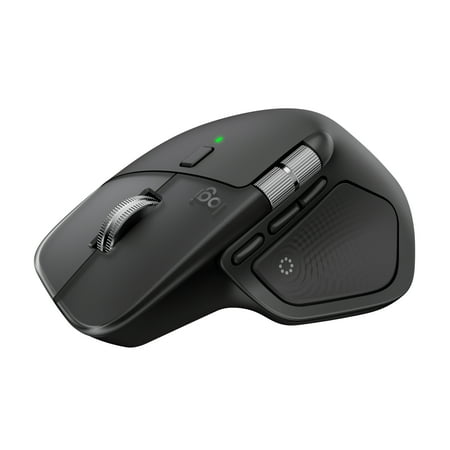
Logitech MX Master 4, Ergonomic Wireless Mouse with Advanced Performance Haptic Feedback, Ultra-Fast Scrolling, Black
- Brand:
- Logitech
- Model Number:
- 910-007560
- UPC:
- 097855207524
- EAN:
- 0097855207524
- ASIN:
- B0FTXLBMJQ
- Walmart SKU:
- 18045313241
Market direction turned downward with current $119.99 representing 0.0% under standard pricing.
| Price Type | Price | Date |
|---|---|---|
|
Highest Price
|
$127.90 | |
|
Lowest Price
|
$104.00 | |
|
Most Recent Price
|
$114.95 |
| Price Type | Price | Date |
|---|---|---|
|
Highest Price
|
$119.99 | |
|
Lowest Price
|
$119.99 | |
|
Most Recent Price
|
$119.99 |
Tracking History: We have tracked Logitech MX Master 4, Ergonomic Wireless Mouse with Advanced Performance Haptic Feedback, Ultra-Fast Scrolling, Black since 4/3/2026. The most recent price update was on Sep 13, 2026.
Price Range: Over the past 90 days, the price has ranged from $119.99 (lowest on 4/3/2026) to $119.99 (highest on 4/3/2026). The average price during this period is $119.99.
Current Trend: Walmart.com prices have ranged from $119.99 (Sep 13) to $119.99 (Sep 13) over the past 90 days. Current price is close to the 90-day average of $119.99.
Customer Insights: Rated 4.4/5 from 637 reviews.
Overall, the mouse is excellent and works very well in daily use. However, there are a couple of minor issues worth noting. First, on Windows 11, the Action Ring takes a few seconds to activate after startup or waking from sleep, which feels slightly inconvenient. Second, the current selection of plugins for the Action Ring is quite limited. It mainly supports Adobe apps, DaVinci Resolve, and a few others. It would be great to see broader support, for example a plugin for Blender. As a workaround, I configured additional buttons for navigation in Blender, and that works well. Aside from these points, everything else performs great.
Great mouse. I am annoyed with the change in the button placement for mac gestures given my muscle memory from the Master 3, but it's not bad after getting used to it. I do find myself accidentally pushing the button my thumb rests on a lot. If you're used to the older variants, it will take some learning to change the muscle memory.
The mouse is famous for a reason, all the features are amazing. My favorite thing about the mx4 is how comfortable it is over extended work sessions. The "click" is the best feeling. Its a beautiful mouse and the new materials stay clean for wayyyyy longer and are way easier to clean. I got the non-mac version to get the USB C dongle and it works flawlessly on my Mac Mini M4 with the logi+ app.
And not only would I for-sure favorite the debut single from MX Master Mouse on Spotify, it's also a damned good input device for my PC. It's comfortable, fits beautifully in my hand, and has a lot of features that I love (especially the MagSpeed scrolling). I still accidentally click the thumb-triggered "Action ring" when I don't mean to, but turning the sensitivity down has helped with that. I need to spend some time setting the action ring up and getting used to it. I'm sure it's great but I just haven't used it much. Anyhoo, in summary, I've been using MX Master mouses since v2 and I love them. I wouldn't call an upgrade from v3 to v4 a necessity, but I bought one for home and one for work so I guess you could say they're my favorite. A++++++ 10/10 Would recommend.
great product. I use a mouse about 10-12 hrs per day and these last for 3-4 years. I am on my 3rd version and each iteration has seen real improvements. I've not seen or used a better mouse in over 40 years of professional computer, engineering and IT use.
[This review was collected as part of a promotion.] The MX Master 4 was my first dive into the MX series. The mouse works well and is quite comfortable, however i rarely get the full benifit from its features. My main PC runs Linux, and its not officially supported. My employer owned PC has limited us to an older version of Logi Options+ that does not support it. My android tablet doesnt have offixal support either. Does run well as a normal mouse and on my windows pc i use from time to time. That being said, this mouse is totally dependent on software for features its know for. It is a solid everyday mouse without them, but not worth the price. Plz give offical linux support.
I really enjoy this mouse, the clicks are quiet and is the perfect size. I have a small hand and have no issues using the mouse. I have two things I would like to make a commentary on… 1 is I use this for my WFH set up and my company policy does not allow us to download the most recent version of Logi Options+, so I'm not able to use the mouse for its max capabilities. 2 the scroll is clean, but it is a bit sensitive so it may scroll longer than I wanted and end up zooming in and out of things. Both of these are user error related so don't take this review as negative. I would recommend buying it if you are looking for a new mouse.
I have been using Logitech hardware for years now, and I have never been disappointed. Battery life is exceptional, ease of use is outstanding. HOWEVER, I wanted to give this product a 5, but there's one annoying feature that keeps me from doing so. The thumb click for the action ring drives me nuts. I use this mouse for gaming as well, and every now and then I press too hard on the "pad" and the ring appears and makes me lose my place in the game. I have turned down the sensitivity, but it still triggers. I wish I could disable it altogether, but I have been told it can't be done.
I returned it. It was way too easy to accidentally press the thumb pad. The bulbous protrusion protecting the thumb wheel makes it harder to use. The ergonomics have changed and my hand doesn't rest on it as naturally. These two drawbacks are deal breakers. On the plus side, I do like the heavier weight.
The Logitech MX4 feels too heavy and doesn't offer the same comfortable grip as the MX3S. As a trader, I prefer a lighter mouse that's faster and more precise, and the MX4 doesn't match the speed and accuracy I need for long trading sessions. maybe because of the weight.
Detailed price history for the past 90 days
Walmart.com prices have ranged from $119.99 (Sep 13) to $119.99 (Sep 13) over the past 90 days. Current price is close to the 90-day average of $119.99.
| Date | Price | Change | % Change |
|---|---|---|---|
| $119.99 | $+0.00 | +0.0% | |
| $119.99 | $+0.00 | +0.0% | |
| $119.99 | $+0.00 | +0.0% | |
| $119.99 | $+0.00 | +0.0% | |
| $119.99 | $+0.00 | +0.0% | |
| $119.99 | $+0.00 | +0.0% | |
| $119.99 | $+0.00 | +0.0% | |
| $119.99 | $+0.00 | +0.0% | |
| $119.99 | $+0.00 | +0.0% | |
| $119.99 | $+0.00 | +0.0% | |
| $119.99 | $+0.00 | +0.0% | |
| $119.99 | — | — |
Third-Party Sellers prices have ranged from $109.94 (Jul 25) to $119.99 (Sep 9) over the past 90 days. Current price is close to the 90-day average of $117.59.
| Date | Price | Change | % Change |
|---|---|---|---|
| $114.95 | $+0.00 | +0.0% | |
| $114.95 | $-5.04 | -4.2% | |
| $119.99 | $+0.00 | +0.0% | |
| $119.99 | $+0.00 | +0.0% | |
| $119.99 | $+0.00 | +0.0% | |
| $119.99 | $+0.00 | +0.0% | |
| $119.99 | $+0.00 | +0.0% | |
| $119.99 | $+0.00 | +0.0% | |
| $119.99 | $+0.00 | +0.0% | |
| $119.99 | $+0.00 | +0.0% | |
| $119.99 | $+0.00 | +0.0% | |
| $119.99 | $+10.00 | +9.1% | |
| $109.99 | $-10.00 | -8.3% | |
| $119.99 | $+5.04 | +4.4% | |
| $114.95 | $+0.00 | +0.0% | |
| $114.95 | $-5.04 | -4.2% | |
| $119.99 | $+0.00 | +0.0% | |
| $119.99 | $+5.04 | +4.4% | |
| $114.95 | $+0.00 | +0.0% | |
| $114.95 | $-5.04 | -4.2% | |
| $119.99 | $+0.00 | +0.0% | |
| $119.99 | $+0.00 | +0.0% | |
| $119.99 | $+0.00 | +0.0% | |
| $119.99 | $+0.00 | +0.0% | |
| $119.99 | $+5.04 | +4.4% | |
| $114.95 | $-5.04 | -4.2% | |
| $119.99 | $+0.00 | +0.0% | |
| $119.99 | $+10.05 | +9.1% | |
| $109.94 | $-10.05 | -8.4% | |
| $119.99 | $+10.05 | +9.1% | |
| $109.94 | $-10.05 | -8.4% | |
| $119.99 | $+0.00 | +0.0% | |
| $119.99 | $+10.05 | +9.1% | |
| $109.94 | $-3.65 | -3.2% | |
| $113.59 | $-6.40 | -5.3% | |
| $119.99 | $+0.00 | +0.0% | |
| $119.99 | $+6.40 | +5.6% | |
| $113.59 | $-6.40 | -5.3% | |
| $119.99 | $+5.04 | +4.4% | |
| $114.95 | $+0.00 | +0.0% | |
| $114.95 | — | — |