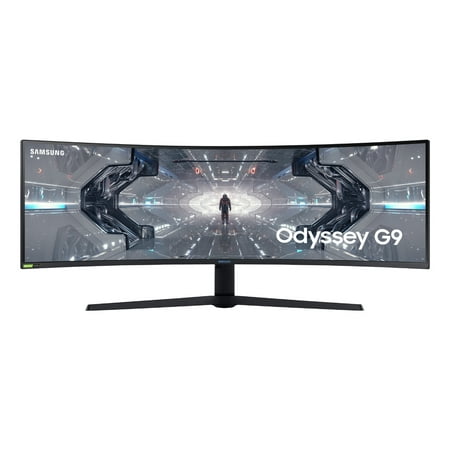
SAMSUNG 49" Class 1000R Curved (5120 x 1440) Gaming Monitor - LC49G97TSSNXDC
- Brand:
- Samsung
- Model Number:
- LC49G97TSSNXDC
- UPC:
- 887276460130
- EAN:
- 0887276460130
- ASIN:
- B08JN7T3DD
- Walmart SKU:
- 583047522
Market rate of $1,609.99 positions buyers 0.0% under the established average.
| Price Type | Price | Date |
|---|---|---|
|
Highest Price
|
$1,699.99 | |
|
Lowest Price
|
$630.00 | |
|
Most Recent Price
|
$1,599.99 |
| Price Type | Price | Date |
|---|---|---|
|
Highest Price
|
$1,620.07 | |
|
Lowest Price
|
$799.99 | |
|
Most Recent Price
|
$1,609.99 |
Tracking History: We have tracked SAMSUNG 49" Class 1000R Curved (5120 x 1440) Gaming Monitor - LC49G97TSSNXDC since 12/5/2022. The most recent price update was on Jun 17, 2025.
Price Range: Over the past 90 days, the price has ranged from $799.99 (lowest on 4/4/2024) to $1,620.07 (highest on 7/8/2023). The average price during this period is $1,229.16.
Current Trend: No Walmart.com pricing data available for analysis.
Customer Insights: Rated 4.5/5 from 1085 reviews.
Every game I have run on it so far looks crazy! Doom running at 5120x1440@120 with all the setting maxed will make your eyes pop out!! The combination of the 32:9 aspect ratio, high frame rate and the HDR makes playing on this thing like nothing else I have seen. I can see enemies on screen that other people can't. It's curve is 1800R, more curved than a TV. You sit so much closer to it that it has to be more aggressive. Once you are sat in front of it you don't really notice the curve but you do notice how much more comfortable it is on your eyes. I have an RTX 2080ti in my PC. I think if you want to game on one of these an RTX 2080 is the minimum. It being so large and you sitting so close to it means that any drop in settings you do, to get framerate up, ends up looking muddy, you're kind of defeating the point of having it. If you get one, be prepared to have an irresistible urge to buy a stupidly expensive video card. With nVidia enabling G-Sync on Freesync monitor you get full VBR support on AMD and nVidia cards. It works great on the standard Freesync setting. I have always used multi-monitor setups so upgrading to this monitor has meant that I can now run my desktop on one monitor yet have more screen estate than before. It's amazing how much more productive you can be with a 5120 x 1440 desktop. The games that I have tried in HDR look great but the real star is Netflix. I found that Netflix didn't want to show me HDR content. I installed "HEVC Video Extensions from Device Manufacturer" from the Windows store. I'm completely blown away by this monitor.
[This review was collected as part of a promotion.] I give this monitor 5 stars because it accomplishes what it set out to do perfectly. But beware, you need to know what you're getting with this beast. I can now comfortably put three windows side by side to do my work and that alone is worth the price of admission. Gaming wise this thing is fantastic. I have paired it with a RTX 2080 Ti and all games run beautifully. Everything looks nice and crisp on the high resolution 5120×1440 screen and HDR1000 makes the colours and brightness pop. Freesync works from 48hz up to 120hz and you can also simultaneously use FreeSync/G-SYNC and HDR. The view is so immersive, it's just fantastic. This monitor has a DPI of about 80. This monitor has no speakers at all. I have it mounted on my monitor arm with no problems. The monitor weighs 33lbs which many will find heavy. Getting it mounted was quite the chore and nearly led to my wife divorcing me, but we did it. I have to say overall I love it. I can fit everything I need comfortably onto the screen. No more switching desktops. It's been a great productivity and "staying in the zone" boost. My only complaint is how it changes sources, it's a bit tedious. My productivity, focus and happiness while working has increased so much with this monitor, and gaming is fantastic. I use Linux with a tiling window manager. To be honest when I'm in Windows or OSX then this monitor isn't quite as godly. The automatic tiling really helps squeeze out the full worth of this giant beast. I've had zero issues with it. No matter what machine, OS or whatever, it has worked 100% perfectly, it's simply stellar.
[This review was collected as part of a promotion.] Wow, just wow, that is most probably going to be your first reaction when you see it for the first time. For gaming the 120hz 5120*1440 is like no other available on the market, the super ultrawide ratio is immersive increasing dramatically your horizontal field of view and the 120hz refresh rate gives an amazing connected feel. The monitor is using a VA panel that gives a good contrast ratio but usually at the expense of the response time of the pixel. The good news here is that the panel is responsive at all frequencies and the smearing and shadow effect. The monitor also supports FreeSync 2 HDR for owner of a Radeon graphic card over the 48-120hz range. It also supports LFC in case you get out of the range without flickering. The HDR implementation is pretty good with great colour reproduction and a good contrast ratio and an impressive 1000nits peak brightness. The monitor has 10 vertical dimming zones which is a bit on the low side, I wish Samsung had used an array local dimming solution instead but this is on the best HDR implementation I have seen on a monitor and at this price range it doesn't have any competition. In order to use HDR you will need to make a small sacrifice though as the display port 1.4 interface can't support this resolution at 120hz with a 10-bit colour depth. I personally restrict the refresh rate at 100hz, but you can also lower the resolution of use Chroma subsampling. I also use this monitor for work and the real estate that this monitor provides is a real luxury. As a software engineer, I always have a lot of windows open going from my main code editor to documentation, emails, slack, and the application I am working on. The CRG9 gives you a lot of flexibility. My favourite set up is to have a 16:9 windows right in the centre which host Visual Studio or my main work item and two half screens on each side of it for the rest of the info I need. But you can experiment and create a many configuration as you want. And finally you can use the monitor with two sources at the same time, like 2 PCs or a game console and a laptop. Just keep in mind that HDR, FreeSync, and a few other features are disabled in this mode, your refresh rate will also be capped at 100HZ. Overall, I love this monitor, it is a delight to work and play with. Samsung has fixed the issues if the previous generation, the HDR performance is enjoyable and within this price range you would be hard pressed to find a more impressive monitor.
[This review was collected as part of a promotion.] It's incredible!! Every game I have run on it looks crazy! Doom at 5120x1440@120 will make your eyes pop out!! The combination of the 32:9 aspect ratio, high frame rate and HDR makes playing on this thing like nothing else I have seen. I can see enemies on screen that other people can't. The curve is 1800R, more curved than a TV. You sit so much closer to it that it has to be more aggressive. Once you are sat in front of it you don't really notice the curve but you do notice how much more comfortable it is on your eyes. I have an RTX 2080ti in my PC. I think if you want to game on one of these an RTX 2080 is the minimum. It being so large and sitting so close to it means that any drop in settings you do, to get framerate up, ends up looking muddy, you're kind of defeating the point of having it. If you get one, be prepared to have an irresistible urge to buy a stupidly expensive video card. With nVidia enabling G-Sync on Freesync monitor you get full VBR on AMD and nVidia cards. It works great. I use multi-monitor setups so this monitor has meant that I can now run my desktop on one monitor yet have more screen estate than before. It's amazing how more productive you can be with a 5120 x 1440 desktop. Games in HDR look great but the real star is Netflix. I found that Netflix didn't show me HDR content until I installed "HEVC Video Extensions from Device Manufacturer" from the Windows store. I'm blown away by this monitor, if your on the fence about getting one and have the room, buy it.
Just upgraded from an Acer Predator X34. This screen is far more superior in every way. Huge step up. Well done Samsung
Unboxing and handling is relatively easy. I would have liked a hard copy of the user manual, but it's easily obtainable online. It was easy to assemble and position on the desktop (once the previous 2 monitors and cables removed) I put it on a corner desk and seem to have more space now than with the previous setup. Gets quite warm so really needs the ventilation space they suggest. It's good that both displayport and HDMI cables are provided, and positioning them for connecting to PC is straightforward, although a little awkward at times. The monitor is enormous, and the screen is very clear and bright, with no dead pixels. The jog button to switch it on and change options is easy to master. It works with a chromecast, but I need to set it up so the picture isn't stretched. Seeing games with native support for ultra-wide is incredible (totally insane is what some people have said). I have just been so distracted by playing games (it is a gaming monitor after all) that I haven't got round to trying many of the settings or options for connection yet, so I will report on my experiences later. It's great to be able to have several good-sized windows open at the same time without them overlapping. (I managed to watch 3 sports events simultaneously and didn't miss anything on any of them). I would never have dreamed of spending so much on a monitor before but I feel this is worth it. Update: I have now had the opportunity to try the PBP (picture-by-picture) mode, which allows you to display input from two separate sources at the same time on side by side fixed-size windows which work totally independently. (they can be 2x16:9 or 21:9 + 11:9) With my desktop PC connected to displayport, and the second device connected to HDMI, It worked straight away with a laptop, and should work with with a second desktop computer (PC or Mac) as well as with the second displayport. With a console, (PS3) it worked perfectly. I haven't got PBP to work with an android device, but that might be because I'm doing something wrong - sometimes the order of connecting and switching on is important. The presets for different game types are useful and can save time setting up your own profiles (which you can do as well). The HDR features of the display do have an effect but I'm not an expert - I just know it looks great.
[This review was collected as part of a promotion.] Hi everybody I would like to start this review on the Samsung CRG9 super ultra-wide screen monitor with the box, because when you see it for the first time and absorb in the size of this beast you know you have something that is that bit more special hidden away inside. I was like a kid who just had the best Christmas ever just looking at this thing before me. After cutting through the tape and opening the box lid you are greeted with printed instructions on both sides for fixing the leg to the monitor and for getting the monitor out of the box. What did I tell you, what an amazing box with its useful build instructions. Now we get to the admire the contents, parts to be added or used with the monitor. They are all laid out on the top half of the polystyrene encasement. Ok that was for dramatic effect it's all wrapped in polythene to protect it. I have added a photo of the contents unwrapped of cause so I don't have to list them here. If your one of those people that don't read the manual, you're in luck you don't get any. Well not the paper type anyway, the manual comes on a mini CD. Remember you do get the instructions on the box lid and a brief open out sheet with some on too. Ok now we have unboxed everything we need to stop ourselves from grabbing the screen and pulling it out like we did with our new television when we got it, It's a big no no due to the curve in the screen. Simply put it will not lay down flat so don't do it. You first need to build the leg then fit the leg while the monitor is still in the box. The leg of the monitor is a heavy and well-built bit of kit that you know is going to hold the monitors weight well. The leg is built from metal then a plastic shroud is fixed over this, Solid bit of kit indeed. Building the leg is so easy, you simply put the two parts together then using the two wing nuts on the bottom to tighten them up by hand, you can then use a screwdriver to just give them a nip. A lot of force is not required. Once you have the two bits together you fit the leg with the four screws which are pre fitted to the body of the monitor. Having fitted the leg to the monitor you now get the disk in two halves. These get cupped around the neck of the leg and then pressed into the monitor. The role of this is to defuse the blue LEDs that encircle the top of the leg support. So far I have managed to complete the tasks myself but now I need to call on the good wife. I will link the rest of this review to my video.
[This review was collected as part of a promotion.] The first thing I noticed when I collected this monitor was just how huge the box was, and upon opening it I was completely taken back by the size of it, it is huge, however this is not a bad thing. Once it's all plugged in and powered on it really does strike you just how amazing this monitor is. When it comes to gaming, it means that you have the most immersive experience possible, with the 1,800R screen curvature most of your field of view is taken up by the screen. With the 5120x1440 resolution the 4ms response time the 120hz refresh rate the 1,000 nits peak brightness and HDR it truly is a no compromises monitor. I can't imagine any game looking any better on any other monitor. When it comes to productivity you can have at least 5 tabs open at once and still be able to read everything clearly without having to zoom in, which makes writing papers or programming a dream. When first ordering this monitor I was worried the size of it would mean that it wouldn't be as sturdy or well-made as some smaller monitors, but the build quality of this monitor is incredible from the very sturdy metal stand to the rigid plastic surrounding the screen. There isn't a single part of this monitor that feels cheap or flimsy. The only negative things I could find to say about this monitor is the HDR being a bit hit or miss depending on the game, due to the limited lighting regions, and blue light on the back on the monitor being redundant most of the time and annoying when watching a movie in the dark, however as a whole this monitor is incredible so 5 stars.
I bought the monitor to replace two older 21 inch monitors. I don't think I quite appreciated just how big this monitor was actually going to be! Setup was a breeze thanks to the easy to follow quick guide printed on the box. The first thing I noticed was how much less space was taken up on the desk by the stand versus the the two previous monitors. Windows 10 picked up the new monitor without a hitch. The available screen real estate is amazing! It makes multi tasking a lot easier. The included software "Samsung Easy Setting Box" allows you to configure custom screen splitting so you can drag and drop windows into predefined areas. I found this to be a little tetchy at times; when it worked it was rather handy, but I found myself falling back quite frequently to the built in Windows positioning shortcuts. Gaming using the monitor offers an amazingly immersive experience, and HDR means that the colours really pop. Watching videos is an interesting experience given the super wide aspect ratio as there are large black bars to either side. Overall I'd highly recommend this monitor for both day to day development work and gaming during down time!
Coming from a setup with three identical monitors in an arc, this single monolith of a panel was a nice refreshing change from all the bezels. Games that supported the ultrawide format looked awesome providing you have the power to push all those pixels. Among the other highlights is the bright HDR capabilities of the QLED back light, looking directly at the sun in some games gave an impressive need to squint that I've never experienced with a monitor before. The resolution and frame rate at this price is good to see too, usually this format is 1080p or 60Hz as a compromise. I found motion smooth part in thanks to the addition of Freesync which is now compatible with Nvidia GPUs right out of the box by simply ticking it in the control panel. The pendulum demo came up great and performance in game was great too where my GPU power fell short of the monitors native rate. Lastly one set of feet and a curve is a great space saver versus multiple displays. There are some downsides to being on the cutting edge as this monitor is. I did not get along with this display when it came to managing my programs. Samsung include some software to divvy up the screen into sections but it will only allow maximised windows and is all round rubbish. I bought and used Display Fusion but even that is not ideal, putting anything to full screen will do exactly what you don't want and vertical letterboxes the entire screen, Windows is just not ready for Super Ultrawide. The QLED feature brings great HDR but it works in one-inch vertical strips down the entire screen, your cursor is a dead giveaway on a black screen and honestly it can be as jarring as very bad backlight bleed. This monitor is ideal if you play a lot of games that benefit from the format, simulation games are perfect such as project cars 2, unprepared games like Subnautica just turn into a sub ocean stretched nightmare. If you lean more towards being power user that also plays games like me then I don't think this is for you, I for one decided on two separate monitors instead. Mega-Nerds that want that huge POV in crispy 2k with blinding HDR at 120fps, go for it.
Detailed price history for the past 90 days
No Walmart.com pricing data available for analysis.
Third-Party Sellers prices have ranged from $1,599.99 (Jul 29) to $1,599.99 (Jul 29) over the past 90 days. Current price is close to the 90-day average of $1,599.99.
| Date | Price | Change | % Change |
|---|---|---|---|
| $1,599.99 | $+0.00 | +0.0% | |
| $1,599.99 | $+0.00 | +0.0% | |
| $1,599.99 | $+0.00 | +0.0% | |
| $1,599.99 | $+0.00 | +0.0% | |
| $1,599.99 | — | — |