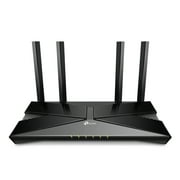
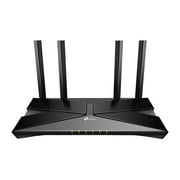
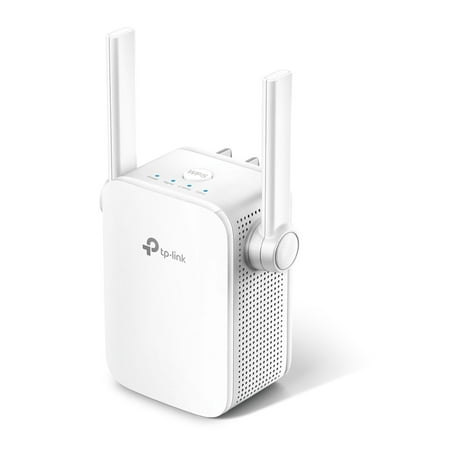
TP-Link AC750 Wi-Fi Range Extender with two External Antennas
- Brand:
- TP-Link
- Model Number:
- RE205
- UPC:
- 845973080990
- EAN:
- 0845973080990
- ASIN:
- B0779QCNJ1
- Best Buy SKU:
- 6295317
- Walmart SKU:
- 917463498
Market rate of $27.99 positions buyers 0.0% under the established average.
| Price Type | Price | Date |
|---|---|---|
|
Highest Price
|
$38.21 | |
|
Lowest Price
|
$19.98 | |
|
Most Recent Price
|
$28.00 |
| Price Type | Price | Date |
|---|---|---|
|
Highest Price
|
$33.60 | |
|
Lowest Price
|
$24.99 | |
|
Most Recent Price
|
$27.99 |
Tracking History: We have tracked TP-Link AC750 Wi-Fi Range Extender with two External Antennas since 12/5/2022. The most recent price update was on Dec 12, 2025.
Price Range: Over the past 90 days, the price has ranged from $24.99 (lowest on 5/1/2023) to $33.60 (highest on 9/12/2023). The average price during this period is $30.49.
Current Trend: No Walmart.com pricing data available for analysis.
Customer Insights: Rated 3.8/5 from 72 reviews.
This is a great device to extend your Wi-Fi range at home. My router is in the farthest corner of the house, and the TP-Link AC750 has now given my devices full Wi-Fi signal throughout the house. I placed the device in my living room, which is a hallway and another bedroom away. Before turning on the device, the Wi-Fi signal on my phone was at two bars. After I plugged in the device and waitied for it to boot up, my signal jumped to a full 4 bars. The TP-Link AC750 was also very easy to set up. The quick set up instructions allowed me to choose one of the three methods to connect the device to my router. I chose to connect it to my router by downloading the TP-Link tether app on my smartphone. I then followed the step by step instructions on the app and I had it connected and running in no time. Overall, this is a great product and I recommend it!
This review is for the TP-Link AC750 Wi-Fi Range Extender with two External Antennas (works with any router or WiFi system). So we have had AT&T for years for our cell phones and at home we try to always be on wifi to save data. We recently moved 90 seconds up our street and suddenly we have very poor service on our cell phones where we would have signal in one room but not in another room through their network and also had very poor wifi range due to trees I guess. So I was really happy to get and try this wifi range extender. We set this up 2 days ago and it is a miracle! We now have wifi in all rooms of our house. This was such an easy solution that I wish we got sooner. This operates with 2.4GHz and 5GHz bands which is pretty much all smartphones. We have the Galaxy S7 and it worked great. It was surprisingly easy to set up as well, it took less than 5 minutes. I am so happy with this and even more happy that we no longer have to worry about not getting a text message just because we are sitting to far to the left in one room of our house lol
This TP-Link Range Extender did work to extend our WiFi range. We weren't having any problems with our WiFi other than a dead spot in the evil furnace room in the basement. For some reason this room never lets WiFi in. But I plugged this into an electrical outlet right next to the furnace room and it helped extend the WiFi into that area. Well finally for the first time we have internet access in the furnace room. This extender also made my son very happy. Not only does it extend the range of the WiFi but you can plug a device directly into it for a boost in your speed. And since it plugs into the wall you can put it in any room, anywhere. So my son was able to plug his game console directly into it and did experience a better internet connection for his gaming. This was very easy to setup. Just plug it in and download the TP-Link Tether app. The app is available for Android and iOS. The app pretty much did the setup for me, I just followed the instructions. You can setup a 2.4Ghz and a 5Ghz. There are 4 lights on the extender. Power, signal, 2.4, and 5. They will all be a solid blue when everything is working fine. When you are trying to decide where to place this, plug it in and watch the signal light. It will be red if the signal is weak, telling you that you need to place it closer to your router, until it's solid blue. Or you can use the app and go into the location assistant. It will check the signal strength and tell you which areas are strong. The unit is white and it's small. It measures 3 inches at the widest point. And the unit measures a little over 3 inches high but with the antennas up it is a total of 5 inches high. This plugs into an electrical wall outlet. And has one Ethernet port on the bottom. An Ethernet cable is not included.
It has a fantastic range. I can reach my wifi 40 yards outside away from the house and It works great upstairs too. Sometimes wifi needs a line of sight. I use a single TP Link deco( a leftover from a friend's Deco mesh system as my router. It was surprisingly easy to set up and the app is fairly easy to use. Have had no problems with the booster.
I opened the packaging and it was packed well in the box and had instructions on usage. The booster fits in standard electrical outlets and turns right on. Easy to follow directions and connects well to your existing WiFi router. I've noticed better WiFi signal in areas where I typically lose it like in basement and even outside on other side of my house. Works very well and really boosts the signal to extend your ranges.
This TP-Link AC750 Wi-Fi Range Extender with two External Antennas (works with any router or WiFi system) is first-rate! It was so easy to install. I am not technically knowledgeable so I used Method 3 via the WPS(have no idea what or where that is) button, but I followed the instructions and WOW! There has always been an area in the house where the Wi-Fi drops off but, no longer! It actually works now and I am so excited that I was actually able to do it on the first try! Believe me-If I can do this set up so can you!!! I cannot recommend this highly enough and hope you enjoy this range extender as much as I do.
Incredible is the best word I can find for this TP Link extender. This product went beyond any of my expectations after setting it up. Setting this extender up is pretty easy if you can “read between the lines” as some of the instructions are not really that clear and seem to forget some steps. I initially downloaded the app from the play store and tried setting up the extender from that. I could not connect to the TP Link wireless on my phone. I then tried connecting though the WPS button on my router, and still no luck. At some point when I was about ready to give up, I pressed the WPS button on the router and then looked at the app that I had installed. Waiting right there was the rest of the set up. Basically, it asks for your router password and if you want to change the name of the TP Link wireless signal. I wish I had looked at the app to begin with after pressing the WPS button. After getting it set up I took the extender out to my patio and plugged it in. It picked up the signal from both signals from my dual band router. I switched to just the wireless signal from the router and started walking out from my patio to see how far the signal would go. I didn't get but about 20 more feet away, and the signal was very weak. At that point, I switched to the TP Link wireless signal and had full wireless signal. I walked completely out to the alley which is about 75 feet from my house, and into the neighbors back yard before I even started to get a degraded signal. I never lost the signal completely, but I didn't want to walk into my neighbor's house either! I realize that being able to use this outside with no walls or wires to interfere with the signal might not be a fair test for inside a house, but for me, it performed exactly how I wanted. I want to be able to listen to online music while gardening or mowing the lawn, and with the extender, I can easily access my wireless signal. I would not hesitate to recommend this fantastic product to help extend a wireless signal.
Appearance: Lightweight, bright lights are easy to see when in use, moveable "arms" to adjust for space or reception, small and fits easy in small space. For my particular preference, I would have preferred the lights be on the front of the device instead of on top. I like to be able to look and see it from directly instead of having to go to it and look on top of the device. Setup: Directions were easy to read and use, with 3 different ways to set up the device. The WPS button option did not work for me, but I easily connected by using the web page option. Once it was connected to our router, I could easily move it to different parts of my house to find the best place for our needs. Reliability: Once connected, it has stayed connected. I have used it for the last 3 days with no issues whatsoever. I have had much better connection inside and outside of the house. Then I did before using the TP link. Summary: This little device has been extremely useful for my family and I would absolutely recommend it.
So the whole point of trying this product is because I cut the cable a year or so ago and now stream TV using Roku. I want better signal strength. And my cell phone on Wi-Fi doesn't work downstairs as well as I would like it to. I thought I was pretty quick to figure out the set up of the computers, router and cell phone that I manage in my own home. Not this time. This Wi-Fi extender says easy setup. I had a heck of a time just finding the sign-up page on the web page they give you in the instructions; I did download the app onto my phone and signed up there. After trying all three of the “connect and extend options” in the instructions I still wasn't connected to anything. Method 1: Via a web browser. This is not enough info for me. Turns out you need a couple more steps before you go to the web. Method 2: Via the tether App (cell phone only) I downloaded the app and eventually was able to sign up but never figured out how to connect. Method 3: Via the WPS Button on your router. Nothing happened at all. Very frustrating. I spent an hour and a half goofing around trying with the limited instructions they sent in the box. Could just be me but it was far from easy to set up. I was about to give up altogether when I found a YouTube video on how to set it up. The guy walked me through the whole thing and I'm connected and my network is secure. Yes, I have better reception and picture on my TV and my phone works better in the basement. I would recommend it but watch the video and save yourself the headache of setting it up.
We have a really old, and big house. In the rooms closet to the computer there was no problem picking up the signal whereas in the rooms further away, it was not. This Wi Fi range extender allowed us to use the internet in rooms we had not before been able to connect in. The set up was relatively easy, and I would definitely recommend this product.
Detailed price history for the past 90 days
No Walmart.com pricing data available for analysis.
Third-Party Sellers prices have ranged from $24.49 (Sep 17) to $33.80 (Aug 1) over the past 90 days. Current price is close to the 90-day average of $28.71.
| Date | Price | Change | % Change |
|---|---|---|---|
| $28.00 | $+0.00 | +0.0% | |
| $28.00 | $+0.00 | +0.0% | |
| $28.00 | $+3.51 | +14.3% | |
| $24.49 | $-2.50 | -9.3% | |
| $26.99 | $-2.46 | -8.4% | |
| $29.45 | $-0.50 | -1.7% | |
| $29.95 | $-0.04 | -0.1% | |
| $29.99 | $-3.81 | -11.3% | |
| $33.80 | $+4.80 | +16.6% | |
| $29.00 | $+0.50 | +1.8% | |
| $28.50 | $+0.50 | +1.8% | |
| $28.00 | $-1.00 | -3.4% | |
| $29.00 | — | — |