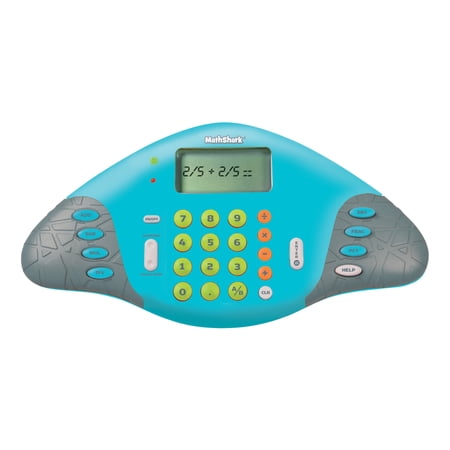
Educational Insights MathShark Electronic Math Game, Electronic Learning Toy, Ages 6+
- Brand:
- Educational Insights
- Model Number:
- 8490
- UPC:
- 086002084903
- EAN:
- 0086002084903
- Walmart SKU:
- 15379986
Recent downward movement established $28.54 pricing, now 0.0% below the quarterly average.
| Price Type | Price | Date |
|---|---|---|
|
Highest Price
|
$44.16 | |
|
Lowest Price
|
$44.16 | |
|
Most Recent Price
|
$44.16 |
| Price Type | Price | Date |
|---|---|---|
|
Highest Price
|
$43.99 | |
|
Lowest Price
|
$23.13 | |
|
Most Recent Price
|
$28.54 |
Tracking History: We have tracked Educational Insights MathShark Electronic Math Game, Electronic Learning Toy, Ages 6+ since 12/11/2022. The most recent price update was on Sep 6, 2026.
Price Range: Over the past 90 days, the price has ranged from $23.13 (lowest on 12/11/2022) to $43.99 (highest on 8/24/2023). The average price during this period is $34.70.
Current Trend: Walmart.com prices have ranged from $28.54 (Sep 6) to $28.54 (Sep 6) over the past 90 days. Current price is close to the 90-day average of $28.54.
Customer Insights: Rated 4.39/5 from 44 reviews.
Having been a teacher for 23 years and knowing the importance of learning your math facts, this game was a must for my grandkids. This Math Shark gives your kids practice in learning all 4 types of math facts, decimals, and percentages in a fun way and efficient way. This game can be used by teachers as an assessment for students and would be great in a learning center. It gives you their scores and shows their improvement. It recycles the problems the student misses and has them practice those more than others. It can be played in a silent mode or with sounds. It can be used as a calculator for student or adult use and can also be used as a learning game. It has increased levels of proficiency as they master their skills. A green light comes on if their answer is correct and red if they miss it. If they do miss it there is a help button that they can push. It then displays 2 different ways to do the problem, which accommodates different learning styles. It is rated for grades 1+ and ages 6+. Which makes sense because you have to be a good reader to follow the directions printed on the screen. I do however think if you demonstrated it to a younger child they would still be able to do it easily once they see how to use it. Kids are so technological savvy nowadays that I don’t see this as a problem. The only problem I see with this game is the problems read left to right instead of above and below. This is a great learning tool for this generation.
I choose the Educational Insights Math Shark because I thought it would be a wonderful device to use to help my daughter with her arithmetic. I was not disappointed by the product at all. Once we started using the Educational Insights Math Shark, it has been nothing but a blessing for my daughter. She enjoys using to help with her homework and also when she is asked to pick something to do for awhile during the time I am making dinner or lunch. She'll go and get the Educational Insights Math Shark. She totally loves it. What I like most, as a parent, about the Educational Insights Math Shark is that it is not limited to just one age level or math level. The device will grow with my daughter as we use it in our home to help her. And, as a parent who has not had to do math for years, it has been great for me to refresh my math skills so that I am able to help her more. I find it fun to play with myself. That is another great point, we not only see it as something to use for and educational supporter but my daughter also sees it as something fun to play with not only something to help her with her homework and studies.
I'm doing a review on the MathShark. It is for ages six and up. It will help you practice with your adding, subtraction, multiplying, dividing, decimals, fractions and percents. It has a button for each one of these. After you turn it on it will tell you what to do on the lcd screen. Let's do it! 1. Turn on. 2. It says MathShark. 3. Then it say Sounds. It will ask you if you want the sound on or off. Choose Enter if you want the sound on and Clear if you want the sound off. I'm going to click the Enter button to hear the sounds. 4. Then it says to Choose a skill. If will go through all of your options. Choose add, sub, mul, div, dec, frac, pct. These are the abbreviations of adding, subtraction, multiply, division, decimal, fraction and percent. I'm going to press the button Add. 5. Then it reads Add, Press 1-8 for level. There are 8 skill levels. I'm going to choose the number one because it is the easiest and then hit enter. 6. An example shows up with 1 + 2 = 3. 7. Then it reads Start ? with a yes or no. Click on enter for yes and Clear for no. I'm going to click enter. 8. In the left hand corner it says L 1. That means Level One. To the right is 0 + 2. I'm going to press the answer as 2. The Green light comes on with some sort of sound. That tells you it is the correct answer. 9. It has changed to the next screen with a different adding problem. It says 1 + 2. I'm going to press 1 and see what happens because this is the wrong answer. The Red light flashes on and makes a sound. This is to tell you it was the wrong answer. Then the next problem shows up. It continues in this way. It sounds like a lot of steps but it's really not. There is one thing that parents will really like about this toy. The two sounds it make are very low volume. I can see kids really liking and playing with this toy. To me it looks like it is in the shape of a video game which makes it more appealing. It is very easy to learn. I forgot to tell you that there is a button that you press to choose Calculator or Learning. You press the top or bottom to choose which one. The calculator works the same as any other calculator. The sounds work with it also. I highly recommend this product. Give you kids a chance to lean Math early so they have something to build on.
This device has proven to be very timely. It is easy to use (particularly for a child) and I got it for my 10yr old 5th grade grandson. All the topics the Math Shark covers he is having to learn or be refreshed in the 5th grade. It is very specific topic wise..you can choose between topic such as adding, subtracting, multiplying, dividing, and fractions as well as decimals. In addition, under each of thest topics you can start simple (levels 1-9) and get as advanced as you want to. This is a small device so it feels like the person is controlling it in their hands. You can opt for sound or no sound. When I gave it to my grandson, he was curious (he is truly an “electronic” child) and at first didn't think he would like it, but as time has passed, he actually looks forward to coming home from school and spending 10mins on the Math Shark before he gets into his assigned math homework (ixl online) from school. It seems durable and I expect it to last as long as any other electronic gadget lasts, which is to say a pretty long time and the fact that it takes only uses 2 AA batteries is a real plus. Tried to upload a photo but the system would not permit..my photo was 1.16mb and Walmart's limit is 1.5mb, so it should have worked but .. whatever.
How easy is it to have a mobile math calulator and game in one product! My daughter is 10 and has struggled with math. This allows her to learn in a fun and easy way that looks and feels like a handheld game. She takes it with her, even in the car she is practicing division. Very good investment that will allow the kids to play games while learning.
My 6 year old granddaughter loves this! She likes to multiply to see how big the number will get. My 10 year old grandson loves it for his homework. It shows how the problem is worked out to get the answer. So much better than "just the answer". I like it in calculator mode...for the checkbook. It's a neat little thing that is perfect size for little hands. I would definitely recommend this to anyone with a son/daughter in school. It even does fractions! 100% like!!
I gave this MathShark to my 9 year old. She is learning the multiplication tables and next comes division. She is doing ok in math but her teacher wants her to complete her multiplication tables faster than she is doing. After 2 weeks of playing with the MathShark she has increased her speed tremendously. Better than we expected and we are amazed at how easy it was. The MathShark has many ways to use it but the one way that has helped her the most is there is a section where they time you on your answers. It encouraged her to beat her old score without any prodding. The MathShark also show you when you give a correct answer and if you don't it will show you the correct answer and put the problem somewhere back into the sequence so you can try again. We are thrilled with the results that she has had after just a few weeks of playing with the MathShark. I would definitely recommend this to anyone that has children or grandchildren in school, even as young as 1st grade.
The MathShark is a portable, easy way for students to practice and increase basic math skills - add, subtract, multiply and divide, plus decimals, fractions and percentages. In fact, it is useful for the whole family with its built-in calculator. There are 8 levels for each math skill, each level a little more challenging. When the correct answer is input, a green light flashes and a tone sounds. When an incorrect answer is entered, a red light flashes and the correct answer is shown, but only for an instant. At the end of the set, both lights flash, time is given in seconds and an encouraging line appears on the screen. There is a help button, and the sounds can be turned off if desired. My 6 and 8 year olds both found the MathShark to be engaging and used it on their own. The instructions are well written and clear, plus the screen on the unit is self explanatory, except for fractions, which must be reduced. It's a good idea to read the instructions first. The unit requires 2 AA batteries that fit in a compartment secured by a screw. The screw would not go in straight but caught enough to keep the compartment closed. Our whole family enjoyed using the MathShark. Even mom and dad can brush up on their math skills if they choose. It is a great way to practice, increase and master basic math. Highly recommended.
We have been using our MathShark for approximately two weeks now. First off, the product shown is in bright cheerful colors. The one we received was a very dark and decidedly uncheerful dark turquoise and dark gray. I didn't notice a color choice, so not sure if they just randomly change or we got a newer version (or older version!). I reviewed the directions and tried to pop in two new AA batteries. That is where the problems started. The battery case does not slide off - it has a flat, wide screw that holds it in place, although the battery door was also warped and looked like it might not hold the batteries in place. The screw was put in at the factory in a crooked angle, so it took trying three different screwdrivers before we could remove it to get to the battery compartment. The batteries popped in without incident, and we had the same fun getting the cover back on, with the weird angled screw. Once that was done, we turned it on to take it for a spin. It is pretty intuitive, and honestly, the directions would almost not be needed by most people. A light flashes green if you get the right answer and red if it is wrong. You can turn off the sound effects, which is pretty much preferable at our house. It feels fairly well balanced in our adult hands, and the kids didn't seem to have much trouble with it either. The first thing I did not like was the screen. It is TINY compared to the size of the toy. The display fonts are extremely primitive! With so many to choose from now, this reminded me of the very early-on calculators or hand held games from the 1970's. They were hard to read many times. What made it worse is that this screen is not backlit. It is part of what makes it harder to read - a gray screen with either dark gray or light black letters and numbers. The contrast was not enough. And I don't know of any kid who doesn't like lying in bed and playing games! You sure can't do this one in a dark room, because all you'll see would be the red or green light. Our model also had a problem with the number zero. Once in a while, a great deal of pushing, like you are trying to push the number button out the bottom of the machine would result in a zero, but otherwise, it just didn't respond. So every answer that has a zero in it (and of course, there are many) will be counted as wrong. Your answers are also timed, so don't waste time with buttons that don't work, because it will just increase your game time and your frustration. There are some good things - I promise! The kids still liked it a little bit, but when they couldn't get the zero to work, they stopped playing with it. I kept trying different levels and skills just for the mental exercise. I found it was actually a bit fun to try to figure out various levels of math problems in my head, having been used to relying on a calculator so often. There are seven math skills covered in this game: addition, subtraction, division, multiplication, fractions, decimals and percentages. Each math skill has eight levels that get progressively more difficult. Some of the levels were actually a little bit of a challenge for this "old" adult. The multiplying fractions function was a reminder of how much I'd forgotten since I didn't use it! Ha! I enjoyed the mental math and trying to get a high score, but then, I always have enjoyed any sort of computer games. I would suggest the following changes to the manufacturer: 1) Add a backlight to the screen. Evenings while bored silly or long car rides (which can be day or night) are a great time to use this item, and it is too hard to see without an abundance of light. 2) Update the fonts used to a more legible one. It looks like I picked this up at a garage sale circa 1980. 3) Use a different screw on the back battery compartment. It didn't work well at all. Overall, this definitely could be useful, but it is not too likely a child who has a PSP or Nintendo DS would give this much of a second glance. And with so many math games available for other gaming systems, I would think an individual handheld like this would be working overtime to make sure their item is more appealing. So, if your child doesn't have any of those other handhelds, then this would be an acceptable way to practice math skills, especially in the car. The game seems very sturdy and should survive several drops. Just test everything as soon as possible, and if you have a bad button, exchange it at your store for one that works.
First of all, the picture shown of this product is not what I received because the color is yellow and blue; as you can see I got blue and gray in color. I rated this MathShark fair because the LCD screen does not clearly display the problems, you need to press the number buttons hard when answering the problems, and the software is not user friendly. Other than that, your kids can play exciting quiz games complete with lights and sound effects or you can use it like a regular calculator. There are seven timed skill building games with engaging quiz questions that covers everything from addition, subtraction, multiplication, division, fractions, and percentages. Your child can simply choose one of eight levels of play then solve each problem that appears on the screen. They can also switch to the calculator function with just the press of a button. Two AA batteris are not included. I would recommend this for first graders and/or six years old.
Detailed price history for the past 90 days
Walmart.com prices have ranged from $28.54 (Sep 6) to $28.54 (Sep 6) over the past 90 days. Current price is close to the 90-day average of $28.54.
| Date | Price | Change | % Change |
|---|---|---|---|
| $28.54 | $+0.00 | +0.0% | |
| $28.54 | $+0.00 | +0.0% | |
| $28.54 | $+0.00 | +0.0% | |
| $28.54 | $+0.00 | +0.0% | |
| $28.54 | $+0.00 | +0.0% | |
| $28.54 | — | — |