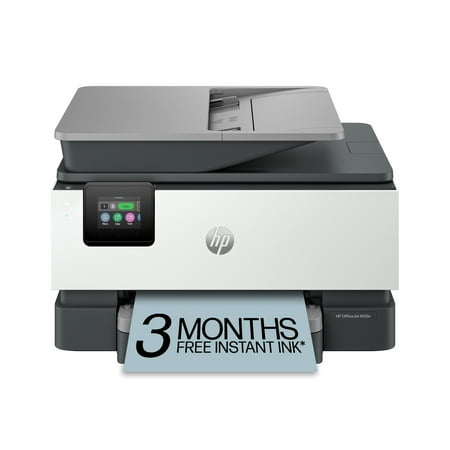
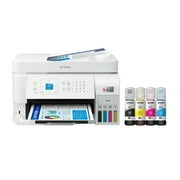
HP OfficeJet 9122e Wireless All-in-One Color Inkjet Printer, Scanner, Copier, Fax, ADF, 3 months Instant Ink price history and forecast - HP HP OfficeJet 9122e Wireless All-in-One Color Inkjet Printer
HP OfficeJet 9122e Wireless All-in-One Color Inkjet Printer, Scanner, Copier, Fax, ADF, 3 months Instant Ink

HP OfficeJet 9122e Wireless All-in-One Color Inkjet Printer, Scanner, Copier, Fax, ADF, 3 months Instant Ink

Brand:
HP
Model Number:
HP OfficeJet 9122e Wireless All-in-One Color Inkjet Printer
UPC:
196786895852
EAN:
0196786895852
Walmart SKU:
5152138188
Key Takeaway

Price stability at $249.00 over the past three weeks indicates equilibrium, with current pricing closely tracking the 90-day average of $249.00.

Third-Party Seller Summary

No price history available for Third-Party Sellers

Walmart.com Summary

Walmart.com Price History Summary
Price Type Price Date
Highest Price
$249.00
Lowest Price
$199.00
Most Recent Price
$249.00
Average Price
$230.25
First Tracked
Last Update

Price Analysis

Tracking History: We have tracked HP OfficeJet 9122e Wireless All-in-One Color Inkjet Printer, Scanner, Copier, Fax, ADF, 3 months Instant Ink since 5/13/2024. The most recent price update was on Jun 11, 2026.

Price Range: Over the past 90 days, the price has ranged from $199.00 (lowest on 1/25/2025) to $249.00 (highest on 11/13/2025). The average price during this period is $230.25.

Current Trend: Walmart.com prices have ranged from $249.00 (Jun 11) to $249.00 (Jun 11) over the past 90 days. Current price is close to the 90-day average of $249.00.

Customer Insights: Rated 4.0/5 from 329 reviews.

Customer Reviews

329 reviews

Customer Reviews

4.0
Based on 329 reviews
5
205
4
48
3
14
2
9
1
53
Filter Reviews:
Sort By:
Showing 10 of 329 reviews

Fast & Accurate

Guy R Jones January 13, 2026

This printer is incredibly fast & has virtually no defects. My previous HP Smart Tank 7602 was slow, had fewer functions and almost a 23% defect rate. I wouldn't recommend that printer to anyone except a very casual user. If you want a printer that meets the needs of someone in business or community service, I'd highly recommend this one.

Was this review helpful?

9125e some good, some bad

Bunkys1 December 27, 2025

I've had mostly good experience with HP printers however the earlier models (10 years back) were more solidly built and didn't use as much plastic. My previous HP 8025 and this current 9125e, the paper trays are very flimsy in my opinion... if not careful when pulling them to load paper, you could break the end of the tray which I did on my previous 8025 model. I also don't like the fact that there isn't a paper adjusting slider inside the tray in the front of both these models, only for the sides of the paper (not a plus). The biggest complaint about this 9125e model is how LOUD it is each time it's sits idle and when you're ready to print something... it goes thru it's automatic cartridge adjustment internally and is makes a very loud banging sound like there's something ready to go inside! Would be nice to have a "quiet" printer... this model by far is the loudest I've had but everything runs as it should, color quality is reasonable, digital display is a nice, visible size. I did refer to YouTube for help setting up this printer to my WiFi... found a good tutorial that was much easier to follow than the info from HP's website.

Was this review helpful?

Setup

Anonymous November 28, 2025

We rely on a printer to be available 24/7 which I doubt is an unusual requirement for home or home office.. Setting up the 9125e to meet this requirement was a task and required several trips to the internet. HP wake up! This should be your basic setup instructions- power on 24/7, WIFI connect 24/7, Infact these should be defaults. Also scans to USB should be PDF not JPEG or at least allow a way to reset the power on defaults (firmware?). Another question Why do we have to periodically turn the printer off and then on to get it to reconnect to the WIFI even even though the WIFI light is on?

Was this review helpful?

HP OJ Pro 9125e AIO 3 Mo In Ink

Anonymous December 31, 2025

I have bought HP products for over 30 years starting with the HP 12C calculator, then PCs and printers. This new HP OJ Pro 9125e is OK but does not match the quality of our previous 8600 ink jet which failed after a reasonable number of years. After my Spectre PC's battery failed I bought a new Spectre PC which shows defects when I type emails and is inferior to the previous Spectre. I regret to write that HP products are decreasing in quality and reliability. This will be ok until it no longer is and long time clients like me migrate to other brands. HP used to be the gold standard.

Was this review helpful?

My Initial Thoughts On My New HP OfficeJet Pro 9125e Printer

kgrizzaffi January 10, 2026

To the point - overall, my new OfficePro 9125e printer is a good replacement for my previous HP OfficeJet Pro 6978. On the whole, I am satisfied with it. I had one or two of my apps have some initial trouble properly connecting to the printer but with a little help from one of the AI apps, I was able to get this resolved. My biggest complaints deal with the front panel display and printing envelopes. Regarding the display, I have found typing in alphanumeric characters is a bit difficult because the characters are small and your finger position has to be fairly precise. This, however, is not a show stopper for me as I seldom have to do this. I am disappointed that HP does not allow some customization of the front panel functions through the computer app. Having this ability would allow me to have most-used functions where I can most easily get to them. Also, the printer only has one tray so when you want to print an envelope you have to swap out paper with an envelope. This is not a problem as I had to do this with my previous printer. What is a bit more cumbersome is that apparently even if you specify say a #10 envelope in the print settings on your software (such as Microsoft Word), you still have to tell the printer you are using a #10 envelope on the front panel and as I mentioned, the front panel is not customizable so you have to go 3 button presses down into the menu to select the #10 envelope then when you are finished, you have reverse this to return to normal pages. Again, this is not a show-stopper for me since I rarely have to print onto envelopes but I'm again disappointed that HP doesn't make printing envelopes a bit easier. Finally, I obviously cannot comment on long-term reliability as I have had this printer for less than two months but hopefully, with regular maintenance, it will perform as expected for several years.

Was this review helpful?

Good, but not great!

Linda S. December 3, 2025

What I like about it is it will print double-sided documents without my having to get up and turn the paper. What I don't like is that it is slow to react, whether scanning or printing. Why I wouldn't give it more than 3 stars is that it was really hard to install because it came with outdated software and I needed HP help to make it work. That should not be! If HP is still selling an electronic product, it should come with a notice that it will require updating before it will work.

Was this review helpful?

Not good

SouthernYankee April 5, 2026

As someone who has worked in the tech field for over 30 years, I can honestly say I would never buy an HP printer after this. The interface for this printer is terrible. The little screen on the printer is basically worthless if you have large hands/fingers and don't have a magnifying glass to try to read the extra small fonts. I ended up returning this printer.

Was this review helpful?

Frustrated!

Anonymous October 2, 2025

Our new printer will only work if we shut it off, then turn it on every time we need to print: highly frustrating!

Was this review helpful?

Stupid Ink System

Anonymous February 7, 2026

This printer comes with new ink cartridges. HP enrolls the buyer in an ink replenishment program and immediately sends replacement cartridges before I have come anywhere near using the original supply.

Was this review helpful?

Disappointed

August1919 November 4, 2025

works sometimes and sometimes it doesn't - no manual - so how does this printer work? When I print an email sometimes it prints all the folders on the side of the email - what gives I don't want that on my printed email. It will not print a marked passage-it will print the whole document out-gee what a pain. Where is the 24/7 phone number I was promised???

Was this review helpful?

Price History

Historical price data graph for HP OfficeJet 9122e Wireless All-in-One Color Inkjet Printer, Scanner, Copier, Fax, ADF, 3 months Instant Ink

Recent Price Changes

Detailed price history for the past 90 days

Walmart.com Pricing

25 records

Walmart.com prices have ranged from $249.00 (Jun 11) to $249.00 (Jun 11) over the past 90 days. Current price is close to the 90-day average of $249.00.

Walmart.com price history for HP OfficeJet 9122e Wireless All-in-One Color Inkjet Printer, Scanner, Copier, Fax, ADF, 3 months Instant Ink showing recent price changes over the past 90 days
Date Price Change % Change
$249.00 $+0.00 +0.0%
$249.00 $+0.00 +0.0%
$249.00 $+0.00 +0.0%
$249.00 $+0.00 +0.0%
$249.00 $+0.00 +0.0%
$249.00 $+0.00 +0.0%
$249.00 $+0.00 +0.0%
$249.00 $+0.00 +0.0%
$249.00 $+0.00 +0.0%
$249.00 $+0.00 +0.0%
$249.00 $+0.00 +0.0%
$249.00 $+0.00 +0.0%
$249.00 $+0.00 +0.0%
$249.00 $+0.00 +0.0%
$249.00 $+0.00 +0.0%
$249.00 $+0.00 +0.0%
$249.00 $+0.00 +0.0%
$249.00 $+0.00 +0.0%
$249.00 $+0.00 +0.0%
$249.00 $+0.00 +0.0%
$249.00 $+0.00 +0.0%
$249.00 $+0.00 +0.0%
$249.00 $+0.00 +0.0%
$249.00 $+0.00 +0.0%
$249.00
No third-party seller price history available for this product in the past 90 days.

Related Products