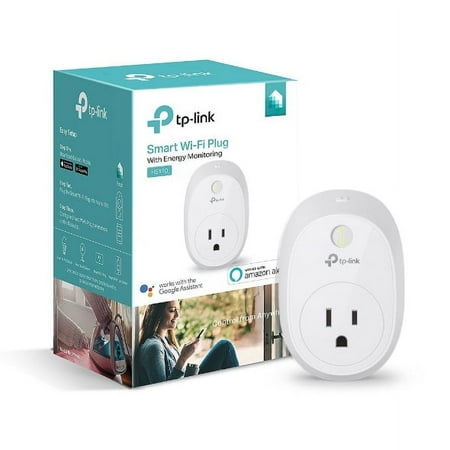
TP-Link HS110 Smart Plug with Energy Monitoring, No Hub Required
- Brand:
- TP-Link
- Model Number:
- HS110
- UPC:
- 845973094294
- EAN:
- 0845973094294
- Walmart SKU:
- 48695645
| Price Type | Price | Date |
|---|---|---|
|
Highest Price
|
$94.88 | |
|
Lowest Price
|
$27.99 | |
|
Most Recent Price
|
$64.88 |
| Price Type | Price | Date |
|---|---|---|
|
Highest Price
|
$25.98 | |
|
Lowest Price
|
$25.98 | |
|
Most Recent Price
|
$25.98 |
Tracking History: We have tracked TP-Link HS110 Smart Plug with Energy Monitoring, No Hub Required since 2/12/2025. The most recent price update was on Feb 12, 2025.
Price Range: Over the past 90 days, the price has ranged from $25.98 (lowest on 2/12/2025) to $25.98 (highest on 2/12/2025). The average price during this period is $25.98.
Current Trend: No Walmart.com pricing data available for analysis.
Customer Insights: Rated 4.49/5 from 41 reviews.
I purchased this plug to try the whole 'Smart Home' thing and integrate it with my Echo. And if you are ever on the fence or remotely considering controlling your home appliances/lights . I can tell you that You Need this ! Just like the Echo - Its one of those things you didn't know you wanted until you actually own it . I am now in the process of getting more to control more stuff in my home Size -------- The size of this plug is definitely larger than what I expected and what looked like a cute little plug in pictures is certainly not little (cute maybe). It will cover adjacent ports on power strips or wall outlets . Your best bet is to mount it on the upper of the two outlets or an extension cord of you plan to use multiple outlets Construction & Build Quality --------------------------------------------- -The plug is well built with nice thick ABS plastic materials . - There is a small WiFi indicator light on the front face that glows green when connected and flashes red-green during the setup process. WiFi authentication errors are indicated by a Red light - The Plug can only use the 2.4 Ghz WiFi band for connecting to your network and in my opinion is a good thing as it gives you the flexibility of installing your plug at a greater range from your router. A modern router should be able to bridge your 2.4Ghz and 5Ghz bands anyway for network visibility. (If not , then you probably need to update your router) There is a very distinct click sound when the plug is operated On/Off via the app or Echo and this means only one thing - The plug uses a physical ElectroMechanical Relay for switch actuation. Now using electromechanical relays has its ups and downs (there are quite a few differences but I'm focusing mainly the differences in the context of my use case of a Smart Home) Ups: - Cheaper to produce , keeps overall cost low - Able to handle higher currents and thus even works for larger appliances Downs: - Just like any mechanical component , it will wear out eventually ( the two year warranty should give some peace of mind) - Slightly higher idle power consumption Initial Setup & The TP-Link Kasa App ---------------------------------------------------------- - The setup process if very simple and straightforward once you download the Kasa App & signup for a TP-Link Account. The app walks you through the setup process asks you to enter your device name like 'Living Room Lamp' etc - The app itself is simple and elegantly designed , and gives you the option to turn On/Off your appliance via it - It also gives you a total runtime for the day , week and month on how long your device was switched on . Not very useful but good to know anyway - The more useful feature is the scheduling and the Away feature which is just another glorified scheduling feature which allows you to program your lights/devices to turn off/On on set times and days - You WILL have to enable the 'Allow Remote Control' option if you want control your devices via Echo or while away from home Echo Integration ----------------------------- After a a brief <1 Minute setup you can start controlling your smart plug via Echo/Alexa . The process is simple and straightforward : - Make sure you have Remote control enabled on the Kasa App for the plug you want to control - Enable the TP-Link Kasa skill and enter your TP-Link account information for the Skill in the Amazon Alexa app - Ask Alexa to discover devices , & volia thats it ! - Once you have more plugs, devices you can form them into groups via the Alexa App otherwise it works just with "Alexa , Turn Off/On <whatever name you gave the plug in the Kasa app> " Overall thoughts --------------------------- I love this smart plug and how simple and straightforward it is to convert your dumb Lamps and appliances around your home into 'smart' devices. I also like the fact that its less expensive than the WeMo Plugs/switches, However while ~$30 may not seem much at the beginning , but I promise you that you will come back for more soon wanting to control more devices via your voice/phone just like me and then you will start looking into Smart Bulbs like the Philips hue, connected thermostats, IFTTT etc. - And that, my friends, is a slippery slope & an expensive indulgence :)
Controlled via free KASA app, Google Home, or Amazon Alexa. KASA shows current power of device plugged in, and daily average as well as total consumption today, over last 7 days, and over past 30 days. Can schedule on/off times for individual days or the week, Can set AWAY mode to set random on/off between selected times or sunrise/sunset times. Can also turn on/off manually at switch. Only drawback is that its size blocks second plug if used in standard wall outlet.
Super easy to set up - I had a Kasa plug before - so all I had to do was open the app and add the + button to add a new device and in a couple of minutes I was controlling my dehumidifier wirelessly and figuring out how much power it was consuming! Yay
The unit not only allows on and off control of the appliance but provides accurate monitoring of the power consumption in watts! This can easily be accessed at any time through the app. Finally we can get a handle on how much power gadgets are consuming. A great product indeed.
Compatible! Just about every hub, app, website smart thing-a-ma-jig lists TP-Link stuff so that's the main reason I bought it. Haven't seen any problems so-far. It's almost too big though. Really a tight fit to get a second plug in an outlet.
I got this working fairly quickly on an Amazon Kindle Fire HD8. The first step is to pair the HS110 to the kindle. Then you can use the kindle keyboard to set up connection to the router. I found the HS110 had to be fairly close to the router to set up but then the HS110 can be unplugged and moved where you want it (subject to wifi signal strength). I had no trouble using the Kasa app to turn a lamp on and off or to set up dusk to a set hour. The app could use some improvement.
I just recently started buying tp link devices to automate my home without having to buy a hub to use them properly. The Kasa app is simple and straightforward to use and has quite a bit of features like scheduling, energy monitoring and the ability to turn on and off anywhere you are. The HS110 was purchased because it monitored exactly kilowatt hours and we are aiming to save money on electricity. Now, I have had this device 2 weeks and unfortunately it stopped allowing the electricity to pass through it it will turn on and off but the device wont turn on. Despite several trouble shooting steps I was not able to get it working, so I will be returning it for a new. Although the other device I have from tp link are still chugging along with no issue. I for one will keep on using tp link to automate my home for a great price.
Do I think this will work? Sure, it works for many people and is a handsome device. For me, not so much. So why did I take it back? 1: My Android recognized the smartplug, so that can't be the problem. Strength of signal was up in seconds. 2: My Kasa installed and uninstalled 2x, as per customer support. Then, searching and searching and searching and searching...and after a few hours and recognizing that Kasa support was not up to the task, I said Okay, that's going back. 3: This is already archaic...my whole point was that I dreamed up several months ago that the outlet or appliance should provide feedback on usage in this day-and-age. I saw the TP-Link and said hey, they've got it. But really, if you have say a Cree bulb on, what's the difficulty (for me, yes, but for tekkies, I should think not,) of integrating usage monitoring from your PC? An entire plug? Obviously, we are just working around hardware situations here that should be, simply put, more convenient and accessible. Two hours to have a signal found, unless extraterrestrial, is not my idea of time well spent. Just me.
I tried to link this plug with my Echo Dot, my Iphone, and my laptop. None of these three devices recognized this TP-Link smart plug. I tried multiple times. Now I have to return two of them. Unless you enjoy being frustrated. I don't recommend this device!
The power consumption feature works for a few hours, then the numbers randomly change to something obviously wrong: hundreds, thousands, even millions of kilowatt hours. Resetting the device only fixes the problem for a few hours or a couple of days at most.
Detailed price history for the past 90 days
No Walmart.com pricing data available for analysis.
Third-Party Sellers prices have ranged from $64.88 (Jul 13) to $64.88 (Jul 13) over the past 90 days. Current price is close to the 90-day average of $64.88.
| Date | Price | Change | % Change |
|---|---|---|---|
| $64.88 | — | — |