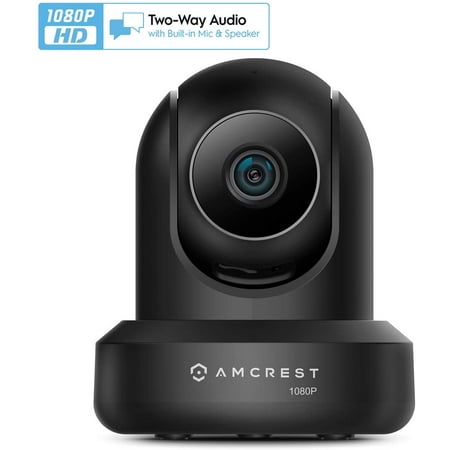
Amcrest 1080p WiFi Camera Indoor, 2MP Pan/Tilt Home Security Camera, Auto-Tracking, Motion & Audio Detection, Privacy Mode, Enhanced Browser Compatibility, H.265, Two-Way Talk IP2M-841B-V3 (Black) price history and forecast - Amcrest IP2M-841B-V3
Amcrest 1080p WiFi Camera Indoor, 2MP Pan/Tilt Home Security Camera, Auto-Tracking, Motion & Audio Detection, Privacy Mode, Enhanced Browser Compatibility, H.265, Two-Way Talk IP2M-841B-V3 (Black)

Amcrest 1080p WiFi Camera Indoor, 2MP Pan/Tilt Home Security Camera, Auto-Tracking, Motion & Audio Detection, Privacy Mode, Enhanced Browser Compatibility, H.265, Two-Way Talk IP2M-841B-V3 (Black)

Brand:
Amcrest
Model Number:
IP2M-841B-V3
UPC:
850007530099
EAN:
0850007530099
Walmart SKU:
721722376

Third-Party Seller Summary

Third-Party Seller Price History Summary
Price Type Price Date
Highest Price
$54.99
Lowest Price
$50.00
Most Recent Price
$54.99
Average Price
$52.99
First Tracked
Last Update

Walmart.com Summary

No price history available for Walmart.com

Price Analysis

Price history data is not available for this product at the moment.

Current Trend: No Walmart.com pricing data available for analysis.

Customer Insights: Rated 4.0/5 from 82 reviews.

Customer Reviews

82 reviews

Customer Reviews

4.0
Based on 82 reviews
5
49
4
12
3
3
2
6
1
12
Filter Reviews:
Sort By:
Showing 10 of 82 reviews

Perfect house sitter, works great!

GoodCop March 15, 2016

The Amcrest Pro HD is such a great camera. It is much smaller than I had expected, which is perfect. Much harder to notice it in a room if you are not expecting it. The Amcrest Pro HD has the 1080P recording capabilities and also a night vision capability. It says up to 32ft. and so far it seems to be doing just that. As you can see by my photos, the camera comes with everything you need to set it up and start your surveillance. The only additional recommendation that I would make is to purchase a Micro SD Card which can be purchased with up to 32GB of additional storage. Keep in mind the Micro SD Card is not necessary to use and operate the Amcrest HD Pro, it simply allows you to keep more of your recordings on a storage SD card. That way if you need to carry the footage to police or something you have an original recording for your self and to keep as proof. The set up was very easy, and all of the added options, such as the night vision, motion detection, alarms to indicate sound and or motion, pan and tilt movements and best of all was the wifi set up. It says 60 seconds but with my lack of PC knowledge, it took about 3 minutes. Which for me that was great. The picture is so very clear and the movement in the video is also very very clear. Great quality and clarity. This is such a neat little unit, that my husband actually wants to purchase another one in order to cover both ends of the house. At first, I put it in my cats room, just to get a feel for the quality, and to see which one was knocking down my figurines.... anyway...I then moved it to the center of our home. As you can see in the photo the camera sits up high on a wall that divides the house. This is a perfect spot because now I can see from the front door to the back entry and I am able to keep an eye on 90% of my home. The Amcrest Pro HD helps me to feel confident that when my husband and I need to leave, perhaps overnight at times, I know that I am able to check on anything that may be happening in my home at anytime. Also with the camera alarms set I can get notifications of sounds and movement of any kind. Thanks Amcrest, and thanks Walmart. Now all I need to do is check my account with my cell phone or any computer at any time and feel at ease.

Was this review helpful?

Great Camera

Bethaniaz March 22, 2016

I received the Amcrest IP2M-841W 1080p WiFi IP Pan/tilt 2-Way Camera with Cloud Recording, White to review and I absolutely love it. I can't compare it to others because I have never purchased anything like this nor have I really had the need to. I live in a very safe town so purchasing any kind of security camera never crossed my mind. I always imagined something like this would be hard to set up or the instructions to hard to understand, I love technology and all these gadgets as long as they are simple to install and understand the instructions. Now first of all I like the little box it came in, everything was neatly placed and protected. The camera isn't very large which is good if your goal is to try and place it somewhere and not have it call so much attention. I love that the quick start guide only consist of a few pages...to me that's always a plus because I panic when there is to much to read because I automatically think it requires to much to learn to use it. Honestly setting it up, downloading the app and synchronizing the wifi took less than 15 minutes. I played around with it and got the hang of it right away. I love the live stream. A CD is included that goes more into detail and shows how to set up different functions..but because I just want to keep it simple the App on the phone works just fine. The camera has a speaker where you can hear what's going on as well as a mic which I really like. The camera pan's so you can get a view of the whole room and it tilts. I'm amazed at how much this little thing can do. The picture on the camera is nice and clear and it has night vision so you can see whats going on even when it's dark. You can record, playback and even snap a picture with ease. I also like that their is alarm that you can setup to alert you in their is a sound or motion. I posted a video but it isn't really detailed... sorry also my bird wanted to make noise but it is a great camera , I'm sure you won't be disappointed and Walmart always has the best prices.

Was this review helpful?

This is the best Wi-Fi camera on the market.

xcgfatboy March 22, 2016

After receiving my new Amcrest 1080p Wi-Fi Pan/Tilt 2-Way Camera. I opened it up to find a very nice looking pan and tilt camera with two-way audio. It comes with an adjustable mount, but I decided to mount mine upside down to the ceiling via a (¼” – 20 x 2”) hanger bolt, which is part lag bolt to screw into a rafter and part threaded end to screw into the bottom of the camera. You can pick one up at your local home improvement store. After mounting my camera and running the power cord, it only took a few minutes to set up and download the Amcrest app to my computer, iPad & iPhone. This is a high quality security camera system, not a cheap after thought to make a few bucks. I have had 2 other top name brand Wi-Fi camera systems for inside and outside my home and Amcrest cameras and systems put them to shame. So much so that I have sold my other cameras and purchased an eight camera DVR system from Amcrest for the outside of my home and I just love it. The new Wi-Fi camera has a SD card slot to record to, or you can add it to your Amcrest DVR on an open channel, if available. You can also record to the cloud for a fee. But I like keeping everything in house. The only drawback is that the instructions are a little hard to understand. I feel that I needed a degree in security DVR systems. I had to make a few calls to Amcrest customer service and found them to be very helpful. They have a great staff ready to help you and they have videos online to guide you through the workings and a little playing around with the apps helps to find how most everything works. I'm still learning, but loving Amcrest. And no I do not work for them! Just a customer for life. Thanks,

Was this review helpful?

WOW! WHAT A CAMERA!!!

happysatisfiedshopper March 14, 2016

I am so impressed with this Amcrest IP2M-841W 1080p WiFi IP Pan/tilt 2-Way Camera with Cloud Recording. This is one hard working little camera! I am very big on home security. We have several cameras set up inside and outside our home. Each type of camera that we use has its own special features. This camera seems to have them all. You can stream, record and play back in full HD 1080P resolution. With the advanced video recording, you can record, store and review using a MicroSD card, Amcrest NVR, or Amcrest Cloud. It also has a clear night vision of up to 32 feet. I really like the feature that records and sends notifications when motion or sound is detected. I can even talk and listen using the built-in mic and speaker. This feature comes in handy when I am away from home and want to check on my fur-babies. This camera is so cool. We were even able to connect it to our security system. From the convenience of our smartphone we can remotely pan/tilt and zoom with a 90 degree wide viewing angle. This feature greatly enhances our viewing area. I am so happy with this camera! I wish all our other cameras had all these features.

Was this review helpful?

Camera is great, set-up is confusing

MiniRoadster2012 March 12, 2016

First let me state that I own 3 other IP cameras from another company, One is a HD camera, 2 are not. One is an indoor camera and two are outdoor cameras. I chose to review the Amcrest 1080P Pan/Tilt Wi-Fi camera for two reasons. First, I wanted to compare the HD quality against my non HD camera. Second, I wanted to compare the ease of setting up the Amcrest camera with the difficulty of setting up my 3 previous cameras. As far as setup goes, the Amcrest camera was just as hard to setup as my 3 other cameras. As with my older cameras I had to contact the company for help. The camera comes with a 5 page Quick Start Guide that got me up and running on my LAN network in 30 minutes. If all you want to do is monitor your home while you are at home, this would be a nice camera for you. But if you want to monitor your home while you are away like I do, then you must setup a WAN network connection. This is more difficult to do. You will need to read the 78 page user manual included in the box on a CD. Also, on the CD is an application you must install on your computer. If you do not have a computer, you will not be able to setup WAN access. The 78 page user manual is overwhelming because this camera can do so many things. See picture of label below.If you do not understand the following terms I would be careful about purchasing this camera : TCP/IP, IP address, PPPoE, DDNS, SMTP, UPnP, SNMP, P2P, Port Forwarding and QoS. You should also know how to make changes in your router settings and how to login to your camera's web interface. To access the camera from your Smartphone, you need to install the Amcrest APP. This APP was not as good as the APP I use to control my other 3 cameras. On my current APP I can turn off email alerts. I called Amcrest and was told their APP could not do this. I wanted to add my Amcrest camera to my older IP camera APP but the Amcrest camera could not be added. The APPs must be proprietary so I now must use 2 apps to control my cameras. Be aware that some functions can only be done on a LAN connection, such as two-way audio. A function not listed on the package that I use with my old cameras is having an email sent to me with a picture when motion or sound is detected. The Amcrest camera can be setup to do this. You can receive emails, but you cannot disable the emails on a WAN network using the Amcrest Pro APP. PLUSES - The picture quality of the Amcrest IP camera is excellent. See sample picture below. When you use the tilt/pan function the camera moves quickly and quietly. The camera comes with a 10 foot A/C cord and a mounting bracket so it can be hung high up on a wall. If the power goes off and the camera resets, you can set a location where the camera will reset to. My older IP cameras reset to looking at the ceiling which is not good. I gave the camera 4 stars because the setup was very hard and confusing. After 5 days of trying I still do not have all the functions working. I would not recommend this to a friend because I know how frustrating the setup was.

Was this review helpful?

Beats Expectations

JRPautos March 24, 2016

It was a bit of a long process for me to set up since it has multiple abilities, but once finished it works like a dream. I also had never done a set up like that so I took my time familiarizing myself. The video is such a nice quality and even while night vision is in use I can make out objects pretty well in my room. Enough to see if anything is missing should anyone walk by and get a little too curious. The camera itself is kind of big, but it does well being disguised as a webcam sitting on top of my computer. (Shown in picture) I do not like to keep my wireless internet on while I am away for very long, so the option to be able to record video on an SD card is really great. My internet is not that good anyway so the streaming capabilities wouldn't be the best option for me. Even though I don't have a use for this feature just yet, having the microphone and speaker is really helpful. I didn't expect much from them, but they sounded surprisingly nice. I didn't give this five stars because of the odd file type that it saves as. I had to download a file converter in order to view the videos on my preferred media player. BUT that is just a personal annoyance. This little hiccup wouldn't stop me from recommending it!

Was this review helpful?

Great camera, but unhappy with video file format..

WalmartShopperCP March 7, 2016

While I own many security IP cameras, this is my first Amcrest camera. As soon as I opened the box, I could feel excellent physical quality of the camera, it is truly impressive. The camera size was smaller than I expected. I read their quick start guide, downloaded their phone app and followed the setup instructions. The camera was online in about 5 minutes. I wanted to upgrade the firmware to the latest, but there was no provision in the phone app. So I switched to my laptop to use their web interface, it is much better than the mobile app. After the firmware upgrade, first I tested the picture quality and it is excellent, in light and in the dark. If you are a technical person and have setup WiFi IP camera before then you will understand the software features relatively quickly, but if this is your first one then you may end up spending lot more time understanding it and this is not the best software interface in my opinion. After digging around their software, I could successfully test email alerts, motion sensing, two-way audio, PTZ, recording to local micro SD card – all passed with flying colors. Now the fun began…. All my existing IP cameras send email alerts as well as write videos to my network storage using FTP server, where I have lot more storage and can hold files for months. I could quickly set this camera to write to my network storage without issue. However, when I wanted to play those files, I found that video files are stored in .dav format!! All my other cameras generate .avi files that I could open with many applications. I spent significant time to find an app that can read a .dav file; most internet search pointed me to conversion software from .dav to .avi. So apparently, .dav is old and not a very popular format. This is my biggest dislike about this product. They have made such a nice camera but this file format is a killer. If you use SD card only as your storage then their web interface reads the .dav file from the SD card and show you the video, so you won't have this problem if you are okay with SD card storage limit. Obviously, their software has .dav reader built-in but can only show from SD card!!! I hope they change the software either to generate .avi file or open their web interface to locate and play .dav files. Other than this .dav blunder, I am very happy with the camera.

Was this review helpful?

STOLEN TRUMP YARD SIGN! Night monitor thru Glass.

Bluest March 24, 2016

THEY KEEP STEALING MY TRUMP YARD SIGN! It started on Presidents' Day weekend, 2016. I fell in love with security camera after testing it for a few days. Initial set up was somewhat difficult but the IT department (888) 212-7538 got me up and initially running. I was looking for a camera that I could place on the inside of my window sill which could also monitor night time activity. The Amcrest IT dept recommended that I light up the outside and then the indoor camera could be able to monitor through glass. That worked great with just a porch light on! I then wanted to test it to see if it could monitor my outdoors with no porch light on. I turned off the infared feature, turned off my porch light and was amazed at the quality of the night time monitoring I was able to achieve; not perfect but was great enough for me. Of course, it will not pick up motion through glass but I was still able to monitor night time activity around my home premises using this camera. Amcrest IT also recommended a clear window screen that I could place over the camera lens (but I haven't tried that yet). I especially loved how the User can plug it in to a wall outlet and also insert a recommended 32gb Sandisk microSDHC to save videos and photos. (The 32 GB Sandisk microSDHC card became stuck in the unit and I have yet to be able to get it out). I did find a lot of complications with the software and hardware and found it to be extremely User UN-friendly. It is set up so that only an IT professional can understand it and no matter how many instructions I read (I read them all), and calls to the Amcrest IT dept, they only wanted access to my computer to fix the problem instead of guiding me through it until I understood it. I don't give access to my computer to anyone or any company, so I had to figure it out on my own. And, quite frankly, I would rather LEARN for future problems instead of relying on calling the IT techs to fix. I never figured out the software completely and the two functions that should have been easy: setting up a LOGIN NAME and PASSWORD were not. The Login name of "admin" comes standard and I never figured out how to change it. I was able to change my password but with that being said, the PC software made me log in over and over and over and eventually locked me out even though I was using the same login information. I had to delete all Apps, reset the camera and start all over. At this writing, I am up an running once again, connected with the Ethernet cable but every time I unplug it, it shuts my computer off. Not quite sure why. The panning, tilting and ability to see through glass for night time monitoring is exceptional! However I noticed that the streaming is jumpy and not fluid during day and night streaming. Things appear, and then they disappear (like cars, cats, any people walking past your house). As well, the touch-screen feature on my cell phone is delayed and sometimes non-existent. So when I see activity and want to hit the video function, it doesn't always accept my finger prompt, thus I lose what I wanted to capture. I can only compare this camera to the ease and fluid streaming of the battery-operated Arlo. The Arlo cameras are fluid-streaming and their Apps and PC interface are user friendly, as well as the touch screen features on their cell phone App. The Arlo touch-screen from a cell phone is immediate and flawless. Yet the Arlo does not have the ability for the User to shut off the Infared so that it can see and monitor through glass (this is a deal-breaker for me). As well, Arlo can only monitor up to 5 cameras from an App while Amcrest can monitor 16 cameras at once on their App. The Amcrest camera offers electrical outlet plug-in ability which is a huge Plus and also has a slot to insert up to a 32 GB microSDHC card. The instructions didn't seem to indicate which or what type of SD card would fit this item, so after I emailed them, they sent me a picture of what I needed. Excited to finally figure out what type of card it needed, the card arrived, I placed it into the slot and now it is STUCK and won't come out! It would be fantastic is this camera could eventually come with a built-in battery backup. This camera also features Audio IN/OUT which I am thinking would be great for pet owners - talk to your pet while you are at work! But seriously, it is your ability to hear what is going on inside your home while you are away AND be able to voice whatever it is you have to say like, "GET OUT OF MY HOUSE!" I recommend this camera. To fine tune the camera to your preferences will take some research and time online with your PC and calls to the Amcrest IT department. Even though I have not mastered everything this camera has to offer (and it is plentiful), I recommend it and would love to have additional Amcrest cameras. (Eventually I will master it!). I give it a 4 of 5 rating because I think the instructions can be improved as well as the IT call center and their online videos. Please NOTE: Instructions come on disk; only a quick-start guide hard copy comes in the box. I am not happy that, after spending $$ on a 32 GB micro card for this unit, it fails to eject. So now how am I to access what is on the 32 GB card? I guess this means calling the Amcrest IT department again. I just don't think a product should require the User to have to call the IT department this many times for a simple security camera. Inside the box: One pan/tilt 1080 camera 10 foot power cord with power plug Ethernet cable Quick-start guide Three screws with plastic inserts

Was this review helpful?

Excellent camera, bad software

MikeM July 20, 2016

The camera is exactly what I was looking for. Great night vision, sharp color image, good range and field of view. It pans and tilts and is easy to get working. I have the camera mounted outside in a weather protected location to monitor my front door, driveway and front yard and it does that well. However, the supporting software is unacceptable. To make matters worse, the company is aware of the issues as they have been discussed in their forum for months. For instance, the parameters you set in the software change without notice, the alarm icon does not display most of the time, the date time stamp disappear any time there is an event as does the alarm area selection. The schedule times for monitoring revert to zero at midnight or an alarm whichever comes first There is a built in 10 second alarm delay and so if you are monitoring a small area an intruder can pass through undetected. There are more glitches documented in the forum. It is shame they don't get their software act together as this could be a dynamite product.

Was this review helpful?

bad tech support and the free cloud is a con

unhappycamper2016 June 28, 2016

owned this for a week .used software says to use for p.c upload. then used the so called free cloud amcrest app. if you want any more than 2 hour time to view your camera you have to pay a monthly fee. yes you could go to a hot web spot when away and view thru web but than so can every one else. called tech support 4 times in 5 days to get help put on hold for 20 to 30 min at a time while at the end of each session the tech was not able to resolve my issues. only answer was to use a Ethernet cable hook to my router and view on my home p.c. REALLY the reason for this type of system is to view while away on the road or any wear but home. returned item for a full refund. p.s the picture quality was outstanding when i was able at times to get it to function. we where with a group of people camping who when i was able to get the cloud to work saw the functions of the camera and quality of picture . said they where going to order some for their home but few days later after all my problems with the software and customer support changed their minds and canceled their orders.

Was this review helpful?

Price History

Historical price data graph for Amcrest 1080p WiFi Camera Indoor, 2MP Pan/Tilt Home Security Camera, Auto-Tracking, Motion & Audio Detection, Privacy Mode, Enhanced Browser Compatibility, H.265, Two-Way Talk IP2M-841B-V3 (Black)

Recent Price Changes

Detailed price history for the past 90 days

Walmart.com Pricing

0 records

No Walmart.com pricing data available for analysis.

No Walmart price history available in the past 90 days

Third-Party Seller Pricing

5 records

Third-Party Sellers prices have ranged from $50.00 (Aug 13) to $54.99 (Sep 7) over the past 90 days. Current price is close to the 90-day average of $52.99.

Third-party seller price history for Amcrest 1080p WiFi Camera Indoor, 2MP Pan/Tilt Home Security Camera, Auto-Tracking, Motion & Audio Detection, Privacy Mode, Enhanced Browser Compatibility, H.265, Two-Way Talk IP2M-841B-V3 (Black) showing recent price changes
Date Price Change % Change
$54.99 $+0.00 +0.0%
$54.99 $+0.00 +0.0%
$54.99 $+4.99 +10.0%
$50.00 $+0.00 +0.0%
$50.00

Related Products