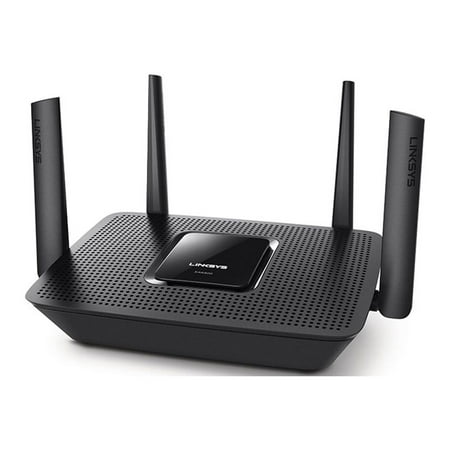
Linksys Max Stream Tri Band AC2200 WiFi Router, Black (EA8300)
- Brand:
- Linksys
- Model Number:
- EA8300
- UPC:
- 745883731916
- EAN:
- 0745883731916
- Walmart SKU:
- 676566425
At $199.00, pricing shows 0.0% discount compared to typical $0.00 levels.
| Price Type | Price | Date |
|---|---|---|
|
Highest Price
|
$198.88 | |
|
Lowest Price
|
$41.99 | |
|
Most Recent Price
|
$159.00 |
| Price Type | Price | Date |
|---|---|---|
|
Highest Price
|
$199.00 | |
|
Lowest Price
|
$199.00 | |
|
Most Recent Price
|
$199.00 |
Tracking History: We have tracked Linksys Max Stream Tri Band AC2200 WiFi Router, Black (EA8300) since 12/27/2024. The most recent price update was on Mar 10, 2026.
Price Range: Over the past 90 days, the price has ranged from $199.00 (lowest on 12/27/2024) to $199.00 (highest on 12/27/2024). The average price during this period is $199.00.
Current Trend: No Walmart.com pricing data available for analysis.
Customer Insights: Rated 3.8/5 from 72 reviews.
The Linksys Max stream tri-band Wifi 5 router is an absolute powerhouse! With an amazing range of 2000 square feet, the ability to connect over 20 wireless devices, and up to 2.2 GBPS speeds this router will work wonders for making you wifi connection optimal. I have had Linksys routers in the past and have found them to be quite reliable, I picked this one up to boost my Wifi range and connect more devices with ease and it did just that. I also like that this router included a 1 year warranty for any issues that might come up within the first year. I found the router very easy to hook up and connect my devices to using the Linksys App that is free to download and makes it easy to control your network from your phone. This router also is build with advanced security features that safeguard your network with wireless WPA2 encryption and an SPI firewall. I would recommend putting this router in the most middle or central point of your home to fully utilize the range. This router is perfect for gamers or households with a high demand for Wifi speeds due to various devices. Overall a great wireless router.
Easy to set up. I had no problems and I am NOT techie at all. I did go in and change my password so that all my devices hooked up with the new router and that was really no problem. The online instructions are easy to follow even for an almost Luddite
I have to say that after using this Linksys router for roughly 1-2 weeks I’ve been extremely satisfied. I had previously been using the regular router that my internet provider was providing me (for a monthly rate...). With this router I don’t have to worry about that monthly fee anymore and quite honestly overtime it pays for itself in savings. Furthermore I’ve actually noticed a stronger connection along with faster speeds. I’ve run a speed test a couple of times and was pleasantly surprised that this modem was pumping a little bit more Mpbs that what I’m actually paying my provider for. So that’s amazing, you typically always get less than the advertised speed. I have this situated in my living room (not enclosed), and all my devices pick up the signal without an issue. I even get signal in my front and back yard, so very pleased overall. I do have about 15-20 devices that connect to the network and while they all are not running simultaneously this router has worked like a charm. Overall I’m very satisfied with this product and would have expected nothing less from a Linksys router.
Linksys Max-Stream Router Although the Router didnt really have any printed directions other then a Quickstart guide it was fairly simple once I got started but had to go download the PDF Manual– (Note: It’s probably best you download the PDF instructions at their Website first which the URL is in your Quickstart guide!) Setting up the Router was fairly simple following the PDF manual– Once the Router is plugged in you simply point your Browser to the IP Address: 192.168.1.1 and get started! The Linksys I thought is one sweet Router with a ton of features & is affordable if your looking for a nice Router! The Box & specs say the Wi-Fi has a 2000 square feet range! ( Did test this as much as possible & it’s Super Far! (Farthest I’ve ever seen so far!) It has 4 Cat-5 connection ports with WI-FI also. It also will let you connect 20+ Devices! It has a USB Port also on the back so that you can share files on your Network. The entire router is configurable so you can switch your Network name, Passwords, etc. . Along with even a GUEST Access on your Wi-Fi– Once you connect online the easy Setup menu will let you configure all kinds of stuff if your one of the technical people, if not, it pretty much works out of the box as soon as you activate it online. (The Router Passwords to the Network it Defaults at are in your QuickStart guide) It has two 5GHz bands and one 2.4GHz band, which top out at speeds of only 867 Mbps and 400 Mbps. (Most devices won't reach those speeds anyway since environmental factors make all signals change time to time.) The band steering option is nice as well, allowing the router to choose the best band for optimal performance. If you disable band-steering, you can customize the channel, channel width and network mode (802.11ac only, 802.11n only, and so on). All in All, I couldn’t find anything I disliked about the Router! After almost a week I’m still playing around with some of the features but I LOVE IT!
We were able to hook it up and get full connection while outside of the house. Full bars. Easy to hook up. Has the best range of any router I have had. It has device priorities on it, so you can designate which devices. It has ability for gueat networks. It has several network options. Not a lot of advanced options, but is still great. You can limit the amount of guests that are connected. Can auto update if you chose. It has an associated app that goes with it, and you can control it through the app.
This is a good router for my one person household. I stream on my smart tv while surfing the internet on Wifi while playing games on my phone and since I installed this router I have not had any issues. I tried the AC1100 and had to return it because it could not sustain my streaming tv or my laptop individually. This Router covers everything all at once :)
I have been using Linksys routers for the longest time and they have never let me down. We purchased a new gaming system for our kids and we wanted a router that the kids could play on while we use it to stream movies. This Linksys AC2200 has not disappointed us at all. No lag playing games or buffering movies. The set up took 20 minutes following instructions. You can also use a Linksys App to help. The router is small enough so as not to be an eyesore. We have a 2 story home and have no problems anywhere in the house and I can still use internet while out in back yard. I recommend this router to everyone.
This router was easy to set up. Just have to change a few settings on your modem to connect the router properly, then attach the cables. It definitely boosts speed. I stream a lot of movies and TV. Our regular internet is pretty terrible, dropping out like every 20 minutes. It took forever to watch a movie or even an episode of a show because I'd had to wait for the WiFi to reconnect to the streaming service multiple times. If it would load at all. With this router, when I connected my streaming devices to it - I noticed an immediate difference. Finally no more dropped connections. I can watch everything all the way through without the connection freezing up or being slow to load. If you're a casual gamer or use streaming services a lot and have crappy internet speeds or just want better speeds in general - this is perfect.
I got the Linksys AC2200 Tri Band Wireless and Ethernet Router (EA8300) and so far its working pretty good for me. I don't have a lot of gamers here so its mostly just for our smart TV, tablets and phones. It was fairly easy to setup and the range is great for our one level home. The only issue I have noticed is that my tv sometimes loses connection and starts clocking but it comes back up within a minute. I think the Tri-Band feature has improved the speed of my other connections (tablets and phones) so not really sure why my TV is having that small issue. I was previously using another big name brand router which doesn't even compare to the speeds I'm getting from this router. Also my TV was having the same issue with the old router so it may just be issue with my TV itself. Overall this router seems to work great for our everyday Wi-Fi needs.
i thought the range would be better also it took a while to hook up all my apps
Detailed price history for the past 90 days
No Walmart.com pricing data available for analysis.
Third-Party Sellers prices have ranged from $149.00 (May 20) to $159.00 (Jul 15) over the past 90 days. Current price is close to the 90-day average of $156.69.
| Date | Price | Change | % Change |
|---|---|---|---|
| $159.00 | $+0.00 | +0.0% | |
| $159.00 | $+0.00 | +0.0% | |
| $159.00 | $+0.00 | +0.0% | |
| $159.00 | $+0.00 | +0.0% | |
| $159.00 | $+0.00 | +0.0% | |
| $159.00 | $+0.00 | +0.0% | |
| $159.00 | $+0.00 | +0.0% | |
| $159.00 | $+0.00 | +0.0% | |
| $159.00 | $+0.00 | +0.0% | |
| $159.00 | $+10.00 | +6.7% | |
| $149.00 | $+0.00 | +0.0% | |
| $149.00 | $+0.00 | +0.0% | |
| $149.00 | — | — |