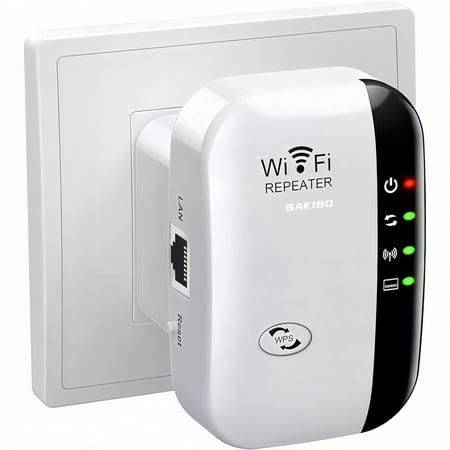
WiFi Extender Signal Booster Up to 5000sq.ft and 50 Devices, WiFi Range Extender, Wireless Internet Repeater, Long Range Amplifier with Ethernet Port, 1-Key Setup, Access Point, Alexa Compatible price history and forecast - bakibo MT02
WiFi Extender Signal Booster Up to 5000sq.ft and 50 Devices, WiFi Range Extender, Wireless Internet Repeater, Long Range Amplifier with Ethernet Port, 1-Key Setup, Access Point, Alexa Compatible

WiFi Extender Signal Booster Up to 5000sq.ft and 50 Devices, WiFi Range Extender, Wireless Internet Repeater, Long Range Amplifier with Ethernet Port, 1-Key Setup, Access Point, Alexa Compatible

Brand:
bakibo
Model Number:
MT02
UPC:
738060905736
EAN:
0738060905736
Walmart SKU:
5586586021

Third-Party Seller Summary

Third-Party Seller Price History Summary
Price Type Price Date
Highest Price
$11.99
Lowest Price
$8.79
Most Recent Price
$11.99
Average Price
$10.55
First Tracked
Last Update

Walmart.com Summary

No price history available for Walmart.com

Price Analysis

Price history data is not available for this product at the moment.

Current Trend: No Walmart.com pricing data available for analysis.

Customer Insights: Rated 3.5/5 from 665 reviews.

Customer Reviews

665 reviews

Customer Reviews

3.5
Based on 665 reviews
5
328
4
67
3
46
2
46
1
178
Filter Reviews:
Sort By:
Showing 10 of 665 reviews

Great Wifi Extender

Deborah January 22, 2026

I bought this extender to use for my outside surveillance cameras. We put it in the hallway outlet and it sends the signal all the way out to our camera on the barn at least 300 feet from the Wifi Extender. It works really well.It simply plugs into the electrical outlet and I point the antenna toward the building. It goes through the walls all the way out to the barn. We receive very clear pictures on the camera.

Was this review helpful?
queenzach3 October 1, 2025

I brought this for my job but tried it out at home. It worked wonders very easy to install and use. It came early and it is worth the money. I was having connectivity issues at home everyday about 10 pm my signal would go out. Since I used the WiFi repeater it doesn't go out at all. Good product.

Was this review helpful?
Adonna August 13, 2025

Super easy to set up we needed this for our home security cameras to reach our WiFi and it took me 5 mins to get it up and running! Def saved a TON of money with this!!!

Was this review helpful?

WiFi signal boost by WiFi Repeater

Stephanie June 14, 2026

It was pretty easy to install but patience is required for signals to synchronize with modem %26 router. I got a little help from Google too. It is doing the job intended them for so I am pleased with results. Once installed it is best to wait about 15-20 minutes to test.

Was this review helpful?

Need magnifying glass for instructions

lardog June 20, 2026

Instructions were smaller than fine print. Exam glasses AND magnifying glass to read! Once set up it has worked perfectly. Used it to connect my VR set to use outdoors for my Golf game. Uses 2.4 GHz not 5GHz, btw, probably for distance/coverage, but steady.

Was this review helpful?
David October 30, 2025

It doesn’t work. It will not give me a boosted WiFi signal out, even though it gets a good direct signal in from the house router (cable). I gave up after trying several different re- boots. %26 resets. The LTE is better.

Was this review helpful?

COMPLETE WASTE OF MONEY

Anthony September 18, 2025

This is a complete waste of money (and it isn't even a lot of money). It arrived quickly, so no issues there. What little instructions it comes with (not much) are so poorly translated that it is laughable. It seems to imply that there is some sort of app or something you can use to set it up, but there isn't. There is no website either. Regardless of what Walmart's website says. You have 2 methods of connecting it. 1: The "WPS method". Press/activate WPS mode on your router, and then press the WPS button on the extender. Easy enough right? Well it should be...except that the button on the extender I received doesn't appear to be a functioning button. Though I did manage to somehow get the WPS LED to blink once...but according to the poorly written instructions...it will blink both if it is expecting a signal, AND if it has one..... so..... no clue if that was good or not. 2: the "Browser method." This one has you using your computer/laptop/phone to open a browser to load the browser interface of the default wireless network the device has. Which is supposed to be at 192.168.1.1 But naturally, when I did this, noting happened. There was nothing there. I read another review that suggested doing a reset first (after having similar issues trying to figure things out.) so, I found myself a paperclip, stuck it in the reset spot....only to find that that hole seemed to just go all the way to the other end...... there was no button to press with the paperclip like there should be....just like the WPS button didn't seem to be pressing anything.... Perhaps I just got a really bad one? That is entirely possible.... but I doubt it. I've been buying tech for years. I am very experienced. I know what I am doing. not your typical luddite here. Do yourself a favor, and DO NOT BUY THIS!

Was this review helpful?
Mark April 7, 2026

It actually lessened the signal. i only wanted a stronger signal that was more easily picked up by the roku television that was roughly 30 feet from the router. placed the extender between the two, 10 feet from router and the router showed to have more signal than the extender. moved it closer to the television and it wouldn't pick up the router. closer to the router and it wouldnt even show up the television. its supposed to extend the signal 5000 ft but wouldnt work in a 100 foot space. don't waste your time or money.

Was this review helpful?
Ruth October 12, 2025

I bought for my son who is a senior in highschool 😭. I hope to allow better access to WiFi but it doesn't work 😔 as we hoped. It was a complete waste of money and time.

Was this review helpful?

Doesn't connect

CouponMom November 10, 2025

It did not work. The instructions were very small. Once we figured out how to get it to connect, it did not connect. We tried it on different phones (Iphone, Samsung) and it did not connect.

Was this review helpful?

Price History

Historical price data graph for WiFi Extender Signal Booster Up to 5000sq.ft and 50 Devices, WiFi Range Extender, Wireless Internet Repeater, Long Range Amplifier with Ethernet Port, 1-Key Setup, Access Point, Alexa Compatible

Recent Price Changes

Detailed price history for the past 90 days

Walmart.com Pricing

0 records

No Walmart.com pricing data available for analysis.

No Walmart price history available in the past 90 days

Third-Party Seller Pricing

40 records

Third-Party Sellers prices have ranged from $10.99 (Jul 9) to $11.99 (Jul 14) over the past 90 days. Current price is close to the 90-day average of $11.09.

Third-party seller price history for WiFi Extender Signal Booster Up to 5000sq.ft and 50 Devices, WiFi Range Extender, Wireless Internet Repeater, Long Range Amplifier with Ethernet Port, 1-Key Setup, Access Point, Alexa Compatible showing recent price changes
Date Price Change % Change
$11.99 $+0.00 +0.0%
$11.99 $+0.00 +0.0%
$11.99 $+0.00 +0.0%
$11.99 $+1.00 +9.1%
$10.99 $+0.00 +0.0%
$10.99 $+0.00 +0.0%
$10.99 $+0.00 +0.0%
$10.99 $+0.00 +0.0%
$10.99 $+0.00 +0.0%
$10.99 $+0.00 +0.0%
$10.99 $+0.00 +0.0%
$10.99 $+0.00 +0.0%
$10.99 $+0.00 +0.0%
$10.99 $+0.00 +0.0%
$10.99 $+0.00 +0.0%
$10.99 $+0.00 +0.0%
$10.99 $+0.00 +0.0%
$10.99 $+0.00 +0.0%
$10.99 $+0.00 +0.0%
$10.99 $+0.00 +0.0%
$10.99 $+0.00 +0.0%
$10.99 $+0.00 +0.0%
$10.99 $+0.00 +0.0%
$10.99 $+0.00 +0.0%
$10.99 $+0.00 +0.0%
$10.99 $+0.00 +0.0%
$10.99 $+0.00 +0.0%
$10.99 $+0.00 +0.0%
$10.99 $+0.00 +0.0%
$10.99 $+0.00 +0.0%
$10.99 $+0.00 +0.0%
$10.99 $+0.00 +0.0%
$10.99 $+0.00 +0.0%
$10.99 $+0.00 +0.0%
$10.99 $+0.00 +0.0%
$10.99 $+0.00 +0.0%
$10.99 $+0.00 +0.0%
$10.99 $+0.00 +0.0%
$10.99 $+0.00 +0.0%
$10.99

Related Products