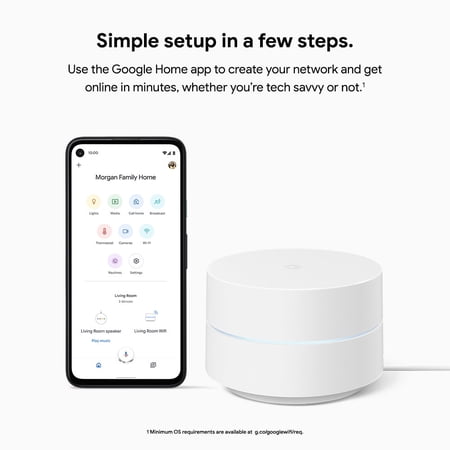
Google Wifi AC1200 Mesh WiFi System, 3-Pack, White, 4,500 Sq. Ft. Coverage – GA02434-US
- Brand:
- Nest
- Model Number:
- GA02434-US
- UPC:
- 193575014340
- EAN:
- 0193575014340
- ASIN:
- B08GG9CMLR
- Walmart SKU:
- 886554733
Current pricing at $148.99 reflects recent market activity, running 0.0% below the 90-day average.
| Price Type | Price | Date |
|---|---|---|
|
Highest Price
|
$283.95 | |
|
Lowest Price
|
$54.00 | |
|
Most Recent Price
|
$152.99 |
| Price Type | Price | Date |
|---|---|---|
|
Highest Price
|
$148.99 | |
|
Lowest Price
|
$109.00 | |
|
Most Recent Price
|
$148.99 |
Tracking History: We have tracked Google Wifi AC1200 Mesh WiFi System, 3-Pack, White, 4,500 Sq. Ft. Coverage – GA02434-US since 12/5/2022. The most recent price update was on Jun 30, 2026.
Price Range: Over the past 90 days, the price has ranged from $109.00 (lowest on 8/23/2023) to $148.99 (highest on 6/30/2026). The average price during this period is $132.66.
Current Trend: No Walmart.com pricing data available for analysis.
Customer Insights: Rated 4.0/5 from 1065 reviews.
I had a little net gear range extender probably was about $40. I brought this took about 20 mins to set up. Long story short WOW! I pay for 400mbps, and I'm getting that anywhere and every where around my home, I'm literally getting that speed at the Mailbox, and where I stay it is the Abyss, if you thought you had a deadzone. The best $200 I spent on my home.
[This review was collected as part of a promotion.] I was having trouble with internet buffering and bought a cheap WiFi extender and struggled to connect and still had issues. This wonderful little google WiFi was easy to set up and now there is no more buffering! It's secure and attractive looking. The only issue I have is the light it gives off at night. I need to fiddle with the app and turn that off as it's in our spare bedroom. I don't want to keep my guest awake.
[This review was collected as part of a promotion.] Google Wifi, the perfect in MESH Wifi. I am in absolute love with these routers! They're small, and they can sure broadcast a signal! I have 4 of these little guys, (3) of the 2016 version, and (1) of the 2020 version. This is the 2020 version with the barrel plug power supply, which I have to admit, I do like the USB power supply a little better but this one is a nice and small connector. The Google WIFI has 2 ports of the bottom of the unit, and they are both color coded with symbols on each. The setup is a breeze and once you install the APP on your phone, it walks you thru everything you need to do to get these guys working in no time flat. Once port is the one that goes from your cable modem (Internet In) and the other port would go to a wired device. I assume it was meant to go to your computer workstation wired direct however I sent mine to a mini 8 port RJ45 switch so I can distribute my internet not only wirelessly (with this Google WIFI) but also via the CAT cords running in my home. The APP on your phone controls everything, there are NO Buttons on this thing. Not even a power button (which would be somewhat nice, but I guess pulling the pull does just as good.) These things are capable of so much, from a main wifi network to a guest wifi network. It broadcasts in both 2.4ghz and 5.0ghz. Supports all the modern wifi adaptors from A to E and everything in between. I have one in my Office, One in my Kitchen, One In My Garage, and One downstairs. All 4 mesh together and connect. They don't need wires to mesh together, just to be within range of each other. I have my house and backyard / pool area blanketed with coverage and never loose signal going from the basement to the garage and back again! I can no say enough great things on these routers, except give them a try. Once you have them, you'll wonder why you never purchased such a great device before.
[This review was collected as part of a promotion.] I took the Google Wifi out of the box, had it hooked up, and the app downloaded in minutes. Scan the QR codes on the bottom to configure your network, give the new network a name, and set a password, then add devices you want covered. If you have a larger home over 1,500ft, you might need two. You can prioritize bandwidth with time limits, helps with parental control. You set the time limit for their device on the app, it will stop it for the time you allot. If you have Google Nest, you can use this with it also, I love it! No more buffering while watching movies, or lagging, everything loads so much quicker, I can also do an internet speed test on the app. to make sure it's up to speed, and it updates on it's own. No more dead spots, everybody uses the internet at once, and finally being able to watch a movie without the spinning wheel, and a teen that no longer has dropped calls.
I have xfinity internet and I had to keep resetting it. They told me I had to many things using the internet so I needed to not use so many. I have a lot of smart home things and didn't want to stop using them. Where I am though, doesn't have a lot of options for internet so switching wouldn't help. I got this Google system and the problems went away. I had to put my xfinity modem into bridge mode but after looking it up on line it was easy Definitely worth it for us!
The Google product was my first choice for our 2,100 plus square foot home. I have 1 gig internet and these routers support it and offer stability of speed throughout the house. The Google home app is easy to use for set up and you don't have to be technically savvy to get these going. Just follow the instructions and go. We have two teenagers who love gaming and we have a bit of a smart home with cameras, smart plugs, smart lights and many other items connected. This mesh system is wonderful fun for that.
Once setup the system works great. I installed three units, one at the router, one in sight of the first, and the third in sight of the second. My house (4000 sq ft, two story) now has full coverage end to end. I've tried range extenders and they have been worthless. They consume at least half the bandwidth. With the Google system I have almost full bandwidth everyone. The only frustrating part was the setup. The setup process guided by the App just did not work. The units, although being recognized, could not complete the setup process. I used the online chat and tech support had me change the default settings for the cloud privacy settings. Then everything worked ok. A little painful, and very surprising for Google, but in the end worth it. By the way, when the instructions say you need to hook the first unit to a "modem" it works find connected to a "modem-router".
Privacy concern, unless you turn on a certain privacy setting not all features and network data in App will work. Google is watching us too much. And sometimes selling our data. Product works well but Google has gone to far.
1 of 3 them wouldnt connect after multiple setup attempts, returned item. Also, had hard time with return because the product serial number sent from walmart distribution center didnt match the serial number on the box.
We tried to connect these devices to get a mesh in our larger size house. We first tried connecting them wireless and the connection speed was terrible at 15-25 mbps. Then we tried hard wiring them up with ethernet cat5e wire, and we got 18-28 mbps. Almost enough to run a tv. The set up was a pain using google home, and had very few options to try. Overall the connection was easy, but in the end it was useless with the speed it provided. Since we have Spectrum bringing in 230-250mbps, this was a total disappointment, and a waste of 3 days of trying different things with no luck. We will be returning the item tomorrow!!
Detailed price history for the past 90 days
No Walmart.com pricing data available for analysis.
Third-Party Sellers prices have ranged from $149.98 (Oct 11) to $274.99 (Aug 12) over the past 90 days. Current price is 16.2% below the 90-day average of $182.55.
| Date | Price | Change | % Change |
|---|---|---|---|
| $152.99 | $-17.01 | -10.0% | |
| $170.00 | $+0.00 | +0.0% | |
| $170.00 | $+0.00 | +0.0% | |
| $170.00 | $+0.00 | +0.0% | |
| $170.00 | $+0.00 | +0.0% | |
| $170.00 | $+0.00 | +0.0% | |
| $170.00 | $+0.04 | +0.0% | |
| $169.96 | $-0.04 | +0.0% | |
| $170.00 | $+0.00 | +0.0% | |
| $170.00 | $+0.00 | +0.0% | |
| $170.00 | $+17.01 | +11.1% | |
| $152.99 | $+3.01 | +2.0% | |
| $149.98 | $-20.02 | -11.8% | |
| $170.00 | $+0.00 | +0.0% | |
| $170.00 | $+0.00 | +0.0% | |
| $170.00 | $+0.00 | +0.0% | |
| $170.00 | $+0.00 | +0.0% | |
| $170.00 | $+0.00 | +0.0% | |
| $170.00 | $+0.00 | +0.0% | |
| $170.00 | $+0.00 | +0.0% | |
| $170.00 | $+0.00 | +0.0% | |
| $170.00 | $+0.00 | +0.0% | |
| $170.00 | $+0.00 | +0.0% | |
| $170.00 | $-78.98 | -31.7% | |
| $248.98 | $+0.00 | +0.0% | |
| $248.98 | $+2.99 | +1.2% | |
| $245.99 | $-2.99 | -1.2% | |
| $248.98 | $-26.01 | -9.5% | |
| $274.99 | — | — |