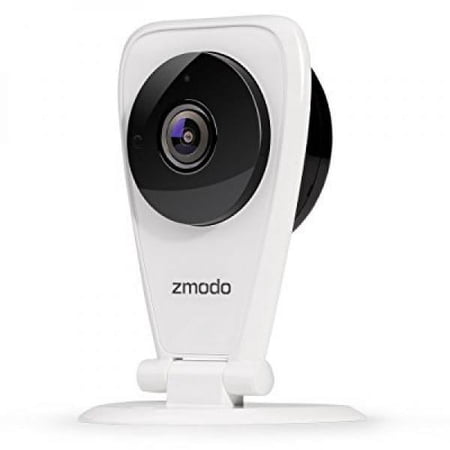
Zmodo EZCam 720p HD WiFi Wireless Security Surveillance IP Camera System with Night Vision and Two Way Audio, Work with Google Assistant
- Brand:
- Zmodo
- Model Number:
- SD-H2605
- UPC:
- 889490013710
- EAN:
- 0889490013710
- Walmart SKU:
- 818620001
| Price Type | Price | Date |
|---|---|---|
|
Highest Price
|
$35.60 | |
|
Lowest Price
|
$35.60 | |
|
Most Recent Price
|
$35.60 |
| Price Type | Price | Date |
|---|---|---|
|
Highest Price
|
$79.99 | |
|
Lowest Price
|
$79.99 | |
|
Most Recent Price
|
$79.99 |
Tracking History: We have tracked Zmodo EZCam 720p HD WiFi Wireless Security Surveillance IP Camera System with Night Vision and Two Way Audio, Work with Google Assistant since 3/7/2025. The most recent price update was on Mar 7, 2025.
Price Range: Over the past 90 days, the price has ranged from $79.99 (lowest on 3/7/2025) to $79.99 (highest on 3/7/2025). The average price during this period is $79.99.
Current Trend: No Walmart.com pricing data available for analysis.
Customer Insights: Rated 3.8/5 from 172 reviews.
Great little camera for the price. Simple and affordable using the Zmodo app. Easy setup, easy to use, good app and high resolution images. I love that I am notified by the app when sound or motion is detected. You can also live stream and check up on things when gone. You can even talk and listen to people on the other side. I also noted that the camera can only be set on a flat surface, not at a corner. I did notice that sometimes audio is distorted when I wAwatch via browser, even though it is much clearer on the app. Requirements: pw protected, 24 GHz WiFi in order to function. Your network needs at least 2 Mbps upload speed and 4 Mbps when using Zmodo Cloud. Very happy for the opportunity to receive and review this amazing Zmodo EZ Cam. Thanks Walmart for the privilege.
I love this security camera. I was able to connect to my Wi-Fi effortlessly, which was surprising because my Wi-Fi signal is terrible. For me, the quick start guide was a little confusing. However, this is my first experience setting up a wireless security camera. I was able to set up the camera, and download the application to my phone using the quick start guide. It is recommended to use the Zmodo web site during set up. Following the steps I found on the web site, I was able to set up my alerts. The web site explains in detail what each mode consists of, basic, and more advanced functions. There is a lot of useful information with the manual on line, especially for a novice like me. The camera comes with hardware to mount to the wall, and you can rotate the camera for the best view of the area you are monitoring. I chose not to wall mount, because the cord would hang down the wall to the outlet. I like the way it looks on my dresser, and the camera covers my whole living area, front door, and back door. The camera is small, but it covers a lot of area. The camera is controlled by the Zmodo ap on my phone. During the initial set up, you are given 30 days of cloud, after the 30 days it's $9.99 a month. You can set up several camera's on this single application. The quick guide shows six devices attached to the application. The three quick modes on the home page are away, sleep, wake up. Sleep mode includes night vision. I checked this on the video, and it's pretty awesome. Away is used when you are leaving, just touch it, and the camera is turned on. It has motion detector, and it starts recording the movement. You can also schedule times for these modes, with a clock to set times. On the application you can also set up behaviors. This is how your quick keys respond when touched. I set my home key to turn off the camera when I am home, until I set sleep, or away. The alerts show up on the bottom of the application screen. It is easy to see when you have an alert, it shows a red stamp. You can touch the alert, and it will take you to the cloud. The video footage from the alert, has a time stamp. The video screen allows you to zoom in and out as much as necessary to see what caused the alert. It took me a little bit to figure out where my video's from the alerts were, but it's actually really easy. The manual doesn't explain this part. The video's are great, clear, and easy to view. This EZcam is perfect really. There is a lot of information, but I hope I have shared enough so everyone can see that this is would be a great purchase.
Since I got this camera I was surprised by the work it does, because of its size it is easy to install anywhere in the home, the image is quite sharp and captures any movement inside the home in one occasion it could capture smoke in my Apt. I was surprised, his night vision works very well and above all I travel from Massachusetts to New York and I can see everything that happens in my home at every moment it is a wonderful thing to leave home and know that you can continue to see everything and receive alerts of movements or activities at home and this is just the simple way because in the instructions there are many offers to get more benefits, but in my case I like the simple form, but if you want something else you should read the manual well ....... .....
I received this Zmodo EZCam 720p HD WiFi Wireless Security Surveillance IP Camera System with Night Vision and Two Way Audio - Cloud. This is a very good motion cam. I order it because i have mu kids on another room. Sometimes I want too see what's going on in there room but too tired to get up. I set cam and can see everything now. This cam has very good night vision. You have too put it to night mode. You must set up this camera to your wifi. Then you download an app on your Android cell. The app is for free for 30 days. After those 30 days you only pay 9.99$ a month. You can check your app when ever too see what's go on. Thus has a very clear pic. Very good resolution. Another thing that i love about this motion camera is that you can set up the to revived alerts when a motion is detective. It comes in a simple brown box. It's very easy to set it up. I LOVE this very affordable Zmodo EZCam 720p HD WiFi Wireless Security Surveillance IP Camera System with Night Vision and Two Way Audio - Cloud. I have order another motion camera. It's on it's way. Yes you can have more then one camera set up. My other camera is black. I recommend this very good motion camera to everyone.
It took me a few attempts to pair the first camera to the Zmodo app on my cell phone. The other camera was paired on the first attempt along with the optional camera. I'm not a tech geek, however I worked on electronic equipment when serving in the US navy. Some of the questions in the booklet I did not understand but tried different steps to success. I tested the cameras that came in the the package buy having my wife move the cameras so I could see motion. I then went outside and tested the connection to the cameras. I then drove my truck down the block and stopped seeing any motion on my cell phone. I drove back home and my wife had stopped moving the camera. I then faced the camera towards the TV and could observe the show. I drove about a block away and could still see motion from the TV on my cell phone. I drove about another 1/2 block and no longer saw motion. I guess I was out of our WiFi range. I signed up for a free trial of the cloud service. We have a senior dog that has trouble getting up so we plan on using one of the cameras to keep a watch on her if she needs assistance.
I received the Zmodo EZCam 720p HD WiFi Wireless Security Surveillance IP Camera System with Night Vision and Two Way Audio - Cloud Available as part of the Spark Reviewer program. I read the" Cloud available" to mean optional as I did not want to be required to sign up and pay for cloud service. I read and reread the pamphlet and did not see how it was optional rather it is required that you download the "free" ZMODO APP" to register for an account so you can set up the ZMODO camera. GRRR! I was really excited to get this camera as I have had issues with Peeping Toms and even middle of the night break-ins. So I finally thought I would at least try to set up the camera and see what happens. Now I don't see that this is listed as an indoor-only camera, but I want to set it up outside /over my back door where the break-ins have been attempted. This area is well protected and in the four years that I've lived here I've never had any rain on the area above the door where I set the camera. It does need to be connected to a power source but the outdoor light fixture provides that connection. So the camera is connected and ready to be set up. I download the app and register for an account and attempt to set up the camera. I say attempt, because it took multiple, more than six, tries to get connected. Then, ZMODO offered option of Free trial of cloud services. I clicked "NO Thanks" and seemed to be at dead end. I opened the app several times before being able to move to appropriate page to view what the camera was showing. Yeay!! Seems it can be be used just locally. It will download the alert and photo to your device, which you can choose to save or trash. NO CLOUD REQUIRED. Overall, happy with the camera, decent picture, vocal aspect ok, if I yell, the intruder will hear me, and, best of all, piece of mind that I can see what's going on at my back door. Picture is taken with movement, so intruder is recorded by time he realizes there's a camera. Best of all, I will have something to show police officer, as I get tired of being treated as crazy lady when they arrive and nobody is here. Thanks!
This camera was easy to install and the app makes it a breeze to watch on my cell phone no matter where I am. I would have given it 5 stars, but on playback it needs pause button and a slower playback feature. If it has these, I have not been able to find it yet.
UNBOXING The Zmodo ZH-IXU1F-W arrived in a simple, small plain brown box, with a label affixed to the back to call out its key technical features. Inside the box I found a set of printed instructions on glossy paper, the supplied camera unit with protective plastic covering the front and rear, a power cable in a plastic bag, and a set of screws and drywall posts for wall mounting. FIRST STEPS The instructions say to go find and download the Zmodo phone application. As an iOS user, I was able to locate the application quickly in the App Store. It downloaded and installed without any problems. The next step is to create an account, so I signed up using my mobile phone number, created a password, and received a texted pin to my phone that allowed me to complete the simple registration process via the mobile app. So far, so good. CAMERA SETUP This is an indoor-only camera, so I decided to set this camera up to face my family room and rear sliding door to monitor it through the day and night. I peeled off the protective plastic, unwrapped and uncoiled the power cable, and hooked it up for the first time. Immediately the green light illuminated, letting me know the camera was ready. In the app, I went to add a new device, and followed the on-screen instructions to get this done. As long as I stayed on the same 2.4GHz network band, I was fine and could get the camera to connect. The camera needed a name and a password, so I set that up too. This was all very straightforward. TEST USAGE With the camera facing my family room and sliding door, I could easily see the entire room with the camera's wide angle of view, by using the phone app to monitor the camera's output. I tested a motion event, and found a video clip stored that showed the event with audio and reasonably clear video. I tried out the two way speaker / microphone function, and found that worked satisfactorily as well. At night, the night vision IR sufficiently lit up the large room allowing me to view any motion events easily. During the day, enough light gets into the room to illuminate any motion events as well. OVERALL For its intended purpose of monitoring indoors, I'd say this camera does the job. The company offers higher resolution models which may be a better choice if you end up needing to clearly and positively identify someone in the video, but if you're just trying to monitor an area for specific activities, this Zmodo will fit the bill. It was easy to set up and appears to do exactly what it was meant to do - provide a low cost monitoring solution using your existing WiFi and electrical infrastructure.
This little camera does a lot for the price. It helps a lot if you are somewhat “tech savvy” when setting it up, but anyone familiar with a computer or a smart phone shouldn't have any trouble. With 2 touches on your smart phone screen you can bring up what the camera is seeing. From the Zmodo website, you can see it on your computer and search for times that motion was detected. These times are marked in red on the timeline. However, the red marks don't appear right after the motion, so you have to check back. There is also a connection to the cloud where you can view activity for the past 36 hours for free, but there is a monthly charge for more time. This model is rated for indoor use. We tried it indoors for a few days and then moved it outdoors to an area sheltered from the weather. We are more interested in keeping an eye on things outside, and this camera's range is perfect for detecting anyone approaching our small lot which is in a mobile home park. The viewing angle is about 115 degrees so it's pretty wide without having extreme “fish-eye” distortion. The resolution is pretty good if the person or vehicle is close to the camera, but it loses detail if the person is more than 8 to 10 feet away. This wouldn't be much of a problem if you're using it indoors where it's covering a smaller area. I can picture using it to see what your teenagers are doing when you're away, or if they have company. :) It would work well if you want to keep an eye on your baby sitter. You can also speak through the camera from your phone. There are not many frames per second so the movements are jerky and sometimes if a person is moving fast, they disappear off the screen, such as a bicyclist riding by. This is a very good starter camera, but if you want outdoor use with more detail, you'll have to spend more.
I got the Zmodo EZCam 720p HD WiFi Wireless Security Surveillance IP Camera so that I could see what is going on at my front door and in front of my house. Originally I thought it would be good outdoors but it is only for indoor use so I thought I would point it out my front window. That would have worked out great except the camera doesn't work well for me. Like the other model I got the picture is on its side and no matter what I try I can't get it right side up so I have to look at it with my head cocked sideways. Not good! I was able to hook it up quickly since I had another one of their cameras. I can click on the camera icons on the home page in their app so it's easy to go from one camera to the other. Although the picture is clear and looks good during the daytime (especially when it's an overcast day) there is nothing at all after it gets dark. It shows the brickwork outside the window for about 5 inches and then there is only blackness with an occasional tiny white light moving by which I assume is the headlights on a car. So much for night vision. The audio is OK for talking but I don't hear anything when I put the speaker on so I guess either my street is very quiet or it's not picking up the noise outside. I got two red alerts and when I clicked on them they were both advertisements to purchase something. There are a lot of ads asking you to purchase other products or subscribe to the cloud in their links. I thought that the cloud storage was included. It's not and the subscription is $10 and up a month. I will leave it in the window because it may deter crooks who will think there is surveillance. Otherwise it is helpful during daylight hours when I can see who is at my front door but at night it's useless. Of course during the day I can just look out my window to see who is there so it's not really any help then either. I would not recommend this camera to any of my friends or anyone who is not skilled in using a lot of different devices.
Detailed price history for the past 90 days
No Walmart.com pricing data available for analysis.
Third-Party Sellers prices have ranged from $35.60 (Sep 19) to $35.60 (Sep 19) over the past 90 days. Current price is close to the 90-day average of $35.60.
| Date | Price | Change | % Change |
|---|---|---|---|
| $35.60 | $+0.00 | +0.0% | |
| $35.60 | $+0.00 | +0.0% | |
| $35.60 | $+0.00 | +0.0% | |
| $35.60 | — | — |