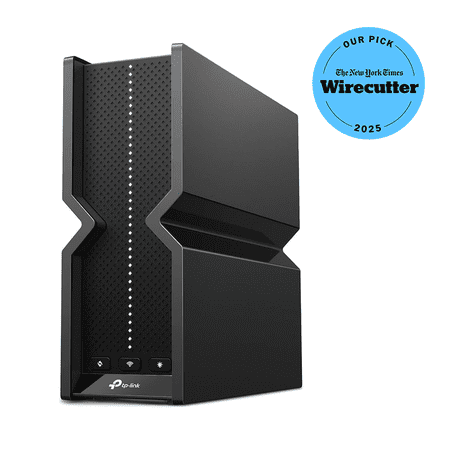
TP-Link Archer BE9300 Router | Tri-Band WiFi 7 Wireless Router | up to 9.2 Gbps Speeds | Easy Setup | Parental Controls
- Brand:
- TP-Link
- Model Number:
- Archer BE9300
- UPC:
- 840030710728
- EAN:
- 0840030710728
- ASIN:
- B0DGBZLHB3
- Walmart SKU:
- 3339006219
Holding at $198.00 for the past three weeks while 8.9% above the 90-day average of $181.78—typical market behavior for this category.
| Price Type | Price | Date |
|---|---|---|
|
Highest Price
|
$351.62 | |
|
Lowest Price
|
$113.00 | |
|
Most Recent Price
|
$175.95 |
| Price Type | Price | Date |
|---|---|---|
|
Highest Price
|
$299.99 | |
|
Lowest Price
|
$158.00 | |
|
Most Recent Price
|
$198.00 |
Tracking History: We have tracked TP-Link Archer BE9300 Router | Tri-Band WiFi 7 Wireless Router | up to 9.2 Gbps Speeds | Easy Setup | Parental Controls since 10/18/2023. The most recent price update was on Jul 18, 2026.
Price Range: Over the past 90 days, the price has ranged from $158.00 (lowest on 3/17/2026) to $299.99 (highest on 3/3/2024). The average price during this period is $194.61.
Current Trend: Walmart.com prices have ranged from $158.00 (Jun 12) to $199.00 (Jul 17) over the past 90 days. Current price is close to the 90-day average of $181.78.
Customer Insights: Rated 4.3/5 from 487 reviews.
Overall, good so far. Dropped 3 times during firmware updates. After that, connected solid. Not a bad router for this price. By default, OFDMA MU-MIMO is disabled. 📡 What “OFDMA MU‑MIMO” Means on a TP‑Link Router TP‑Link combines two Wi‑Fi technologies under one toggle: 1. OFDMA (Orthogonal Frequency Division Multiple Access) • Lets the router split a Wi‑Fi channel into smaller “sub‑channels.” • Multiple devices can send/receive data at the same time. • Great for homes with many devices (phones, tablets, cameras, smart TVs). 2. MU‑MIMO (Multi‑User, Multiple Input Multiple Output) • Allows the router to talk to several devices simultaneously instead of one‑by‑one. • Helps reduce congestion and improves speed consistency. Together, they improve: • Efficiency • Lower latency • Better performance when many devices are active 🟢 Should You Enable or Disable It? ✔ Enable it (recommended for almost everyone) You should keep OFDMA MU‑MIMO ENABLED if: • You have multiple devices (which you do — family, kids, smart home, etc.) • You want smoother streaming, gaming, and browsing • You use Wi‑Fi 6 or Wi‑Fi 7 devices (phones, laptops, tablets) ❌ Disable it only if: • You have very old Wi‑Fi 4 / Wi‑Fi 5 devices that behave weirdly (rare, but sometimes old devices disconnect) • You are troubleshooting a specific compatibility issue. I hope it will help those who are complaining about the speed and connectivity.
Life changing. Had no control over any setting with the routine spectrum provided, the HomeKit accessories I have in my home (20 or more) would always have issue or be unresponsive or something. This solved all that as soon as we switched. Streaming and gaming is amazingly smooth, I experienced zero lag! Jitter is 1-2 I. All devices. for people that know that's very good total I have 38 devices that connect to the router and use the 3 bands, and mlo network as well. Amazing. Dint use device priority settings at all as traffic has never been anything but butter smooth. Also have to give mad credit to the app, 2026 and apps are half of how we do things so it's important to back companies that put the right features into the products and control into the consumers hands with useful setting and user interface that's not lacking any settings you need and has streamline user setup perfectly and the app. Is user friendly and I love continuity in brand that take pride in the products they make. Get this router After this router all my devices find the optimum band to use automatically, speed is actually quite astonishing over a WiFi 6e, my MacBooks use the mlo network while connected and it's like being plugged in direct! .
I previously had a 4 device, TP-Link Deco XE75 Pro mesh system. My ioT devices would constantly disconnect and that mesh system couldn't keep up with my needs. I bought this new router yesterday and let me tell you how seamlessly this router was integrated into my smart home and replaced my XE75 mesh system. This router is currently handling 75 devices with no lag, and no disconnects. I took a chance with it and I am extremely happy with this router....no more headaches. The set up was a breeze and the performance so far is great. I am completely satisfied. And in case any of you are wondering, I have a 2200 sq. ft. home (one level) and a 600 mbs internet connection with AT%26T fiber. I also use live streaming tv and haven't had any issues in that area either. I think it looks great as well.
provides the speeds that gamers and streamers alike will love. use with 2 gb brightspeed fiber internet service, and currently can get 2 gb right off a direct ethernet connection, running thru a switch to the living room where we mostly stream/some pc gaming, and get 950 mbps. very little lag, gigabit speeds easily both wired and wifi. setup takes a little patience, but isnt hard. highly recommend for heavy internet users, or even just streamers, provides great quality and speeds, just wait for it to go on sale (purchased when was $149.99 on sale)
This router is exceptional, exceeding my expectations. I am currently operating ten devices that consume significant network bandwidth, yet I experience no latency issues whatsoever. This product offers outstanding value for its price, and I wholeheartedly endorse it.
Using it for an Alexa smart home. It's great for this as some smart devices still use 2.4 GHz, but the newest Alexa speakers are on the new WiFi 7 standard. The router has 2.4Ghz, 5GHz and 6GHz bands for backward compatibility, which makes it really nice for online gaming and 4K streaming as well. Probably the best WiFi 7 router for this price.
Best router I've ever bought. i had an older tp link router that performed flawless for the past 5 years and upgraded to this one and I'm very satisfied. we have 20 items connected and stream along with video games with no issues in a 350p sqft house
I didn't know changing a router would be so difficult to reconnect everything and I don't find it to be a very good Router. I don't have good reception in my bedroom which is 25 feet away from the router with only one wall between us nor do I have it outside, which is also about 25 feet away from the Router With no wall but a window between it. I would not recommend this Router if it wasn't so difficult for me to set up. I would certainly return it and I may still.
This thing has the slowest connection I have ever seen from a router. 6 Ft of Cat6 that tests at 1 gb when direct connected to the modem, gets 80 MB when connected to this overpriced paperweight. I tried 2 other TP links against multiple desktop PCs and the same problem keeps happening. I do not know what happened to TP link but avoid avoid avoid.
Constantly drops connection and has high latency, their customer service is horrendous. I called 5 times trying to talk to a supervisor after their troubleshooting didn't work. I was told one time a supervisor would call me back and they never did, I was told I was being transferred another time and it gave me a survey and disconnected. AVOID
Detailed price history for the past 90 days
Walmart.com prices have ranged from $158.00 (Jun 12) to $199.00 (Jul 17) over the past 90 days. Current price is close to the 90-day average of $181.78.
| Date | Price | Change | % Change |
|---|---|---|---|
| $198.00 | $-1.00 | -0.5% | |
| $199.00 | $+1.00 | +0.5% | |
| $198.00 | $+0.00 | +0.0% | |
| $198.00 | $+0.00 | +0.0% | |
| $198.00 | $+0.00 | +0.0% | |
| $198.00 | $-1.00 | -0.5% | |
| $199.00 | $+1.00 | +0.5% | |
| $198.00 | $+0.00 | +0.0% | |
| $198.00 | $-1.00 | -0.5% | |
| $199.00 | $+1.00 | +0.5% | |
| $198.00 | $-1.00 | -0.5% | |
| $199.00 | $+0.00 | +0.0% | |
| $199.00 | $+0.00 | +0.0% | |
| $199.00 | $+1.00 | +0.5% | |
| $198.00 | $-1.00 | -0.5% | |
| $199.00 | $+0.00 | +0.0% | |
| $199.00 | $+0.00 | +0.0% | |
| $199.00 | $+1.00 | +0.5% | |
| $198.00 | $+0.00 | +0.0% | |
| $198.00 | $-1.00 | -0.5% | |
| $199.00 | $+0.00 | +0.0% | |
| $199.00 | $+0.00 | +0.0% | |
| $199.00 | $+1.00 | +0.5% | |
| $198.00 | $-1.00 | -0.5% | |
| $199.00 | $+0.00 | +0.0% | |
| $199.00 | $+1.00 | +0.5% | |
| $198.00 | $+40.00 | +25.3% | |
| $158.00 | $+0.00 | +0.0% | |
| $158.00 | $+0.00 | +0.0% | |
| $158.00 | $+0.00 | +0.0% | |
| $158.00 | $+0.00 | +0.0% | |
| $158.00 | $+0.00 | +0.0% | |
| $158.00 | $+0.00 | +0.0% | |
| $158.00 | $+0.00 | +0.0% | |
| $158.00 | $+0.00 | +0.0% | |
| $158.00 | $+0.00 | +0.0% | |
| $158.00 | $+0.00 | +0.0% | |
| $158.00 | $+0.00 | +0.0% | |
| $158.00 | $+0.00 | +0.0% | |
| $158.00 | $+0.00 | +0.0% | |
| $158.00 | $+0.00 | +0.0% | |
| $158.00 | $+0.00 | +0.0% | |
| $158.00 | $+0.00 | +0.0% | |
| $158.00 | $+0.00 | +0.0% | |
| $158.00 | $+0.00 | +0.0% | |
| $158.00 | — | — |
Third-Party Sellers prices have ranged from $175.95 (Jul 6) to $351.62 (May 17) over the past 90 days. Current price is 24.4% below the 90-day average of $232.78.
| Date | Price | Change | % Change |
|---|---|---|---|
| $175.95 | $+0.00 | +0.0% | |
| $175.95 | $+0.00 | +0.0% | |
| $175.95 | $-74.04 | -29.6% | |
| $249.99 | $+0.00 | +0.0% | |
| $249.99 | $+0.00 | +0.0% | |
| $249.99 | $-101.63 | -28.9% | |
| $351.62 | — | — |