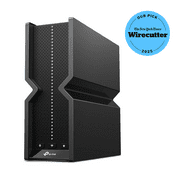
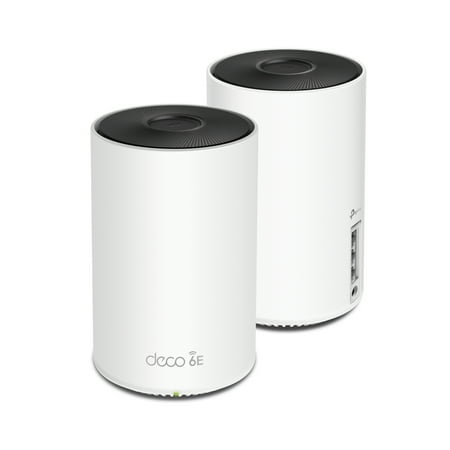
TP-Link Deco Wi-Fi 6E Whole Home Mesh Routers, 6 Ghz Band, Coverage up to 5,500 Sq. ft. (2-Pack)
- Brand:
- TP-Link
- Model Number:
- Deco WE10800(2-pack)
- UPC:
- 840030704758
- EAN:
- 0840030704758
- Walmart SKU:
- 1781005921
Trending downward with a $25.00 move recently to reach $224.00. Current price runs 3.6% below the 90-day average.
| Price Type | Price | Date |
|---|---|---|
|
Highest Price
|
$248.50 | |
|
Lowest Price
|
$113.00 | |
|
Most Recent Price
|
$143.81 |
| Price Type | Price | Date |
|---|---|---|
|
Highest Price
|
$249.00 | |
|
Lowest Price
|
$149.00 | |
|
Most Recent Price
|
$224.00 |
Tracking History: We have tracked TP-Link Deco Wi-Fi 6E Whole Home Mesh Routers, 6 Ghz Band, Coverage up to 5,500 Sq. ft. (2-Pack) since 8/30/2023. The most recent price update was on Apr 8, 2026.
Price Range: Over the past 90 days, the price has ranged from $149.00 (lowest on 2/2/2026) to $249.00 (highest on 2/13/2024). The average price during this period is $211.53.
Current Trend: Walmart.com prices have ranged from $224.00 (Apr 8) to $249.00 (Mar 20) over the past 90 days. Current price is close to the 90-day average of $232.33.
Customer Insights: Rated 4.6/5 from 174 reviews.
Wow, this system is impressive. The coverage extends to every corner of my house. I don't have issues with my outdoor wifi bulbs anymore. The box states you can connect up to 200 devices, which sounds like a lot. But, these days everything uses wifi. The setup was very easy...download the app and follow the instructions. The system also works with Google Assistant and Alexa. It learns your behaviors and creates a more user-friendly environment. The system has security features built-in with optional services available. Basically, this system does way more than I can explain. The bottom line is that it will extend your coverage and make your wifi experience better.
This Wi-Fi mesh router system by TP-Link is one of the latest updates to their wifi mesh router products. This is the Deco WE10800 model that comes in a 2-pack. Setting up the hardware with the included AC adapter plugs and ethernet cable was easy. The software setup using a mobile device took a few minutes to set up and get it working, once you have the dedicated app installed, and follow the on-screen setup wizard. For an average size house, placement of these 2 units strategically should give solid wifi coverage throughout. We have one placed on the main floor and the other one upstairs. With a lot of smart devices, this mesh wifi system can handle upto 200 devices. The newest feature is the 6 GHz wifi-band, which is blazingly fast, depending if you have the maximum subscription from your Internet service provider. I've noticed a difference in speeds but works better when close to the router for serious uploads and downloads, when latched on to the 6GHz. For further distance away from the router the 2.5GHz and 5.0GHz is more than adequate for average use, which latches on seamlessly in the background without noticing and doing anything. The Deco app on the mobile device is the main interface that's needed to access features for this mesh router, such as the 6GHz wifi band, Guest Network, analytical data, as well as controlling, monitoring kids devices by manipulating wifi access times, filter websites, and check internet history. Overall, this Deco mesh system is superb with solid wifi coverage and great features that'll keep devices connected and everyone satisfied. Highly recommended.
I setup the TP-Link Wi-Fi 6E Model AXE5400 several weeks ago hoping to overcome the dead spots in my home. What is a Mesh system and how does it work? Basically a Mesh system is a router along with one or more other connected devices to expand the Wi-Fi coverage in your home. This product is rated at a coverage area for a 5,500 square feet home. Setup is easy. You use the TP-Link setup application which can be found for either a Android system on Google Play or an iPhone on the App Store. By following the direction on the application, I had both the Router and extender working within 30 minutes. The first thing I noticed that my internet speed was faster. I also noted that in areas I previously could not receive an internet signal I now could. Measuring my speeds using the free Google online test system I found that my speed had increased by over 50% and that I was able to connect to the internet in other areas, i.e. my backyard, where I couldn't before. I would highly recommend this product to my family and friends.
I have been wanting a Mesh Wifi system for my new home and this one is fantastic! There was one entire side of my home where the wifi was very spotty. This system is super easy to set up and brings your wifi to every room of your home. The instructions are very clear and easy to follow. Downloading the app was a very simple process. This is truly a plug and play system! Each unit is self contained allowing me to place them strategically around the house for maximum coverage. I’m even getting wifi in my yard and garage which I never had before! It also has the capability to connect smart devices and control them from the tp-link deco app. I currently have 2.4 and 5 GHz network and this has the capability of 6 GHz if ever offered by our internet provider. Another great feature is a guest network so I no longer have to share my personal wifi password. I don’t have anything negative to say about this system, it’s truly a 5 star product. I love it and I highly recommend it.
My wi-fi has been kind of spotty lately. We have a two story home and our main setup is upstairs, it works great upstairs. But I have noticed that in the living room it works fine and sometimes would get stuck. But in the kitchen in one spot it would completely not work. I would have to turn of my wifi on my phone so I can use it. So I got this extension to see if it would help. Surprisingly it did. Now I can use my internet even in the kitchen with no problem. It didn't take long to set up, instructions were very clear just download the app. And I really love the look of these. Simple and white, looks perfect anywhere in your house.
I love this 6E mesh router system! It's so powerful it can cover up to 5500 square feet in your home helping to eliminate any dead spots. Right out of the box, I had it up and running in minutes. Take out the included Quick Installation Guide. Download the TP-Link Deco app for IOS and Android. Create a TP-Link account. This app will then lead you step by step through the entire set up process. Installation is an amazingly smooth, quick, and painless procedure. You'll need to know your existing router's password and user name for access during the installation process so have that handy. Once you have provided the requested information, the modem will find your new router and you are up and running. Next the system will have to find your satellite router once you plug them in. Once it does find it, you are all set! I now enjoy Wi-Fi everywhere in my home! This superior mesh everywhere Wi-Fi 6E system is amazingly powerful! It offers more spectrum, lower latency, wider channels, more throughput, it's congestion-free for less interference, and it supports all Wi-Fi Generations and devices. That means this mesh system offers true Tri-Band Speed compatibility. All three WiFi bands work together to unleash your network's total speeds up to 5,400 Mbps for 200 devices(6 GHz: 2402 Mbps (HE160);5 GHz: 2402 Mbps (HE160);2.4 GHz: 574 Mbps.) This system comes with a 1 month free trail of TP-Link HomeShield – TP-Link's premium security services keep your home network safe with cutting-edge network and IoT protection. Free features: 1. Network Security Scan 2. Basic Parental Controls 3. QoS 4. Weekly/Monthly Reports 5. IoT Device Identification HomeShield Pro paid service adds more robust protections and features for $5.99 dollars/month. This system works with internet service providers modems such as Comcast, Charter, AT & T, Verizon, Xfinity, Spectrum, RCN, Cox, CenturyLink, Frontier, etc. It works with Alexa and Google Home too. It also comes with a 2 year warranty with 24/7 tech support for additional peace of mind. I love this 6E Wi-Fi Tri-Band Speed compatible mesh system! It's easily the best router I have ever owned!
This isn't a technical review, because I'm not a technical person. I can follow directions, and I'm reasonably informed, but if you want technical specs, etc, then there are plenty of those reviews out on the internet. This is a review from someone who wants to open the box and have it work quickly and easily without a lot of fiddling. I'm capable of that, but it's not how I want to spend my time! I was using another brand of wifi6 mesh router, and it was simple to set up and use, but my performance was average. I ran a speed test with my previous router, and then set up this router in the middle of my workday, and ran that test again, and used it with my work VPN. My speeds were on average 50% faster than they were with my previous router on my wired work VPN, my wireless personal laptop, and my phone. These aren't small devices; they are about the size of a smart speaker. Setup was as easy as downloading an app and plugging them in and turning on the modem. You will need to set up a new account with TP-Link, so be ready with a username and secure password. The app was easy to use and didn't require any knowledge of settings. The most technical thing it asked was for you to set up the name and password of your router. I used the name and password of my previous router so that I wouldn't have to reconnect every single device in the home. That isn't the most secure thing to do, but it was expedient! Once all the lights stopped flashing and it connected to the internet (zero issues), my devices started connecting quickly and automatically. One or two devices had to be powered off and back on to connect, but the transition was easy. Setting up the second router was even easier, as once I plugged it in, the main router found it and brought it into the system and I didn't have to do anything. I will note that this particular model wasn't available for setup in the app, and I used model XE75 Pro, since several articles I read equated this model with that number. I'm not sure if this is an AXE5400, or a WE10800, but it was used in other places interchangeably with XE75, and that was all that was available on the app. I have not tried to contact customer support about this, and I don't know if using that model number versus the correct one is costing me features or performance. But I do know that I'm faster, and that it was an easy transtion, and that's enough for me. I will try to figure out the model number/setup situation soon.
We set this up a few days ago, set up was pretty simple and impressed with it so far. The coverage is working great for our entire home even in some areas where we previously had low signals. I like that it's compatible with Alexa too. We haven't had any buffering issues when playing online games or streaming videos. I also like that is has built in antivirus protection, parental controls and guest network access.
I did procrastinate in setting this up as I knew everything logged to the wifi would need to be added but once I gave in set up was a breeze! I downloaded the app a week before even setup. Once I was ready I opened the box and set one router in the living room and the second one at the other end of the house in the office. My previous router was 5+ years older. I enjoy that I get an app and alerts when any item or someone's phone links to my wifi. I linked my wireless printer, blink cameras, iPhone, nest, laptop, iPad, Alexa, tv, and hardwired the Xbox, as I couldn't get the Xbox to add my SSID wireless. Not sure why, I'm not the best tech savvy. Regardless most importantly I have ZERO buffering on the tv I'm happy! Will have to see how zoom is when I work.
A little confusing with the setup, but after a trial and error was able to connect successfully. Wireless mesh routers extend the wifi range of your current router. So if you have spots in your house that you lose Wifi connectivity, this will eliminate that problem. In order to setup the system, you download the TP-Link app. It asks you to select your model. This is where the problem started for me, there is no model number AXE5400 on the app. I picked the closest that I could find and was able to finish the installation easily. It took maybe 10 minutes. After searching on the TP-Link Website, I found that the model number should be XE75. So that is what you should look for in the app. If that is not there, pick the closest and it will detect that you put the wrong model number in. I have a few TP-Link devices around the house and they work great. I would have giving 5 stars, but the installation issues subtracted one.
Detailed price history for the past 90 days
Walmart.com prices have ranged from $224.00 (Apr 8) to $249.00 (Mar 20) over the past 90 days. Current price is close to the 90-day average of $232.33.
| Date | Price | Change | % Change |
|---|---|---|---|
| $224.00 | $+0.00 | +0.0% | |
| $224.00 | $+0.00 | +0.0% | |
| $224.00 | $+0.00 | +0.0% | |
| $224.00 | $+0.00 | +0.0% | |
| $224.00 | $+0.00 | +0.0% | |
| $224.00 | $-25.00 | -10.0% | |
| $249.00 | $+0.00 | +0.0% | |
| $249.00 | $+0.00 | +0.0% | |
| $249.00 | — | — |
Third-Party Sellers prices have ranged from $143.81 (Jun 3) to $224.00 (Apr 13) over the past 90 days. Current price is 16.3% below the 90-day average of $171.72.
| Date | Price | Change | % Change |
|---|---|---|---|
| $143.81 | $+0.00 | +0.0% | |
| $143.81 | $+0.00 | +0.0% | |
| $143.81 | $+0.00 | +0.0% | |
| $143.81 | $-16.19 | -10.1% | |
| $160.00 | $+0.00 | +0.0% | |
| $160.00 | $+1.00 | +0.6% | |
| $159.00 | $+0.00 | +0.0% | |
| $159.00 | $-1.00 | -0.6% | |
| $160.00 | $+0.00 | +0.0% | |
| $160.00 | $+0.00 | +0.0% | |
| $160.00 | $+0.00 | +0.0% | |
| $160.00 | $+0.00 | +0.0% | |
| $160.00 | $-5.00 | -3.0% | |
| $165.00 | $-32.00 | -16.2% | |
| $197.00 | $-1.00 | -0.5% | |
| $198.00 | $+0.00 | +0.0% | |
| $198.00 | $+19.00 | +10.6% | |
| $179.00 | $-30.00 | -14.4% | |
| $209.00 | $-15.00 | -6.7% | |
| $224.00 | $+0.00 | +0.0% | |
| $224.00 | $+15.00 | +7.2% | |
| $209.00 | $+64.01 | +44.1% | |
| $144.99 | $-15.01 | -9.4% | |
| $160.00 | — | — |